1. Nhanganyaya
Thank you for choosing the Sceptre 32-inch Class FHD (1080P) LED TV with Built-in DVD, Model E325BD-FSR. This manual provides essential information for the proper setup, operation, and maintenance of your new television. Please read this manual thoroughly before using the product and retain it for future reference.
2. Safety Information
Kuti uve nechokwadi chekushanda kwakachengeteka uye kudzivirira kukuvadzwa, ndapota chengeta zvinotevera zvekuchengetedza:
- Read all instructions before operating the TV.
- Chengeta bhuku rino kuti ugozorishandisa mune ramangwana.
- Teerera nyevero dzese pamudziyo uye mumirairo yekushandisa.
- Tevera mirairo yose.
- Chenesa chete nemucheka wakaoma.
- Iva nechokwadi chekufema zvakanaka. Usavhare chero mazaru emhepo.
- Chengetedza tambo yemagetsi kubva pakufamba kana kudzvanywa.
- Bvisa TV panguva yemadutu emheni kana kuti isina kushandiswa kwenguva refu.
- Tumira masevhisi ese kuvashandi vanokwanisa.
3. Package Zviri mukati
Ndokumbira utarise bhokisi rezvinhu zvinotevera:
- Sceptre 32-inch Class FHD (1080P) LED TV with Built-in DVD (Model E325BD-FSR)
- TV Yamira
- Remote Control
- Power Cord
- 6ft Indoor 3-Outlet Extension Cord
- Mushandisi Chinyorwa (gwaro iri)
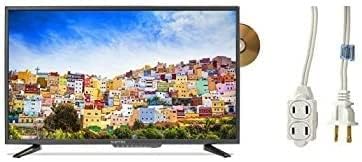
Image: The Sceptre 32-inch Class FHD LED TV with its built-in DVD player visible on the side, accompanied by a 6ft indoor 3-outlet extension cord.
4. Setup
4.1 Stand Installation
- Isa skrini yeTV pasi zvinyoro nyoro panzvimbo yakachena uye yakapfava kuti isakwenya.
- Gadzirisa chigadziko cheTV nemaburi anoiswa pazasi peTV.
- Chengetedza chigadziko uchishandisa screws dzakapihwa. Usaomese.
4.2 Kubatanidza Simba
Plug the power cord into the TV's power input, then connect the other end to a standard electrical outlet. Use the included 6ft indoor 3-outlet extension cord if additional outlets are needed.
4.3 Kubatanidza Zvishandiso Zvekunze
Your TV features various input ports for connecting external devices:
- HDMI: For high-definition video and audio from devices like Blu-ray players, game consoles, or cable/satellite boxes.
- Antenna/Cable (RF): Yekubatanidza antenna yekuparadzira terevhizheni pamhepo kana tambo yeTV.
- USB: Kutamba midhiya kubva kumidziyo yekuchengetera USB.
Connect your devices to the appropriate ports on the back or side of the TV.
5. Operating Instructions
5.1 Simba On/Kudzima
Press the SIMBA button on the remote control or on the TV itself to turn the TV on or off.
5.2 Sarudzo Yekupinza Kwemukati
Press the INPUT or SOURCE button on the remote control to cycle through available input sources (e.g., TV, HDMI1, HDMI2, DVD, USB).
5.3 Channel Scan (TV Input)
If using an antenna or cable connection, select the 'TV' input source. Navigate to the TV's menu, find the 'Channel' or 'Setup' section, and initiate an 'Auto Scan' or 'Auto Program' to find available channels.
5.4 Built-in DVD Player Operation
- Iva nechokwadi chekuti TV yakabatidzwa uye kuti sosi yekupinda yakaiswa pa 'DVD'.
- Gently insert a DVD disc into the disc slot on the side of the TV, label side facing up. The TV will automatically detect the disc and begin playback.
- Use the DVD control buttons on your remote control (Play, Pause, Stop, Fast Forward, Rewind, Skip) to manage playback.
- Kuti ubvise dhisiki, tinya iyo EJECT bhatani riri paremote control kana TV.
5.5 Menyu Navigation
Press the MENU button on the remote control to access the TV's settings. Use the arrow buttons to navigate and the PINDA or OK button to select options. Press Buda or MENU again to close the menu.
6. Kuchengeta
6.1 Kuchenesa Screen
pukuta skrini zvinyoro nyoro nemucheka wakapfava, wakaoma, usina lint. Pazvibodzwa zvakasindimara, zvishoma dampsn jira rine mvura kana chekuchenesa skrini. Usafe wakapfapfaidza mvura zvakananga pachiratidziri.
6.2 Kuchenesa Kunze
Wipe the TV's exterior with a soft, slightly damp cloth. Avoid using harsh chemicals, abrasive cleaners, or solvents, as these can damage the finish.
6.3 Kuchengeta
If storing the TV for an extended period, unplug it from the power outlet and store it in a cool, dry place, preferably in its original packaging.
7. Kugadzirisa matambudziko
Usati wabata rutsigiro rwevatengi, edza zvinotevera mhinduro kune zvinowanzoitika:
- Hapana Simba: Iva nechokwadi chekuti tambo yemagetsi yakabatanidzwa zvakanaka paTV nepachinoburitsa magetsi chiri kushanda. Tarisa kana chinoburitsa magetsi chiri kushanda.
- Hapana Mufananidzo: Verify the correct input source is selected. Check all cable connections (HDMI, antenna) are secure.
- Hapana Inzwi: Check the volume level and ensure the TV is not muted. Verify audio settings in the menu.
- Remote Control Haisi Kushanda: Dzorera mabhatiri. Ita shuwa kuti hapana zvipinganidzo pakati peremote neTV's IR sensor.
- DVD Playback Issues: Ensure the disc is clean and free of scratches. Verify the disc is inserted correctly. Confirm the input source is set to 'DVD'.
8. Zvinotsanangurwa
| Model | E325BD-FSR |
| Screen Size | 31.5 inches |
| Resolution | 1080p (Yakazara HD) |
| Special Features | Sikirini Yakatsetseka, DVD Player Yakavakirwa Mukati |
| Sravana Sameeralu Serial XNUMXth Tuner Technology | ATSC |
| Kudzora Nzira | Remote |
| Screen Surface | Glossy |
| Year (Manufacturing) | 2017 |
| Inotsigirwa Internet Services | Blockbuster |
9. Warranty uye Tsigiro
Your Sceptre TV is covered by a manufacturer's warranty. For specific warranty details, please refer to the warranty card included with your product or visit the official Sceptre website. For technical assistance, troubleshooting beyond this manual, or warranty claims, please contact Sceptre customer support.


