1. Nhanganyaya
Thank you for choosing the ASAKUKI Smart Wi-Fi Essential Oil Diffuser. This device combines aromatherapy with smart technology, allowing you to control it via a mobile application or voice commands. It is designed to humidify and purify the air, creating a relaxing atmosphere in your home or office.
Bhuku rino rinopa mirairo yakadzama yekushandiswa kwakachengeteka uye nemazvo kwedhibhurawuza rako. Ndokumbirawo uriverenge zvakanaka usati washandisa uye urichengete kuti uzorishandisa mune ramangwana.

Image: The ASAKUKI Smart Wi-Fi Essential Oil Diffuser is versatile for various environments, including nurseries, family rooms, bedrooms, yoga studios, and workspaces.
2. Chengetedzo Yekuchengetedza
Kuti uve nechokwadi chekuti ichishanda zvakanaka uye kudzivirira kukuvara, ndapota cherechedza zvinotevera:
- Always place the diffuser on a flat, stable surface.
- Usapfuure mwero wekuzadza mvura (500ml).
- Use only clean tap water or distilled water. Avoid using hot water.
- Add essential oils carefully to avoid spilling on the exterior of the unit.
- Chengetedza diffuser kunze kwekusvikirwa nevana nemhuka dzinovaraidza.
- Do not cover the mist outlet during operation.
- Bvisa mudziyo kubva panzvimbo yemagetsi usati wachenesa kana kuzadzazve.
- Usanyudza chinhu ichi mumvura kana zvimwe zvinwiwa.
- If the unit is damaged, do not attempt to repair it yourself. Contact customer support.
- The diffuser features an automatic shut-off when water runs out, but it is recommended to monitor water levels.
3. Package Zviri mukati
Ona kuti zvinhu zvese zviripo mupasuru yako:
- ASAKUKI Smart Wi-Fi Essential Oil Diffuser (Model DF010)
- Power Adapter
- User Manual
- Kapu yekuyeresa (inogona kuverengerwa)
4. Chigadzirwa Pamusoroview
Familiarize yourself with the main components of your diffuser:

Image: The ASAKUKI Smart Wi-Fi Essential Oil Diffuser, showing its sleek design and the accompanying mobile app for control.
- Lid: Top cover of the diffuser.
- Mist Outlet: Where the mist is released.
- Tangi Yemvura: Holds up to 500ml of water.
- Mutsetse weMvura Wakanyanya: Inoratidza huwandu hwepamusoro hwekuzadza.
- Ultrasonic Plate: Iri pasi petangi remvura, ine basa rekugadzira mhute.
- Air Outlet: Located on the base.
- Drain Side: Indicated for proper water drainage.
- Chiedza Bhatani: Inodzora mashandiro emwenje ye LED.
- Mist/Wi-Fi Button: Controls mist output and initiates Wi-Fi pairing.
- Simba Jack: Yekubatanidza iyo adapta yemagetsi.
5. Setup Instructions
Tevera matanho aya ekutanga kuseta:
- Isa Diffuser: Position the diffuser on a flat, stable, and water-resistant surface.
- Bvisa Chivharo: Gently lift the top lid off the diffuser.
- Wedzera Mvura: Using a measuring cup, fill the water tank with clean tap water or distilled water up to the maximum water line (500ml). Do not overfill.
- Wedzera Essential Oiri: Add 3-5 drops of your preferred essential oil directly into the water tank. Adjust the amount based on personal preference and room size.
- Tsiva Chivharo: Securely place the lid back onto the diffuser.
- Batanidza Simba: Plug the power adapter into the power jack at the base of the diffuser, then plug the adapter into a wall outlet.
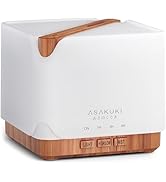
Image: Simple setup guide illustrating connecting power, app pairing, and wireless control.
6. Operating Instructions
6.1 Manual Kudzora
- Kudzora Mhute: Press the Mist/Wi-Fi button once for continuous mist. Press again for intermittent mist (30 seconds on, 30 seconds off). Press a third time to turn off the mist.
- Light Control: Press the Chiedza button once to turn on the LED light with automatic color cycling. Press again to fix the light to a specific color. Continue pressing to cycle through colors. Press and hold the Light button to turn off the light.
6.2 Smart Wi-Fi and App Control
The diffuser can be controlled remotely using the TuyaSmart app.
- Dhaunirodha App: Tsvaga "TuyaSmart" in your smartphone's app store (iOS or Android) and download it.
- Nyoresa/Pinda: Vhura iyo app uye nyoresa account nyowani kana kupinda kana iwe uchitova nayo.
- Pinda Pairing Mode: With the diffuser plugged in, press and hold the Mist/Wi-Fi button for 5 seconds until the indicator light flashes rapidly. This indicates the diffuser is in pairing mode.
- Wedzera Mudziyo: In the TuyaSmart app, tap "Add Device" or the "+" icon. Select "Small Home Appliance" > "Diffuser" (Wi-Fi).
- Batanidza kuWi-Fi: Follow the in-app instructions to connect the diffuser to your 2.4GHz Wi-Fi network. Ensure your phone is also connected to the same 2.4GHz network during setup.
- Kudzora: Once successfully paired, you can control the mist, light, set timers, and create schedules directly from the TuyaSmart app.

Image: The mobile app allows for convenient control of the diffuser's functions.
6.3 Kudzora Izwi neAlexa
The diffuser is compatible with Amazon Alexa for voice control.
- Vhura Unyanzvi: In the Alexa app, search for and enable the "TuyaSmart" skill.
- Akaunti yeChinongedzo: Link your TuyaSmart account to your Alexa account.
- Tsvaga Zvishandiso: Ask Alexa to "Discover devices" or manually discover them in the Alexa app.
- Voice Commands: Once discovered, you can use commands such as:
- "Alexa, turn on the diffuser."
- "Alexa, turn off the diffuser."
- "Alexa, set the diffuser to red."
- "Alexa, set diffuser brightness to 50%."

Image: Voice control with Alexa allows hands-free operation of the diffuser.
7. Kuchengeta
Regular cleaning helps maintain optimal performance and extends the lifespan of your diffuser.
7.1 Kuchenesa
Geza diffuser mushure mekushandisa ka5-6 kana mazuva ese matatu-mashanu, kunyanya kana uchichinja mafuta anokosha.
- Unplug: Disconnect the diffuser from the power outlet.
- Mvura isina chinhu: Remove the lid and carefully pour out any remaining water from the drain side of the water tank.
- Wipe Clean: Use a soft cloth or cotton swab with a small amount of mild dish soap to gently wipe the inside of the water tank and the ultrasonic plate.
- Sukurudza: Sukurudza tangi remvura nemvura yakachena, uchichenjerera kuti mvura isapinde mumhepo inobuda.
- Dry: Wipe all parts dry with a clean, soft cloth.
- Deep Clean (Optional): For stubborn residue, add a small amount of white vinegar to the water tank and let it sit for 10-15 minutes before wiping and rinsing.
7.2 Kuchengeta
When not in use for an extended period, ensure the diffuser is clean and completely dry. Store it in a cool, dry place away from direct sunlight.
8. Kugadzirisa matambudziko
Kana ukasangana nematambudziko, tarisa kune anotevera akajairika matambudziko uye mhinduro:
| Dambudziko | Zvinogona Kukonzera | Solution |
|---|---|---|
| Hapana mhute kana mhute yakaderera |
|
|
| Diffuser does not power on |
|
|
| Haikwanise kubatana neWi-Fi/App |
|
|
| Kubuda kwemvura |
|
|
9. Zvinotsanangurwa
| Feature | Detail |
|---|---|
| Brand | ASAKUKI |
| Model Number | DF010 |
| Capacity | 500 mamiriyoni |
| Dimensions | 6"L x 6"W x 7"H |
| Material | Acrylonitrile Butadiene Styrene (ABS), Polypropylene (PP) |
| Simba Source | Corded Electric |
| Wattage | 10 watts |
| Nzvimbo yekuvhara | Kusvika ku323 Square Feet |
| Special Features | App Control, Automatic Shut-Off, Multiple Light Settings, Multiple Mist Settings, Voice Control (Alexa) |
| Noise Level | Lower than 35 dB |
| Runtime (Full Capacity) | Up to 16 hours (on weak mist setting) |
10. Warranty uye Tsigiro
The ASAKUKI Smart Wi-Fi Essential Oil Diffuser comes with a 1-year technical support warrantyWaranti iyi inovhara zvikanganiso zvekugadzira uye matambudziko anokonzerwa nekushandiswa kwakajairika.
For technical assistance, troubleshooting, or warranty claims, please contact ASAKUKI customer support through the retailer where you purchased the product or visit the official ASAKUKI websaiti yeruzivo rwekusangana.
Please have your model number (DF010) and proof of purchase ready when contacting support.


