Nhanganyaya
The Akuvox SP-R50 is a business IP phone designed to provide high-quality, cost-effective communication solutions. It features HD Voice, a 2.3-inch 132x64 graphical LCD with backlight, and supports 3-way conferencing. This manual provides essential information for setting up, operating, maintaining, and troubleshooting your SP-R50 IP phone.
Package Zviri mukati
Usati watanga, ndapota iva nechokwadi chekuti zvinhu zvese zviripo mupakeji:
- IP Phone (Akuvox SP-R50) x 1
- Chimiro x1
- Handset with Cord x 1
- Ethernet Cable x 1
- Power Adapter x 1
Gadzirira
Follow these steps to set up your Akuvox SP-R50 IP Phone:
- Batanidza Stand: Securely attach the stand to the back of the IP phone.
- Batanidza Handset: Batanidza mugumo mumwe wetambo yenharembozha yakamonerwa mufoni uye mumwe mugumo muchiteshi chenharembozha chiri panharembozha.
- Batanidza kune Network:
- If using Power over Ethernet (PoE), connect one end of the Ethernet cable to the LAN port on the phone and the other end to a PoE-enabled network switch or router.
- If not using PoE, connect one end of the Ethernet cable to the LAN port on the phone and the other end to your network switch or router. Then, connect the power adapter to the phone's power port and plug it into a power outlet.
- Kutanga kwekutanga: The phone will power on automatically. The LCD screen will display the boot-up sequence. Once complete, it will attempt to obtain an IP address and register with your SIP server.
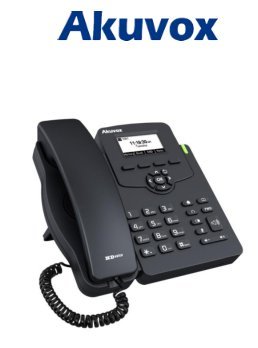
Image: Akuvox SP-R50 Business IP Phone, showing the main unit with the handset resting on its cradle and the stand attached, ready for setup.
Operating Instruction
This section covers the basic operation of your Akuvox SP-R50 IP Phone.
Kuita uye kugamuchira mafoni
- Kufona: Pick up the handset or press the Speaker button. Dial the desired number and press the Dial or # key.
- Kugamuchira Call: Tora ruoko kana kudzvanya iyo Mutauri bhatani kana foni yarira.
- Kupedza Kufona: Simudza handset kana kudzvanya iyo Mutauri bhatani.
Fona Zvimiro
- Call Kumirira: Allows you to answer a second incoming call while on an active call.
- Call Forward: Redirects incoming calls to another number.
- Call Transfer: Transfers an active call to another party.
- Call on Hold: Puts an active call on hold.
- Nyarara: Inodzima maikorofoni yako panguva yekufona.
- Mhinduro yega Configures the phone to automatically answer incoming calls.
- Kudzorera: Anofonera nhamba yekupedzisira yaakafonera.
- Usakanganisa (DND): Blocks all incoming calls.
- Local 3-Way Conference: Allows you to conduct a three-way conference call.
Phonebook and Settings
- Bhuku renhare: The phone supports a phonebook of up to 500 groups and 5 remote phone book URLs. Access and manage contacts through the menu.
- Kugadziridza Vhoriyamu: Use the volume keys on the phone to adjust the handset, speaker, or ringer volume.
- Mheremhere: Select from various ring tones through the phone's settings menu.
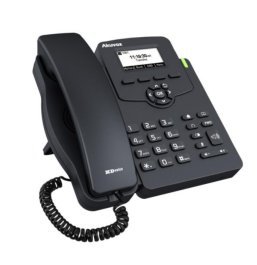
Image: Akuvox SP-R50 Business IP Phone, showcasing its ergonomic design and key layout from a slightly elevated angle, highlighting the display and navigation buttons.
Maintenance
Kugadziriswa kwakakodzera kunovimbisa kugara kwenguva refu uye kushanda zvakanaka kwefoni yako yeIP.
- Kuchenesa: Shandisa jira rakapfava, rakaoma kuchenesa pamusoro pefoni. Kana paine mavanga akaoma, bvisa mavanga madiki.ampIsa jira nemvura. Usashandise makemikari ane simba, mishonga inobvisa huturu, kana zvinonyungudutsa.
- Environment: Keep the phone away from direct sunlight, excessive heat sources, and moisture. Ensure it is placed on a stable surface to prevent accidental falls.
- Tambo: Periodically check all connected cables (handset, Ethernet, power) for any signs of wear or damage. Replace damaged cables immediately.
Kugadzirisa matambudziko
If you encounter issues with your Akuvox SP-R50, refer to the following common problems and solutions:
| Dambudziko | Zvinogona Kukonzera | Solution |
|---|---|---|
| Nhare haibati. | No power connection or faulty power adapter/PoE. | Check if the power adapter is securely plugged in or if the Ethernet cable is connected to a PoE-enabled port. Try a different power outlet or PoE port. |
| Hapana dhoni yekudaira. | Network connection issue or SIP registration failure. | Verify the Ethernet cable is properly connected. Check the network status on the phone's display. Contact your network administrator or SIP service provider if the issue persists. |
| Hatikwanise kufona kana kugamuchira. | SIP registration failed, DND enabled, or network problem. | Ensure the phone is registered (check display). Disable DND if active. Confirm network connectivity. |
| Hunhu hwekufona husina kunaka (echo, static). | Network congestion kana kupindira. | Ensure your network has sufficient bandwidth. Avoid placing the phone near other electronic devices that may cause interference. |
Zvinotsanangurwa
Key technical specifications for the Akuvox SP-R50 Business IP Phone:
| Feature | Tsanangudzo |
|---|---|
| Brand | Akuvox |
| Model | Akuvox SP-R50 |
| Display | 2.3'' 132*64 Graphical LCD with Backlight |
| SIP Accounts | 1 Line (Support 1 SIP account) |
| Voice Features | HD Voice, 3-Way Conference |
| Phonebook Capacity | 500 groups, 5 Remote Phone Book URL Inotsigirwa |
| Call Logs | 100 zvinyorwa |
| Simba | PoE Support, Power Adapter (included) |
| Special Features | Call Waiting, Call Forward, Call Transfer, Call on Hold, Mute, Auto-answer, Redial, DND, Speed Dial, Hotline, Direct IP call, Music on hold, Intercom, Call Pickup, Group Call Pickup, Anonymous Call, Anonymous Call Rejection |
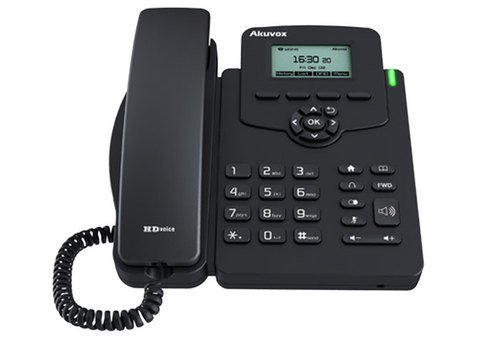
Mufananidzo: Mberi view of the Akuvox SP-R50 Business IP Phone, clearly showing the display, navigation keys, and numeric keypad.
Warranty Information
The Akuvox SP-R50 Business IP Phone comes with a 2 Year Warranty from the date of purchase. This warranty covers manufacturing defects and malfunctions under normal use. Please retain your proof of purchase for warranty claims. For detailed terms and conditions, refer to the warranty card included with your product or contact Akuvox customer support.
Support
If you require further assistance or have questions not covered in this manual, please contact your vendor or Akuvox customer support. You may also visit the official Akuvox website for additional resources and frequently asked questions.


