1. Nhanganyaya
The Kaito Voyager Pro KA600 is a versatile digital emergency radio designed for both daily use and emergency preparedness. It features multiple power options, comprehensive radio band coverage, and additional functions like a smartphone charger, reading lamp, and flashlight. This manual provides detailed instructions for its setup, operation, and maintenance.
2. Safety Information
- Do not expose the radio to extreme temperatures, direct sunlight for prolonged periods, or high humidity.
- Dzivisa kudonhedza redhiyo kana kuiisa panjodzi huru.
- Chengeta redhiyo kure neminda ine simba remagineti.
- Usaedze kupatsanura kana kugadzirisa redhiyo. Izvi zvinoita kuti garandi isashande.
- Use only recommended batteries and power adapters.
- When charging external devices, ensure they are compatible with 5V USB output.
3. Package Zviri mukati
Ona kuti zvinhu zvese zviripo mupasuru yako:
- Kaito Voyager Pro KA600 Digital Emergency Radio
- Maearphone
- Mushandisi Chinyorwa (gwaro iri)
- Warranty Card
4. Chigadzirwa Pamusoroview
Familiarize yourself with the main components of your Kaito Voyager Pro KA600 radio.

Mufananidzo 1: Pamberi Panel Kurongwa
This image displays the front of the Kaito Voyager Pro KA600 radio, highlighting the digital display, numeric keypad, speaker grille, and various control buttons and knobs for tuning and volume.
Zvikamu Zvikuru:
- Dhijitari Display: Shows frequency, time, temperature, humidity, and other operational information.
- Mutauri Audio kubuda.
- Keypad: Numeric buttons for direct frequency entry and function selection.
- Tuning Knob: For manual frequency adjustment.
- Vhoriyamu Knob: Inogadzirisa nhanho yekubuda kweaudio.
- Power Select Switch: Choose between battery, solar/crank, or adapter power.
- Telescopic Antenna: Kuti pave neredhiyo iri nani.
- Hand Crank: Kugadzira magetsi nemaoko.
- Solar Panel: Kuchaja kwezuva.
- USB Output Port: Yekuchaja midziyo yekunze.
- Kuverenga kwe LED Lamp & Flashlight: Integrated lighting features.
Video 1: Kaito Voyager Pro KA600 Radio Overview
This video provides a visual demonstration of the Kaito Voyager Pro KA600 radio, showcasing its various features and components in action, including tuning and power options.
5. Setup
5.1 Kupa Simba Redhiyo
The KA600 offers multiple power options:
- Internal Rechargeable Ni-MH Battery: The radio includes a built-in rechargeable battery pack (3 Ni-MH batteries, 600mAh). This battery can be charged via hand crank, solar panel, USB input, or an optional AC/DC adapter.
- AA Batteries (Not Included): For extended use, insert three (3) AA batteries into the battery compartment.
- Dynamo ine ruoko: Rotate the hand crank on the side of the radio to generate power and charge the internal battery.
- Solar Panel: Expose the integrated solar panel to direct sunlight to charge the internal battery.
- USB Input (5V): Connect the radio to a computer or a standard USB wall adapter using a USB cable (not included) to charge the internal battery.
- AC/DC Adapter (Optional): A 6V DC wall power adapter (sold separately) can be used to power the radio and charge the internal battery.

Mufananidzo 2: Battery Compartment
This image shows the rear of the radio with the battery cover removed, revealing the internal rechargeable Ni-MH battery and the slots for optional AA batteries.
5.2 Kuwedzerwa kweAntena
For optimal reception, extend the telescopic antenna fully when listening to FM, LW, SW, or NOAA Weather bands. For AM reception, the radio uses an internal ferrite bar antenna, so the telescopic antenna is not required.
6. Operating Instructions
6.1 Turning On/Off and Band Selection
Press the SIMBA bhatani rekuvhura kana kudzima redhiyo. Shandisa FM/WB button to cycle through FM and NOAA Weather bands. Use the AM button to select the AM band. For Longwave (LW) and Shortwave (SW), use the appropriate band selection buttons or direct frequency entry.
6.2 Nzira dzekugadzirisa
The KA600 offers several ways to tune into stations:
- Chinyorwa Kugadziridza: Rotate the TUNING knob on the side of the radio to manually scan frequencies.
- Direct Keypad Entry: Enter the desired frequency directly using the numeric keypad and press PINDA (or similar confirmation button, refer to display).
- Automatic Tuning System (ATS): This function automatically scans and stores strong stations. Refer to the on-screen prompts or specific button for ATS activation.
- Memory Tuning: Store your favorite stations into memory for quick access. Use the M+ uye M- mabhatani ekufambisa nepazviteshi zvakachengetwa.
6.3 Basa reNoaa rekuzivisa mamiriro ekunze
The NOAA Weather Alert feature automatically activates the radio to broadcast emergency weather alerts. To enable this:
- Ensure the radio is set to a NOAA Weather channel (1-7).
- Activate the "Alert" mode (refer to the specific button or menu option on the radio, typically labeled ALERT).
- The radio will remain in standby and automatically turn on with an audible alert and broadcast the weather warning when activated by the NOAA network.
6.4 RDS (Radio Data System)
When tuned to an FM station broadcasting RDS, the radio's display may show additional information such as station name, program type, or song title. This feature is automatic when available.
6.5 Emergency Mobile Charger
The KA600 can charge external devices via its built-in standard DC 5V USB output port.
- Connect your smartphone, GPS unit, MP3 player, or digital camera to the USB output port using a compatible USB cable.
- Ensure the radio has sufficient power (internal battery charged, or actively cranking/solar charging).
- Kuchaja kuchatanga otomatiki.
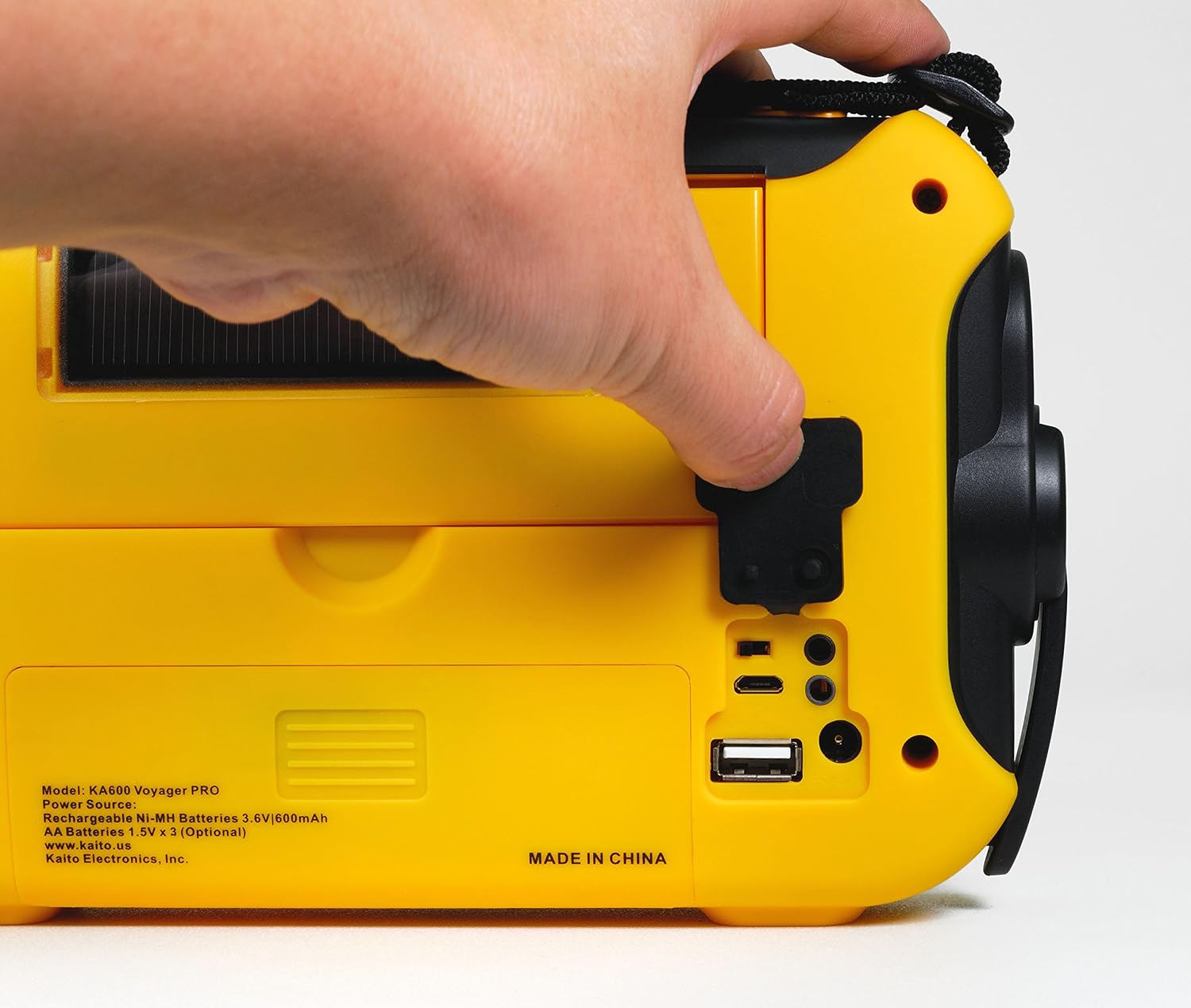
Figure 3: USB Output Port
This image highlights the USB output port on the side of the radio, used for charging external mobile devices.
6.6 Lighting Features
- 5-LED Kuverenga Lamp: Flip up the solar panel to reveal the integrated reading lamp. Activate it using the designated button.
- Chiedza che LED: A powerful LED flashlight is integrated into the radio. Activate it using its dedicated button.
- Red LED S.O.S. Beacon Light: In emergencies, activate the S.O.S. beacon for signaling.

Figure 4: Reading Lamp and Solar Panel
This image shows the rear of the radio with the solar panel raised, exposing the 5-LED reading lamp kuitira kuvhenekera.
7. Kuchengeta
- Kuchenesa: Pukuta redhiyo nenyoro, damp jira. Usashandise abrasive cleaners kana solvents.
- Battery Care: If storing the radio for an extended period, remove any non-rechargeable AA batteries to prevent leakage. Ensure the internal Ni-MH battery is charged periodically to maintain its lifespan.
- Kuchengeta: Chengetedza redhiyo munzvimbo inotonhorera, yakaoma kure nechiedza chezuva uye tembiricha yakanyanyisa.
8. Kugadzirisa matambudziko
| Dambudziko | Zvinogona Kukonzera | Solution |
|---|---|---|
| Radio haibatike. | Low or depleted battery; incorrect power source selected. | Charge the internal battery via hand crank, solar, or USB. Insert fresh AA batteries. Ensure the power select switch is in the correct position. |
| Kugamuchirwa kweredhiyo kusina kunaka. | Antena haina kuwedzerwa; chiratidzo chisina simba; kupindira. | Fully extend the telescopic antenna. Reposition the radio for better signal. Avoid sources of electronic interference. |
| Haikwanise kuchaja mudziyo wekunze. | Radio battery too low; incompatible device; faulty cable. | Ensure the radio's internal battery is sufficiently charged. Verify device compatibility. Try a different USB cable. |
| NOAA Alert not activating. | Not on a NOAA channel; Alert mode not enabled; no active alerts. | Tune to a NOAA Weather channel. Ensure Alert mode is activated. Confirm there are active alerts in your area. |
9. Zvinotsanangurwa
- FM: 88 - 108 MHz
- AM (MW): 520 - 1710 KHz
- LW (Longwave): 150 - 521 KHz
- SW (Shortwave): 2,300 - 23,000 KHz
- NOAA Mamiriro ekunze: Channels 1 - 7
- Mutauri Wemukati: Diameter 66 mm
- Headset Jack: 3.5 mm
- Mabhatiri Anogona Kuchajwa: 3 Ni-MH batteries, 600mAh
- Dimensions: 9.5 x 5.5 x 2.5 inches (24.13 x 13.97 x 6.35 cm)
- Kurema 1 Lbs (0.45 kg)
- Kubatana: USB (for charging external devices)
- Power Sources: Hand crank, solar panel, 3x AA batteries (not included), 5V USB input, 6V DC adapter (optional), internal Ni-MH battery.
10. Warranty uye Tsigiro
Your Kaito Voyager Pro KA600 radio comes with a warranty. Please refer to the included Warranty Card for details on coverage, terms, and how to register your product. For technical support or service inquiries, please visit the official Kaito websaiti kana kubata dhipatimendi ravo rebasa revatengi.
Kaito Official Websaiti: www.kaito.us


