1. Nhanganyaya
This manual provides essential information for setting up, operating, and maintaining your AWOW 10.1-inch Windows 10 2-in-1 Tablet PC. This device combines the portability of a tablet with the functionality of a laptop, featuring a detachable keyboard and a multi-touch IPS display. Please read this manual thoroughly to ensure proper usage and to maximize your product experience.
2. Chii chiri muBhokisi
Kana wabvisa zvinhu mubhokisi, ndapota iva nechokwadi chekuti zvinhu zvese zvinotevera zvabatanidzwa:
- AWOW 10.1-inch 2-in-1 Tablet PC
- Detachable Keyboard
- AC Power Adaptor (5V-2.5A)
- User Manual (Chirungu)
3. Chigadzirwa Pamusoroview
The AWOW 2-in-1 Tablet PC is designed for versatility and portability. Below are key features and physical components.

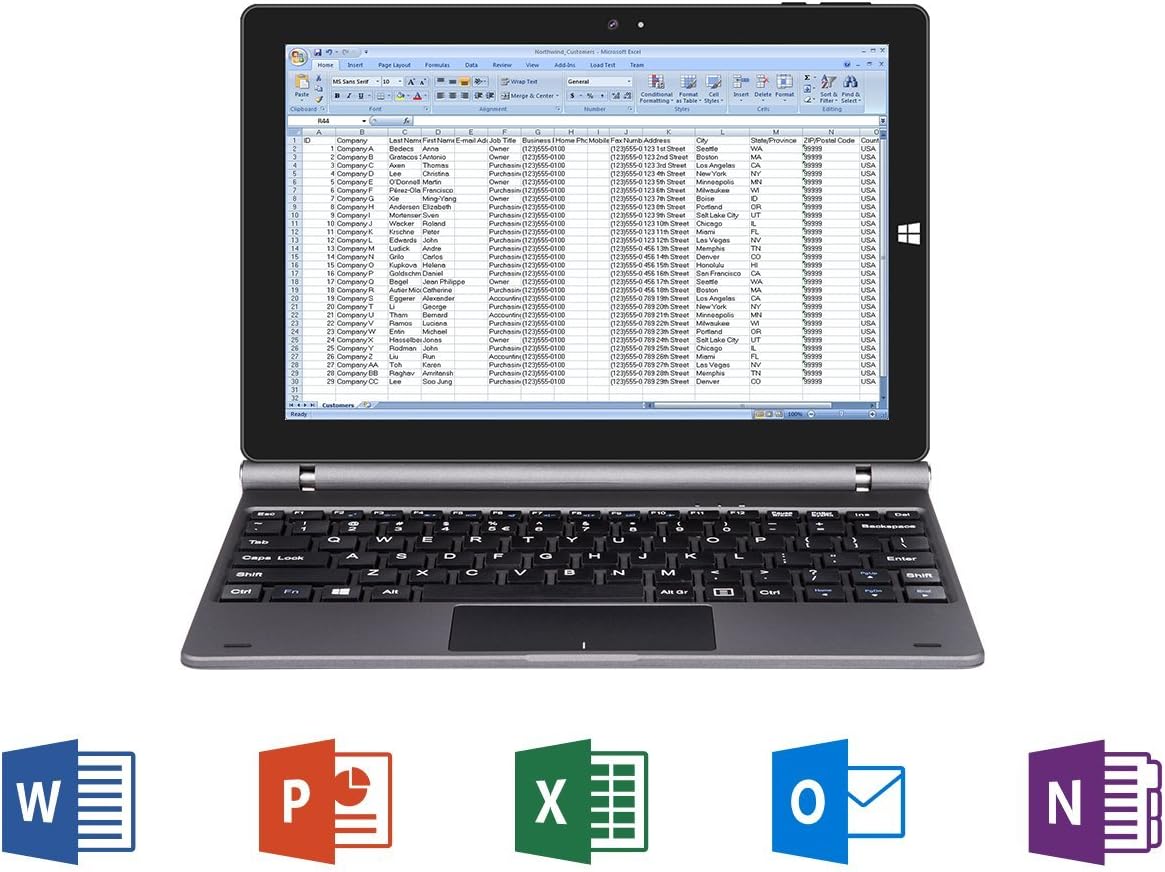
Figure 3.1: AWOW 10.1-inch 2-in-1 Tablet PC with detachable keyboard, displaying Windows 10 desktop.

Figure 3.2: Key features of the AWOW 2-in-1 Tablet PC, including Intel Atom processor, Intel HD Graphics, Windows 10 (64bit), Microsoft Office compatibility, IPS Display, G-sensor, Bluetooth 4.0, and 802.11 b/g/n WiFi.
Mufananidzo 3.3: Kupfuuraview of tablet ports and buttons, including power, volume, audio, charging, and connectivity options.

Figure 3.4: Detachable keyboard layout with full QWERTY keys and integrated trackpad.
4. Kutanga Setup
4.1 Kuchaja Chishandiso
Before first use, ensure the tablet is fully charged. Connect the AC Power Adaptor to the DC power input port on the tablet and plug it into a wall outlet.
4.2 Powering On and Initial Windows Setup
- Press and hold the Power button (located on the side of the tablet) until the screen illuminates.
- Follow the on-screen prompts to complete the Windows 10 initial setup. This includes selecting your region, language, and setting up a user account.
- During Windows activation, if you encounter any issues, please contact AWOW customer service for assistance.
4.3 Kubatanidza Kiyibhodhi Inobviswa
Align the 5-PIN keyboard interface on the tablet with the corresponding connector on the detachable keyboard. Gently push the tablet down until it securely connects to the keyboard. The magnetic connection will help guide it into place.
5. Operating Instructions
5.1 Switching Between Tablet and Laptop Mode
The device automatically detects when the keyboard is attached or detached, switching between laptop mode (with keyboard) and tablet mode (without keyboard). In tablet mode, the touchscreen interface is optimized for touch input.
5.2 Kushandisa iyo Touchscreen
The 10.1-inch IPS display supports multi-touch gestures. Use your fingers to navigate, tap to select, pinch to zoom, and swipe for scrolling. For optimal viewing, the IPS display offers a 178-degree wide vieweng angle

Figure 5.1: IPS display showcasing vibrant colors and wide viewing angles. Note: Stylus is sold separately.
5.3 Kamera Kushanda
The tablet is equipped with dual webcams: a 2MP front camera and a 5MP rear camera. These can be used for video conferencing, taking photos, or recording videos.

Figure 5.2: Illustration of the tablet's dual cameras (2MP front, 5MP rear) for video communication.
5.4 Kushanda Kwaperaview
The AWOW 2-in-1 Tablet PC is powered by an Intel Atom X5-Z8350 Quad Core processor, designed for smooth multitasking and HD video streaming. It runs on Windows 10 Home (64-bit).
Video 5.3: A performance test demonstrating the tablet's capabilities, including system responsiveness and internet speed. This video shows the device handling various tasks and displaying system resource usage.
6. Kuchengeta
6.1 Kuchenesa
To clean the screen, use a soft, lint-free cloth. For stubborn marks, slightly dampen the cloth with water or a screen-cleaning solution. Avoid harsh chemicals or abrasive materials. For the keyboard and body, use a dry, soft cloth.
6.2 Kuchengeta
Store the device in a cool, dry place away from direct sunlight and extreme temperatures. If storing for an extended period, ensure the battery is charged to approximately 50% to prolong its lifespan.
7. Kugadzirisa matambudziko
If you encounter issues with your AWOW Tablet PC, refer to the following common solutions:
- Mudziyo Haubatiki. Ensure the device is charged. Connect the AC adapter and try powering on again.
- Kuita Kunonoka: Close unnecessary applications. Check for Windows updates and ensure sufficient free storage space.
- Kiyibhodhi Haisi Kupindura: Ensure the keyboard is securely attached to the tablet's 5-PIN interface. Detach and reattach the keyboard. Restarting the device may also resolve the issue.
- Windows Activation Issues: If you experience problems with Windows activation, please contact AWOW customer service directly for support.
- Matambudziko ekubatana kweWi-Fi: Check your router and internet connection. Ensure Wi-Fi is enabled on the tablet and try reconnecting to the network.
8. Zvinotsanangurwa
| Feature | Tsanangudzo |
|---|---|
| Brand | AWOW |
| Model Name | SimpleBook 432 |
| Screen Size | 10.1 inches |
| Screen Resolution | 1280x800 Pixels |
| processor | Intel Atom X5-Z8350 (up to 1.92 GHz) |
| RAM | 4GB DDR3 |
| Storage (eMMC) | 32GB SSD |
| Expandable Storage | Micro SD kadhi slot (inotsigira kusvika ku256GB) |
| Operating System | Windows 10 Kumba (64bit) |
| Graphics Coprocessor | Intel HD Graphics 400 |
| Wireless Type | 802.11ab (Wi-Fi) |
| Bluetooth | Bluetooth 4.0 |
| USB Ports | 2 USB ports (Type not specified, typically USB 2.0) |
| HDMI | Micro HDMI |
| Mberi Webcam Resolution | 2 MP |
| Rear Webcam Resolution | 5 MP |
| Avhareji Hupenyu hweBhatiri | 6 Maawa |
| Item Weight | 2.45 makirogiramu |
| Zviyero zveChigadzirwa (LxWxH) | 9.91 x 6.53 x 0.59 inches |
9. Warranty uye Tsigiro
9.1 Ruzivo rweWaranti
Your AWOW 2-in-1 Tablet PC comes with a 1-year product warranty. Please retain your proof of purchase for warranty claims.
9.2 Return Policy
A 30-day return policy is available from the date of purchase. Please refer to your retailer's specific return guidelines.
9.3 Basa reVatengi
For any questions, technical support, or warranty inquiries, please contact AWOW customer service. We offer 24-hour customer service to assist you.
This product has been approved and holds CE and FCC certificates.


