Nhanganyaya
The VAIS Technology GSR-MZ01 adapter kit allows seamless integration of SiriusXM Satellite Radio into your compatible factory Mazda radio system. This adapter eliminates the need for additional mounts or FM modulation adapters, preserving your vehicle's original aesthetic and functionality. Enjoy a vast array of music, sports, news, and entertainment channels directly through your existing car stereo controls.
Chii Inosanganisirwa
Tarisa uone kuti zvese zvirimo mupasuru yako:
- GSR Interface Adapter
- GSR USB Cable
- Simba Sunga
- Antenna yemotokari
- SiriusXM Tuner SXV300 (Note: Vehicle Antenna and SiriusXM Tuner SXV300 are included in GSR-TKIT only)
- OBD II connector

Product Overview: GSR Connectors and Ports
Familiarize yourself with the connectors and ports on the GSR Interface Adapter:

- Brown USB Interface Connector: Connects to the factory USB data port in your vehicle.
- Interface Connector for SiriusXM SXV300 Tuner: Connects to the SiriusXM tuner module.
- Simba Chinobatanidza: Connects to the provided power harness.
- MaODs: Zviratidzo zvechimiro chemudziyo.
- Micro USB Connector: Inoshandiswa kugadzirisa firmware.
Kugarisana
The VAIS Technology GSR-MZ01 is specifically designed for select Factory Mazda models. Please refer to the table below to ensure compatibility with your specific vehicle model and year:

Inoenderana Models:
- Yaris / Yaris iA (2018-2019) - With factory USB
- iA (2017) - With factory USB
- Spider (2017-2019) - With Factory USB
- Mazda 3 (2015-2017) - With USB A
- Mazda 6 (2016-2017) - With USB A
- CX3 (2016-2017) - With USB A
- CX5 (2016-2017) - With USB A
- CX9/CX90 (2016-2017) - With USB A
- Miata/MX5 (2017) - With USB A
Installation
Tevedza nhanho idzi kuti ubudirire kuisa:
- Connect OBD II Connector: Connect the provided OBD II connector to your vehicle's OBD II port for power.
- Connect GSR to Factory USB Port: Plug the VAIS adapter into the factory USB data port to send SiriusXM data to the radio. This port is typically found on the dashboard or in the center console.
- Isa Antenna padenga: For optimal Satellite Radio reception, install the antenna on the highest point of the vehicle's roof. It must be mounted outside the vehicle with a clear view of the sky. Avoid placing it near other antennas or under roof racks.
- Isa Zvese Kuseri KwemaPaneli: Secure the GSR and the SiriusXM tuner module behind the dash panels to keep them hidden and prevent clutter.

Antenna Installation Video Guide
Video 1: This video demonstrates the proper installation of a SiriusXM antenna, including recommended mounting locations and cable routing techniques.
Operation
Once installed, activating and using your SiriusXM Satellite Radio is straightforward:
- Activate Subscription: After connecting the adapter, activate your SiriusXM subscription.
- Select SiriusXM Source: Turn on your vehicle and select SiriusXM from the source menu on your factory radio.
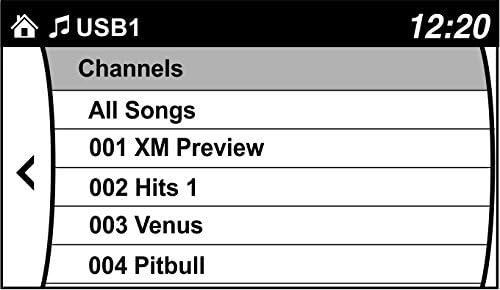
- Browse Channels: Use your factory radio controls and steering wheel controls to browse and enjoy SiriusXM channels. You can also save up to 36 presets.

Product Overview Vadivelu Comedy Videos
Video 2: This video highlights the benefits of adding SiriusXM to your factory original radio with the VAIS Technology adapter, showcasing seamless integration and control.
Video 3: This video demonstrates how to quickly add SiriusXM to your factory radio using a GSR adapter, emphasizing the ease of installation and use.
Kugadzirisa matambudziko
Kana ukasangana nematambudziko, funga zvinotevera:
- Hapana Chiratidzo: Ensure the antenna is correctly positioned on the vehicle's roof with an unobstructed view of the sky. Check all cable connections.
- Hapana Simba: Verify the OBD II connector is securely plugged into the vehicle's OBD II port.
- No Audio/Channels: Confirm the USB connection to the factory radio is secure. Ensure your SiriusXM subscription is active.
- Chiratidzo Chinopindira: Re-evaluate antenna placement for optimal reception. Avoid areas with tall buildings or dense foliage.
For further assistance, please contact VAIS Technology customer support.
Zvinotsanangurwa
| Model Number | GSR-MZ01 Interface Tuner Kit |
| Brand | VAIS Technology |
| Kubatana Technology | USB |
| Sravana Sameeralu Serial XNUMXth Tuner Technology | Satellite |
| Simba Source | Vehicle Powered |
| Inosanganisirwa Zvikamu | Antenna, OBD II connector, SXV300V1 SiriusXM tuner module |
| Item Weight | 1 pounds (16 ounces) |
| Package Dimensions | 9.4 x 5.9 x 2.3 inches |
Warranty Information
For detailed warranty information regarding your VAIS Technology GSR-MZ01 adapter kit, please refer to the warranty card included with your product or visit the official VAIS Technology website. Chengetedza humbowo hwako hwekutenga kune warranty claim.
Mutengi Support
Should you require technical assistance, have questions about installation, or need to troubleshoot an issue, please contact VAIS Technology customer support. Contact information can typically be found on the product packaging or the official VAIS Technology website.


