Nhanganyaya
Thank you for choosing the VR SHINECON VR Headset. This device is designed to provide an immersive virtual reality experience for movies, videos, and games using your smartphone. This manual will guide you through the setup, operation, maintenance, and troubleshooting of your VR headset to ensure optimal performance and enjoyment.
Chii chiri muBhokisi
Ndokumbira utarise zvirimo pasuru kuti uone kuti zvinhu zvese zviripo:
- VR SHINECON VR Headset
- Controllers (if included with your specific package)
- Audio Equipment
- Kutakura Nyaya
- Power Adapter (kana yakabatanidzwa)
- Mushandisi Chinyorwa (gwaro iri)
Product Overview
The VR SHINECON VR Headset offers a 360° ultra-wide realistic experience, transforming your smartphone into a personal IMAX private theater. It features adjustable pupil and focal distance settings for individual eye comfort and clarity, along with integrated Hi-Fi stereo headphones for an immersive audio experience.

Mufananidzo: Close-up of the VR SHINECON VR Headset highlighting its adjustable headphones, soft facial padding, and integrated control buttons for volume and phone interaction.
The headset is constructed with high-quality Acrylic (PMMA) lenses, providing up to 92% light transmittance for a clear visual experience, comparable to 4K film quality. It is compatible with most Android and iOS smartphones ranging from 4.7 to 6.2 inches in size.

Mufananidzo: Yemukati view of the VR SHINECON VR Headset, showcasing the high-transmittance Acrylic (PMMA) lenses designed for clear visual fidelity.
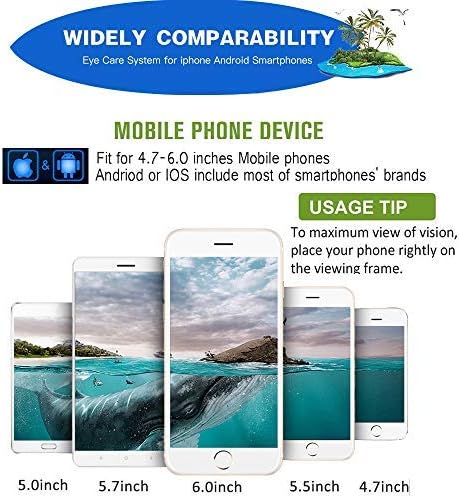
Mufananidzo: A visual guide illustrating the wide compatibility of the VR SHINECON VR Headset with various smartphone sizes, specifically from 4.7 to 6.0 inches, for both Android and iOS devices.
Setup Instructions
- Prepare Your Smartphone: Ensure your smartphone is charged and has a 3.5mm headphone jack for optimal audio. If your iPhone only has a Lightning port, a 3.5mm to Lightning adapter is required, though headphone functionality may vary. Remove your phone case to ensure proper fit and prevent overheating.
- Install VR Content: Download and install VR applications, games, or 3D video players from your smartphone's app store.
- Insert Smartphone: Open the front cover of the VR headset. Carefully slide your smartphone into the designated holder, ensuring it is centered and securely latched.
- Adjust Head Straps: Place the headset on your head and adjust the elastic head straps for a comfortable and secure fit. The straps should hold the headset firmly without causing discomfort.
- Batanidza Audio: Plug the headset's 3.5mm audio cable into your smartphone's headphone jack.
Vhidhiyo An official product video from VR SHINECON Direct demonstrating the features and setup of the VR Headset, including inserting a smartphone and adjusting components. This video highlights the adjustable pupil and focal distance, multifunction buttons, and Hi-Fi stereo headphones.
Operating Instruction
- Adjust Pupil Distance (PD): Use the adjustment wheel on the top of the headset to move the lenses closer or further apart until the image appears clear and comfortable for both eyes.
- Adjust Focal Distance: Use the individual focus adjustment wheels for each eye to fine-tune the clarity of the image. This is particularly useful for users with varying vision in each eye.
- Kudzora inzwi: Utilize the volume up/down buttons located on the headset to adjust the audio level.
- Interaction Button: The multifunction button (often a square button on the bottom right) allows for basic interaction within VR applications by simulating a screen tap. For more complex controls, external VR controllers (if included) may be necessary.
- Nakidzwa neZviri mukati: Once adjustments are made, launch your chosen VR application or 3D content and immerse yourself in the virtual experience.
Maintenance
- Kuchenesa Lenzi: Use a soft, dry microfiber cloth specifically designed for optical lenses to gently wipe the VR headset lenses. Avoid using abrasive materials or chemical cleaners, which can damage the lens coating.
- Kuchenesa Headset Body: Wipe the exterior of the headset with a soft, slightly damp cloth. Do not use excessive moisture or immerse the headset in water.
- Kuchengeta: Store the VR headset in its carrying case or a clean, dry place away from direct sunlight, dust, and extreme temperatures.
- Kuchengeta Musoro Wefoni: Keep the headphone pads clean and dry. If removable, follow instructions for cleaning or replacing them.
Kugadzirisa matambudziko
| Dambudziko | Zvinogona Kukonzera | Solution |
|---|---|---|
| Mufananidzo hauna kujeka kana kuti hauna kutariswa | Incorrect pupil distance or focal distance settings. | Adjust the pupil distance and individual focal distance wheels until the image is clear. Ensure your phone is properly centered. |
| Hapana mutsindo kana kutadza kunaka kweaudio | Headphone cable not fully connected; phone lacks 3.5mm jack or adapter issue. | Ensure the 3.5mm audio cable is securely plugged into your phone. If using an adapter, verify its functionality. Check phone's volume settings. |
| Phone overheating | Phone case obstructing ventilation; prolonged use. | Remove your phone case before inserting it into the headset. Take breaks during extended use to allow your phone to cool down. |
| Buttons on headset not responding | Compatibility issue with specific app; loose connection. | Ensure the phone is correctly positioned for the internal button to make contact. Some apps may require an external Bluetooth controller for full functionality. |
Zvinotsanangurwa
- Model Number: 5962857254
- Zviyero zvechigadzirwa: 8.74 x 8.07 x 3.9 inches
- Chinhu Weight: 14.6 ounces
- Zvishandiso Zvinoenderana: Smartphones (Android, iOS)
- Supported Phone Sizes: 4.7 - 6.2 inches
- Kubatana Technology: Wired (for audio)
- Special Features: Adjustable Pupil Distance, Adjustable Focal Distance, Integrated Hi-Fi Stereo Headphones, Multifunction Button
- Ruvara: Nhema
- Mugadziri: VR SHINECON
- Mashandisirwo Akanyanya: Gaming, Entertainment
- Age Range: Mazera ose
Warranty uye Support
For warranty information and customer support, please refer to the documentation provided with your purchase or contact VR SHINECON customer service directly. Keep your purchase receipt as proof of purchase for any warranty claims.
For further assistance, you may visit the official VR SHINECON store online: VR SHINECON Store


