1. Nhanganyaya
The Denver MRD-51 is a versatile multi-function music system designed to play various audio formats. It integrates a record player, DAB+ and FM/AM radio tuner, CD player, and cassette deck into a single unit. Additionally, it features a USB port for digitizing audio from CDs, records, or cassettes, and an AUX input for connecting external devices. The system includes two integrated stereo speakers for a complete audio experience.
2. Mirayiridzo Yekuchengetedza
- Verenga mirairo yese zvakanaka usati washandisa mudziyo.
- Chengeta bhuku rino kuti ugozorishandisa mune ramangwana.
- Usaise mudziyo wacho pamvura kana hunyoro kudzivirira moto kana kuvhundutswa nemagetsi.
- Iva nechokwadi chekufema kwakakodzera; usavhare chero mazaru emhepo.
- Isa chikwata panzvimbo yakagadzikana, yakatsetseka.
- Disconnect the power plug from the wall outlet if the unit is not in use for a long period.
- Usaedza kushandira iyo unit iwe pachako. Tumira masevhisi ese kuvashandi vanokwanisa.
3. Package Zviri mukati
Ona kuti zvinhu zvese zviripo pakuburitsa:
- Denver MRD-51 Multi-Function Music System
- Power Cable
- Remote Control
- User Manual
4. Chigadzirwa Pamusoroview

Mufananidzo 4.1: Denver MRD-51 Multi-Function Music System with turntable open. This image displays the Denver MRD-51 music system from a front-top perspective, with the turntable lid open and a vinyl record placed on the platter. The control panel, including the LCD display, knobs, and buttons, is visible below the turntable.

Mufananidzo 4.2: Denver MRD-51 Multi-Function Music System, front view. A front view of the Denver MRD-51 music system with the turntable lid closed. This image highlights the integrated stereo speakers on the sides and the central control panel, emphasizing its classic design.
4.1 Front Panel Controls
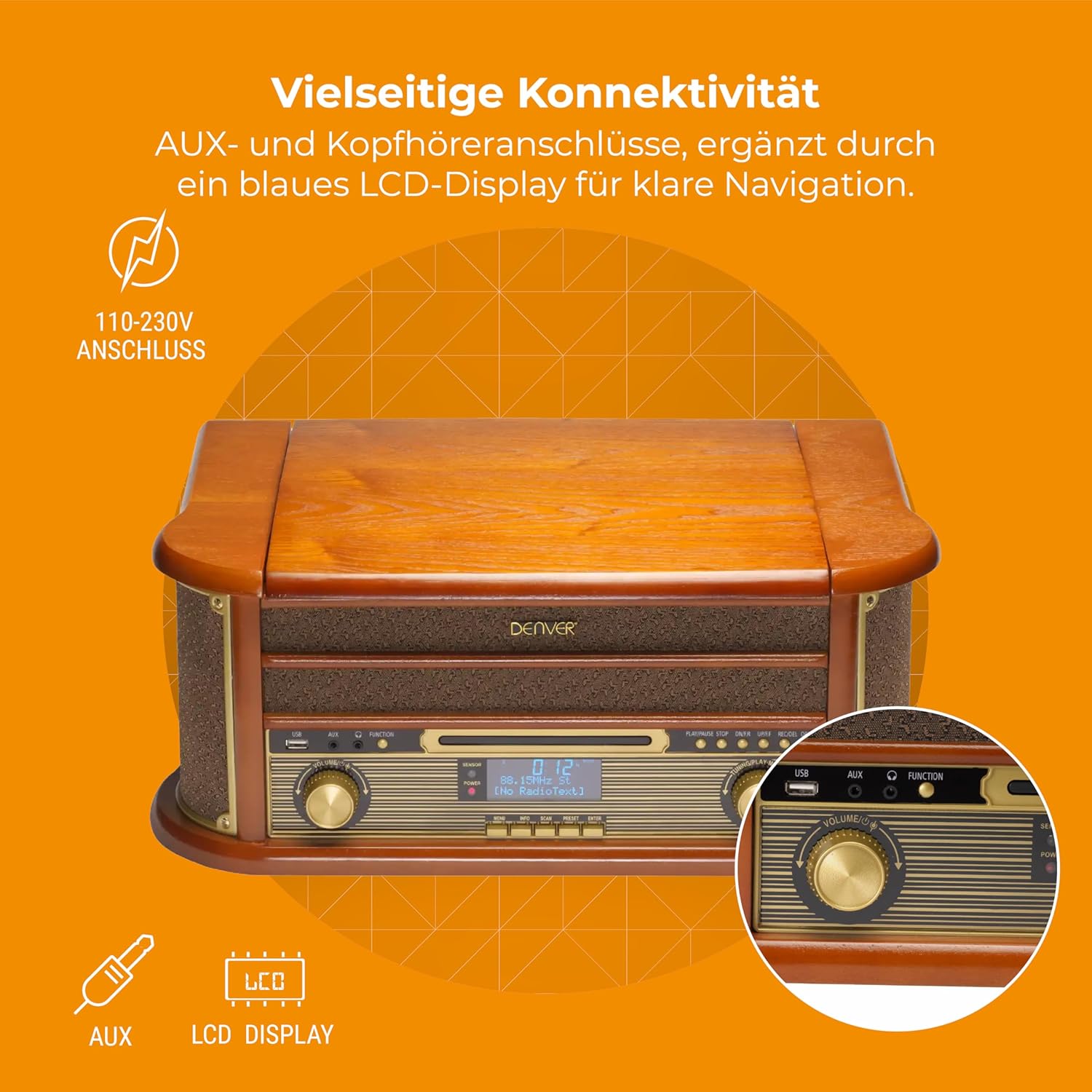
Mufananidzo 4.3: Denver MRD-51 front panel with USB, AUX, and LCD display. A close-up of the Denver MRD-51's front control panel, showcasing the USB port, AUX input, and the blue LCD display for clear navigation. This view details the various connectivity options available.
- SIMBA Bhatani: Inobatidza kana kudzima unit.
- Bhatani reBASA: Selects between Turntable, CD, Cassette, DAB+, FM, AM, AUX, and USB modes.
- USB Port: For connecting USB storage devices for playback or recording.
- AUX Input: 3.5mm jack yekubatanidza ekunze odhiyo masosi.
- Chiratidziro cheLCD: Shows current mode, track information, radio frequency, and other system status.
- PLAY/PAUSE Bhatani: Starts or pauses playback for CD, Cassette, or USB.
- STOP Bhatani: Inomira kutamba.
- Mabhatani eSkip (◀◀ / ▶▶): Skips tracks or fast forwards/rewinds.
- REKODI Bhatani: Initiates recording to USB.
- VOLUME Knob: Inogadzirisa huwandu hwese hwezvinobuda.
- TUNING Knob: Adjusts radio frequency in FM/AM mode or navigates menus in DAB+ mode.
4.2 Turntable and Cassette Deck

Mufananidzo 4.4: Denver MRD-51 showing open turntable and cassette deck. This image illustrates the versatility of the Denver MRD-51, featuring the open turntable with a record and an arrow pointing to the cassette deck slot on the side, indicating its multi-format playback capabilities.
- Turntable ndiro For playing vinyl records.
- Tone Arm with Stylus: Reads the grooves of vinyl records.
- Speed Sector: Allows selection of 33, 45, or 78 RPM.
- Cassette Deck Slot: For inserting audio cassettes.
4.3 CD Player

Mufananidzo 4.5: Denver MRD-51 with CD tray open and remote control. This image shows the Denver MRD-51 with its CD tray open, ready for disc insertion. A remote control is also pictured, indicating convenient operation of the system's functions.
- CD Tray: For inserting compact discs.
- OPEN/CLOSE Button: Opens and closes the CD tray.
5. Setup
5.1 Kusunungura uye Kuisa
- Nyatsobvisa iyo unit kubva pakurongedzerwa kwayo.
- Place the unit on a flat, stable surface away from direct sunlight, heat sources, and excessive dust or moisture.
- Iva nechokwadi chekuti pane nzvimbo yakakwana yakakomberedza mudziyo wekufema.
5.2 Simba Connection
- Connect the power cable to the AC IN socket on the rear of the unit.
- Plug the other end of the power cable into a standard wall outlet (110-230V).
5.3 Antenna Connection
For optimal radio reception, extend the telescopic antenna fully for FM/DAB+ or adjust its position for AM.
6. Operating Instructions
6.1 General Operation
- Press the SIMBA bhatani rekubatidza unit.
- Press the BASA button repeatedly to cycle through available modes: Turntable, CD, Cassette, DAB+, FM, AM, AUX, USB.
- Gadzirisa iyo VOLUME knob to your desired listening level.
6.2 Kushanda kweTurntable
- Select the 'Turntable' function.
- Open the turntable lid.
- Isa vinyl rekodhi mundiro.
- Set the speed selector to match the record's speed (33, 45, or 78 RPM). For 45 RPM records, use the included adapter if necessary.
- Gently lift the tone arm and position the stylus over the desired track on the record.
- Lower the tone arm slowly onto the record. Playback will begin.
- At the end of the record, the tone arm may automatically return to its rest, or you may need to manually lift and return it.
6.3 CD Player Kushanda
- Select the 'CD' function.
- Press the Vhura/VHARA bhatani rekuvhura CD tray.
- Place a CD (CD/CD-R/CD-RW compatible) with the label side facing up into the tray.
- Press the Vhura/VHARA bhatani zvakare kuvhara tireyi. Iyo unit ichaverenga disc.
- Press TAMBA/KUMIRA kutanga kutamba.
- Shandisa iyo SKIP mabhatani (◀◀ / ▶▶) kuti ufambe pakati pematraki.
- Press MIRA kugumisa kutamba.
6.4 Mashandiro eMutambi weKaseti
- Select the 'Cassette' function.
- Insert an audio cassette into the cassette deck slot until it clicks into place.
- Press the ITAMBA button (often integrated with the cassette mechanism) to start playback.
- Shandisa iyo MIRA button to end playback. Fast forward and rewind functions are typically available via dedicated buttons on the cassette deck.
6.5 Kushanda kweRedhiyo (DAB+/FM/AM)
- Select the desired radio function (DAB+, FM, or AM).
- For DAB+ Radio: The unit will typically perform an automatic scan for available stations upon first use. Use the TUNING knob kana SKIP buttons to navigate through the list of stations.
- For FM/AM Radio: Shandisa iyo TUNING knob to manually tune to a station. The frequency will be displayed on the LCD.
6.6 USB Kurekodha
The MRD-51 allows you to digitize audio from your records, CDs, or cassettes directly to a USB storage device.
- Isa USB flash drive mukati USB Port.
- Select the source function you wish to record from (Turntable, CD, or Cassette).
- Start playback of the audio source (e.g., play a record, CD, or cassette).
- Press the RECORD button. The recording indicator on the display will illuminate, and recording will begin.
- Press the RECORD bhatani zvakare kana iyo MIRA button to end the recording. The recorded file ichachengetwa pa USB drive.
6.7 AUX Input
- Batanidza mudziyo wekunze wekuteerera (semuenzaniso, smartphone, MP3 player) kune AUX Input using a 3.5mm audio cable.
- Select the 'AUX' function.
- Start playback on your external device. The audio will be played through the MRD-51's speakers.
7. Kuchengeta
7.1 Kuchenesa Chikamu
- Gara uchibuditsa unit kubva mudura remagetsi usati wachenesa.
- Shandisa jira rakapfava, rakaoma kupukuta kunze.
- Usashandise abrasive cleaners, wax, kana solvents.
7.2 Kutarisirwa kweStylus yeTurntable
- Chenesa chinyoreso zvinyoro nyoro nguva dzose nebhurashi rakapfava, uchikwesha kubva kumashure kuenda kumberi.
- Dzivisa kubata stylus neminwe yako.
- Replace the stylus when sound quality deteriorates or if it is visibly damaged.
7.3 Kutarisirwa kweMutambi weCD/Kaseti
- Handle CDs and cassettes by their edges to avoid fingerprints and scratches.
- Keep the CD tray and cassette deck free of dust and debris.
8. Kugadzirisa matambudziko
| Dambudziko | Zvinogona Kukonzera | Solution |
|---|---|---|
| Hapana simba | Power cable not connected; Wall outlet not active | Ensure power cable is securely connected; Try a different outlet |
| Hapana ruzha | Volume too low; Incorrect function selected; External device not playing | Increase volume; Select correct function; Ensure external device is playing and connected properly |
| Turntable not spinning or poor sound | Speed setting incorrect; Stylus dirty or damaged; Record dirty | Adjust speed selector; Clean or replace stylus; Clean record |
| CD haisi kutamba | CD inserted incorrectly; CD scratched or dirty; CD format not supported | Reinsert CD correctly; Clean or replace CD; Ensure CD is CD/CD-R/CD-RW format |
| Kugamuchirwa kweredhiyo kusina kunaka | Antenna not extended/positioned correctly; Weak signal | Extend and adjust antenna; Try repositioning the unit |
| Kurekodha kweUSB hakusi kushanda | USB drive full or incompatible; Source not playing | Use a different USB drive or clear space; Ensure audio source is playing during recording |
9. Zvinotsanangurwa
| Feature | Tsanangudzo |
|---|---|
| Product Dimensions | 20.08 x 13.39 x 8.46 inches |
| Item Weight | 15.18 pounds (6.9 Makirogiramu) |
| Model Number | MRD-51 (Internal: 111201210000) |
| Brand | Denver |
| Maximum Rotational Speed | 78 RPM (inotsigira 33, 45, 78 RPM) |
| Inosanganisirwa Zvikamu | MRD-51 unit |
| Special Features | Adjustable Speed, Digital Recorder, Integrated Speakers |
| Material | Aluminum (internal components), Wood (housing) |
| Color | Wood |
| Inowirirana Devices | Personal Computer (for USB transfer) |
| Radio Tuner | DAB+, FM, AM |
| CD Player | Supports CD/CD-R/CD-RW |
| Audio Output | 2 x 2.5W Stereo Vanotaura |
10. Warranty uye Tsigiro
For warranty information and technical support, please refer to the documentation provided with your purchase or contact Denver customer service through their official website. Chengetedza humbowo hwako hwekutenga kune chero vimbiso yewaranti.


