Nhanganyaya
This manual provides detailed instructions for the installation, setup, and operation of your JVC KD-X260BT Digital Media Receiver. This unit is designed to provide high-quality audio playback and hands-free communication in your vehicle, featuring Bluetooth connectivity, USB input, and a 13-band equalizer. Please note, this unit does not play CDs. Read this manual thoroughly before use to ensure proper operation and to prevent damage.

Mufananidzo: Mberi view of the JVC KD-X260BT Digital Media Receiver, showing the display and control buttons.
Safety Information
- Do not operate the unit in a way that distracts you from driving. Always keep your attention on the road.
- Ensure proper wiring connections to prevent short circuits or damage to the vehicle's electrical system.
- Dzivisa kuisa chikamu kune unyoro kana kupisa kwakanyanya.
- Usaedze kuparadzanisa kana kugadzirisa iyo unit. Tumira masevhisi ese kuvashandi vanokwanisa.
- Use only accessories specified by JVC.
Package Zviri mukati
Tarisa uone kuti zvinhu zvese zviripo mupakeji:
- JVC KD-X260BT Digital Media Receiver
- Wiring Sunga
- External Wired Microphone
- Mounting Hardware
- Chinyorwa Chirairo (gwaro iri)
Installation
Professional installation is recommended for this product. Incorrect installation can lead to damage to the unit or vehicle. The KD-X260BT features a short body design, which facilitates easier installation in various vehicle dashboards.
Wiring Connections:
- Connect the wiring harness according to your vehicle's wiring diagram.
- Ita shuwa kuti zvese zvinongedzo zvakachengeteka uye zvakavharirwa kudzivirira mapfupi maseketi.
- Connect the external microphone to the designated input for hands-free calling. Position the microphone in a location that provides clear voice pickup.
- Batanidza tambo yeantenna.
- Kana uchishandisa zvekunze amplifiers, connect the 2.5V preamp outputs (rear/subwoofer selectable).
Kukwidza:
- Isa chishongo chekuisa mubhokisi repadashboard.
- Isa chinogamuchira muruoko kusvika chapinda panzvimbo yacho.
- Batanidza mhete yekucheka.
Gadzirira
Kutanga Kubatidza
After installation, turn on your vehicle's ignition. The unit should power on. Follow any on-screen prompts for initial setup, such as language selection.
Bluetooth Pairing:
The KD-X260BT supports Bluetooth 3.0+EDR and allows for two phones to be connected full-time. This enables receiving calls from either phone with a push of a key.
- On the receiver, navigate to the Bluetooth menu.
- Select "Pairing" or "Device Search".
- Pafoni yako, vhura Bluetooth wobva watsvaga zvishandiso zviripo.
- Select "KD-X260BT" from the list on your phone.
- Simbisa kodhi yekubatanidza pamidziyo miviri kana wakurudzirwa.
- Once paired, the unit will display a confirmation.
The unit supports Bluetooth profiles HFP (Hands-Free Profile 1.6 for wideband speech), HSP (Headset Profile), PBAP (Phone Book Access Profile), A2DP (Yepamberi Audio Distribution Profile), uye AVRCP (Audio/Vhidhiyo Remote Control Profile 1.5).
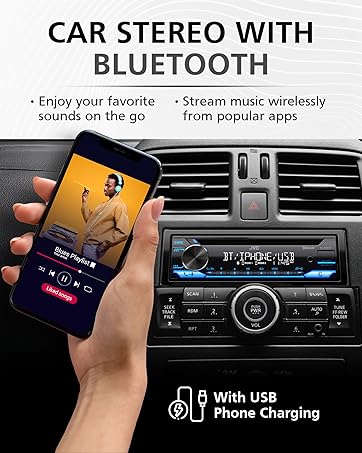
Image: JVC KD-X260BT display indicating Bluetooth connection, with a smartphone showing music playback, illustrating wireless audio streaming.
JVC Remote App:
Download the "JVC Remote" app (available for iOS and Android) to control the receiver's source directly from your smartphone using simple finger gestures.
Operating Instruction
Basic Controls:
- Bhatani reSimba: Dzvanya kuti ubatidze / kudzima unit.
- Vhoriyamu Knob: Rotate to adjust the volume level. Press to access menu options.
- Kunobva Bhatani: Press to cycle through available audio sources (Tuner, USB, Bluetooth Audio, AUX).
- Ratidza Bhatani: Changes display information (e.g., clock, track title).
Radio Tuner:
- Press the Source button to select "Tuner" (AM/FM).
- Use the seek buttons to find radio stations.
- Press and hold a preset button (1-6) to store a station.
USB Kutamba:
Connect a USB device to the front USB port. The unit supports MP3/WMA/WAV/FLAC playback. The USB port also provides high current 1.5A charging for smartphones.
- Insert the USB device. The unit will automatically switch to USB source and begin playback.
- Use the track buttons to skip tracks.
- Use the folder buttons to navigate through folders.
- MP3 ID3 Tag Display (title/artist/album) is supported.
- Android music playback (AOA 2.0) is supported for Android phones (version 4.1 or later).
Kutepfenyura kweBluetooth Odhiyo:
Once a Bluetooth device is paired, select "Bluetooth Audio" as the source to stream music wirelessly. Use the receiver's controls or the paired device to manage playback (play, pause, skip, search via AVRCP 1.5).
Kufona Kwemahara:
When a call comes in on a paired phone, the unit will display the caller ID. Press the call button to answer, and the end call button to hang up. The external microphone ensures clear communication.
Audio Settings (Equalizer):
The unit features a 13-Band Graphic Equalizer with 10 preset EQ settings and 1 user-customizable setting. Access the audio menu to adjust:
- Chiyero: Select from preset curves or customize your own.
- Bass Boost: Enhances low frequencies.
- Rudado: Compensates for perceived loss of bass and treble at low volumes.
- Balance/Fader: Adjusts sound distribution between left/right and front/rear speakers.
- Subwoofer Kudzora: Adjust subwoofer output level and frequency if connected.
Internet Radio/Digital Radio Control:
Control Pandora, iHeartRadio, and Spotify directly from the receiver when connected to a compatible Android device via Bluetooth.
Steering Wheel Remote Control:
Factory steering wheel control functions can be retained with a third-party adapter (sold separately).
Maintenance
- Kuchenesa Chikamu: Shandisa jira rakapfava, rakaoma kupukuta jira repamberi. Usashandise zvinochenesa zvinogumbura kana zvinonyungudutsa.
- USB Port: Chengeta USB port isina guruva nemarara.
- Firmware Dzokorora: Check the JVC website periodically for any available firmware updates for improved performance and features.
Kugadzirisa matambudziko
| Dambudziko | Solution |
|---|---|
| Hapana simba | Check vehicle's fuse. Ensure wiring harness is correctly connected. |
| Hapana ruzha | Check speaker connections. Verify volume level. Ensure correct source is selected. |
| Bluetooth haina kubatana | Ensure Bluetooth is enabled on both devices. Delete previous pairing and re-pair. Move devices closer. |
| USB mudziyo hauzivikanwe | Ensure USB device is formatted correctly (FAT16/32). Check for compatible file mhando. Edza chimwe chishandiso cheUSB chakasiyana. |
| Kugamuchirwa kweredhiyo kusina kunaka | Tarisa kubatana kweantenna. Iva nechokwadi chekuti antenna yatambanudzwa zvizere (kana zvichibvira). |
Zvinotsanangurwa
| Feature | Detail |
|---|---|
| Model Number | KD-X260BT |
| Simba Rinobuda (Nhamba Yepamusoro) | 50 Watts x 4 Channels |
| Simba Kuburitsa (RMS) | 22 Watts x 4 Channels |
| Display | VA LCD Display, Spanish Text Display |
| USB Inzwa Zvinotaurwa | Front USB, 1.5A Charging, MP3/WMA/WAV/FLAC Playback, Android AOA 2.0 |
| Wekubatsira Input | 3.5mm Front Audio Auxiliary Input |
| Bluetooth Version | 3.0+EDR Certified |
| Makaralı Profiles | HFP 1.6, HSP, PBAP, A2DP, AVRCP 1.5 |
| Equalizer | 13-Band Graphic Equalizer (10 Preset x 1 User) |
| Preamp Outputs | 1 Set of 2.5V (Rear/Subwoofer Selectable) |
| Internet Radio Control | Pandora, Spotify, iHeartRadio (for Android) |
| Zviyero (Chigadzirwa) | 4 x 9 x 8 inches |
| Item Weight | 1.79 makirogiramu |
Warranty uye Support
This JVC KD-X260BT Digital Media Receiver comes with a 1-Year Manufacturer's Warranty. For warranty claims, technical support, or service inquiries, please contact JVC customer support or visit the official JVC website. Chengetedza humbowo hwako hwekutenga kuti utsigire waranti.
JVC Customer Support: Refer to the contact information provided with your product packaging or on the official JVC website.


