1. Nhanganyaya uye Pamusoroview
The JOBY TelePod Mobile Tripod is a versatile, all-in-one support system designed for mobile content creators. It seamlessly transforms between a handheld grip, an extended monopod or selfie stick, an elevated stand, and a stable tripod. Its compact and lightweight design makes it an ideal companion for capturing photos and videos with smartphones, small 360 cameras, or other compatible devices.
2. Zvigadzirwa zveChigadzirwa
- Kushanda kwakasiyana-siyana: Works as a selfie stick, monopod, elevated stand, or tripod.
- GripTight One Mount: Supplied with a secure mount specifically designed for mobile vlogging and selfie use.
- Kuenderana Nemudziyo: Supports devices up to 0.7 lbs (325g), covering the entire smartphone market and fitting small 360 cameras or phones with 360 camera attachments.
- Integrated Ball Head: Allows for precise positioning and angle adjustments.
- Bluetooth Remote: Includes a detachable Bluetooth remote for convenient photo and video capture.
3. Setup
Follow these steps to set up your JOBY TelePod Mobile Tripod:
- Tambanudza Makumbo: Hold the main body of the TelePod and gently spread the three legs outwards until they are fully extended and stable. The legs are designed to provide a stable base when used as a tripod or elevated stand.
- Attach the Phone Mount: The TelePod comes with a GripTight One Mount. This mount can be screwed onto the 1/4"-20 standard tripod screw at the top of the ball head. Ensure it is securely tightened.
- Isa Smartphone Yako: Gently pull apart the spring-loaded jaws of the GripTight One Mount and carefully insert your smartphone. Ensure the phone is centered and securely gripped by the rubber pads to prevent slipping.
- Adjust the Ball Head: Loosen the locking knob on the ball head to adjust the angle and orientation of your device. Tighten the knob firmly once the desired position is achieved.
- Batanidza iyo Bluetooth Remote: The detachable Bluetooth remote is located on one of the tripod legs. Slide it out. Turn on your smartphone's Bluetooth and search for available devices. Select 'JOBY' or 'TelePod Remote' from the list to pair. Once paired, you can use the remote to trigger your phone's camera shutter.

Figure 3.1: The JOBY TelePod Mobile Tripod in its compact, folded state, ready for transport.

Mufananidzo 3.2: Kuvhara view of the GripTight One Mount, showing its spring-loaded mechanism for securing a smartphone.
4. Maitiro Okushandisa
The JOBY TelePod Mobile Tripod offers multiple operating modes to suit various shooting scenarios:
4.1. Handheld Grip Mode
With the legs folded together, the TelePod acts as a comfortable handheld grip, perfect for stable vlogging or capturing dynamic shots on the go.

Figure 4.1: The TelePod in handheld grip mode, ideal for vlogging and on-the-go shooting.
4.2. Monopod / Selfie Stick Mode
Extend the telescoping pole while keeping the legs folded to use the TelePod as a monopod or selfie stick. This mode is excellent for overhead shots, wider angles, or group selfies.

Figure 4.2: The TelePod fully extended, functioning as a selfie stick or monopod.

Figure 4.3: A user demonstrating the extended selfie stick mode for capturing a wider perspective.
4.3. Elevated Stand Mode
With the legs extended for stability and the telescoping pole extended upwards, the TelePod becomes an elevated stand. This is useful for video calls, streaming, or capturing content from a higher vantage point.
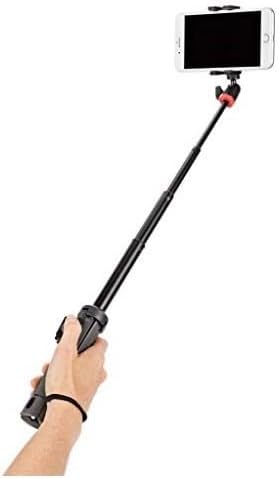
Figure 4.4: The TelePod with legs extended and pole telescoped, serving as an elevated stand.
4.4. Tripod Mode
Fully extend the legs and keep the telescoping pole retracted or slightly extended for a stable tabletop or ground-level tripod. This mode is ideal for steady shots, time-lapses, or hands-free viewing.

Figure 4.5: The TelePod in its classic tripod configuration, providing a stable base for your device.
5. Bluetooth Remote Control
The JOBY TelePod Mobile Tripod includes a detachable Bluetooth remote for convenient wireless control of your device's camera shutter. This allows you to capture photos and start/stop video recording without touching your phone, reducing camera shake and enabling remote operation.
5.1. Pairing Instructions
- Ensure the Bluetooth remote is turned on and has sufficient battery power.
- Slide the remote out from its slot on the tripod leg.
- Turn on the remote (usually by pressing and holding the button until an indicator light flashes).
- Gonesa Bluetooth pane yako smartphone.
- Tsvaga new devices and select 'JOBY' or 'TelePod Remote' to pair.
- Once paired, the indicator light on the remote will change (e.g., solid blue).
5.2. Kushanda
Once paired, open your smartphone's camera app. Press the button on the Bluetooth remote to trigger the shutter for photos or to start/stop video recording (functionality may vary slightly depending on your phone's camera app).
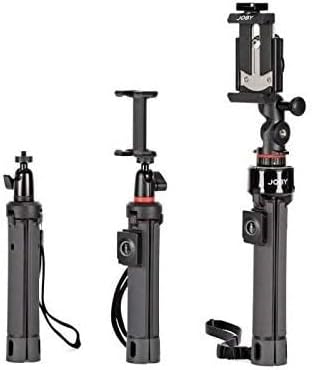
Figure 5.1: The compact and detachable Bluetooth remote control for wireless camera operation.
6. Kuchengeta
To ensure the longevity and optimal performance of your JOBY TelePod Mobile Tripod, follow these maintenance guidelines:
- Kuchenesa: Pukuta tripod ne soft, damp cloth. Avoid using harsh chemicals or abrasive materials that could damage the finish or components.
- Kuchengeta: Store the TelePod in a cool, dry place away from direct sunlight and extreme temperatures. Ensure it is clean and dry before storing.
- Dzivisa kuwandisa: Do not exceed the maximum weight capacity of 0.7 lbs (325g) to prevent damage to the ball head or legs.
- Bata Nekungwarira: While durable, avoid dropping the TelePod or subjecting it to excessive force, especially when extending or retracting the pole.
7. Kugadzirisa matambudziko
If you encounter issues with your JOBY TelePod Mobile Tripod, refer to the following common problems and solutions:
- Dambudziko: Bluetooth remote does not pair with smartphone.
Solution:- Ensure the remote is turned on and has sufficient battery power.
- Make sure Bluetooth is enabled on your smartphone and it's discoverable.
- Try unpairing and re-pairing the remote from your phone's Bluetooth settings.
- Restart both the remote and your smartphone.
- Dambudziko: Phone mount does not hold the phone securely.
Solution:- Ensure the phone is centered within the mount's jaws.
- Check if the rubber pads on the mount are clean and free from debris.
- Verify that your phone's weight does not exceed the 0.7 lbs (325g) capacity.
- Dambudziko: Tripod inonzwa isina kugadzikana.
Solution:- Ensure all three legs are fully extended and locked into position.
- Isa katatu panzvimbo yakati sandara, yakagadzikana.
- Avoid extending the telescoping pole too high, especially with heavier devices, as this can affect stability.
- Ensure the ball head is securely tightened after positioning your device.
8. Zvinotsanangurwa
| Attribute | Detail |
|---|---|
| Product Dimensions | 2.25 x 2.25 x 9 inches |
| Item Weight | 8.8 ounces (0.25 Makirogiramu) |
| Item Model Number | JB01550 |
| Brand | Jobho |
| Color | Nhema |
| Inowirirana Devices | iPhone (and other smartphones, small 360 cameras) |
| Special Features | Lightweight, Portable, Adjustable, Remote Control, Slip Resistant |
| Material | Stainless steel, ABS Plastic, Glass-Filled Nylon Plastic, TPE |
| Kurema Kurema | 0.7 Pondo (325g) |
| Maximum Height | 19 Masendimita |
| Tripod Musoro Type | Ball Heads |
| Zuva Rokutanga Kuwanikwa | Gunyana 24, 2018 |
9. Warranty uye Tsigiro
The JOBY TelePod Mobile Tripod (Model JB01550-BWW) comes with a JOBY 1 Year Warranty. For warranty claims, technical support, or further assistance, please refer to the official Joby webkana kuti bata vatengi vavo zvakananga. Chengeta humbowo hwekutenga kwako kuti usimbise garandi.


