1. Nhanganyaya
Ndatenda nekutengaasing the Yenkee YKB 3200 Gaming Keyboard. This manual provides essential information for the proper setup, operation, and maintenance of your new keyboard. Please read this manual thoroughly before using the product to ensure optimal performance and longevity.
2. Safety Information
- Chengeta kiibhodhi kure nemvura uye hunyoro hwakawandisa.
- Usafumure iyo keyboard kune yakanyanya tembiricha.
- Dzivisa kudonhedza kana kuisa keyboard pakugumburwa kwakasimba.
- Do not attempt to disassemble or repair the keyboard yourself. Refer all servicing to qualified personnel.
- Use only a dry, soft cloth for cleaning.
3. Package Zviri mukati
Ndapota tarisa zviri mupakeji kana muchibvisa zvinhu. Kana paine zvinhu zvisipo kana kuti zvakakuvara, taurai nemutengesi wenyu.
- Yenkee YKB 3200 Gaming Keyboard with integrated smartphone holder
- Tambo yeUSB (yakabatanidzwa)
4. Chigadzirwa Pamusoroview
The Yenkee YKB 3200 is a robust gaming keyboard designed for an enhanced gaming experience. It features a durable metal construction, responsive rubber dome keys, and dynamic rainbow backlighting.
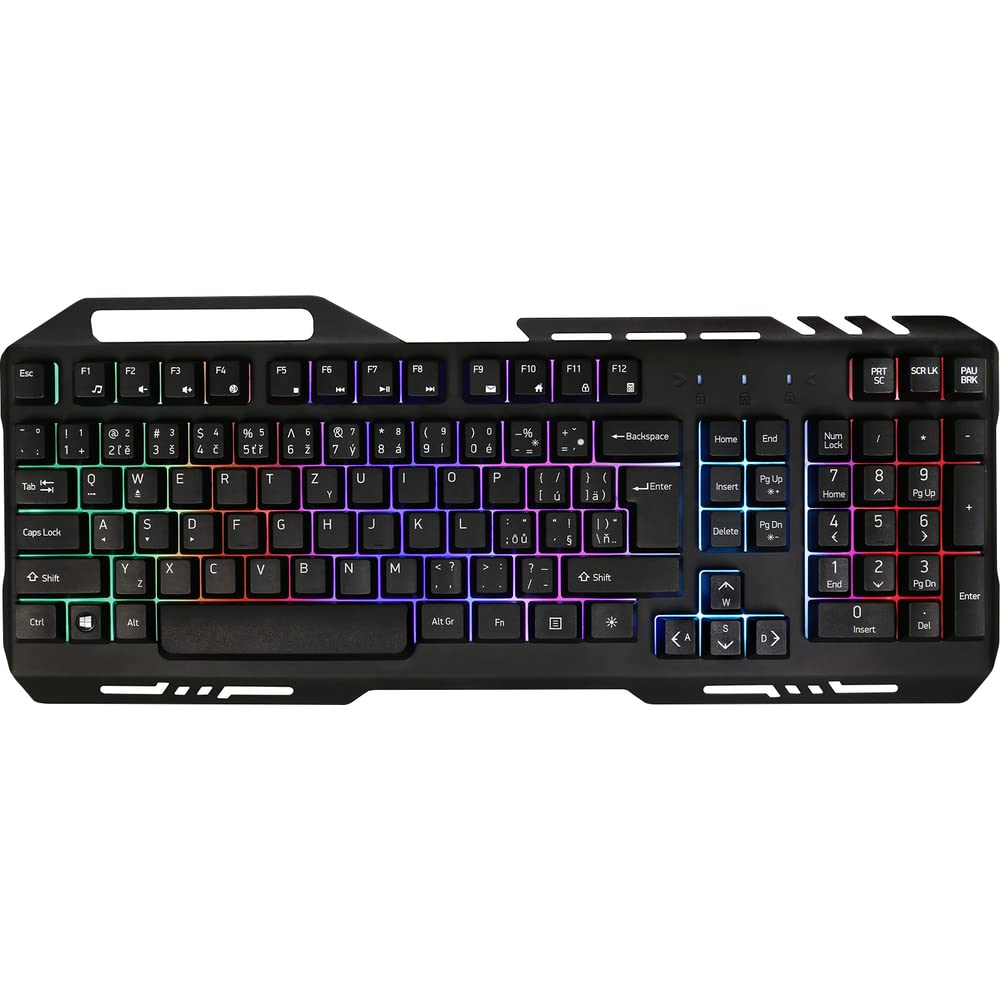
Image 1: Yenkee YKB 3200 Gaming Keyboard. This image displays the full keyboard with its metal frame and illuminated keys, highlighting the integrated smartphone holder at the top.
Zvinokosha:
- Metal Keyboard Design: Provides enhanced durability and a premium feel.
- Integrated Smartphone Holder: Conveniently located at the top of the keyboard for easy access to your mobile device.
- Durable Rubber Dome Keys: Offers a comfortable and responsive typing experience.
- Nine Rainbow Backlight Modes: Customizable lighting effects to suit your preference and gaming atmosphere.
- USB Kubatana: Simple plug-and-play connection to your computer.
- 1.5m Cable Length: Inopa ampndinosvika kune akasiyana setups.
5. Setup
- Bvisa kiyibhodhi: Bvisa kiibhodhi nokungwarira kubva pakurongedza kwayo.
- Batanidza kuKombuta: Locate an available USB port on your computer (PC or laptop). Insert the USB connector of the keyboard into the USB port.
- Kuiswa kwemutyairi: The keyboard is plug-and-play and typically does not require additional driver installation. Your operating system should automatically detect and install the necessary drivers.
- Kuiswa: Place the keyboard on a stable, flat surface. You can use the integrated smartphone holder to position your mobile device.
- Test Mashandiro: Open a text editor or browser to test if the keys are responding correctly.
6. Operating Instructions
Backlight Control:
The Yenkee YKB 3200 features nine distinct rainbow backlight modes. These modes can typically be cycled through using a dedicated function key combination.
- Kuchinja Modes: Look for a key labeled 'FN' (Function) and a key with a light bulb icon or 'Scroll Lock' / 'Pause Break'. Pressing FN + Light Bulb / Scroll Lock / Pause Break (depending on keyboard layout) will cycle through the available backlight modes.
- Kugadzirisa Kupenya: Some keyboards allow brightness adjustment using FN + Up/Down Arrow keys. Refer to your specific keyboard layout for exact key combinations.
- Turning Backlight On/Off: A long press of the backlight control key or a specific FN combination might turn the backlight on or off.
Multimedia uye Basa Makiyi:
The keyboard may include additional function keys (F1-F12) that, when combined with the 'FN' key, provide multimedia control or quick access to applications. Common functions include:
- FN + F1-F12: Volume control, media playback, email, web browser, etc. (Specific functions vary by model).
7. Kuchengeta
Kuchenesa:
- General Cleaning: Use a soft, dry, lint-free cloth to wipe the surface of the keyboard.
- Kubvisa Dust: Shandisa mweya wakamanikidzwa kubvisa huruva nemarara kubva pakati pemakiyi.
- Akasindimara Stains: Pamavara akasindimara, zvishoma dampen the cloth with water or a mild, non-abrasive cleaning solution. Ensure no liquid enters the keyboard.
Kuchengeta:
Kana usingashandiswe kwenguva yakareba, chengeta kiyibhodhi munzvimbo inotonhorera, yakaoma, kure nezuva rakananga uye tembiricha dzakanyanya.
8. Kugadzirisa matambudziko
| Dambudziko | Zvinogona Kukonzera | Solution |
|---|---|---|
| Kiyibhodhi haisi kudaira | Yakasununguka USB yekubatanidza, yakanganisa USB port, mutyairi nyaya. | Ensure USB cable is securely connected. Try a different USB port. Restart your computer. |
| Backlight haisi kushanda | Backlight turned off, low brightness setting. | Press the backlight control key combination (e.g., FN + Scroll Lock) to cycle modes or adjust brightness. |
| Makiyi anonamira kana kuti haapindure | Dirt or debris under keys. | Clean the keyboard using compressed air and a soft cloth. |
9. Zvinotsanangurwa
| Feature | Tsanangudzo |
|---|---|
| Brand | Yenkee |
| Model Number | YKB 3200 |
| Kubatana Technology | USB |
| Cable Length | 1.5 mamita |
| Keyboard Tsanangudzo | Mutambo |
| Backlight Theme | Rainbow (9 modes) |
| Inowirirana Devices | Laptop, PC |
| Product Dimensions | 45.2 x 20 x 3.5 cm |
| Product Weight | 841 g |
| Inosanganisirwa Zvikamu | USB cable (attached) |
10. Warranty uye Tsigiro
Yenkee products are designed and manufactured to the highest quality standards. For information regarding warranty terms and conditions, please refer to the warranty card included with your purchase or visit the official Yenkee website. For technical support or service inquiries, please contact your local retailer or the Yenkee customer support team.


