Nhanganyaya
Thank you for choosing the MIFA A3 Soundbox Bluetooth Portable Speaker. This manual provides essential information for the safe and efficient use of your device. Please read it thoroughly before operating the speaker and retain it for future reference.
Safety Information
- Usaisa mukurukuri pakupisa kwakanyanya, zuva rakananga, kana kuti mwando wakanyanya.
- Dzivisa kudonhedza kana kuita kuti mukurukuri apedzisire akasimba.
- Do not disassemble or attempt to repair the speaker yourself. Contact qualified service personnel.
- Keep the speaker away from water and liquids, despite its waterproof rating, to prevent damage to charging ports or internal components.
- Shandisa tambo yekuchaja neadapta chete.
Package Zviri mukati
Ndokumbira utarise pasuru yezvinhu zvinotevera:
- MIFA A3 Bluetooth Portable Speaker
- USB Kuchaja Cable
- AUX Audio Cable
- Mushandisi Chinyorwa (gwaro iri)
Product Overview
The MIFA A3 speaker features intuitive touch controls and multiple connectivity options. Familiarize yourself with the speaker's layout:
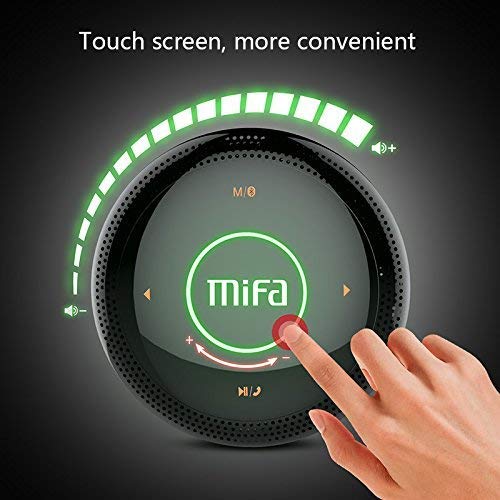
Mufananidzo 1: Top view of the MIFA A3 speaker, highlighting the touch-sensitive control panel. The panel displays volume indicators, play/pause, and track navigation buttons. A central 'Mifa' logo is also visible.
- Bata Control Panel: Located on the top surface for volume adjustment, playback control, and mode selection.
- Maikorofoni: Zvekufona pasina maoko.
- Kuchaja Port: Chiteshi cheMicro USB chekuchaja.
- AUX Input: 3.5mm audio jack for wired connection.
- Micro SD Kadhi Slot: Yekuridza mimhanzi zvakananga kubva pamemori kadhi.
Gadzirira
1. Kubhadharisa Mutauri
Before first use, fully charge the speaker. Connect the provided USB charging cable to the speaker's charging port and the other end to a USB power adapter (not included) or a computer's USB port.
- Chiedza chechiratidzo chekuchaja chichavhenekera panguva yekuchaja.
- The indicator will turn off or change color once fully charged.
- A full charge provides approximately 8 hours of continuous playtime.
2. Simba On / Off
- Kubatidza: Press and hold the Power button (usually integrated into the touch panel or a dedicated button) for 2-3 seconds until you hear an audible prompt or see an indicator light.
- Kudzima: Press and hold the Power button again for 2-3 seconds.
Operating Instruction
1. Bluetooth Kubatanidza
- Ensure the speaker is powered on and in Bluetooth pairing mode (indicated by a flashing blue light or audible prompt).
- Pamudziyo wako (smartphone, piritsi, PC), gonesa Bluetooth uye tsvaga zvishandiso zviripo.
- Select "MIFA A3" from the list of devices.
- Once paired, the speaker will provide an audible confirmation, and the indicator light will become solid blue.
- The speaker will automatically connect to the last-paired device when powered on, if that device's Bluetooth is active and within range.
2. AUX Connection
For devices without Bluetooth, use the provided 3.5mm AUX audio cable:
- Connect one end of the AUX cable to the speaker's AUX input port.
- Unganidza mumwe mugumo kuhedhifoni jack yeyako odhiyo kifaa.
- Mutauri anozochinja otomatiki kuenda kuAUX mode.
3. Kutambazve kweMicro SD Card
Insert a Micro SD card (up to 32GB, FAT32 format) with music files into the designated slot. The speaker will automatically detect the card and begin playback.
4. Touch Control Operations
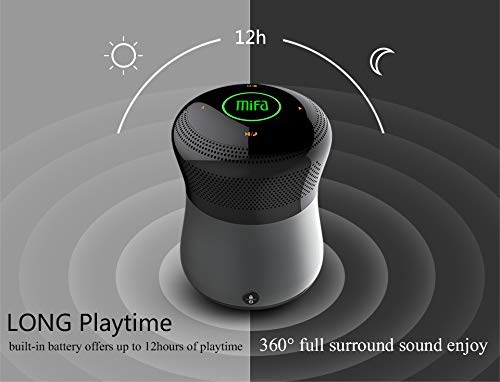
Mufananidzo 2: The MIFA A3 speaker shown with an overlay indicating "LONG Playtime" (up to 12 hours) and "360° full surround sound enjoy." This image emphasizes the speaker's battery life and audio dispersion.
- Kudzora inzwi: Slide your finger clockwise on the touch panel to increase volume, counter-clockwise to decrease.
- Tamba/Kumbomira: Tap the central Play/Pause icon.
- Next Track: Tap the "Next" arrow icon.
- Previous Track: Tap the "Previous" arrow icon.
- Mode Switch: Tap the "M/O" icon to cycle between Bluetooth, AUX, and Micro SD card modes.
- Kiya Bhatani: Press the lock icon to prevent accidental touch inputs.
5. Call Handling (Bluetooth Mode)
- Pindura Call: Tap the Play/Pause icon when a call comes in.
- Pedzisa Kufona: Tap the Play/Pause icon again.
- Ramba Kufona: Press and hold the Play/Pause icon for 2 seconds.
Maintenance
- Geza mutauri nejira rakapfava, rakaoma. Usashandise abrasive cleaners kana solvents.
- Chengeta mukurukuri munzvimbo inotonhorera, yakaoma asi isingashandiswi kwenguva yakareba.
- Charge the battery at least once every three months to maintain battery health.
Kugadzirisa matambudziko
| Dambudziko | Possible Solution |
|---|---|
| Mutauri haabati simba. | Ita shuwa kuti bhatiri rachajwa. Batanidza kune sosi yemagetsi uye edza zvakare. |
| Haikwanise kubatanidza kuburikidza neBluetooth. |
|
| Hapana ruzha. |
|
| Yakashata yemhando yepamusoro. |
|
Zvinotsanangurwa
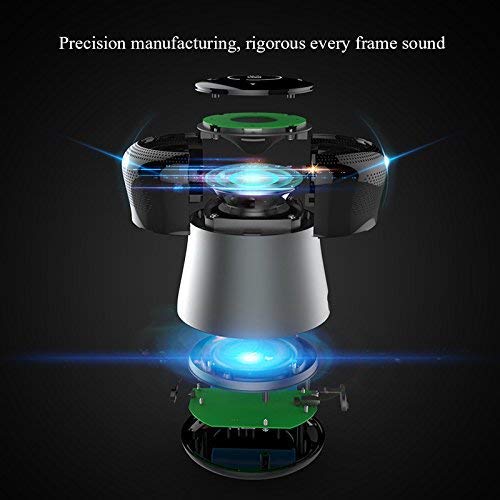
Mufananidzo 3: An exploded diagram of the MIFA A3 speaker, illustrating its internal components and structural design, emphasizing precision manufacturing.
| Model | MIFA A3 |
| Output Power | 10W |
| Kubatana | Bluetooth 4.2, AUX, Micro SD Card |
| Bhatiri | 1800 mAh Li-ion |
| Nguva yekutamba | Kusvika kumaawa 8 (pa60% vhoriyamu) |
| Kuchaja Nguva | Anenge maawa 3-4 |
| Maikorofoni | Yakavakirwa-mukati yemafoni-emahara mafoni |
| Isingapindi mvura | Yes (as per product specifications, but general caution advised for ports) |
| Kudzora Nzira | Bata |
| Inowirirana Devices | Laptop, PC, Smartphone, Tablet |
Warranty uye Support
MIFA products are designed to provide reliable performance. For warranty information or technical support, please refer to the warranty card included with your purchase or visit the official MIFA website. Chengetedza humbowo hwako hwekutenga kune warranty claim.
For further assistance, you may contact MIFA customer support through their official channels.


