1. Nhanganyaya
Ndatenda nekutengaasing the MIFA A30 Bluetooth Speaker. This manual provides essential information for setting up, operating, and maintaining your device. Please read it thoroughly before use to ensure optimal performance and longevity of your speaker.
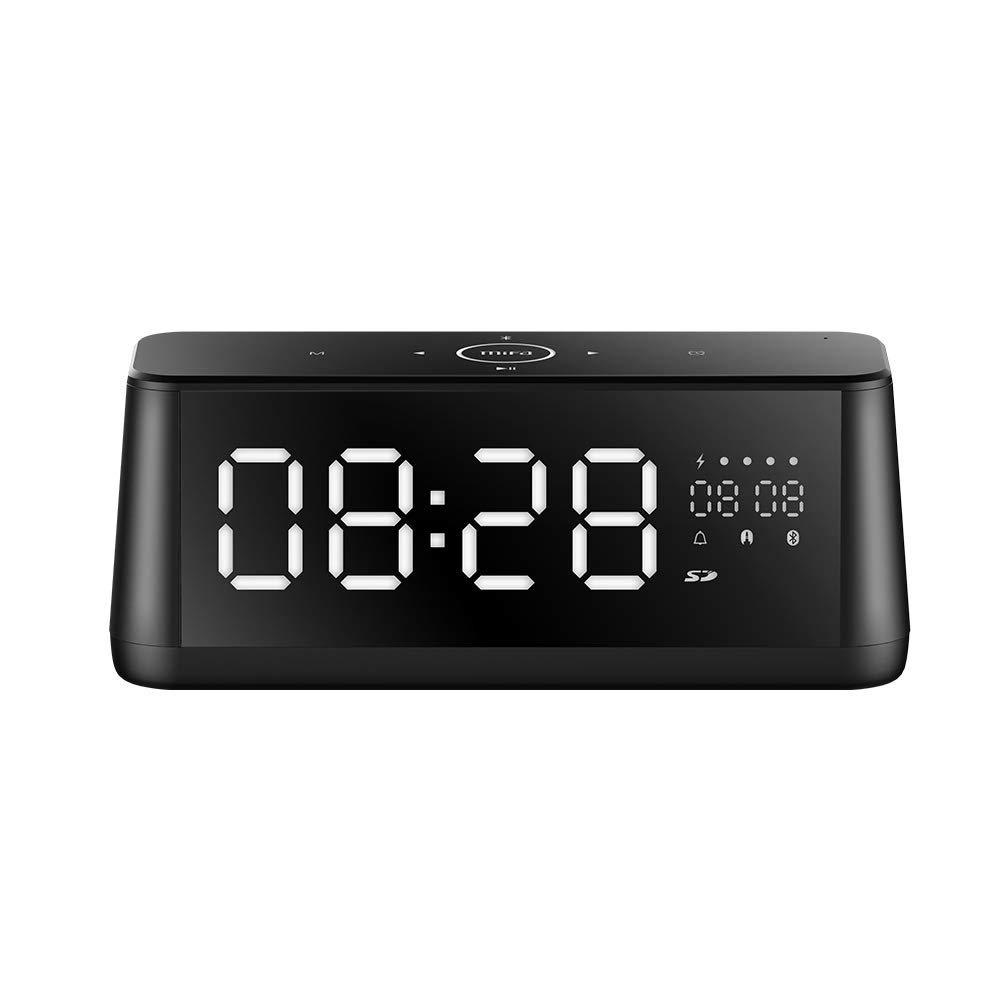
Mufananidzo 1.1: Mberi view of the MIFA A30 Bluetooth Speaker, displaying the time on its large LED screen.
2. Safety Information
- Usaisa mukurukuri pakupisa kwakanyanya, zuva rakananga, kana kuti mwando wakanyanya.
- Dzivisa kudonhedza kana kuita kuti mukurukuri apedzisire akasimba.
- Usabvisa, kugadzirisa, kana kugadzirisa mudziyo wega. Bata vashandi vane mvumo kana paine chero kugadziriswa.
- Keep the speaker away from water and other liquids, despite its waterproof rating, to prevent damage to ports when open.
- Shandisa tambo yekuchaja neadapta chete.
- Clean the speaker with a soft, dry cloth. Do not use abrasive cleaners.
3. Package Zviri mukati
Ndokumbira utarise pasuru yezvinhu zvinotevera:
- MIFA A30 Bluetooth Speaker
- USB Kuchaja Cable
- 3.5mm Audio Cable
- Mushandisi Chinyorwa (gwaro iri)
4. Chigadzirwa Pamusoroview
4.1. Zvikamu
The MIFA A30 speaker features a robust design with advanced audio components for high-quality sound reproduction.

Mufananidzo 4.1: Yakaputika view illustrating the internal components of the MIFA A30, including two 15-watt drivers and two low-frequency passive radiators.
4.2. Control Panel and Ports
The speaker's top panel features capacitive touch controls, and the rear panel houses various connectivity ports.
Mufananidzo 4.2: Pamusoro-pasi view of the MIFA A30 control panel, indicating the functions of each touch button for mode, playback, volume, and clock adjustment.
- M (Modhi) Bhatani: Short press to switch between Bluetooth, TF Card, and AUX modes.
- Kudzora kweBluetooth: Long press to turn off Bluetooth, short press to turn on.
- Yapfuura Track Bhatani: Dzvanya pfupi kuti uende kune yakapfuura track.
- Play/Pause/Hands-Free Button: Short press to play/pause music. Short press to answer/end calls. Long press to reject calls.
- Inotevera Track Bhatani: Dzvanya pfupi kuti uende kune inotevera track.
- Bhatani rewachi: Long press for clock adjustment.
- Vhoriyamu Kumusoro: Tenderedza wachi kuti uwedzere inzwi.
- Vhoriyamu Pasi: Rotate counter-clockwise to decrease volume.
- Mic: Yakavakirwa-mukati maikorofoni yemafoni-emahara mafoni.
- Akatungamirira Ratidza: Shows time, date, battery level, and current mode.
5. Setup
5.1. Kubhadharisa Mutauri
Before first use, fully charge the speaker. Connect the provided USB charging cable to the speaker's charging port and the other end to a USB power adapter (not included) or a computer's USB port. The LED display will indicate charging status.
5.2. Powering On / Off
- Kubatidza: Press and hold the Play/Pause button until the LED display lights up.
- Kudzima: Press and hold the Play/Pause button until the LED display turns off. The speaker will automatically screen out and power off to save battery after a period of inactivity.
6. Operating Instructions
6.1. Bluetooth Kubatanidza
- Ensure the speaker is powered on and in Bluetooth mode (indicated by the Bluetooth icon on the LED display). If not, short press the 'M' button to switch to Bluetooth mode.
- Pane yako smartphone kana piritsi, gonesa Bluetooth uye tsvaga zvishandiso zviripo.
- Select "MIFA A30" from the list of devices.
- Once paired, the speaker will emit a confirmation sound, and the Bluetooth icon on the display will stop flashing.
- The speaker will automatically re-connect to the last paired device when powered on, if the device is within range.
6.2. Audio Kutamba
- Tamba/Kumbomira: Muchidimbu dzvanya bhatani rePlay/Pause.
- Next Track: Short press the Next Track button.
- Previous Track: Short press the Previous Track button.
- Kugadziridza Vhoriyamu: Tenderedza vhoriyamu ichidzora wachi kuti uwedzere vhoriyamu, uchipikisana newachi kuderedza vhoriyamu.
6.3. Hands-Free Calling
Kana wakabatana neBluetooth kufoni yako:
- Pindura Call: Muchidimbu dzvanya bhatani rePlay/Pause.
- Pedzisa Kufona: Short press the Play/Pause button during a call.
- Ramba Kufona: Dzvanya bhatani rekuti Play/Misa kwenguva refu kana foni yapinda.
6.4. TF Card Playback
- Insert a Micro-SD (TF) card with supported audio files (FLAC/APE/MP3/WMA/WAV) into the TF card slot.
- Short press the 'M' button to switch to TF Card mode. The speaker will automatically begin playing music from the card.
6.5. AUX Input
- Connect one end of the 3.5mm audio cable to the speaker's AUX input port and the other end to the audio output of your device (e.g., MP3 player, computer).
- Short press the 'M' button to switch to AUX mode.
- Audio yave kuridza kuburikidza nemutauri kubva pane chako chakabatana mudziyo.
6.6. Clock and Display Settings
- Kugadzirisa wachi: Long press the Clock button to enter time setting mode. Use the Next/Previous buttons to adjust values and the Play/Pause button to confirm.
- Display Luminance: The LED display has 7 adjustable luminance levels. Refer to the full product documentation for specific adjustment steps, typically involving short presses of the Clock button or a combination with volume controls.
7. Kuchengeta
- Kuchenesa: Wipe the speaker's surface with a soft, dry, lint-free cloth. Do not use liquid or aerosol cleaners.
- Kuchengeta: Kana isingashandiswi kwenguva yakareba, chengeta mukurukuri munzvimbo inotonhorera, yakaoma, kure nechiedza chezuva uye tembiricha yakanyanyisa.
- Battery Care: Kuti bhatiri rirambe richirarama kwenguva refu, dzivisa kuburitsa bhatiri rakazara nguva nenguva. Chaja sipika nguva dzose, kunyangwe isiri kushandiswa.
8. Kugadzirisa matambudziko
| Dambudziko | Zvinogona Kukonzera | Solution |
|---|---|---|
| Mutauri haabati simba. | Bhatiri rakaderera. | Chaja sipika kwemaawa gumi nemaviri. |
| Hapana ruzha. | Volume too low; incorrect mode; device not connected. | Increase speaker and device volume. Ensure correct mode (Bluetooth/AUX/TF Card). Re-pair Bluetooth device or check AUX cable connection. |
| Bluetooth pairing inokundikana. | Chipika hachisi muchimiro chekupairira; mudziyo wakanyanya kure; kupindira. | Ensure speaker is in Bluetooth mode. Move device closer to speaker. Turn off other Bluetooth devices. Try forgetting "MIFA A30" on your device and re-pairing. |
| TF Card not playing. | Incorrect mode; unsupported file format; card error. | Switch to TF Card mode. Ensure files are FLAC/APE/MP3/WMA/WAV. Reinsert TF card or try a different card. |
9. Zvinotsanangurwa
| Feature | Detail |
|---|---|
| Model Name | A30 |
| Mutauri Rudzi | Booksherufu |
| Kubatana Technology | Bluetooth 4.2, Auxiliary (3.5mm), Micro-SD (TF Card) |
| Audio Output Mode | Stereo |
| Mutauri Mukuru Wekubuda Simba | 30 Watts (2 x 15W drivers) |
| Bass Enhancement | Two low-frequency boosters |
| Battery Capacity | 4000 mAh |
| Nguva yekutamba | Up to 10-12 hours (depending on volume and content) |
| Kudzora Nzira | Capacitive Touch Panel |
| Display | 7.2" x 2.8" Mirror LED Screen with 106 LEDs, 7-level adjustable luminance |
| Inotsigirwa Audio Formats | FLAC/APE/MP3/WMA/WAV |
| Yakavakwa-mukati Maikorofoni | Yes, for hands-free calls |
| Isingapindi mvura | Yes (Note: Ensure ports are covered for water resistance) |
| Color | Nhema |
| Mounting Type | Tabletop Mount |
10. Warranty uye Tsigiro
The MIFA A30 Bluetooth Speaker typically comes with a 30-day warranty from the date of purchase, covering manufacturing defects. Please retain your proof of purchase for warranty claims.
For technical support, troubleshooting assistance beyond this manual, or warranty inquiries, please contact MIFA customer service through their official website or the retailer where the product was purchased. Provide your product model (A30) and purchase details when seeking support.


