1. Nhanganyaya
Thank you for choosing the Cecotec Ready Warm 6670 Cristal Electric Radiator. This modern and elegant crystal convector is designed to provide efficient and rapid heating for your living spaces. Featuring an adjustable thermostat, timer function, and Wi-Fi connectivity, it offers convenient control and optimized energy consumption. This manual provides essential information for safe operation, installation, maintenance, and troubleshooting.
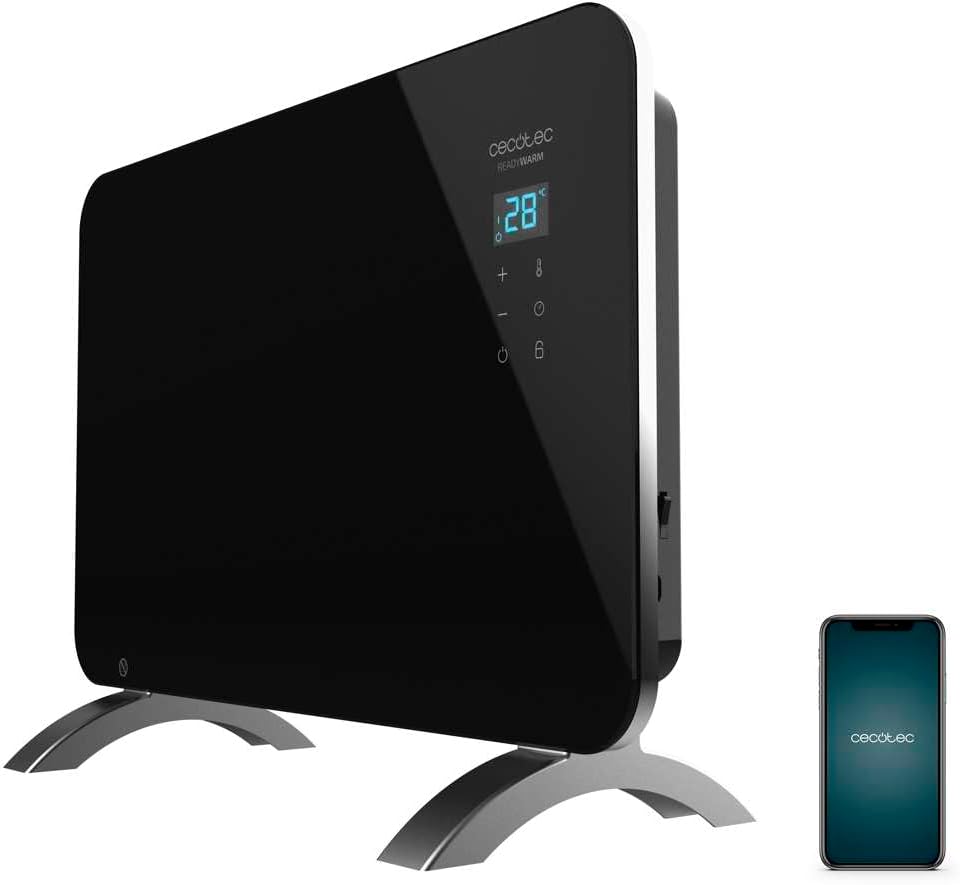
Figure 1: The Cecotec Ready Warm 6670 Cristal Electric Radiator, showcasing its sleek black design and digital display, alongside a smartphone indicating its Wi-Fi control capability.
2. Yakakosha Mirayiridzo Yekuchengetedza
Ndokumbira uverenge mirairo yese nemazvo usati washandisa mudziyo uye chengeta kuti ugozoishandisa mune ramangwana. Kutadza kutevedzera mirairo iyi kunogona kukonzera kuvhunduka kwemagetsi, moto, kana kukuvara zvakanyanya.
- Iva nechokwadi chekuti voltage inoratidzwa pane rating label inoenderana nevhoriyamu yako hurutage pamberi pekubatanidza mudziyo.
- Do not use this appliance near water or in damp environments, such as bathrooms, due to its IP24 splash protection rating.
- Always place the radiator on a stable, flat surface. Ensure adequate clearance from walls and furniture for proper ventilation.
- Do not cover the radiator, as this can lead to overheating and fire hazards.
- Keep children and pets away from the appliance during operation, as surfaces can become very hot.
- Unplug the appliance from the power outlet when not in use, before cleaning, or before moving it.
- Do not operate the appliance with a damaged cord or plug, or if it has malfunctioned or been dropped.
- Repairs should only be performed by qualified personnel. Improper repairs can be dangerous.
- Ichi chigadzirwa chakagadzirirwa kushandiswa kwemukati chete.
3. Zvigadzirwa zveChigadzirwa
Familiarize yourself with the main parts of your Cecotec Ready Warm 6670 Cristal Electric Radiator:
- Main Heating Unit (Glass Panel)
- Digital Display Panel
- Control Buttons (+, -, Power, Mode, Timer)
- Power Cord uye Plug
- Detachable Pedestal Feet (for freestanding use)
- Wall Mounting Brackets (optional, not included in this model description but common for panel heaters)

Mufananidzo 2: A akadzama view of the radiator's digital display and control buttons, showing temperature, mode, and timer indicators.
4. Setup uye Kuiswa
Your radiator can be used as a freestanding unit with the included pedestal feet.
4.1. Attaching the Pedestal Feet
- Carefully unpack the radiator and all components.
- Place the radiator on a soft, flat surface to prevent scratching the glass panel.
- Align the pedestal feet with the mounting holes at the bottom of the radiator.
- Simbisa tsoka uchishandisa screws dzakapihwa. Iva nechokwadi chekuti dzakanyatsobatanidzwa.
- Once the feet are attached, carefully place the radiator upright in your desired location. Ensure it is on a stable, level surface and away from flammable materials.

Figure 3: The radiator positioned in a room, demonstrating its freestanding setup with the pedestal feet.
5. Operating Instructions
5.1. Basic Operation
- Plug the radiator into a suitable power outlet.
- Press the Simba bhatani (chiratidzo: denderedzwa rine mutsara wakatwasuka) on the control panel to turn the unit on. The digital display will illuminate.
- Shandisa iyo + uye - buttons to adjust the desired temperature. The display will show the set temperature.
- Press the Mode bhatani (symbol: thermometer) to cycle through heating modes (e.g., Eco, Max).
- To turn off the radiator, press the Simba bhatani zvakare.
5.2. Kubatana neWi-Fi uye Kudzora Mapurogiramu
The Cecotec Ready Warm 6670 Cristal can be controlled via your smartphone using the Tuya Smart APP.
- Download the "Tuya Smart" app from your smartphone's app store (available for iOS and Android).
- Nyorera kana kuti pinda muakaundi yako yeTuya Smart.
- Ita shuwa kuti smartphone yako yakabatana kune 2.4 GHz Wi-Fi network.
- On the radiator, press and hold the Wi-Fi button (if available, or a combination of buttons as per app instructions) to enter pairing mode. The Wi-Fi indicator on the display will blink.
- In the Tuya Smart app, tap "+" to add a device. Select "Heater" or "Radiator" from the device list.
- Follow the on-screen instructions in the app to connect the radiator to your Wi-Fi network. This typically involves confirming the Wi-Fi indicator is blinking and entering your Wi-Fi password.
- Once connected, you can control the radiator's power, temperature, mode, and timer settings directly from the app.

Figure 4: A user interacting with a smartphone, illustrating the convenience of controlling the radiator remotely via the Tuya Smart application.
5.3. Timer Rinoshanda
The timer allows you to set a specific duration for the radiator to operate.
- Press the Timer bhatani (chiratidzo: wachi) on the control panel or in the app.
- Shandisa iyo + uye - buttons to set the desired operating time in hours.
- The radiator will automatically turn off after the set time has elapsed.
6. Kuchengetedza uye Kuchenesa
Regular cleaning ensures optimal performance and extends the lifespan of your radiator.
- Always unplug the radiator from the power outlet and allow it to cool completely before cleaning.
- Pukuta nzvimbo dzekunze nekanyoro, damp jira. Usashandise abrasive cleaners, solvents, kana makemikari ane hukasha, sezvo izvi zvinogona kukanganisa kupera.
- Usanyudze radiator mumvura kana chero chimwe chinhu chinobuda mvura.
- Ita shuwa kuti hapana mvura inopinda control panel kana magetsi macomponents.
- For storage, clean the unit and store it in a cool, dry place, preferably in its original packaging.
7. Kugadzirisa matambudziko
Kana ukasangana nematambudziko neradiator yako, tarisa matambudziko akajairika nemhinduro dzinotevera:
| Dambudziko | Zvinogona Kukonzera | Solution |
|---|---|---|
| Radiator haibatidzi. | Not plugged in; power outlet faulty; power button not pressed; overheat protection activated. | Check power connection; try a different outlet; press power button; unplug and let cool for 30 minutes before restarting. |
| Hapana kubuda kupisa. | Temperature setting too low; mode not set correctly. | Increase desired temperature; ensure correct heating mode (e.g., Max) is selected. |
| Wi-Fi yekubatanidza yatadza. | Incorrect Wi-Fi password; router too far; 5 GHz network used; pairing mode not active. | Verify password; move radiator closer to router; ensure 2.4 GHz network is used; re-enter pairing mode on radiator. |
| Radiator inodzima zvisingatarisirwi. | Timer function active; overheat protection activated. | Check timer settings; ensure radiator is not covered and has adequate ventilation. |
8. Zvinyorwa zveUnyanzvi
| Feature | Detail |
|---|---|
| Brand | Cecotec |
| Model Number | big-V1704474 (05350) |
| Color | Nhema |
| Simba | 1000 W |
| Voltage | 220 Volts |
| Material | Aluminum (Heating element), Glass (Panel) |
| Heating Method | Convection |
| Special Feature | Adjustable Thermostat, Wi-Fi Connectivity, Timer, Overheat Protection, IP24 Splash Protection |
| Dimensions (L x W x H) | 47 x 13 x 64 cm (Product); 60 x 24 x 46 cm (Product, alternative) |
| Item Weight | 5.1 makirogiramu |
| Noise Level | 44 dB |
| Yakakurudzirwa Kushandisa | Indoor (Home) |
9. Warranty uye Tsigiro
Cecotec products are manufactured to high-quality standards. This product comes with a standard manufacturer's warranty covering defects in materials and workmanship from the date of purchase. Please refer to the warranty card included with your product for specific terms and conditions.
For technical support, troubleshooting assistance, or warranty claims, please contact Cecotec customer service through their official website or the contact information provided in your product packaging. When contacting support, please have your model number (big-V1704474) and purchase date ready.
Spare parts availability: 10 Years.


