SERVO 225 Mobile Phone User Manual
Model: SERVO 225
1. Nhanganyaya
This user manual provides comprehensive instructions for the operation and maintenance of your new SERVO 225 mobile phone. Please read this manual carefully before using the device to ensure proper functionality and to maximize its lifespan. The SERVO 225 is a compact and reliable mobile phone featuring dual SIM capability, a 2.4-inch display, and essential functions for daily communication.

Mufananidzo 1.1: Mberi uye kumashure view of the SERVO 225 mobile phone, showcasing dhizaini yayo diki uye keypad.
2. Safety Information
- Usabvisa kana kushandura mudziyo.
- Chengetedza mudziyo kure nemvura uye unyoro.
- Use only original or approved accessories.
- Dzivisa kupisa kwakanyanya.
- Usashandise foni paunenge uchityaira.
- Rasa mabhatiri uye mudziyo zvine ungwaru maererano nemitemo yenzvimbo.
- Before first use, ensure to remove any insulating tape from the battery terminals.
3. Package Zviri mukati
Ndapota tarisa zviri mupakeji yako. Kana paine zvinhu zvisipo kana kuti zvakakuvara, taura nemutengesi wako.
- 1 x SERVO 225 Mobile Phone
- 1 x Battery (1400 mAh Li-ion)
- 1 x charger
- 1 x Inodzivirira Nyaya
- 1 x Chinyorwa cheMushandisi (gwaro iri)

Figure 3.1: The SERVO 225 package contents, including the phone, battery, charger, and protective case.
4. Chigadzirwa Pamusoroview
The SERVO 225 features a classic candy bar design with a physical keypad and a 2.4-inch display. It supports dual SIM cards for flexible network usage.
4.1. Zvimiro zvemuviri
- Ratidza: 2.4-inch VGA screen.
- Keypad: Standard alphanumeric keypad with navigation keys.
- Kamera: 0.3 Megapixel CMOS camera with flash on the rear.
- Back Cover: Features a mechanical back cover, available in various colors like Black, Brown, and Gold.
- Dimensions: Approximately 122 x 52 x 11 mm (4.80 x 2.05 x 0.43 inches).
- Kurema Anenge 80 magiramu.

Figure 4.1: Close-up of the SERVO 225's rear, highlighting the camera and dual LED flash for improved low-light photography.

Figure 4.2: Various color options for the SERVO 225, demonstrating the 2.4-inch screen size.
5. Setup
5.1. Kuiswa kweBattery uye Kuchaja
- Bvisa chifukidziro chekumashure chefoni nekuchivhura zvinyoro nyoro kubva panotch.
- If present, remove the insulating tape from the battery terminals.
- Insert the 1400 mAh Li-ion battery into the battery compartment, ensuring the gold contacts align with the phone's terminals.
- Dzorera chifukidziro chekumashure, uchidzvanya zvakasimba kusvika chapinda panzvimbo yacho.
- Connect the charger to the phone's charging port and plug it into a power outlet. Charge the battery fully before first use.

Figure 5.1: The 1400 mAh battery and the phone's zinc alloy paint shell design.
5.2. Kuisa SIM Cards neMemory Card
The SERVO 225 supports dual SIM cards (Dual GSM) and a T-Flash memory card (up to 32GB, not included).
- With the back cover and battery removed, locate the SIM card slots. The phone supports two SIM cards.
- Carefully insert your SIM cards into the designated slots with the gold contacts facing down.
- Locate the T-Flash (microSD) card slot. Insert the memory card until it clicks into place.
- Isazve bhatiri nechifukidziro chekumashure.
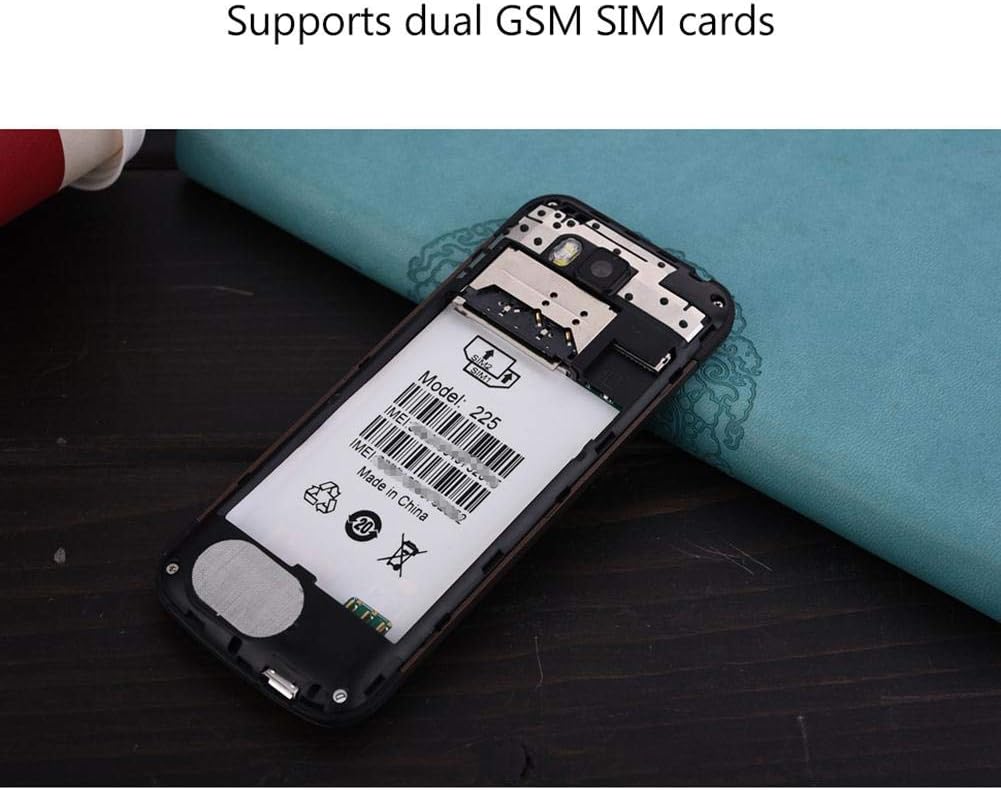
Mufananidzo 5.2: Yemukati view of the SERVO 225, illustrating the dual SIM card slots and the memory card slot.
6. Operating Instructions
6.1. Simba On / Off
- Kubatidza: Press and hold the Power/End Call key until the screen lights up.
- Kudzima: Press and hold the Power/End Call key until the power off options appear, then select "Power off".
6.2. Basic Mabasa
- Kufona: Isa nhamba yefoni uchishandisa keypad wobva wadzvanya bhatani rekuti Fona.
- Kupindura Nhare: Dzvanya bhatani rekuti "Call" kana foni yarira.
- Kutumira Mharidzo: Navigate to the "Messages" menu, select "Write message", enter your text, and send to the desired recipient.
- Menu Navigation: Use the navigation keys (up, down, left, right) to browse through menus and the center key to select.
6.3. Key Features
- Bluetooth: Connect to other Bluetooth-enabled devices for file transfer or hands-free communication.
- FM Radio: Listen to your favorite radio stations. Requires headphones to be plugged in as an antenna.
- MP3/MP4 Player: Tamba odhiyo nevhidhiyo fileyakachengetwa pamemori kadhi.
- GPRS/WAP: Access basic internet services and WAP sites.
- Kamera: Capture photos with the 0.3MP rear camera.
- Zvimwe Zvishandiso: Calendar, Sound Recorder, Calculator, World Clock, Alarm.
7. Kuchengeta
- Kuchenesa: Use a soft, dry cloth to clean the phone's surface. Do not use liquid cleaners or aerosols.
- Kuchengeta: Chengetedza foni munzvimbo inotonhorera, yakaoma kana isiri kushandiswa kwenguva yakareba.
- Battery Care: Avoid overcharging or completely draining the battery frequently to prolong its life.
8. Kugadzirisa matambudziko
| Dambudziko | Zvinogona Kukonzera | Solution |
|---|---|---|
| Nhare haibati. | Bhatiri rakaderera kana kuti harina kuiswa zvakanaka. | Charge the battery. Ensure battery is properly inserted and insulating tape is removed. |
| Hapana netiweki chiratidzo. | SIM card not inserted correctly or out of network coverage. | Reinsert SIM card. Move to an area with better network coverage. |
| Hatikwanise kufona kana kugamuchira. | No network, SIM card issue, or call barring enabled. | Check network signal. Verify SIM card. Disable call barring if active. |
| Memory card not detected. | Memory card not inserted correctly or corrupted. | Reinsert memory card. Try a different memory card. |
9. Zvinotsanangurwa
| Feature | Tsanangudzo |
|---|---|
| Brand | SERVO |
| Model | 225 |
| Display | 2.4-inch VGA |
| Platform | Spreadtrum6531CA |
| SIM Type | Dual SIM, Dual Standby (Dual GSM) |
| Network Frequency | GSM850/900/1800/1900 MHz (2G) |
| Internal Memory | 32MB RAM, 32MB ROM |
| Chiyeuchidzo Chinowedzera | Up to 32GB (T-Flash / microSD card, not included) |
| Kamera | 0.3 Megapixel CMOS (Rear) with Flash |
| Bhatiri | 1400 mAh Li-ion |
| Nguva Yekutaura | Approx. 6 maawa |
| Dimensions | 122 x 52 x 11 mm (4.80 x 2.05 x 0.43 inches) |
| Kurema | Approx. 80 g |
| Kubatana | Bluetooth |
| Zvimwe Zvimiro | FM Radio, MP3/MP4 Player, GPRS, WAP, Calendar, Recorder, Calculator, World Clock, Alarm |
10. Warranty uye Tsigiro
Your SERVO 225 mobile phone comes with a standard manufacturer's warranty. Please refer to the warranty card included in your package for specific terms and conditions. For technical support, troubleshooting assistance, or warranty claims, please contact your point of purchase or the official SERVO customer service channels.
Chengeta risiti yako yekutenga sehumbowo hwekutenga kwezvinangwa zvewarandi.


