Nhanganyaya
The Insignia NS-SPBTWAVE2-BK Wave 2 Portable Bluetooth Speaker provides high-quality wireless audio streaming from your compatible devices. Designed for versatility, its robust construction and rubberized feet allow for stable placement in both horizontal and vertical orientations. Enjoy hands-free communication with the built-in speakerphone and extended listening sessions thanks to its 12-hour battery life.
This manual provides essential information for setting up, operating, maintaining, and troubleshooting your speaker. Please read it thoroughly before use and retain it for future reference.
Package Zviri mukati
Ita shuwa kuti zvinhu zvese zviripo mupakeji:
- Insignia NS-SPBTWAVE2-BK Wave 2 Portable Bluetooth Speaker
- USB Kuchaja Cable
- 3.5mm Audio Cable (Auxiliary)
- Gwaro Rekugadzirisa Nekukurumidza (kana magwaro akafanana)
Product Features
- Wireless Kubatana: Connects wirelessly to smartphones, tablets, and other Bluetooth-enabled devices.
- Hupenyu Hurefu Hwebhatiri: Features a rechargeable 2,000 mAh battery, providing up to 12 hours of playback on a full charge.
- Yakavakirwa-mukati Maikorofoni: Enables hands-free calling directly through the speaker.
- Auxiliary Audio Input: Allows for wired connection to audio devices via a 3.5mm audio cable.
- Kuiswa kwakasiyana-siyana: Designed to stand securely in both horizontal and vertical positions.
Zvikamu zveMutauriri
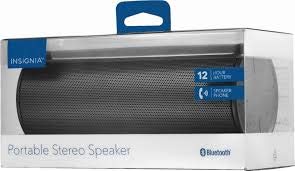
Mufananidzo 1: Mberi view of the Insignia Wave 2 Speaker in horizontal orientation.

Figure 2: Vertical view of the speaker, illustrating the power button, charging port, and auxiliary input port at the bottom.
Refer to the images above for the location of key components such as the power button, volume controls, Bluetooth indicator, charging port, and auxiliary input.
Gadzirira
1. Kubhadharisa Mutauri
- Connect the small end of the USB charging cable to the charging port on the speaker (refer to Figure 2).
- Connect the large end of the USB charging cable to a USB power adapter (not included) or a powered USB port on a computer.
- The charging indicator light will illuminate. Allow approximately 12 hours for a full charge before first use. The indicator light will change or turn off once charging is complete.
2. Bluetooth Kubatanidza
- Ensure the speaker is fully charged. Press and hold the Power button to turn on the speaker. The Bluetooth indicator light will begin to flash, indicating it is in pairing mode.
- On your Bluetooth-enabled device (smartphone, tablet, etc.), navigate to the Bluetooth settings and ensure Bluetooth is enabled.
- Tsvaga available devices. Select "Insignia Wave 2" from the list.
- Once paired, the Bluetooth indicator light on the speaker will become solid, and you may hear an audible confirmation.
- Kana ukakumbirwa password, isa "0000".
3. Auxiliary (Wired) Connection
- Connect one end of the 3.5mm audio cable to the AUX input port on the speaker (refer to Figure 2).
- Connect the other end of the 3.5mm audio cable to the headphone jack or audio output port of your audio device.
- The speaker will automatically switch to auxiliary mode when a cable is detected.
Kushandisa Mutauriri
Simba On/Kudzima
- To turn on: Press and hold the Power button until the indicator lights illuminate.
- To turn off: Press and hold the Power button until the indicator lights turn off.
Volume Control
- Gadzirisa inzwi uchishandisa mabhatani evhoriyamu ari paspeaker.
- You can also control the volume from your connected Bluetooth device or auxiliary audio source.
Kufona Kwemaoko Kwemahara
When connected via Bluetooth, the speaker can be used for hands-free calls:
- Pindura runhare: Press the Play/Pause/Call button once.
- Pedzisa kufona: Dzvanya bhatani rekuti Play/Misa/Call kamwe chete panguva yekufona.
- Ramba kufona Press and hold the Play/Pause/Call button.
- Speak clearly towards the speaker's built-in microphone for optimal voice pickup.
Maintenance
- Kuchenesa: Use a soft, dry, lint-free cloth to clean the speaker's exterior. Do not use liquid cleaners, aerosols, or solvents.
- Battery Care: To prolong battery life, avoid fully discharging the battery frequently. Recharge the speaker regularly, even if not in use. Avoid exposing the speaker to extreme temperatures (hot or cold).
- Kuchengeta: When not in use for extended periods, store the speaker in a cool, dry place away from direct sunlight and moisture.
- Kuramba Mvura: Mutauri uyu ndiye KWETE waterproof. Avoid exposure to water or excessive moisture.
Kugadzirisa matambudziko
| Dambudziko | Possible Solution |
|---|---|
| Mutauri habatiki. | Ita shuwa kuti bhatiri rachajwa. Batanidza sipika kunzvimbo yemagetsi uchishandisa USB yekuchaja tambo. |
| Hapana ruzha kubva kumutauri. | Check the volume level on both the speaker and the connected device. Ensure the correct input source (Bluetooth or AUX) is selected. Verify the Bluetooth connection or auxiliary cable. |
| Haikwanise kubatanidza kuburikidza neBluetooth. | Ensure the speaker is in pairing mode (flashing Bluetooth indicator). Turn off and on Bluetooth on your device. Move the speaker closer to your device. Forget the speaker from your device's Bluetooth list and try pairing again. |
| Yakashata yemhando yepamusoro kana kukanganisa. | Ensure the speaker is within Bluetooth range (approx. 33 ft / 10 m). Reduce the volume on the source device or speaker. Check for interference from other wireless devices. Try a different audio source or file. |
| Maikorofoni haisi kushanda panguva yekufona. | Ensure the speaker is properly connected via Bluetooth. Speak directly towards the speaker. Check your phone's call settings to ensure audio is routed to the Bluetooth speaker. |
Zvinotsanangurwa
- Zita remuenzanisi: Wave 2
- Model Number: NS-SPBTWAVE2-BK
- Kubatana Technology: Bluetooth
- Hupenyu hwebhatiri: Kusvikira kuMaawa mashanu
- Bhatiri Type: 1 Lithium Ion (inosanganisirwa)
- Nguva yekuchaja: Anenge 12 Maawa
- Zviyero zvechigadzirwa: 6.8 x 2.8 x 2.8 inches (17.3 x 7.1 x 7.1 cm)
- Chinhu Weight: 1 pondo (0.45 kg)
- Audio Output Mode: Stereo
- Chiratidzo-ku-Ruzha Ratio: 80 dB
- Yakavakirwa-mukati Maikorofoni: Ehe
- Zvekubatsira: Hongu (3.5mm)
- Isingapindi mvura: Aihwa
- Material: Plastiki
- UPC: 600603230455
Warranty uye Support
This Insignia NS-SPBTWAVE2-BK Wave 2 Portable Bluetooth Speaker comes with a Yakakwana Warranty. For specific terms and conditions of your warranty, please refer to the warranty card included with your purchase or visit the official Insignia website.
For technical support, troubleshooting assistance, or warranty claims, please contact Insignia Customer Service. Contact information can typically be found on the Insignia websaiti kana mune yako chigadzirwa zvinyorwa.