1. Nhanganyaya
The Zerone Sport Action DV Camera is a compact and portable device designed for capturing high-definition video during various outdoor activities. Featuring 1080P and 720P recording options, a 120-degree wide-angle lens, and an IPX-4 waterproof aluminum alloy shell, this camera is built for durability and ease of use. It includes a built-in microphone for audio recording and provides vibration feedback for operational status.
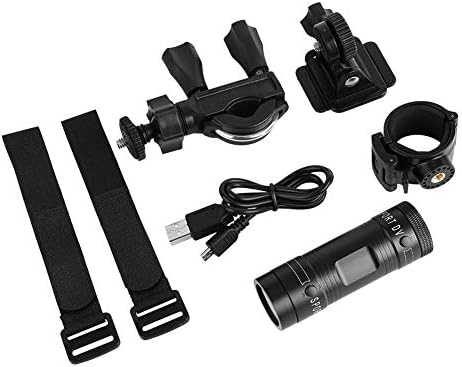
Image 1.1: The Zerone Sport Action DV Camera unit.
2. Safety Information
- Usaise kamera munzvimbo dzinopisa zvakanyanya kana kuti pachiedza chezuva kwenguva yakareba.
- While the camera features an IPX-4 waterproof rating, it is designed to withstand splashes and light rain. Do not submerge or soak the camera in water.
- Chengetedza mudziyo kure nemasimba ane magineti.
- Use only the specified charging cable and power adapter to prevent damage.
- Usayedze kuparadzanisa kana kushandura kamera, sezvo izvi zvinobvisa waranti uye zvinogona kukonzera kukuvara.
- Store the camera in a dry, cool place when not in use.
3. Package Zviri mukati
Ndokumbira utarise pasuru kuti uone kuti zvinhu zvese zviripo:
- Zerone Sport Action DV Camera Unit
- USB Kuchaja Cable
- Mounting Accessories (e.g., bike mount, helmet mount, strap mounts)
- Bhatiri Rinochajwazve (rinogona kunge rakatoiswa kare)
- Mushandisi Chinyorwa (gwaro iri)
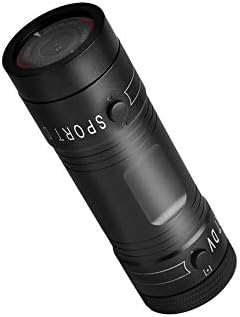
Image 3.1: Contents of the Zerone Sport Action DV Camera package, showing the camera, USB cable, and various mounting options.
4. Kamera Pamusoroview
Ziva zvinhu zvekamera uye zvinodzora.
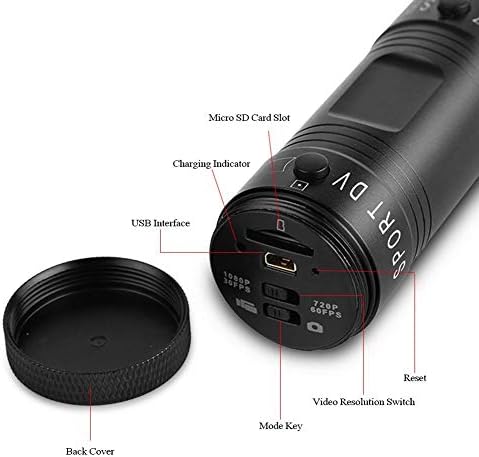
Mufananidzo 4.1: Yakadzama view of the camera's rear end, highlighting the Micro SD card slot, USB interface, charging indicator, mode key, video resolution switch (1080P 30fps / 720P 60fps), and reset button.
- Micro SD Kadhi Slot: Insert your Micro SD card here. A card is required for operation.
- Charge Indicator: Displays charging status. A red light indicates charging; it turns off when fully charged.
- USB Interface: Yekuchaja nekubatanidza pakombuta.
- Modhi kiyi: Used to switch between recording modes (e.g., video, photo).
- Video Resolution Switch: Selects between 1080P 30fps and 720P 60fps recording resolutions.
- Reset Bhatani: Inoshandiswa kuseta zvakare mudziyo kana ukasapindura.
- Power Button (Front): Located on the front side of the camera.
- Record/Stop Button (Back): Located on the back side of the camera.
5. Setup
5.1 Kuchaja Bhatiri
- Batanidza kamera kune USB power source (semuenzaniso, komputa, madziro adapta) uchishandisa tambo yeUSB yakapihwa.
- The chiedza chitsvuku on the back of the camera will illuminate, indicating that it is charging.
- Kana yanyatsochajiswa, rambi dzvuku rinodzima.
- Note: If the camera blinks red and blue when plugged in, it indicates that an SD card is not inserted. This is not a charging indicator.
5.2 Kuisa Micro SD Card
A Micro SD card (not included) is required for recording video and photos. The camera supports Micro SD cards up to a certain capacity (check product packaging for maximum supported size, typically 32GB or 64GB for similar devices).
- Bvisa kavha yekuseri kwekamera.
- Locate the Micro SD card slot (refer to Image 4.1).
- Isa zvinyoro nyoro Micro SD kadhi mune slot kusvika yadzvanya panzvimbo. Ita shuwa kuti kadhi rakanangana nemazvo.
- Replace the back cover, ensuring it is securely tightened to maintain water resistance.
5.3 Kuisa kamera
The camera comes with various mounting accessories for different applications.
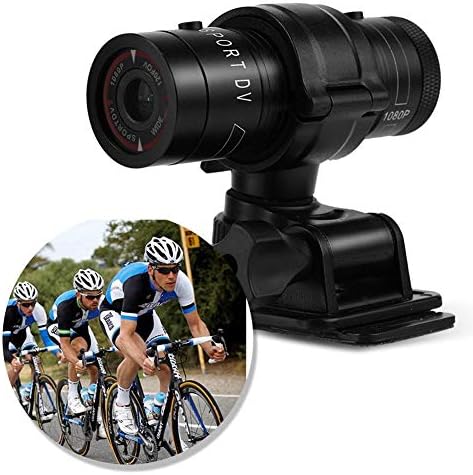
Image 5.1: The camera attached to a bicycle handlebar, demonstrating one of its mounting options.
- Kukwira bhasikoro: Shandisa clamp mount to attach the camera securely to bicycle handlebars or other tubular structures.
- Ngowani Yepamusoro: Utilize the adhesive or strap mounts to fix the camera to a helmet.
- Strap Mounts: For attaching to various gear or body parts.
Ensure all mounts are securely fastened before engaging in activities to prevent the camera from falling.
6. Kushandisa Kamera
6.1 Simba On/Kudzima
- Kuti uwane simba, pfuurira uye ubatisise Bhatani reSimba (front switch) until the camera vibrates.
- Kuti ubvise magetsi, pinda uye bata iyo Bhatani reSimba again until the camera vibrates once.
6.2 Selecting Video Resolution
Before recording, select your desired video resolution using the switch on the back of the camera (refer to Image 4.1).
- Slide chinja ku "1080P 30fps" for Full HD video at 30 frames per second.
- Slide chinja ku "720P 60fps" for HD video at 60 frames per second.
6.3 Kurekodha Vhidhiyo
- Ita shuwa kuti kamera yakabatidzwa.
- Press the Rekodha/Misa Bhatani (back switch) to start recording. The camera will vibrate three times to indicate recording has started.
- Kuti umise kurekodha, dzvanya iyo Rekodha/Misa Bhatani again. The camera will vibrate once to indicate recording has stopped.
6.4 Kubatanidza kune Computer
Kuendesa files or access recorded content:
- Ita shuwa kuti kamera yakadzimwa.
- Batanidza kamera pakombuta yako uchishandisa yakapihwa USB tambo.
- The camera will be recognized as a removable storage device.
- You can then access and transfer your video files.
7. Kuchengeta
- Kuchenesa: Shandisa jira rakapfava, rakaoma kuchenesa muviri wekamera. Kune lenzi, shandisa jira rekuchenesa nerakagadzirwa negirazi. Dzivisa zvinhu zvinokwesha.
- Kuchengeta: When not in use for extended periods, store the camera in a cool, dry place. Ensure the battery is partially charged (around 50%) to prolong its lifespan.
- Kuramba Mvura: Regularly check that the back cover is securely tightened to maintain the IPX-4 water resistance. Avoid exposing the USB port or SD card slot to moisture when the cover is open.
- Battery Care: Avoid fully discharging the battery frequently. Recharge it when the low battery indicator appears.
8. Kugadzirisa matambudziko
| Dambudziko | Zvinogona Kukonzera | Solution |
|---|---|---|
| Kamera haibatike. | Bhatiri rapera. | Charge the camera fully. |
| Camera blinks red and blue, then turns off. | No Micro SD card inserted or card is faulty. | Insert a functional Micro SD card. Ensure it is properly seated. |
| Haikwanise kurekodha vhidhiyo. | No Micro SD card, card full, or card error. | Insert a Micro SD card, delete old files, kana kufomata kadhi (izvi zvichabvisa data rese). |
| Hunhu hwevhidhiyo husina kunaka. | Lens is dirty; low light conditions; incorrect resolution setting. | Clean the lens. Ensure adequate lighting. Select 1080P resolution for higher detail. |
| Kamera haisi kudaira. | Software glitch. | Use a thin object (like a paperclip) to press the Reset Bhatani (refer to Image 4.1). |
9. Zvinotsanangurwa
| Feature | Detail |
|---|---|
| Brand | Zerone |
| Model Number | Zeronefg3h149y2s |
| Vhidhiyo Capture Resolution | 1080p (30fps), 720p (60fps) |
| Lens Angle | 120-degree A+ grade wide-angle |
| Waterproof Rating | IPX-4 (splash-proof) |
| Shell Material | Aluminium Alloy |
| Mufananidzo Sensor Technology | CMOS |
| Maximum Aperture | 1.8 mamirimita |
| Flash Memory Type | Micro SD (card not included) |
| Vhidhiyo Capture Format | AVI |
| Inotsigirwa Audio Format | AAC, MP3, PCM, FLAC, or Dolby Digital/AC-3 |
| Kubatana Technology | USB |
| Item Weight | 10.8 ounces (inenge 306 gramu) |
| Product Dimensions | 11.81 x 6.3 x 5.91 inches (approx. 30 x 16 x 15 cm) |
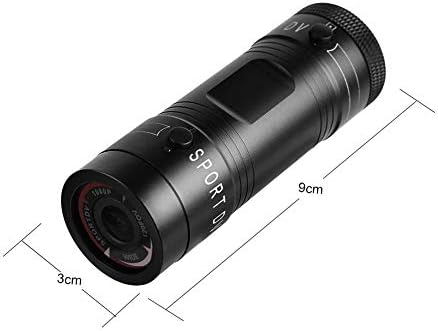
Image 9.1: Physical dimensions of the camera, showing a length of 9cm and a diameter of 3cm.
10. Warranty uye Tsigiro
For warranty information and technical support, please refer to the documentation provided with your purchase or contact the retailer/manufacturer directly. Keep your proof of purchase for warranty claims.
Manufacturer: Zerone
For further assistance, you may visit the Zerone Store on Amazon: Zerone Store
