Nhanganyaya
Ndatenda nekutengaasing the Supersonic IQ-1525BT Wireless Bluetooth Speaker. This manual provides essential information for the safe and efficient operation of your device. Please read it thoroughly before use and retain it for future reference.

Mufananidzo 1: Mberi view of the Supersonic IQ-1525BT Wireless Bluetooth Speaker.
Package Zviri mukati
Tarisa kuti zvinhu zvese zvakanyorwa pazasi zvinosanganisirwa mupakeji yako:
- Supersonic IQ-1525BT Wireless Bluetooth Speaker
- USB Cable
- AUX Cable
- Kutakura Tambo
- Chinyorwa Chirairo (gwaro iri)
Product Overview
Control Panel uye Ports

Mufananidzo 2: Detailed view of the control panel, showing input ports and control knobs.
The front panel of the speaker features the main controls and input ports:
- IQ Sound Display: Digital display for mode, frequency, and other indicators.
- Micro SD Kadhi Slot: Zvekutamba odhiyo kubva kuMicro SD kadhi.
- USB Port: Yekutamba audio kubva pa USB flash drive.
- AUX Input: Jeki ye3.5mm yekubatanidza zvishandiso zvekunze zveaudio.
- MIC Input: Jeki ye6.35mm yekubatanidza maikorofoni.
- DC 5V Kupinza: Simba rekuisa paspika.
- Bass Knob: Inogadzirisa iyo bass level.
- Volume Knob (OFF/VOL/ON): Turns the speaker on/off and adjusts the master volume.
- Bhatani reModhi (M): Switches between input modes (Bluetooth, FM, USB, Micro SD, AUX).
- Bhatani Rokumashure/Kudzosa Anosvetukira kunziyo yekare kana kudzokera shure.
- Bhatani reTamba/Kumbomira: Inoridza kana kumisa odhiyo.
- Bhatani rinotevera/Nekukurumidza Pamberi: Anosvetukira kunzira inotevera kana kuti oenda mberi nekukurumidza.
Speakers and LED Lighting
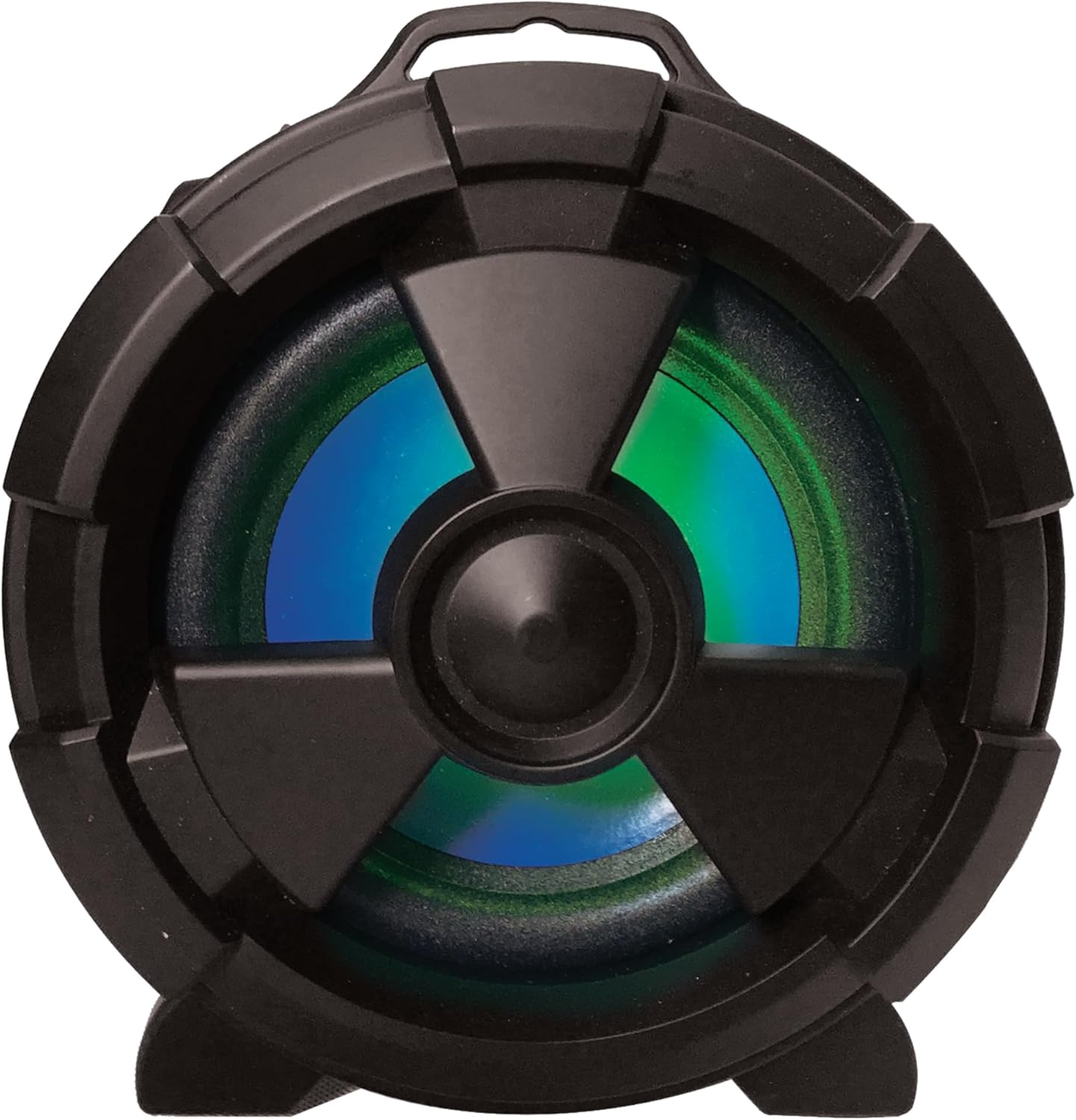
Mufananidzo 3: Rutivi view highlighting the main speaker and its integrated LED lighting.
The speaker features one 5-inch main speaker and two 2-inch built-in speakers for stereo sound. The main speaker on the side includes integrated LED lighting that changes colors during operation.
Portability Features

Figure 4: The speaker's design allows for easy transport and use in various settings.
The IQ-1525BT is designed for portability, featuring a lightweight construction and a carrying strap for convenient transport.
Gadzirira
Kuchaja Mutauriri
- Connect the provided USB cable to the DC 5V input port on the speaker.
- Batanidza rimwe divi retambo yeUSB kune adapta yemagetsi yeUSB inoenderana nayo (isina kuiswa) kana USB port pakombuta.
- The charging indicator will illuminate. Allow sufficient time for a full charge before first use.
Kubatidza/Kudzima
- To turn on the speaker, rotate the Volume knob clockwise until it clicks and the display illuminates.
- To turn off the speaker, rotate the Volume knob counter-clockwise until it clicks and the display turns off.
Operating Instruction
Bluetooth Kubatanidza

Figure 5: Illustrates connecting a device via Bluetooth to the speaker.
- Turn on the speaker. It will automatically enter Bluetooth pairing mode, indicated by a flashing "BLUE" on the display and an audible prompt.
- Pamudziyo wako une Bluetooth (semuenzaniso, smartphone, tablet), vhura Bluetooth wobva watsvaga michina iripo.
- Select "IQ-1525BT" from the list of devices.
- Once paired, the speaker will emit an audible confirmation, and "BLUE" on the display will stop flashing.
- Iwe unogona ikozvino kuridza odhiyo kubva pane chako kifaa kuburikidza nemutauri.
FM Radio Operation
- Turn on the speaker. Press the "M" (Mode) button repeatedly until "FM" appears on the display.
- Press and hold the Play/Pause button to initiate an automatic scan for FM stations. The speaker will save all found stations.
- Use the Previous/Rewind and Next/Fast Forward buttons to navigate between saved stations.
USB/Micro SD Kutamba
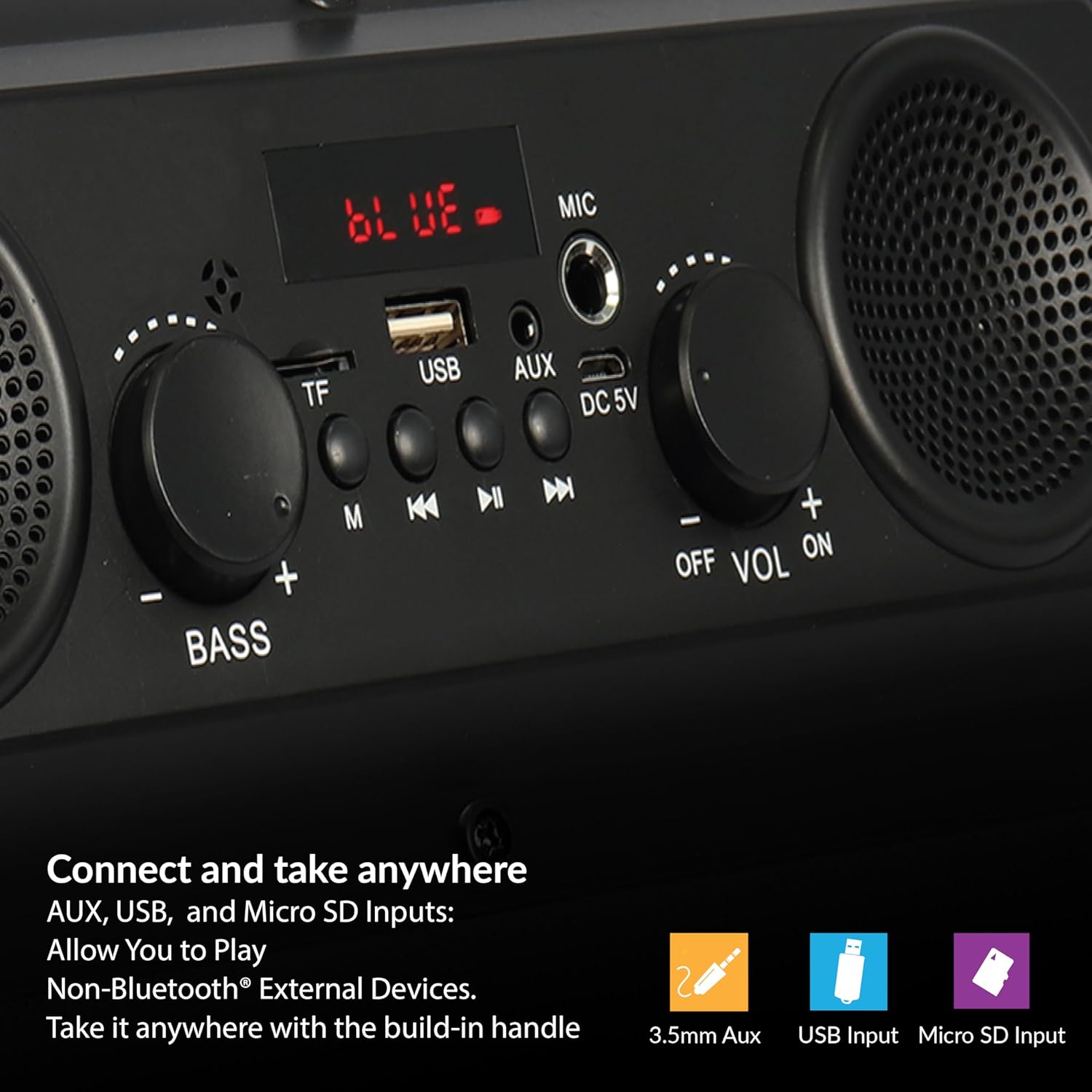
Figure 6: The speaker supports various input options for versatile audio playback.
- Insert a USB flash drive or Micro SD card (with pre-loaded audio files) muchiteshi chakakodzera.
- The speaker will automatically switch to USB or Micro SD mode and begin playback. If not, press the "M" (Mode) button to select the correct mode.
- Use the Play/Pause, Previous/Rewind, and Next/Fast Forward buttons to control playback.
AUX Input
- Connect one end of the provided AUX cable to the AUX input port on the speaker.
- Connect the other end of the AUX cable to the audio output jack of your external device.
- Press the "M" (Mode) button until "AUX" appears on the display.
- Control audio playback from your external device.
Kushandisa Maikorofoni
- Connect a microphone (not included) to the MIC input port.
- Adjust the main volume using the Volume knob.
Adjusting Bass and Volume
- Rotate the Volume bhatani rekuwedzera kana kuderedza huwandu hweruzha.
- Rotate the Bass knob to adjust the low-frequency sound output.
Maintenance
- Kuchenesa: Shandisa jira rakapfava, rakaoma kuchenesa kunze kwemutauri. Usashandise zvicheneso zvemvura kana zvinhu zvinokurisa.
- Kuchengeta: Kana isingashandiswi kwenguva yakareba, chengeta mukurukuri munzvimbo inotonhorera, yakaoma pasina chiedza chezuva uye tembiricha yakanyanyisa.
- Battery Care: To prolong battery life, avoid fully discharging the battery frequently. Recharge the speaker regularly, even if not in active use.
- Kuratidzwa kwemvura: Chinopakurira mvura ichi hachipindi mvura. Dzivisa kusviba nemvura kana hunyoro hwakawandisa.
Kugadzirisa matambudziko
| Dambudziko | Zvinogona Kukonzera | Solution |
|---|---|---|
| Mutauri haabati simba. | Bhatiri rapera. | Chaja mutauri uchishandisa tambo ye USB yakapihwa. |
| Hapana ruzha. | Vhoriyamu yakaderera zvakanyanya kana kuti yakanyarara. Nzira yekuisa isiriyo. | Increase the volume. Press the 'M' button to select the correct input mode. |
| Chishandiso cheBluetooth hachibatanidzi. | Speaker not in pairing mode. Device too far. | Ensure speaker is in Bluetooth mode (flashing 'BLUE'). Move device closer (within 10 meters). |
| Kugamuchirwa kweFM kusina kunaka. | Chiratidzo chisina kusimba. | Reposition the speaker to improve signal reception. |
| USB/Micro SD not playing. | Hazvina kururama file format. Corrupted media. | Iva nechokwadi chekuteerera files are in a compatible format. Try a different USB drive or Micro SD card. |
Zvinotsanangurwa
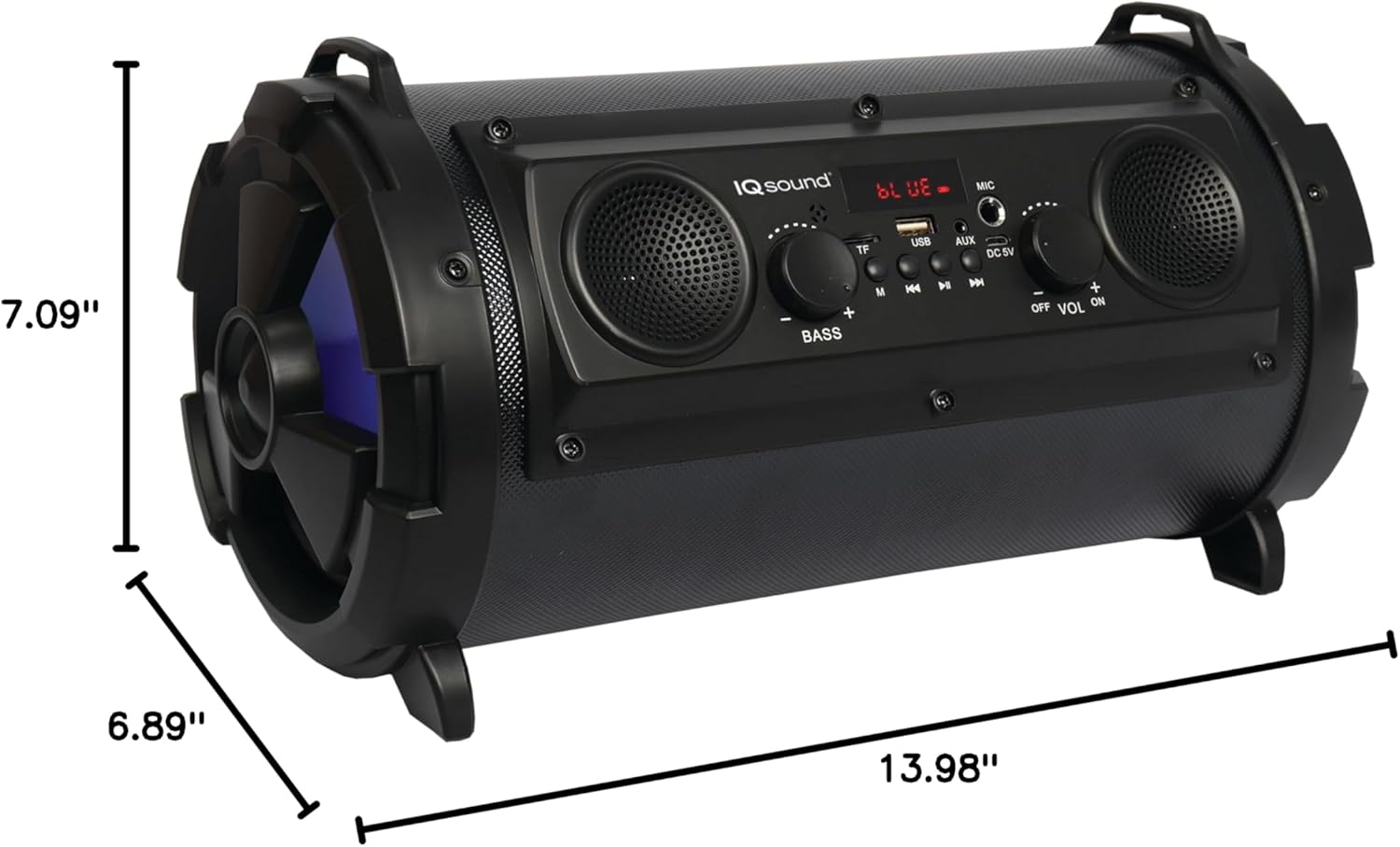
Figure 7: Product dimensions for the IQ-1525BT speaker.
| Feature | Detail |
|---|---|
| Model Name | IQ-1525BT |
| Brand | Supersonic |
| Mutauri Rudzi | Inotakurika Bluetooth Mutauri |
| Output Power | 16 Watts |
| Kugadzirisa Mutauri | One 5-inch, Two 2-inch built-in speakers |
| Bluetooth Version | V4.0 |
| Wireless Range | Kusvika kumamita gumi (10 tsoka) |
| Frequency Response | 100 Hz kusvika 20 kHz |
| Chiyamuro Voltage | DC 5 Volts |
| Bhatiri | 3.7-volt, 2,400 mAh rechargeable battery |
| Inputs | USB, Micro SD, AUX, Microphone |
| Special Features | FM Tuner (87.5 - 108.0MHz), Extra Bass (Passive Radiator), LED Lighting |
| Zviyero zveChigadzirwa (D x W x H) | 6.89" x 7.09" x 13.98" |
| Item Weight | 1 Pondo |
| Material | Plastiki |
Warranty Information
This product comes with a Limited Warranty. For specific details regarding warranty coverage, terms, and conditions, please refer to the warranty card included in your product packaging or visit the official Supersonic website. Chengetedza humbowo hwako hwekutenga kune warranty claim.
Support
If you encounter any issues or have questions not covered in this manual, please contact Supersonic customer support for assistance. Contact information can typically be found on the product packaging or the official Supersonic website.


