1. Nhanganyaya
Ndatenda nekutengaasing the Infocus 24-inch 720p LED TV, model IM24ED800. This manual provides essential information for setting up, operating, and maintaining your television. Please read this manual thoroughly before using the product and retain it for future reference.
Safety Information
- Usafumure TV kunaya kana kunyorova.
- Usadzivirire kuvhurika kwemhepo.
- Iva nechokwadi chekuti magetsi emagetsi akakodzeratage.
- Chengetedza tambo yemagetsi kubva pakufamba kana kudzvanywa.
- Tumira masevhisi ese kuvashandi vanokwanisa.
- Chengetedza TV kure nechiedza chezuva chakananga, kunobva kupisa, uye simba remagineti.
2. Package Zviri mukati
Ndokumbira utarise bhokisi rezvinhu zvinotevera:
- Infocus 24-inch 720p LED TV (IM24ED800)
- Kudzora Kure (nemabhatiri, kana akabatanidzwa)
- Power Cord
- TV Stand (2 zvidimbu)
- Zvikuruu zveChigadziko cheTV
- Mushandisi Chinyorwa (gwaro iri)
3. Setup
3.1 Kubatanidza iyo TV Stand
To attach the stand to your Infocus TV:
- Isa skrini yeTV pasi zvinyoro nyoro panzvimbo yakachena uye yakapfava kuti isakwenya.
- Gadzirisa chidimbu chimwe nechimwe chechigadziko nemiganhu inoenderana nacho pasi peTV.
- Batidza chidimbu chimwe nechimwe chechigadziko uchishandisa screws dzakapihwa. Iva nechokwadi chekuti zvakasimbiswa zvakasimba.
- Simudza TV nokungwarira woiisa panzvimbo yakadzikama, yakati sandara.
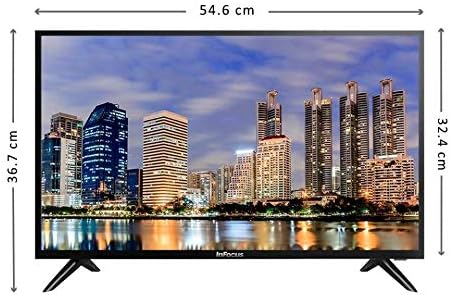
Mufananidzo: Mberi view of the Infocus 24-inch LED TV with dimensions indicated. The TV measures approximately 54.6 cm in width and 36.7 cm in height with the stand.
3.2 Kubatanidza Zvishandiso
Your Infocus TV features multiple input ports for connecting external devices.

Mufananidzo: Rear view of the Infocus 24-inch LED TV, highlighting the location of various input ports including HDMI and USB.
- HDMI Connections: Connect Blu-ray players, game consoles, or cable/satellite boxes to the HDMI ports. The TV has 2 HDMI inputs.
- USB Connections: Connect USB flash drives for media playback to the USB ports. The TV has 2 USB inputs.
- Antenna/Cable: Connect an antenna or cable TV signal to the RF input (if available, not explicitly listed but standard for TVs).
- Simba: Batanidza tambo yemagetsi kune chinopinza magetsi cheTV wobva wabatanidza nechinhu chinoburitsa magetsi pamadziro.
3.3 Simba rekutanga Rakabatidzwa
Mushure mekubatanidza tambo dzose dzinodiwa:
- Ensure the power cord is securely plugged into both the TV and a power outlet.
- Dzvanya bhatani rekuti Power riri pa remote control kana paTV pachayo.
- Follow the on-screen instructions for initial setup, which may include language selection, time zone, and channel scanning.
4. Kushandisa TV Yako
4.1 Remote Kudzora Pamusoroview
The remote control allows you to access all TV functions. While specific button layouts may vary, common functions include:
- Simba: Batidza kana kudzima TV.
- Input/Mabviro: Selects the input source (HDMI 1, HDMI 2, USB, TV).
- Vhoriyamu kumusoro/Kudzika: Inogadzirisa danho reruzha.
- Channel Kumusoro/Kudzika: Inochinja chiteshi cheTV.
- Nyarara: Inonyaradza odhiyo yeTV.
- Menyu: Opens the main menu for settings adjustments.
- Mabhatani Ekufambisa (Kumusoro/Kudzika/Kuruboshwe/Kurudyi/Zvakanaka): Inoshandiswa pakutsvaga menyu uye kusimbisa zvasarudzwa.
- Kubuda/Kudzokera: Returns to the previous screen or exits the menu.
4.2 Basic Mabasa
- Kuchinja Kunopinza Kwakabva: Press the Input or Source button on your remote control. Use the navigation buttons to select the desired input (e.g., HDMI 1, USB) and press OK.
- Kugadzirisa Inzwi: Shandisa iyo Kukwidza inzwi (+) or Vhoriyamu Pasi (-) mabhatani.
- Kuchinja maChannel: Shandisa iyo Channel Up (CH+) or Channel Down (CH-) mabhatani.
4.3 USB Media Playback
Kuridza midhiya files kubva pa USB flash drive:
- Insert a USB flash drive into one of the TV's USB ports.
- Press the Input or Source bhatani pane yako remote control uye sarudza USB.
- Bhurawuza rezvenhau reTV rinofanira kuoneka. Tsvaga pawebhusaiti yako files (photos, music, videos) using the remote control.
- Sarudza a file uye dzvanya OK kuiridza.
5. Kuchengeta
5.1 Kuchenesa Screen
- Turn off the TV and unplug the power cord before cleaning.
- Shandisa jira rakapfava, risina jira (semuenzaniso, jira re microfiber) kupukuta zvinyoro nyoro jira racho.
- Pazvibodzwa zvakasindimara, zvishoma dampIsa jira nemvura kana muchina wekuchenesa sikirini wakasarudzika. Usambofa wapfapfaidza muchina wekuchenesa sikirini zvakananga pa sikirini.
- Rega kushandisa abrasive cleaners, doro, benzene, kana ma thinners, nekuti izvi zvinogona kukanganisa skrini.
5.2 Kutarisira Kwese
- Chengeta TV munzvimbo ine mhepo inofefetera zvakanaka.
- Dzivisa kuisa zvinhu zvinorema pamusoro peTV.
- Bvisa TV panguva yemadutu emheni kana kuti paichange isingashandiswi kwenguva yakareba.
6. Kugadzirisa matambudziko
Kana ukasangana nematambudziko neTV yako, tarisa kune anotevera akajairika matambudziko nemhinduro:
| Dambudziko | Zvinogona Kukonzera | Solution |
|---|---|---|
| Hapana simba | Power cord not connected; power outlet issue | Ita shuwa kuti tambo yemagetsi yakabairwa zvakachengetedzeka. Edzai panobuditsa neimwe mudziyo. |
| Hapana mufananidzo, asi inzwi riripo | Incorrect input source selected; loose video cable | Press the Input/Mabviro button to select the correct input. Check video cable connections. |
| Hapana ruzha, asi mufananidzo uripo | Volume muted or too low; audio cable issue | Press the Mute bhatani kana kuwedzera vhoriyamu. Tarisa kubatana kwetambo dzeruzha. |
| Remote control haisi kushanda | Batteries depleted; obstruction; remote sensor blocked | Replace batteries. Remove any obstructions between the remote and TV. Ensure the TV's remote sensor is clear. |
| "Hapana Chiratidzo" meseji | Incorrect input source; device not powered on; cable issue | Verify the correct input source is selected. Ensure the connected device is powered on. Check all cable connections. |
7. Zvinotsanangurwa
The following are the technical specifications for the Infocus 24-inch 720p LED TV model IM24ED800:
| Feature | Detail |
|---|---|
| Model Number | IM24ED800 |
| Screen Size | 24 inches (61 cm) |
| Display Technology | LED |
| Resolution | 1366 x 768 (720p HD) |
| Refresh Rate | 60 Hz |
| HDMI Zvinowanikwa | 2 |
| USB Zvishandiso | 2 |
| Kubatana | HDMI, USB |
| Mounting Type | Tafura Stand |
| Package Dimensions | 60.8 x 37.8 x 12 cm |
| Package Weight | 5 kg |
8. Warranty uye Tsigiro
This Infocus TV is sold as a renewed product, which typically comes with a limited warranty provided by the seller or refurbisher. Please refer to your purchase documentation or contact your retailer for specific warranty terms and conditions.
For technical support or service inquiries, please contact the customer support channel provided by your retailer or the Infocus support website.


