Nhanganyaya
This manual provides comprehensive instructions for the Hoco ES20 Original Series Wireless V5.0 Earphones. Please read this manual carefully before using the product to ensure proper operation and to maximize your user experience. Keep this manual for future reference.
Product Overview
The Hoco ES20 earphones are designed for wireless audio playback and hands-free communication. The package includes two wireless earphones and a portable charging case.

Mufananidzo 1: Hoco ES20 Wireless Earphones. This image displays both the left and right earphones, highlighting their in-ear design and compact form factor.
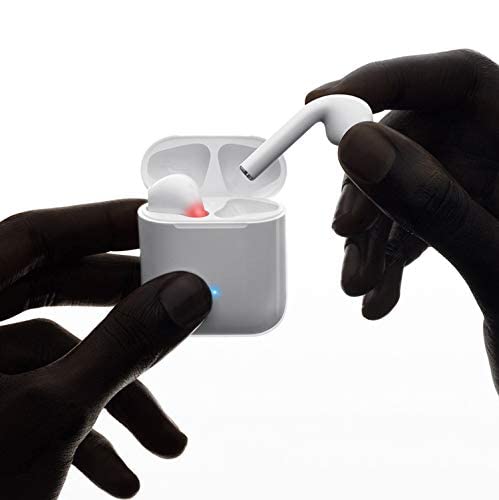
Mufananidzo 2: Hoco ES20 Earphones in Charging Case. The earphones are shown placed inside their charging case, indicating the charging status with an illuminated LED.
Zvinotsanangurwa
| Feature | Detail |
|---|---|
| Wireless Version | V5.0 |
| Inotsigirwa Protocols | Headset, Hands-free, A2DP, Avrcp |
| Transmission Frequency | 2.4GHz |
| Transmission Range | 10 mamita |
| Kubhadharisa Voltage | DC5V |
| Nguva yekuchaja (Earphones) | Inenge awa imwe |
| Nguva Yekutaura | 2 maawa |
| Mumhanzi Nguva Yekutamba | 2 maawa |
| Kuchaja Case Battery Capacity | 400mAh |
| Earphone Battery Capacity (Each) | 40mAh |
| Standby Time | 200 maawa |
| Huremu Hwose (nebhokisi) | 44.8g |
| Imwe Earphone Weight | 3.8g |
| Inosanganisirwa Zvikamu | Bluetooth Headphones, 1 Charging Cable |
Gadzirira
1. Kuchaja maEarphone neCase
- Place both earphones into the charging case. Ensure they are correctly seated.
- Connect the charging cable to the charging port on the case and to a DC5V power source (e.g., USB wall adapter, computer USB port).
- The indicator light on the charging case will show charging status. A full charge for the earphones takes approximately 1 hour. The charging case itself has a 400mAh battery capacity.
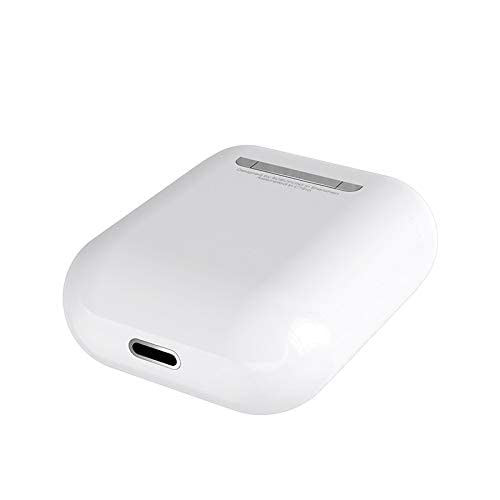
Mufananidzo 3: Hoco ES20 Charging Case Port. This image shows the charging port located at the bottom of the charging case, where the charging cable is connected.
2. Kubatanidza neChishandiso
- Ita shuwa kuti maearphone akachajwa.
- Vhura kesi yekuchaja. Maearphone anozopinda otomatiki pairing mode.
- Pafoni yako kana chimwe chinhu chinoshandisa Bluetooth, enda kuBluetooth settings.
- Tsvaga available devices and select "Hoco ES20" (or similar name) from the list.
- Once connected, the earphones will indicate successful pairing (e.g., an audio prompt or LED change).
- For Apple phones and some Android phones, the battery level of the earphones may be displayed on your device.
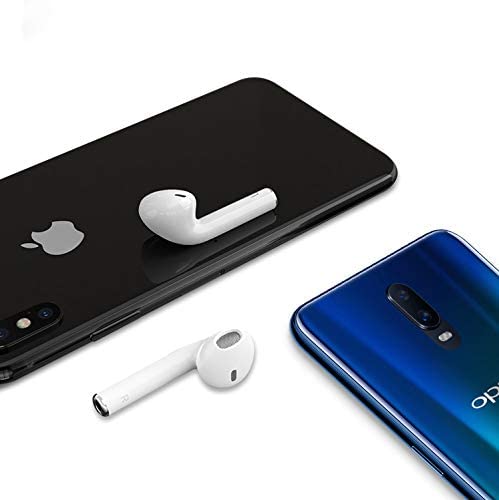
Mufananidzo 4: Hoco ES20 Earphones with Smartphones. This image illustrates the earphones positioned near two different smartphones, demonstrating their compatibility with various mobile devices.
Operating Instruction
Basic Functions (Touch Control)
- Power On: Earphones power on automatically when removed from the charging case.
- Power Off: Earphones power off automatically when placed back into the charging case.
- Tamba/Kumbomira: Tinya nzvimbo yekubata pane chero earphone kamwe.
- Pindura/Pedzisa Kufona: Tap the touch area on either earphone once during an incoming call or an active call.
- Ramba Kufona: Press and hold the touch area on either earphone for approximately 2 seconds during an incoming call.
- Next Track: Tokonya kaviri nzvimbo yekubata pane earphone yekurudyi.
- Previous Track: Tokonya kaviri nzvimbo yekubata iri kuruboshwe ruseve.
- Shandisa Izwi Mubatsiri: Triple-tap the touch area on either earphone.
Maintenance
- Chengeta maearphone nekesi yekuchaja zvakachena uye zvakaoma.
- Avoid exposing the product to extreme temperatures, humidity, or corrosive substances.
- Do not attempt to disassemble or modify the earphones or charging case, as this will void the warranty and may cause damage.
- Use a soft, dry cloth to clean the earphones and charging contacts.
- Chengetedza maearphone mukesi yavo yekuchaja kana isiri kushandiswa kuadzivirira uye kuti agare aine chaji.
Kugadzirisa matambudziko
Matambudziko Anowanikwa uye Mhinduro
- Nzeve dzisina kubatanidzwa:
- Ita shuwa kuti maearphone ese akachajwa.
- Place earphones back in the case, close it, then open it again.
- Dzima uye vhura Bluetooth pane chako kifaa.
- Delete "Hoco ES20" from your device's Bluetooth list and try pairing again.
- Imwe chete earphone inoshanda:
- Ita shuwa kuti maearphone ese akachajwa.
- Place both earphones back in the charging case, close the lid, wait a few seconds, then open the lid and remove them together.
- If the issue persists, try resetting the earphones (refer to manufacturer's website if a specific reset procedure is not in this manual).
- Hapana ruzha kana vhoriyamu yakaderera:
- Tarisa huwandu hwevhoriyamu pane zvese mudziyo wako uye munzeve.
- Ita shuwa kuti mahedhifoni akabatana nemazvo kune chako kifaa.
- Edza kutamba odhiyo kubva kune imwe application kana sosi yakasiyana.
- Kuchaja nyaya:
- Ita shuwa kuti tambo yekuchaja yakabatana zvakachengeteka kune ese ari maviri kesi uye sosi yemagetsi.
- Tarisa uone kana chiteshi chekuchaja pane iyo kesi yakachena uye isina tsvina.
- Edza kushandisa tambo yekuchaja yakasiyana kana adapta yemagetsi.
- Poor connection/intermittent audio:
- Ensure your device is within the 10-meter transmission range.
- Avoid obstacles between your device and the earphones.
- Deredza kukanganiswa kubva kune mamwe mawaya zvishandiso.
Warranty uye Support
The Hoco ES20 Wireless Earphones come with a 6-mwedzi waranti kubva pazuva rekutenga. Waranti iyi inovhara zvikanganiso zvekugadzira. Ndapota chengetai humbowo hwekutenga kwenyu kuti muwane magwaro ewarandi.
For technical support or warranty inquiries, please contact your retailer or the official Hoco support channels. Refer to the product packaging or Hoco's official websaiti yeruzivo rwekusangana.


