1. Nhanganyaya
This manual provides instructions for the installation, setup, and operation of your Lepro Smart GU10 LED Bulbs. These bulbs offer advanced features including tunable white light, dimming capabilities, and smart control via app or voice assistants.
Zvinokosha:
- Tunable White Light: Adjust color temperature from warm white (2700K) to cool white (6500K).
- Dimmable: Adjust brightness via the app or voice control. Note: Do not use with external dimmer switches.
- Voice Control: Inoenderana neAmazon Alexa uye Google Mubatsiri wekushanda-mahara maoko.
- App Control: Manage lights from anywhere using the 'Smart Life' app.
- Kuronga Set timers and schedules for automatic light control.
- Hapana Hub Inodikanwa: Inobatanidza zvakananga kune network yako yeWi-Fi ye2.4GHz.

Mufananidzo 1.1: Pamusoroview of Lepro Smart GU10 LED Bulb capabilities, including dimming, tunable white light, scheduling, and smart control options.
2. Ruzivo Rwakakosha Chekuchengetedza
Please read and follow all safety instructions carefully before installation and use. Failure to do so may result in electric shock, fire, or other injuries.
- Kuchengetedzwa Kwemagetsi: Always turn off power at the circuit breaker before installing or removing the bulb.
- Dimmer Kuenderana: These smart bulbs are not compatible with traditional dimmer switches. Using them with a dimmer switch will cause flickering and may damage the bulb. Control dimming exclusively through the 'Smart Life' app or voice commands.
- Indoor Use Chete: This product is designed for indoor use in dry locations.
- Kushanda Voltage: Ensure your fixture provides 120 Volts, 60 Hertz.
- Kuiswa Kwakakodzera: Install the bulb securely into a GU10 base fixture.
- Dzivisa Kuwedzeredza: Do not enclose the bulb in fixtures that restrict airflow excessively, as this can lead to overheating and reduced lifespan.
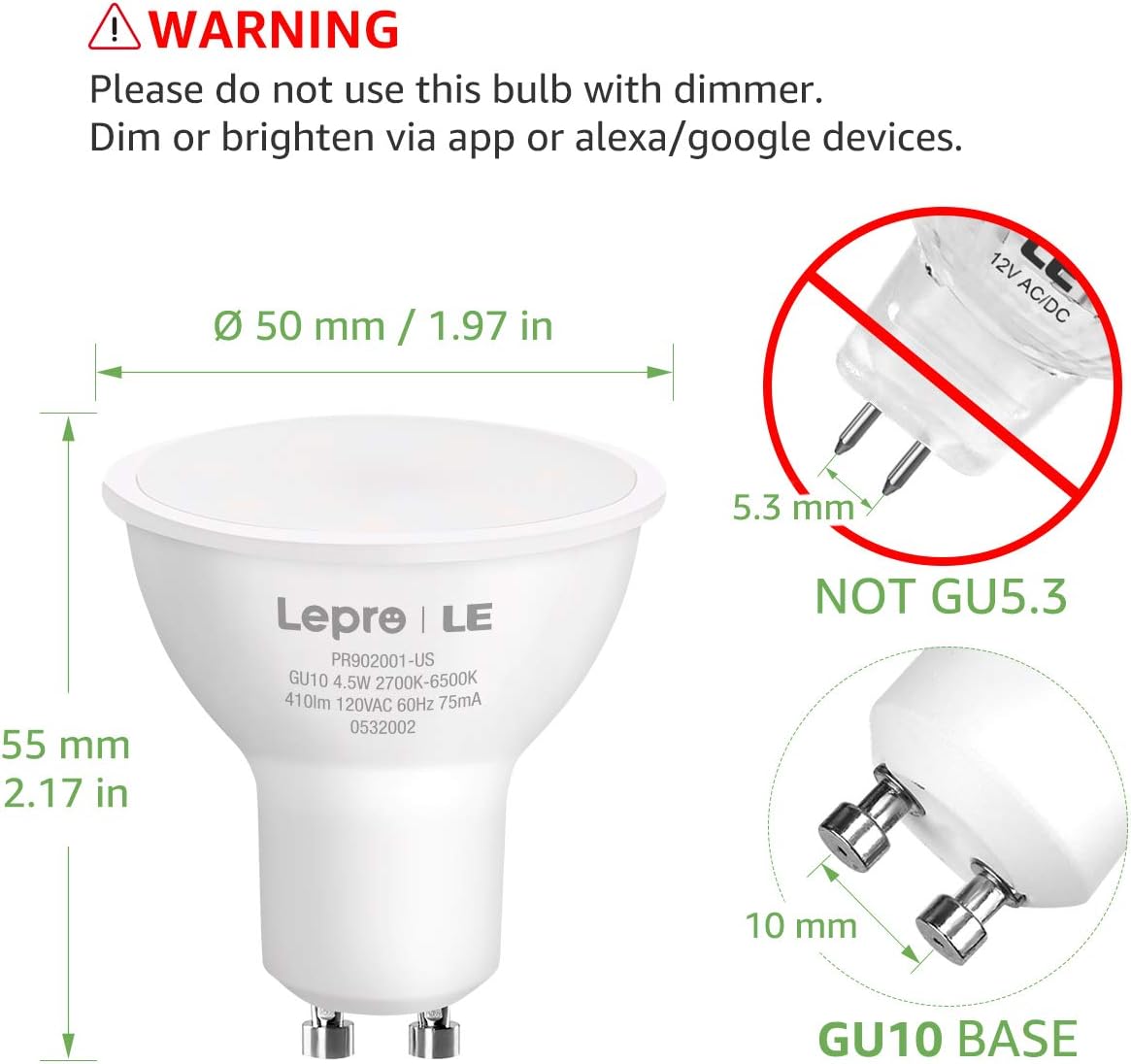
Image 2.1: Important warning regarding dimmer switch incompatibility and correct GU10 base identification.
3. Package Zviri mukati
Ona kuti zvinhu zvese zviripo mupasuru yako:
- Lepro Smart GU10 LED Bulb(s) (Quantity as purchased, e.g., 2-pack)
- Mushandisi Manual (Gwaro iri)

Image 3.1: Lepro Smart GU10 LED Bulbs and packaging.
4. Zvigadzirwa zveChigadzirwa
| Tsanangudzo | Detail |
|---|---|
| Brand | Lepro |
| Model Name | LampUX GU10 WiFi Smart Light Bulbs |
| Chiedza Type | LED |
| Bulb Base | GU10 |
| Wattage | 4.5 Watts |
| Incandescent Zvakaenzana | 50 Watts |
| Kupenya | 350 Lumens |
| Rudzi Tembiricha | 2700K - 6500K (Chena Inogadziriswa) |
| Voltage | 120 Volts |
| Frequency | 60 Hertz |
| Kubatana | 2.4GHz Wi-Fi Only |
| Kudzora Nzira | App (Smart Life), Voice (Alexa, Google Assistant) |
| Avhareji Upenyu | 25,000 Maawa |
| Product Dimensions | 1.97"W x 2.17"H |
| Material | Aluminium, Plastiki |
| Certification | FCC |
5. Setup Guide
5.1 Kuiswa Kwenyama
- Dzima Simba: Before installation, ensure the power to the light fixture is turned off at the circuit breaker to prevent electric shock.
- Bvisa Old Bulb: Carefully remove the existing GU10 bulb from the fixture.
- Isa Smart Bulb: Insert the Lepro Smart GU10 LED Bulb into the GU10 base. Push and twist clockwise until it is securely seated.
- Dzosera Simba: Turn the power back on at the circuit breaker. The bulb should flash, indicating it is in pairing mode. If it does not flash, turn the light switch off and on 3-5 times until it begins to flash rapidly.
5.2 Kudhawunirodha App uye Kugadzira Akaunti
- Dhaunirodha App: Scan the QR code provided in the packaging or search for 'Smart Life' in your smartphone's app store (iOS or Android).
- Nyoresa/Pinda: Open the 'Smart Life' app and register for a new account or log in if you already have one.
5.3 Kubatanidza kuWi-Fi
Ita shuwa kuti network yako yeWi-Fi yakachengeteka 2.4GHz. These bulbs do not support 5GHz Wi-Fi networks.
- Wedzera Mudziyo: In the 'Smart Life' app, tap the '+' icon in the top right corner to add a device.
- Sarudza Mwenje: Choose 'Lighting' or 'Light Source (Wi-Fi)' from the device list.
- Confirm Flashing: Confirm that the bulb is flashing rapidly. If not, cycle the power (off-on 3-5 times) until it flashes.
- Isa ruzivo rweWi-Fi: Sarudza yako 2.4GHz Wi-Fi network uye isa password.
- Kubatanidza: The app will begin connecting to the bulb. Once connected, the bulb will stop flashing and glow steadily.
- Rena Device: You can rename the bulb for easier control (e.g., "Living Room Spotlight 1").

Image 5.1: Illustration of easy setup, highlighting physical installation and 2.4GHz Wi-Fi requirement.
6. Operating Instructions
6.1 Kudzora kweApp
Once connected, you can control your bulb(s) through the 'Smart Life' app:
- Pa/Kudzima: Dzvanya chiratidzo chemagetsi kuti ubate kana kudzima girobhu.
- Kubuda: Use the brightness slider to adjust the light intensity.
- Ruvara Tembiricha: Select the 'White' mode and use the slider or color wheel to choose any shade from warm white (2700K) to cool white (6500K).
- Zviratidziro: The app offers pre-set scenes for different moods or activities. You can also create custom scenes.

Image 6.1: Adjusting color temperature via the 'Smart Life' app, showing warm, natural, and cool white light examples.
6.2 Kudzora Izwi (Alexa/Google Assistant)
Kuti ugone kudzora inzwi:
- Akaunti yeChinongedzo: In your Amazon Alexa or Google Home app, enable the 'Smart Life' skill/action and link your 'Smart Life' account.
- Tsvaga Zvishandiso: Kumbira mubatsiri wako wezwi kuti "Wana zvishandiso."
- Voice Commands: Shandisa mirairo yakaita se:
"Alexa, turn on Living Room Spotlight."
"Hey Google, dim the kitchen light to 50%."
"Alexa, isa mwenje wemukamuri rekurara kuti udziye."
6.3 Kuronga Nguva uye Kuronga Nguva
Set up automated schedules for your lights:
- In the 'Smart Life' app, select your bulb and navigate to the 'Schedule' or 'Timer' section.
- Set desired times for turning lights on/off, or for activating specific scenes.
- Repeat for specific days of the week as needed.
6.4 Group Control
Control multiple bulbs simultaneously:
- In the 'Smart Life' app, select one of your bulbs.
- Tap the pencil icon (edit) or 'Settings' and look for 'Create Group'.
- Select all bulbs you wish to include in the group and confirm.
- You can now control the entire group with a single command or app action.

Mufananidzo 6.2: Eksamples of scheduling and group control features.
7. Kuchengeta
To ensure optimal performance and longevity of your Lepro Smart GU10 LED Bulbs:
- Kuchenesa: Ensure the bulb is off and cool before cleaning. Wipe with a soft, dry cloth. Do not use liquid or abrasive cleaners.
- Kuchengeta: If storing the bulbs for an extended period, keep them in a cool, dry place away from direct sunlight.
- Dzivisa Nzvimbo Dzakaoma: Do not expose the bulbs to extreme temperatures, high humidity, or corrosive substances.
8. Troubleshooting Guide
If you encounter issues with your Lepro Smart GU10 LED Bulbs, refer to the following common problems and solutions:
| Dambudziko | Zvinogona Kukonzera | Solution |
|---|---|---|
| Bhabhu risiri kubatana neWi-Fi | Incorrect Wi-Fi band (5GHz), incorrect password, bulb not in pairing mode, weak Wi-Fi signal. | Ensure your router is broadcasting a 2.4GHz network. Confirm Wi-Fi password. Cycle power to the bulb (off-on 3-5 times) until it flashes rapidly to enter pairing mode. Move closer to the router. |
| Bulb flickering or not working correctly | Used with a traditional dimmer switch. | Remove the bulb from any fixture connected to a traditional dimmer switch. These bulbs require a constant power supply and are dimmed via the app or voice control. |
| Bulb appears "Offline" in the app | Loss of Wi-Fi connection, power outage, router issues. | Check your Wi-Fi router and internet connection. Ensure the bulb has constant power. Try restarting the bulb by turning its power off and on at the switch. If the issue persists, re-pair the bulb. |
| Kudzora inzwi hakupinduri | 'Smart Life' skill/action not enabled or linked, incorrect device name, internet connectivity issues. | Verify that the 'Smart Life' skill/action is enabled and linked in your Alexa/Google Home app. Ensure the device name used in voice commands matches the name in the app. Check your internet connection. |
| Multiple bulbs not working together in a group | One or more bulbs are offline, group not properly configured. | Check individual bulb status in the app. Ensure all bulbs are online. Recreate the group in the 'Smart Life' app. |
9. Warranty uye Tsigiro
9.1 Ruzivo rweWaranti
Lepro Smart GU10 LED Bulbs come with a 2-makore waranti from the date of purchase. This warranty covers manufacturing defects and malfunctions under normal use. It does not cover damage caused by misuse, improper installation, or external factors.
9.2 Mutengi Tsigiro
For technical assistance, warranty claims, or further inquiries, please contact Lepro customer support through their official webwebhusaiti kana ruzivo rwekuonana rwakapihwa nekutenga kwako. Ndapota gadzirira chigadzirwa chako neruzivo rwekutenga paunenge uchibata rutsigiro.


