Product Overview
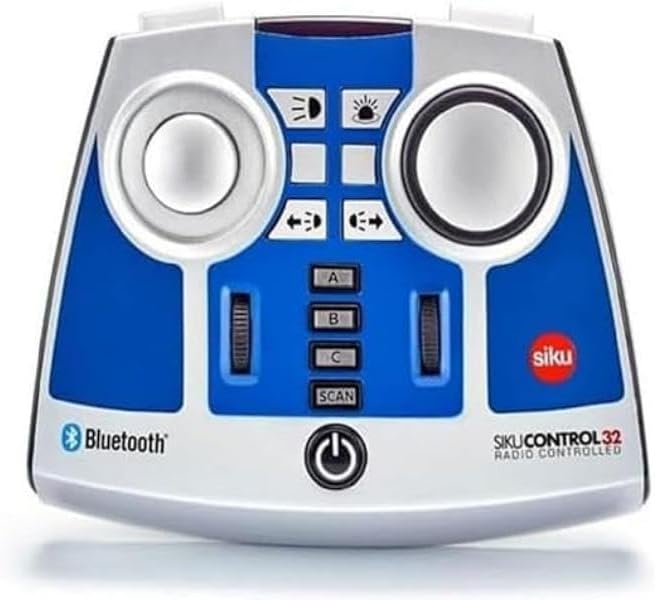
The Siku 6730 Bluetooth Remote Control is designed for precise operation of SIKU Control Bluetooth vehicles, including the John Deere 7310R (Art. No. 6792), Fendt 933 Vario (Art. No. 6793), and Claas Xerion 5000 TRAC VC (Art. No. 6791). This remote allows for comprehensive control over various vehicle functions, enhancing the interactive experience with your SIKU Control models.
Key Features
- Compatible with SIKU Control Bluetooth vehicles: John Deere 7310R (Art. No. 6792), Fendt 933 Vario (Art. No. 6793), and Claas Xerion 5000 TRAC VC (Art. No. 6791).
- Enables control of multiple functions including steering, driving, electronic rear clutch, and lights.
- Features multi-session functionality, allowing simultaneous control of several vehicles with a single remote control.
- Powered by 4 AA batteries or equivalent rechargeable battery packs (batteries not included).
- Constructed from durable plastic.
Mirayiridzo Yekuchengetedza
Please note: Choking hazard. Contains small parts. Not suitable for children under 3 years due to small parts that could be swallowed.
Package Zviri mukati
- 1 x Siku 6730 Bluetooth Remote Control module
Kutanga
Kuiswa kweBattery
- Locate the battery compartment on the rear of the remote control.
- Vhura chivharo chebhatiri.
- Insert 4 AA batteries (or equivalent rechargeable battery packs) ensuring correct polarity (+/-) as indicated inside the compartment.
- Vhara chivharo chebhatiri zvakachengeteka.
Pairing with SIKU Control Vehicles
- Ensure your SIKU Control Bluetooth vehicle is powered on and in pairing mode (refer to your vehicle's specific manual for details).
- Press and hold the power button on the Siku 6730 remote control until the indicator light begins to flash, indicating it is searching for a connection.
- Once the remote control connects to the vehicle, the indicator light will become solid.
- For multi-session control, repeat the pairing process for additional SIKU Control vehicles. Use the A, B, C, and SCAN buttons to manage multiple connections.
Operation
Kudzora Mabasa
- Kutungamira: Use the left joystick to control the steering of the vehicle.
- Kutyaira: Use the right joystick to control the forward and backward movement, and speed.
- Electronic Rear Clutch: Activate or deactivate the electronic rear clutch using the designated button.
- Mwenje: Control the vehicle's lights (headlights, taillights, etc.) using the light function buttons.
Multi-Session Control
The Siku 6730 remote control supports multi-session functionality, allowing you to control several SIKU Control vehicles simultaneously. Use the 'A', 'B', and 'C' buttons to switch between paired vehicles. The 'SCAN' button can be used to search for and connect to new vehicles or re-establish connections.
Kuchengeta uye Kuchengeta
- Clean the remote control with a soft, dry cloth. Do not use abrasive cleaners or solvents.
- Avoid exposing the remote control to extreme temperatures, direct sunlight, or moisture.
- Kana remote control isingazoshandiswi kwenguva yakareba, bvisa mabhatiri kudzivirira kubuda kwemvura.
- Store the remote control in a dry, dust-free environment.
Kugadzirisa matambudziko
- Remote haisi kushanda: Tarisa kuiswa kwebhatiri uye ona kuti mabhatiri matsva.
- Cannot connect to vehicle: Ensure both the remote and vehicle are powered on and within range. Re-attempt the pairing process. Check the vehicle's manual for its specific pairing instructions.
- Controls are unresponsive: Verify the connection. If controlling multiple vehicles, ensure you have selected the correct vehicle channel (A, B, or C).
- Kupindira: Move away from other electronic devices that might cause signal interference.
Zvinotaurwa Nezvehunyanzvi
| Tsanangudzo | Detail |
|---|---|
| Product Dimensions | 4.88 x 5.98 x 2.05 inches |
| Item Weight | 7.4 ounces |
| Model Number | 6730 |
| Mugadziri Anokurudzirwa Zera | 3 makore zvichikwira |
| Release Date | Kubvumbi 1, 2019 |
| Mugadziri | Sieper GmbH |
Warranty uye Customer Support
For warranty information or technical support regarding your Siku 6730 Bluetooth Remote Control, please contact Sieper GmbH customer service directly. Refer to the packaging or the official Siku websaiti yeruzivo rwemazuva ano rwekuonana uye mazwi ewarandi.


