1. Nhanganyaya
The Deli ED991ES is a scientific calculator designed for students and professionals, offering 417 functions for a wide range of mathematical and scientific calculations. It features a clear LCD display, rubber buttons for comfortable operation, and a protective sliding cover. This calculator is powered by both batteries and solar energy, ensuring reliable performance.
2. Setup
2.1 Kuiswa kwebhatiri
The Deli ED991ES calculator requires two AA batteries for operation. It also features a solar panel for supplementary power, extending battery life.
- Tsvaga chifukidziro chebhatiri kumashure kwekarukureta.
- Bvisa chivharo kubva munzira inoratidzirwa nemuseve.
- Insert two AA batteries, ensuring correct polarity (+/-) as marked inside the compartment.
- Tsiva chivharo chekamuri yebhatiri kusvika yadzvanya zvakachengetedzeka panzvimbo.
Cherechedza: The calculator utilizes a dual power system (battery and solar). Ensure sufficient light for solar power to function effectively.
2.2 Simba On/Kudzima
To turn the calculator on, press the [ON] button. To turn it off, press [SHIFT] ichiteverwa ne [KUDZIMA].

Image 1: The Deli ED991ES Scientific Calculator with its protective sliding cover. This image shows the overall design and key layout.
3. Operating Instructions
The Deli ED991ES offers 417 functions and 8 calculation modes to support various mathematical and scientific tasks. The clear LCD display shows inputs and results effectively.
3.1 Basic Operations
Perform standard arithmetic operations using the number keys and operators ([+], [-], [×], [÷]) Press [=] kuti uwane mhedzisiro.
3.2 Function Modes
To access different calculation modes, press the [KUGADZIRA MODI] button and select the desired mode from the menu. Available modes include:
- COMP: Basic arithmetic and functional calculations.
- STAT: Statistical calculations, including standard deviation.
- TAFURA: Generate number tables from functions.
- EQN: Equation solving.
- MATRIX: Matrix calculations.
- VECTOR: Vector calculations.
- BASE-N: Base-N calculations.
- CMPLX: Complex number calculations.
3.3 Mabasa Akakosha
The calculator includes dedicated keys for various functions:
- Trigonometric Mabasa: [sin], [cos], [tan] and their inverse functions (accessed via [SHIFT]).
- Logarithmic Functions: [log], [ln].
- Power and Root Functions: [x²], [√], [xʸ].
- Memory Mabasa: [STO] (Store), [RCL] (Recall), [M+] (Memory Plus).
- Fractional Calculations: Use the fraction key to input and calculate fractions.
- Constants and Conversions: Access scientific constants and unit conversions via [SHIFT] or [ALPHA].

Image 2: The calculator displaying a numerical result, demonstrating its clear screen and button layout during operation.
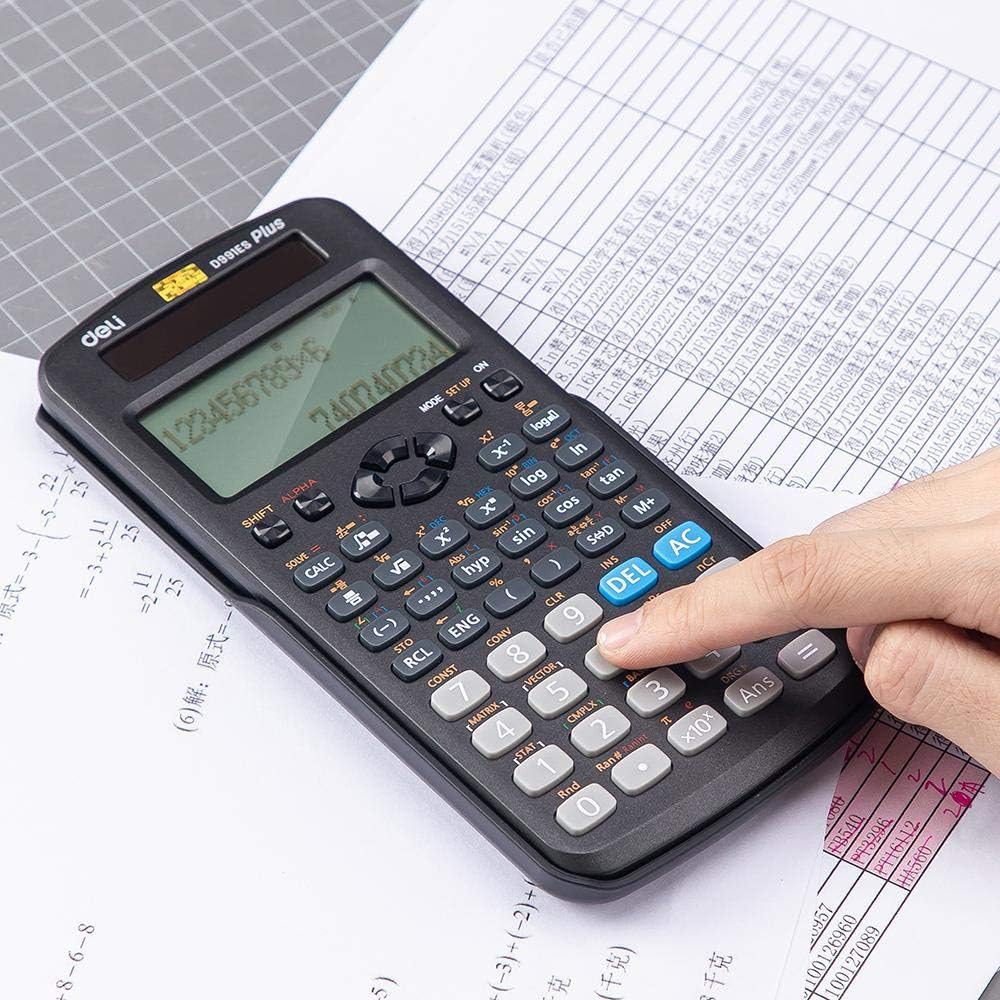
Image 3: A user's hand interacting with the calculator, highlighting the ergonomic design of the rubber buttons.

Image 4: The calculator positioned on a worksheet, illustrating its practical use in an academic setting.
4. Kuchengeta
4.1 Kuchenesa
To clean the calculator, wipe it gently with a soft, dry cloth. Do not use abrasive cleaners, solvents, or spray directly onto the device, as this may damage the display or internal components.
4.2 Kuchengeta
When not in use, always keep the protective sliding cover on the calculator to prevent dust, scratches, and accidental button presses. Store the calculator in a cool, dry place away from direct sunlight and extreme temperatures.
5. Kugadzirisa matambudziko
- Karukureta haibatidzi: Check if the batteries are correctly installed and have sufficient charge. Ensure there is adequate light for the solar panel if operating in low light conditions.
- Mhedzisiro isiriyo: Verify that the calculator is in the correct mode (e.g., DEG/RAD for angles, COMP for basic calculations). Clear previous calculations by pressing [AC].
- Chiratidziro chakaderera kana kuti chisina: Replace the batteries. Ensure the solar panel is exposed to light.
- Mabhatani haapindure: Ensure no debris is lodged under the buttons. If the issue persists, try removing and reinserting the batteries to reset the device.
6. Zvinotsanangurwa
| Feature | Detail |
|---|---|
| Model Number | ED991ES |
| Brand | Deli |
| Type | Scientific / Engineering Calculator |
| Nhamba Yemabasa | 417 |
| Simba Source | Battery (2 AA), Solar |
| Display Type | LCD |
| Dimensions (L x W x H) | 171.9 x 83 x 17.5 mm |
| Kurema | 216 g |
| Color | Nhema |
7. Warranty uye Tsigiro
For warranty information or technical support, please refer to the documentation provided at the time of purchase or contact your retailer. Keep your purchase receipt as proof of purchase.


