1. Nhanganyaya
This manual provides essential instructions for the safe and efficient use of your Vivibright F30 Projector. Please read this manual thoroughly before operating the device and retain it for future reference. The Vivibright F30 is a Full HD 1080p LED projector designed for home theater, education, and business presentations, offering 4200 lumens brightness and multiple connectivity options.
2. Safety Information
- Magetsi: Shandisa adapta yemagetsi yakatarwa chete. Iva nechokwadi chekuti volttage inoenderana nezvinodiwa neprojekita.
- Kufefetedza Usavhare maburi emhepo. Iva nechokwadi chekuti pane nzvimbo yakakwana yakakomberedza purojekita kuti mweya ufambe zvakanaka kudzivirira kupisa zvakanyanya.
- Kupisa: Purojekita lamp generates heat. Avoid touching the lens or vents immediately after use.
- Kudzivirira Kweziso: Usatarise zvakananga muprojekita lens kana iyo lamp Chiedza chakajeka chinogona kukonzera kushushikana kana kukuvara kwemaziso.
- Kuiswa: Isa purojekita panzvimbo yakadzikama uye yakati sandara. Dzivisa kuiisa pachiedza chezuva chakananga, pedyo nekupisa, kana munzvimbo dzine hunyoro hwakawanda kana guruva.
- Kuchenesa: Bvisa magetsi usati wageza. Shandisa jira rakapfava, rakaoma. Usashandise zvinochenesa mvura kana zveaerosol.
- Sevhisi: Do not attempt to service the projector yourself. Refer all servicing to qualified personnel.
3. Package Zviri mukati
Tarisa uone kuti zvinhu zvese zviripo mupakeji:
- Vivibright F30 Projector
- Power Cable
- Remote Control
- Mushandisi Chinyorwa (gwaro iri)
- HDMI Cable (may vary by region/package)
4. Chigadzirwa Pamusoroview
Familiarize yourself with the projector's components and interfaces.
Mufananidzo 4.1: Mberi view of the Vivibright F30 Projector, showing the lens and ventilation.

Mufananidzo 4.2: Side view of the Vivibright F30 Projector, highlighting the various input ports.
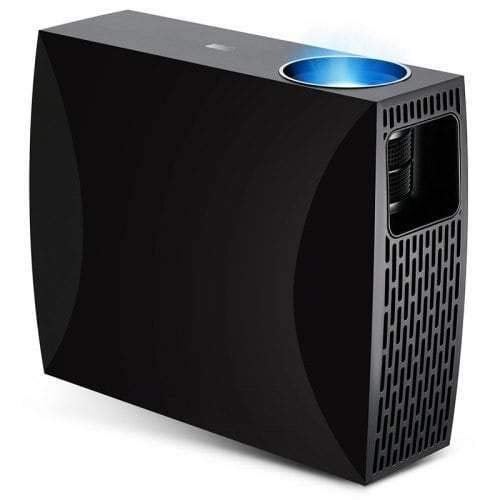
Mufananidzo 4.3: Top or rear view of the Vivibright F30 Projector, showing control buttons or additional vents.
4.1. Interfaces
- HDMI Ports: For connecting devices like laptops, gaming consoles, Blu-ray players, and media players.
- VGA Port: For connecting older computers or other VGA-compatible devices.
- USB Ports: Yekubatanidza USB midziyo yekuchengetera kutamba midhiya zvakananga.
- Audio Out: Yekubatanidza vatauri vekunze kana mahedhifoni.
- Power Input: Yekubatanidza tambo yemagetsi.
5. Setup
5.1. Kugadzwa
Position the projector on a stable surface or mount it appropriately. Ensure the projector is perpendicular to the projection screen for optimal image geometry. The projection distance can range from 1.2 to 6.8 meters, depending on the desired screen size.
5.2. Simba Connection
- Batanidza tambo yemagetsi kuchiteshi chemagetsi chepurojekita.
- Batanidza imwe magumo etambo yemagetsi mupombi yemagetsi yakadzikwa.
5.3. Kubatanidza Input Devices
Connect your desired source device (e.g., laptop, media player) to the projector using an appropriate cable (HDMI, VGA, USB). Ensure the cable is securely connected to both the projector and the source device.
5.4. Kugadzirisa Kutarisa uye Keystone
- Tarisa: Tenderedza rin'i yekutarisa iri pagirazi reprojekita kusvika mufananidzo waoneka wakajeka pachiratidziro.
- Keystone: If the projected image is trapezoidal (wider at the top or bottom), use the keystone correction feature (manual or digital, depending on model) to adjust the image to a rectangular shape.
6. Operating Instructions
6.1. Powering On / Off
- Power On: Press the power button on the projector or the remote control. The indicator light will change, and the lamp achavhenekera.
- Power Off: Press the power button again. Confirm shutdown if prompted. Allow the projector to cool down before unplugging it.
6.2. Input Source Sarudzo
Press the "Source" button on the remote control or the projector's control panel to cycle through available input sources (HDMI1, HDMI2, VGA, USB). Select the input corresponding to your connected device.
6.3. Menu Navigation
Use the arrow buttons on the remote control or projector to navigate through the on-screen display (OSD) menu. Press "OK" or "Enter" to select an option and "Exit" or "Menu" to go back or close the menu.
6.4. Picture and Audio Settings
Adjust picture settings such as brightness, contrast, color, and aspect ratio via the OSD menu to optimize image quality. Adjust volume levels for the built-in speaker or connected external audio devices.
7. Kuchengeta
7.1. Kuchenesa Lens
Pukuta zvinyoro nyoro lenzi yepurojekita nejira rakapfava, risina ruvara rakagadzirirwa nzvimbo dzinopenya. Usashandise zvinhu zvinokwesha kana makemikari akaomarara.
7.2. Kuchenesa Muviri wePurojekita
Shandisa jira rakapfava, rakaoma kuchenesa kunze kwepurojekita. Pazvibodzwa zvakasindimara, zvishoma damp cloth can be used, followed by a dry cloth. Ensure no liquid enters the ventilation openings.
7.3. Lamp Hupenyu
The Vivibright F30 Projector utilizes an LED lamp with an estimated lifespan of up to 50,000 hours, requiring no regular replacement under normal usage conditions.
8. Kugadzirisa matambudziko
| Dambudziko | Zvinogona Kukonzera | Solution |
|---|---|---|
| Hapana mufananidzo waratidzwa |
|
|
| Mufananidzo hauna kujeka |
|
|
| Image is trapezoidal (keystone effect) |
|
|
| Hapana ruzha |
|
|
| Projector inopisa kana kuvhara |
|
|
9. Zvinotsanangurwa
| Feature | Detail |
|---|---|
| Brand | Vivibright |
| Model | F30 |
| Native Resolution | 1920 x 1080 (Full HD) |
| Inotsigirwa Resolution | Kusvika ku4K |
| Kupenya | 4200 Lumens (LED Luminous) |
| Kusiyanisa Ratio | 2200:1 |
| Display Technology | LCD |
| Lamp Type | LED |
| Lamp Hupenyu | Kusvikira kumaawa makumi maviri nemashanu |
| Projection Distance | 1.2 kusvika 6.8 metres |
| Noise Level | 29 Decibel |
| Kubatana | HDMI, VGA, USB |
| Special Features | Portable, Built-in Speaker |
| Item Weight | 3 kg |
| Mounting Type | Tabletop Mount |
10. Warranty uye Tsigiro
10.1. Ruzivo rweWaranti
The Vivibright F30 Projector comes with a 1 Year Warranty kubva pazuva rekutenga. Iyi waranti inovhara kukanganisa kwekugadzira uye kusashanda pasi pekushandiswa kwakajairwa. Ndapota chengetedza humbowo hwako hwekutenga kwezvichemo zvewaranti.
Waranti iyi haibhadhare kukuvara kunokonzerwa nekushandiswa zvisina kunaka, tsaona, kugadziriswa kusina mvumo, kana kusakara kwakajairika.
10.2. Mutengi Tsigiro
For technical assistance, warranty claims, or further inquiries, please contact Vivibright customer support through their official website or the contact information provided with your purchase documentation. When contacting support, please have your product model (F30) and purchase details ready.


