1. Nhanganyaya
This manual provides essential information for the safe and efficient operation of your Muse M-1990 DJ Bluetooth Party Speaker. Please read these instructions thoroughly before using the device and retain them for future reference.
The Muse M-1990 DJ is a powerful party speaker designed to deliver high-quality audio with dynamic light effects. It features multiple connectivity options including Bluetooth, CD player, USB, and AUX inputs, making it versatile for various audio sources.

Image 1.1: The Muse M-1990 DJ Bluetooth Party Speaker showcasing its integrated light effects.
2. Safety Information
Chengetedza anotevera ekuchengetedza ekudzivirira kudzivirira kuvhunduka kwemagetsi, moto, kana kukuvara kuyuniti:
- Usafumure chikwata kune mvura kana hunyoro.
- Usavhura casing. Tumira masevhisi ese kuvashandi vanokwanisa.
- Ita shuwa kuti magetsi emagetsi awandatage inofananidzwa neratidzo label payuniti.
- Chengeta mudziyo wacho kure nezuva rakananga, nzvimbo dzinopisa, uye guruva rakawandisa.
- Ita shuwa kuti pave nemhepo yakakwana yakatenderedza unit.
- Usaisa zvinhu zvinorema pachikwata.
- Bvisa iyo unit panguva yemadutu emheni kana kana isina kushandiswa kwenguva refu.
3. Package Zviri mukati
Iva nechokwadi chekuti zvinhu zvese zviripo mupakeji:
- Muse M-1990 DJ Party Speaker Unit
- Kudzora Kure (inoda mabhatiri maviri eAA, anosanganisira)
- Wired Maikorofoni
- AUX IN Cable (3.5mm jack)
- Power Cable (AC 100-240V, 50/60Hz)

Image 3.1: Included accessories: remote control, wired microphone, and AUX cable.
4. Chigadzirwa Pamusoroview
Familiarize yourself with the main components and controls of your M-1990 DJ speaker.
4.1 Top Control Panel
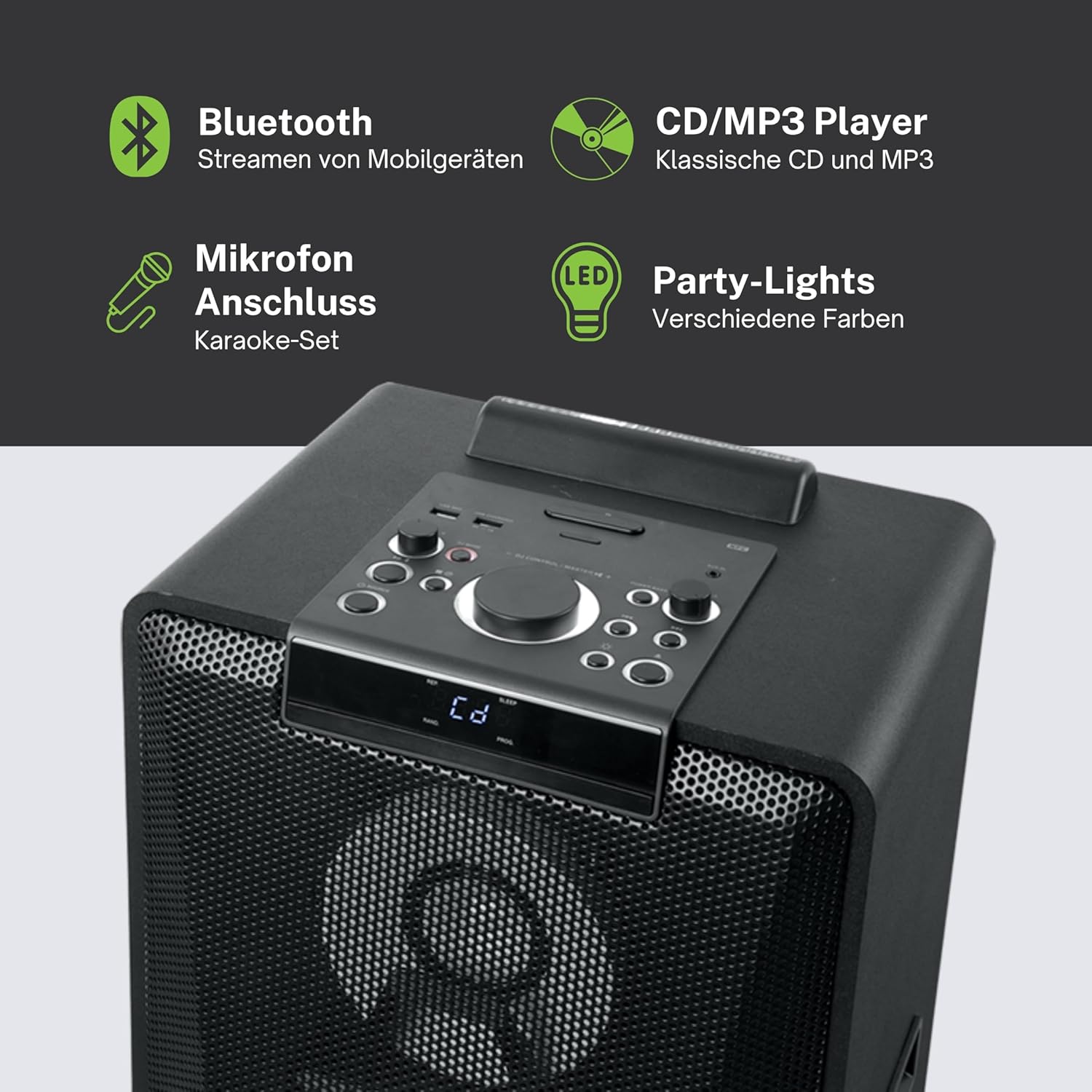
Mufananidzo 4.1: Yakadzama view of the top control panel, showing various buttons and the LED display.
The top panel features controls for power, volume, source selection, playback, light effects, and a white LED display. It also includes a built-in cradle for a tablet or smartphone.
4.2 Rear Connectivity Ports
The rear panel provides various input and output options:
- USB 2.0 Port (for MP3 playback and charging)
- AUX IN 1 (2 x RCA jacks)
- AUX IN 2 (3.5mm jack)
- Microphone Inputs (2 jacks)
- Guitar Input (1 jack)
- AC Power Input (100-240V, 50/60Hz)
5. Setup
5.1 Kuiswa
Place the speaker on a stable, flat surface. Ensure there is adequate space around the unit for ventilation. The unit is designed for floor mounting.
5.2 Simba Connection
- Connect the supplied power cable to the AC power input on the rear of the speaker.
- Batanidza rimwe divi rewaya yemagetsi muchikamu chekunze chemadziro (AC 100-240V, 50/60Hz).
- The unit does not contain a rechargeable battery and must be connected to a power source for operation.
6. Operating Instructions
6.1 Simba On/Kudzima
Press the Power button on the top control panel or the remote control to turn the unit on or off.
6.2 Bluetooth Pairing
- Press the Source button to select Bluetooth mode. The LED display will show 'BT' and the Bluetooth indicator will flash.
- Gonesa Bluetooth pane yako smartphone, piritsi, kana chimwe chinhu chinoenderana.
- Tsvaga 'M-1990 DJ' in your device's Bluetooth list and select it to pair.
- Once paired, the Bluetooth indicator will stop flashing, and you can begin streaming audio.
- For NFC-enabled devices, simply tap your device on the NFC area of the speaker for automatic pairing.
6.3 Kutamba kweCD
- Dzvanya bhatani reKunobva kuti usarudze CD modhi.
- Open the CD tray and place a CD (CD, CD-R/RW, MP3 compatible) with the label side up.
- Close the CD tray. Playback will start automatically or can be initiated using the Play/Pause button.
6.4 USB Playback
- Isa USB flash drive ine MP3 files into the USB 2.0 port.
- Press the Source button to select USB mode.
- Playback will start automatically or can be controlled using the playback buttons.
- The USB port also functions as a charging port for external devices.
6.5 AUX Input
- Connect your external audio device to either the AUX IN 1 (RCA jacks) or AUX IN 2 (3.5mm jack) using the appropriate cable.
- Press the Source button to select the corresponding AUX input.
- Control playback from your connected device.
6.6 Maikorofoni neGitare
- Plug your microphone(s) into the Microphone input jacks.
- Plug your guitar into the Guitar input jack.
- Adjust the microphone/guitar volume using the dedicated controls on the top panel.
6.7 Chiedza Migumisiro
The M-1990 DJ features color-changing lights and strobe effects. Use the dedicated Light Effects button on the control panel or remote to cycle through different modes or turn the lights off.
6.8 Stereo Pairing (Dual Bluetooth)
If you have two M-1990 DJ units, you can pair them wirelessly for a stereo sound experience. Refer to the specific instructions for stereo pairing in the full manual (if provided by manufacturer) or on the manufacturer's website.
7. Kuchengeta
7.1 Kuchenesa
- Gara uchibuditsa unit kubva mudura remagetsi usati wachenesa.
- Shandisa jira rakapfava, rakaoma kuchenesa kunze.
- Usashandise abrasive cleaners, wax, kana zvinonyungudutsa sezvo zvinogona kukanganisa kupera.
7.2 Kuchengeta
Kana isingashandiswi kwenguva yakareba, chengeta mukurukuri munzvimbo inotonhorera, yakaoma, kure nechiedza chezuva uye tembiricha yakanyanyisa.
8. Kugadzirisa matambudziko
If you encounter issues with your M-1990 DJ speaker, refer to the following common problems and solutions:
| Dambudziko | Zvinogona Kukonzera | Solution |
|---|---|---|
| Hapana simba | Tambo yemagetsi haina kubatana; Nzvimbo yekubuditsa magetsi haisi kushanda | Ensure power cable is securely connected; Try a different outlet |
| Hapana ruzha | Volume too low; Incorrect source selected; Audio cable not connected | Increase volume; Select correct input source; Check audio cable connections |
| Bluetooth haina kubatanidza | Speaker not in pairing mode; Device Bluetooth off; Device too far | Ensure speaker is in BT mode and flashing; Enable Bluetooth on device; Move device closer (within 10m) |
| CD haisi kutamba | CD inserted incorrectly; CD scratched/dirty; Incorrect format | Reinsert CD correctly; Clean CD; Ensure CD is audio CD or MP3 compatible |
| USB isiri kutamba | USB drive not inserted correctly; Files not MP3 format; USB drive corrupted | Reinsert USB drive; Ensure files are MP3; Try a different USB drive |
Kana dambudziko rikaramba riripo mushure mekuyedza mhinduro idzi, ndapota taura nerutsigiro rwevatengi.
9. Zvinotsanangurwa
Detailed technical specifications for the Muse M-1990 DJ Party Speaker:
- Model Number: M-1990 DJ
- Brand: MUSE
- Output Power: 1000 Watts
- Nhamba Yemachiteshi: 2
- Kubatana Technology: Bluetooth V4.2
- Zvishandiso Zvinoenderana: Smartphone, Tablet
- Zvinyorwa Zvekuteerera: 2 x Microphone jacks, 1 x Guitar jack, 2 x RCA AUX IN, 1 x 3.5mm AUX IN
- USB Port: 1 x USB 2.0 (for MP3 playback and charging)
- CD Player: CD, CD-R/RW, MP3 compatible
- Light Effects: Color changing lights, Strobe effects, Light projection
- Kunobva Simba: AC 100-240V, 50/60Hz (Electric Cable)
- Rechargeable Battery: Aihwa
- Material: Wood (cabinet)
- Ruvara: Nhema
- Chinhu Weight: 17.9 makirogiramu
- Zviyero (L x W x H): 35.6 x 34.8 x 105.7 masendimita
- Inokurudzirwa Kushandiswa: Party and entertainment
- Mounting Type: Floor Mount
- Anosanganisira Mabhatiri: 2 AA (for remote control)

Image 9.1: Dimensional drawing of the Muse M-1990 DJ speaker.
10. Warranty uye Tsigiro
10.1 Ruzivo rweWaranti
Warranty terms and conditions for the Muse M-1990 DJ speaker are typically provided with the product packaging or can be found on the official Muse website. Ndapota chengetedza humbowo hwako hwekutenga kune chero vimbiso yewaranti.
10.2 Mutengi Tsigiro
For further assistance, technical support, or service inquiries, please refer to the contact information provided in your product documentation or visit the official Muse customer support website.


