1. Nhanganyaya
This manual provides detailed instructions for the installation, operation, and maintenance of your new SCREENARAMA LCD LED Display. This replacement screen is specifically designed for the Lenovo Legion Y720 80VR laptop model. Please read this manual thoroughly before proceeding with installation to ensure proper handling and compatibility.

Image: The SCREENARAMA replacement screen, labeled "FHD 30pin Non-Touch", accompanied by a set of installation tools, all placed on a brown cardboard box with the Screenarama logo.
2. Important Compatibility Notes
To ensure proper functionality, it is crucial that the specifications of this replacement screen match your original laptop screen. Please verify the following:
- Resolution: This screen is FHD 1920x1080. Your original screen must also be 1920x1080.
- Type yekubatanidza: This screen uses a 30-pin connector. Verify your original screen also has a 30-pin connector.
- Touchscreen: This is an LCD screen only and does kwete support touchscreen functionality. If your original laptop had a touchscreen, this replacement will not be compatible.
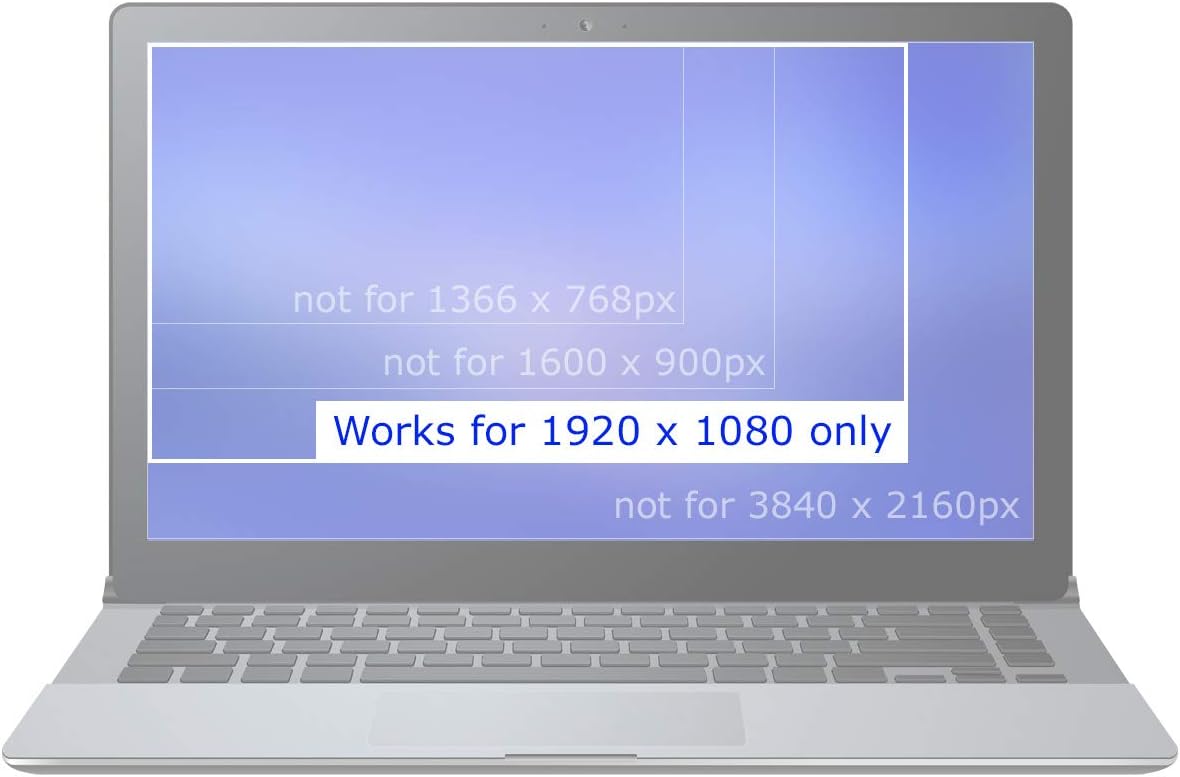
Image: A graphic illustrating a laptop screen with text overlay indicating "Works for 1920 x 1080 only", with other resolutions (1366x768, 1600x900, 3840x2160) marked as incompatible.

Image: A close-up comparison of a 30-pin video connector (correct) and a 40-pin video connector (incorrect, crossed out with a red 'X'), highlighting the difference in pin count.

Image: A warning sign with text "LCD Screen Only. No Touchscreen" above an illustration of a standard LCD screen and a crossed-out touchscreen, emphasizing that this product is not a touchscreen.
3. Package Zviri mukati
Your SCREENARAMA replacement screen package includes:
- 1 x SCREENARAMA FHD 1920x1080 IPS Matte LCD LED Display
- 1 x Set of Installation Tools (as pictured)

Image: A collection of blue and silver tools typically used for electronics repair, including pry tools, tweezers, a precision knife, and a screwdriver.
4. Kuisa Nongedzo
Replacing a laptop screen requires careful handling and basic technical skills. If you are unsure, please seek professional assistance. Always ensure your laptop is powered off and the battery is disconnected before starting the installation process.
General Matanho:
- Kugadzirira: Power off your laptop completely and disconnect the AC adapter. Remove the laptop battery if it is external. For internal batteries, disconnect the battery cable from the motherboard.
- Bezel Removal: Carefully remove the plastic bezel surrounding the screen. This may involve removing rubber screw covers and screws, then gently prying the bezel off.
- Old Screen Removal: Unscrew the old screen from its mounting brackets. Lay it face down on the keyboard.
- Disconnect Video Cable: Carefully peel back the tape securing the video cable connector (30-pin) to the back of the old screen. Gently unlatch the connector and pull the cable straight out.
- Connect New Screen: Connect the video cable to the new SCREENARAMA display, ensuring it is fully seated and latched. Secure it with tape if necessary.
- Test Display: Before reassembling, temporarily connect the battery (if internal) or AC adapter and power on the laptop to test the new screen. Ensure the display is working correctly with no issues. Power off and disconnect power again after testing.
- Mount New Screen: Mount the new screen into the laptop lid using the original screws.
- Resemble: Reattach the screen bezel and any other components removed during disassembly.

Image: The back of a 15.6-inch FHD screen, clearly showing the location of the 30-pin video connector at the bottom center, indicated by an arrow.
5. Hunhu hwekushanda
This SCREENARAMA display features IPS (In-Plane Switching) technology and a matte finish, offering superior visual performance:
- IPS Technology: Provides better viewing angles and more vivid colors compared to traditional TN panels.
- Matte Finish: Reduces glare and reflections, making it more comfortable for extended use in various lighting conditions.

Image: A visual comparison demonstrating the advantages of an IPS screen (better viewing angles, more vivid colors) over a TN screen (narrow viewing angle, washed out colors).
6. Kuchengeta
To maintain the quality and longevity of your SCREENARAMA display:
- Kuchenesa: Use a soft, lint-free cloth specifically designed for electronics. Lightly dampIsa jira nemvura kana mushonga wekuchenesa sikirini. Usapfapfaidze mvura zvakananga pa sikirini.
- Dzivisa Pressure: Do not press on the screen surface with sharp objects or excessive force.
- Kuchengeta: If storing the screen, keep it in its original protective packaging in a cool, dry place.
7. Kugadzirisa matambudziko
If you encounter issues after installing your new screen, consider the following troubleshooting steps:
- Verify Laptop Functionality: Connect an external monitor to your laptop to confirm that the laptop itself is still operational and outputting a display signal.
- Check Pin Count: Ensure the number of pins on your original LCD's connector and the new screen's connector are identical (both 30-pin).
- Blank Image: If the screen remains blank, carefully reconnect the video cable from both the screen and motherboard sides. Ensure the connector is fully seated and secured, possibly with tape. Verify the connector itself is not damaged.
- Dambudziko Rinoramba Richienderera Mberi: If the problem (e.g., no display, distorted image) is identical to the issue experienced with the old LCD, the problem is likely with another component of the laptop (e.g., motherboard, video card) rather than the screen.
- Dim Image: If the image is dim, try connecting the old LCD (if it still lights up). If both LCDs do not light up, check the backlight fuse, which is typically located near the video connector on the motherboard.

Image: A graphic titled "Troubleshooting Steps" listing common issues and their solutions for laptop screen problems, including checking external monitors, pin count, cable connections, and backlight fuses.
8. Zvinotsanangurwa
| Feature | Tsanangudzo |
|---|---|
| Brand | SCREENARAMA |
| Model Kugarisana | Lenovo Legion Y720 80VR |
| Screen Size | 15.6 inches |
| Resolution | FHD 1920x1080 |
| Panel Type | IPS (In-Plane Switching) |
| Surface Finish | Matt |
| Vhidhiyo yekubatanidza | 30-pini |
| Touchscreen Support | Aihwa |
9. Warranty uye Tsigiro
Your SCREENARAMA replacement screen comes with a 2-makore waranti. This warranty covers manufacturing defects and ensures compatibility as specified. For warranty claims or technical support, please contact SCREENARAMA customer service through the retailer's platform or visit the official SCREENARAMA website.
Kuti uwane rumwe ruzivo nerutsigiro, unogona kushanyira SCREENARAMA Store on Amazon.


