1. Nhanganyaya
Thank you for choosing TREBLAB Z2 Hybrid Active Noise Cancelling Wireless Headphones. This manual provides essential information for setting up, operating, and maintaining your headphones to ensure optimal performance and longevity. Please read it carefully before use.
2. Chii chiri muBhokisi
- TREBLAB Z2 Headphones
- TREBLAB Z2 Carrying Case
- Tambo yeOdhiyo ye3.5mm (AUX)
- USB Type-C Yekuchaja Cable
- User Manual; Quick Start Guide; Catalogue; Warranty card
3. Chigadzirwa Pamusoroview
Headphone Features
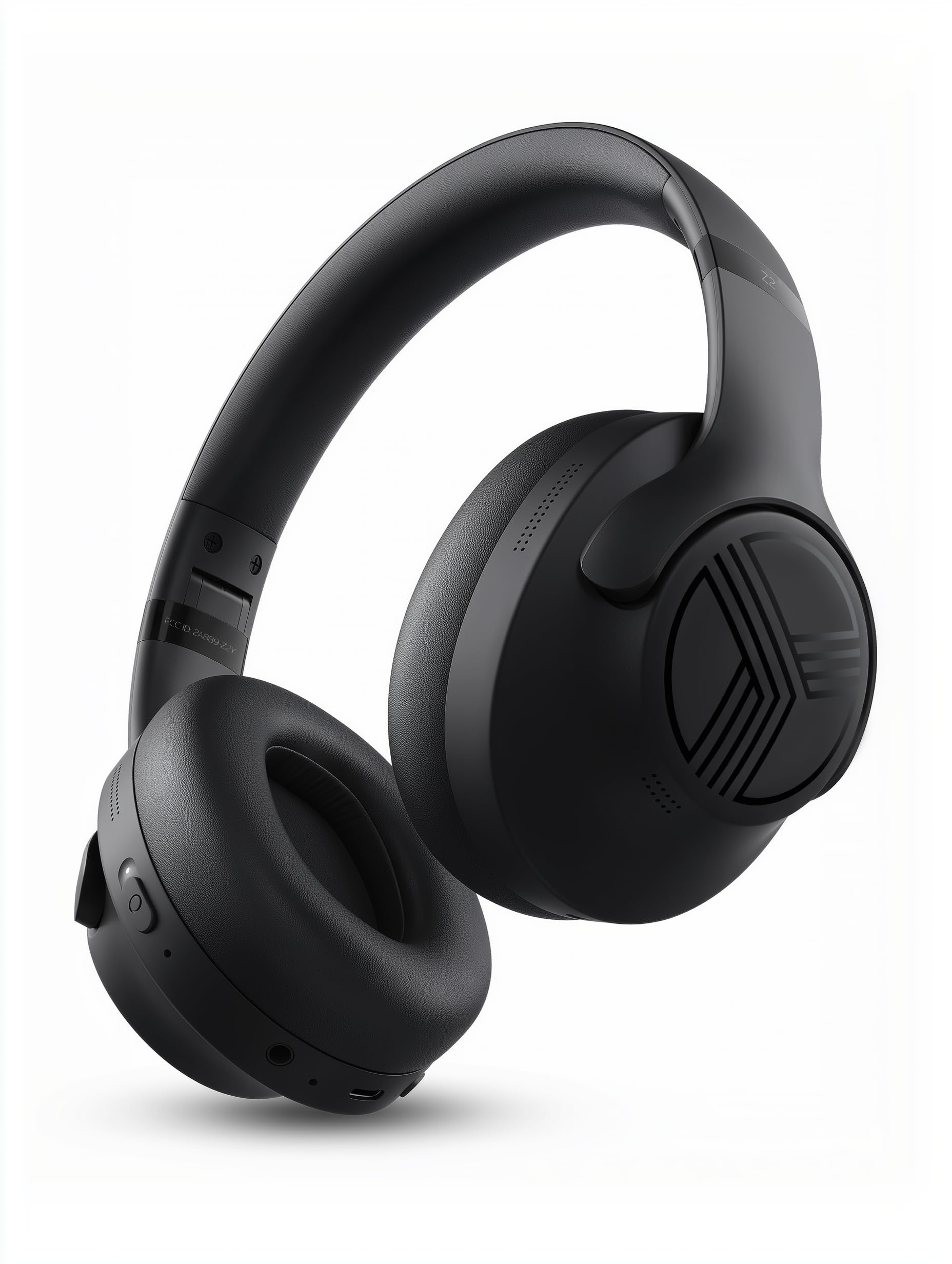
The TREBLAB Z2 headphones are designed for versatility and performance, featuring Hybrid Active Noise Cancelling (ANC) to minimize distractions, a long-lasting battery, and a comfortable, sweat-resistant design suitable for various activities.
- Hybrid Active Noise Cancelling: Blocks external noise for immersive audio.
- Yakawedzerwa Nguva Yekutamba: Up to 58 hours of battery life (without ANC, at 70% volume).
- Deep Bass: Powerful audio with balanced sound.
- IPX4 Water Resistant & Sweatproof: Durable for workouts and outdoor use.
- Bluetooth 5.3 & Multipoint Connection: Stable wireless connection to multiple devices.
- Yakavakirwa-mukati Maikorofoni: Clear voice pickup for calls.
- Yakagadzirwa Dhizaini: Lightweight and comfortable for extended wear and easy storage.
Kudzora uye Ports
The headphones feature intuitive button controls for playback, volume, calls, and ANC activation. All controls and ports are conveniently located on the earcups.
- Power/Play/Pause/Phone Button: Central control for power, media playback, and call management.
- Bhatani reKukwidza/Kunoteera Track: Adjust volume or skip to the next song.
- Bhatani reVolume Down/Previous Track: Adjust volume or go to the previous song.
- ANC On/Off Switch: Activate or deactivate Active Noise Cancelling.
- Micro USB/USB Type-C Charging Port: Zvekuchaja mahedhifoni.
- AUX Input (3.5mm Jack): Zvekubatanidza newaya.
- Maikorofoni: Kune mafoni asingabhadharwe nemaoko uye mirairo yekubatsira nezwi.
- Chiratidzo che LED: Inoratidza simba, kubatanidza, uye mamiriro ekuchaja.
4. Setup
4.1 Kuchaja mahedhifoni
Before first use, fully charge your TREBLAB Z2 headphones. A full charge takes approximately 3 hours.
- Connect the USB Type-C charging cable to the charging port on the headphone.
- Batanidza imwe magumo etambo kune inoenderana USB magetsi sosi (semuenzaniso, madziro adapta, komputa USB port).
- Chiratidzo che LED chicharatidza chitsvuku panguva yekuchaja uye kudzima kana chajairwa zvizere.
4.2 Bluetooth Pairing
Kuti ubatanidze mahedhifoni ako kune mudziyo uchishandisa Bluetooth:
- Ita shuwa kuti mahedhifoni akachajwa uye akadzimwa.
- Press and hold the Power/Play/Pause button for a few seconds until the LED indicator flashes blue and red, indicating pairing mode.
- Pamudziyo wako (smartphone, piritsi, komputa), gonesa Bluetooth uye tsvaga zvishandiso zviripo.
- Select "TREBLAB Z2" from the list of found devices.
- Kana yabatanidzwa zvakanaka, chiratidzo che LED chinopenya bhuruu zvishoma nezvishoma, uye uchanzwa inzwi rekusimbisa.
For multipoint connection, pair the first device, then disable Bluetooth on the first device. Put the headphones back into pairing mode and connect to the second device. Once connected, re-enable Bluetooth on the first device, and the headphones should connect to both.
5. Operating Instructions
5.1 Simba On/Kudzima
- Power On: Press and hold the Power/Play/Pause button for 3 seconds.
- Power Off: Press and hold the Power/Play/Pause button for 5 seconds.
5.2 Kuridza Mumhanzi
- Tamba/Kumbomira: Dzvanya bhatani rePower/Play/Misa pfupi.
- Next Track: Dzvanya bhatani reVolume Up/Next Track kwenguva refu.
- Previous Track: Dzvanya bhatani rekuti Volume Down/Previous Track kwenguva refu.
- Vhoriyamu Kumusoro: Dzvanya bhatani reVolume Up/Next Track muchidimbu.
- Vhoriyamu Pasi: Dzvanya bhatani rekuti "Volume Down/Previous Track" muchidimbu.
5.3 Call Management
- Pindura Call: Dzvanya bhatani rePower/Play/Misa pfupi.
- Pedzisa Kufona: Short press the Power/Play/Pause button during a call.
- Ramba Kufona: Long press the Power/Play/Pause button for 2 seconds.
- Kudzorera: Dzvanya kaviri bhatani rePower/Play/Misa.
5.4 Kudzima Ruzha Runoshanda (ANC)
To activate ANC, slide the ANC switch on the left earcup to the 'ON' position. The LED indicator will light up. Slide to 'OFF' to deactivate.
5.5 Izwi Mubatsiri
Activate your device's voice assistant (Siri, Google Assistant, Alexa) by pressing the Power/Play/Pause button for 1 second.
6. Kuchengeta
- Clean headphones with a soft, damp jira. Usashandise makemikari ane hutsinye.
- Store headphones in the provided carrying case when not in use to protect them from dust and damage.
- Avoid exposing headphones to extreme temperatures, direct sunlight, or excessive moisture.
- Usaedza kuparadzanisa kana kushandura mahedhifoni, sezvo izvi zvichibvisa waranti.
7. Kugadzirisa matambudziko
| Dambudziko | Solution |
|---|---|
| Mahedhifoni haabatike | Iva nechokwadi chekuti mahedhifoni akazara. |
| Haikwanise kubatanidza kuburikidza neBluetooth | Ensure headphones are in pairing mode (flashing blue/red LED). Turn off and on Bluetooth on your device. Clear previous pairings on your device. |
| Hapana ruzha kana yakaderera vhoriyamu | Check volume levels on both headphones and connected device. Ensure headphones are properly paired. Try a wired connection with the AUX cable. |
| ANC haisi kushanda nemazvo | Ensure ANC switch is in the 'ON' position. Check for proper fit of earcups over ears. |
8. Zvinotsanangurwa
| Feature | Detail |
|---|---|
| Model Name | Z2 |
| Noise Control | Hybrid Active Noise Cancellation |
| Bluetooth Version | 5.3 |
| Bluetooth Range | 33 Feet (10 metres) |
| Hupenyu hwebhatiri (Max) | Up to 58 hours (No ANC, 70% volume) |
| Hupenyu hwebhatiri (ANC Yakabatidzwa) | Up to 51 hours (ANC + Wireless, 70% volume) |
| Kuchaja Nguva | 3 Maawa |
| Audio Driver Size | 40 mamirimita |
| Frequency Response | 20 Hz - 20 KHz |
| Sensitivity | 103 dB |
| Impedance | 32 Ohms |
| Mvura Resistance Level | IPX4 (Inodzivirira Mvura uye Inodzivirira Ziya) |
| Item Weight | 8.5 Onzi |
| Dimensions | 6.4 x 3.2 x 8 inches |
9. Warranty uye Tsigiro
Your TREBLAB Z2 headphones are covered by a 1-YEAR WARRANTY & 30-DAY RETURNS. For any questions, suggestions, or issues, please refer to the warranty card included in the box or contact TREBLAB customer support.
10. Media Gallery
Product Images