1. Nhanganyaya
The eKids Frozen 2 Bluetooth Karaoke Machine with Light Show is designed to provide an interactive music experience. This portable device allows users to stream audio wirelessly via Bluetooth, sing along with the included wired microphone, and expand content through a USB port. It features a multi-colored LED light show and built-in memory for storing music.
2. Chii chiri muBhokisi
- Bluetooth MP3 Karaoke Machine
- Wired Maikorofoni
- USB Kuchaja Cable
3. Zvigadzirwa zveChigadzirwa
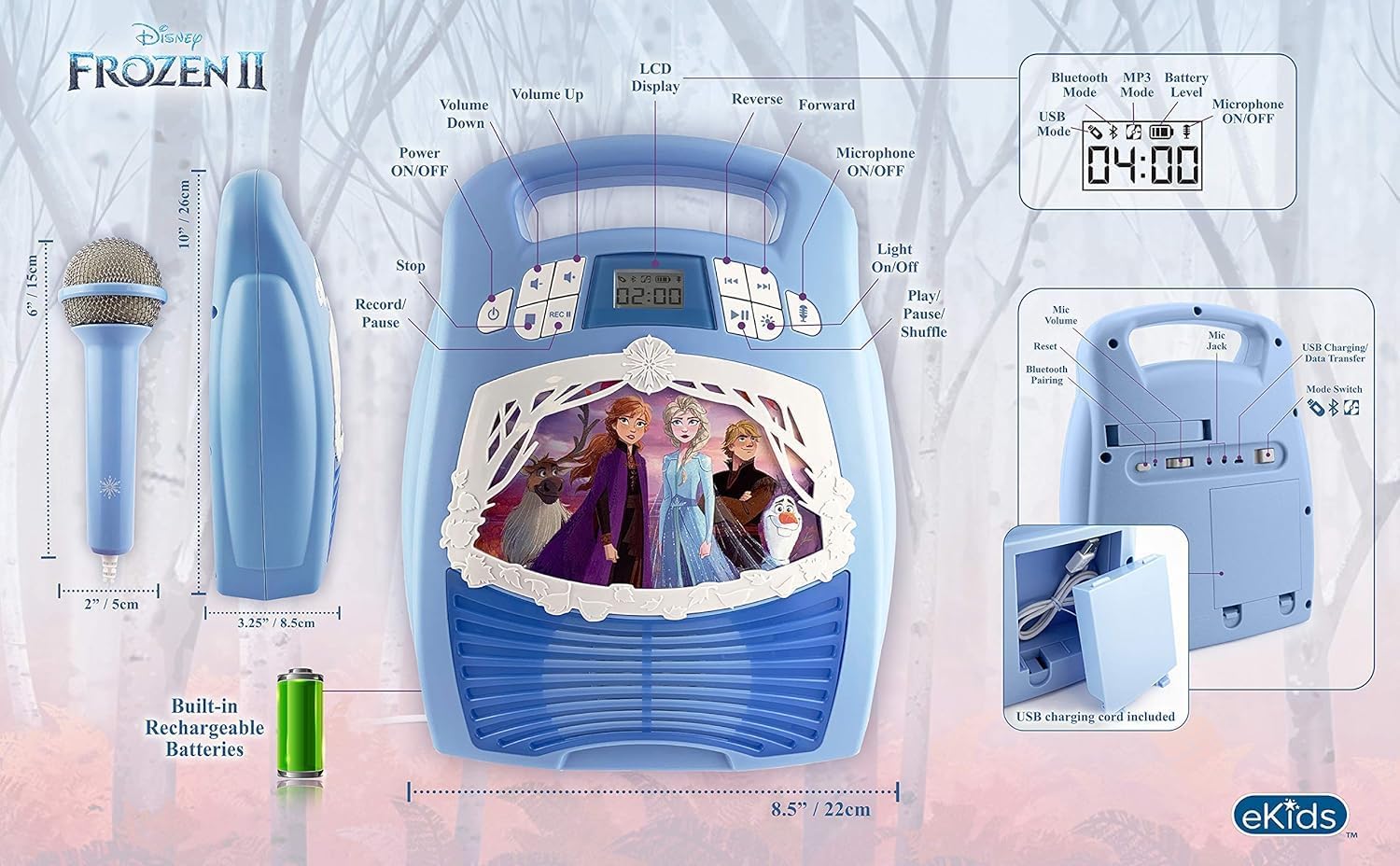
- Kubatana kweBluetooth: Connect to any compatible Bluetooth device to stream audio wirelessly.
- Wired Maikorofoni: Includes one real working wired microphone for singing along. An additional mic jack is available for a second microphone (sold separately).
- USB Audio Player: Features a USB port to play MP3 files from a USB flash drive (not included).
- Basa Rekurekodha: Record performances while singing along to streaming music. Requires a USB flash drive (not included).
- Multi-colored LED Light Show: Integrated light show to enhance the performance experience.
- Yakavakirwa-mukati Memory: Store hours of music directly on the device.
- Rechargeable Battery: Portable design with a built-in rechargeable battery for on-the-go use.

Mufananidzo 1: Kupfuuraview of the Karaoke Machine's Controls and Features.

Figure 2: Bluetooth Compatibility with various devices.
4. Setup
4.1 Kusimbisa Chikamu
The karaoke machine operates on a built-in rechargeable battery. Ensure the unit is fully charged before first use for optimal performance.
- Connect the supplied USB charging cable to the USB charging port on the back of the unit.
- Batanidza rimwe divi retambo yeUSB kune adapta yemagetsi yeUSB yakajairika (isina kuiswa) kana chiteshi cheUSB chinofambiswa nemagetsi.
- The charging indicator will illuminate. Allow sufficient time for a full charge.
4.2 Kubatanidza Maikorofoni
The wired microphone connects to the microphone jack on the unit.
- Locate the microphone jack on the side or back of the karaoke machine.
- Insert the microphone plug firmly into the jack.

Figure 3: Karaoke Machine with Microphone Connected.
5. Operating Instructions
5.1 Simba On/Kudzima
Dzvanya uye ubate iyo Simba button located on the control panel to turn the unit on or off.
5.2 Bluetooth Pairing
- Turn on the karaoke machine. The Bluetooth indicator on the display will flash, indicating it is in pairing mode.
- Pamudziyo wako une Bluetooth (smartphone, tablet, nezvimwewo), enda kuBluetooth settings wobva wagonesa Bluetooth.
- Select "eKids Frozen 2 Karaoke" (or similar name) from the list of available devices.
- Kana yabatanidzwa, chiratidzo cheBluetooth chinomira kupenya uye chinoramba chakasimba. Iye zvino unogona kuridza odhiyo kubva pamudziyo wako.
5.3 Playing Music via USB
- Isa USB flash drive ine MP3 files muchiteshi che USB pane unit.
- The unit should automatically switch to USB mode and begin playing music. If not, press the Mode bhatani kusarudza USB mode.
- Shandisa iyo Tamba/Misa, Next Track,uye Previous Track mabhatani ekudzora kutamba.
5.4 Kushandisa Maikorofoni
- Ensure the microphone is securely plugged into the mic jack.
- Press the Maikorofoni ON / OFF button to activate the microphone.
- Adjust the microphone volume using the dedicated volume controls if available, or the main volume controls.
5.5 Chiedza Show
Press the Chiedza ON/OFF button to activate or deactivate the multi-colored LED light show.
5.6 Kurekodha Kuimba
To record your singing, a USB flash drive (not included) must be inserted into the USB port.
- Iva nechokwadi chekuti USB flash drive yakaiswa.
- Start playing your desired music (via Bluetooth or USB).
- Press the REC bhatani kuti utange kurekodha.
- Sing into the microphone.
- Press the REC button again to stop recording. Your performance will be saved to the USB flash drive.
6. Kuchengeta
- Chenesa mudziyo nejira rakapfava, rakaoma. Usashandise zvinochenesa zvinogumbura kana zvinonyungudutsa.
- Chengeta mudziyo uyu kure nezuva rakananga, nzvimbo dzinopisa, uye hunyoro.
- Store the microphone in its designated compartment on the back of the unit when not in use to prevent loss or damage.
Mufananidzo 4: Kumashure view with microphone storage compartment.
7. Kugadzirisa matambudziko
- Hapana Simba: Ensure the unit is charged. Connect the USB charging cable and allow it to charge.
- Hapana Inzwi: Check the volume levels on both the karaoke machine and your connected Bluetooth device. Ensure the microphone is turned on if using it.
- Bluetooth Haisi Kubatana: Make sure Bluetooth is enabled on your device and the karaoke machine is in pairing mode. Try restarting both devices. Ensure no other devices are currently connected to the karaoke machine.
- Maikorofoni Haisi Kushanda: Verify the microphone is securely plugged into the correct jack and the microphone ON/OFF button is activated.
- Kurekodha Nyaya: Ensure a compatible USB flash drive is inserted and has sufficient free space.
8. Zvinotsanangurwa
| Feature | Detail |
|---|---|
| Product Dimensions | 8 x 3 x 10 inches |
| Item Weight | 2.64 makirogiramu |
| Model Number | FR-553v9M |
| Yakakurudzirwa Zera | 3 - 35 months |
| Mabhatiri | 3 AA batteries required (included) - Note: Product description also mentions built-in rechargeable battery. Please refer to packaging for exact battery type. |
| Special Feature | Portable, Rechargeable |
| Color | Older Version |
| Mugadziri | KIDdesigns |
9. Safety Information
Please read and follow all safety instructions provided with the product packaging. This product is intended for use by children aged 3 and up, under adult supervision.
10. Warranty uye Tsigiro
Ichi chigadzirwa chinouya ne One Year Limited Warranty. For warranty claims or technical support, please refer to the contact information provided in your product packaging or visit the eKids official website.
11. Chigadzirwa Vhidhiyo
Video 1: An official product video from KIDdesigns, Inc. showcasing the eKids Frozen 2 Bluetooth Karaoke Machine with Light Show, highlighting its features and design.


