1. Nhanganyaya
This manual provides detailed instructions for the setup, operation, and maintenance of your Natec TURBOT Wireless Keyboard with Touchpad (model NKL-0968). This device is designed to enhance your experience with Smart TVs, cellphones, and other compatible devices, offering convenient wireless control via 2.4 GHz technology.
Ndapota verenga bhuku rino zvakakwana usati washandisa chigadzirwa kuti uone kushanda kwakakodzera uye kudzivirira kukanganisa.
2. Package Zviri mukati
Tarisa uone kuti zvinhu zvese zviripo mupakeji:
- Natec TURBOT Wireless Keyboard with Touchpad
- USB 2.4 GHz Receiver
- Mushandisi Chinyorwa (gwaro iri)
- (Note: 2 AAA batteries are required and may not be included)
3. Setup Guide
3.1. Kuiswa kwebhatiri
The Natec TURBOT keyboard requires two (2) AAA batteries for operation. Locate the battery compartment on the underside of the keyboard. Open the cover, insert the batteries according to the polarity markings (+/-), and close the cover securely.
3.2. Kubatanidza USB Receiver
The USB 2.4 GHz receiver is typically stored in a dedicated compartment on the keyboard itself for safekeeping. Carefully remove the receiver from its storage slot.

Figure 1: USB receiver stored in the keyboard compartment.
Insert the USB receiver into an available USB port on your Smart TV, computer, or other compatible device. The device should automatically detect and install the necessary drivers.
3.3. Kuisa Simba paKiibhodhi
Locate the power switch on the side of the keyboard. Slide the switch to the "ON" position. The keyboard should now be ready for use.
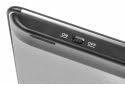
Figure 2: Power switch on the keyboard.
4. Operating Instructions
4.1. Keyboard Mabasa

Figure 3: Natec TURBOT Wireless Keyboard Layout.
The keyboard features a standard QWERTY layout for typing. It also includes dedicated function keys (F1-F12) which may have secondary multimedia functions (e.g., volume control, media playback). These secondary functions are often accessed by holding down the Fn key and pressing the corresponding function key.
- Caps Lock: Toggles uppercase/lowercase letters.
- Shift: Used for uppercase letters and secondary symbols.
- Ctrl / Alt / Win: Standard modifier keys for various shortcuts depending on the operating system.
- Backlight: The keyboard features a backlight for improved visibility in low-light conditions. Refer to your device's operating system or the keyboard's specific function key combinations (often involving the Fn key) to activate or adjust the backlight.
4.2. Touchpad Mabasa
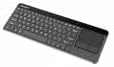
Figure 4: Integrated Touchpad.
The integrated touchpad allows for mouse-like navigation. It supports various gestures:
- Kubata nemunwe mumwe chete: Functions as a left-click.
- Two Finger Tap: Functions as a right-click.
- Mupumburu weminwe miviri: Drag two fingers up or down to scroll through content.
- Mabhatani enyama: Below the touchpad, there are two physical buttons. The left button acts as a left-click, and the right button acts as a right-click.
Touchpad sensitivity and other settings may be adjustable through your connected device's operating system settings.
5. Kuchengeta
- Kuchenesa: Use a soft, dry cloth to clean the keyboard and touchpad. For stubborn dirt, a slightly damp cloth with mild cleaning solution can be used, ensuring no liquid enters the device.
- Kutsiviwa kwebhatiri: Replace batteries when the keyboard's performance degrades or it stops responding. Always use fresh AAA batteries.
- Storage: When not in use for extended periods, turn off the keyboard to conserve battery life. Store the USB receiver in its designated compartment to prevent loss.
- Dzivisa Mamiriro Akanyanyisa: Do not expose the keyboard to extreme temperatures, direct sunlight, or high humidity.
6. Kugadzirisa matambudziko
6.1. Kiibhodhi Haisi Kupindura
- Ita shuwa kuti kiibhodhi yakabatidzwa.
- Tarisa kana mabhatiri akanyatsoiswa uye ane mari yakakwana. Dzorera kana zvakakodzera.
- Verify that the USB receiver is securely plugged into a working USB port on your device.
- Edza kubaya USB inogamuchira mune imwe USB port yakasiyana.
- Restart your connected device (Smart TV, computer, etc.).
6.2. Touchpad Not Working
- Ita shuwa kuti kiibhodhi yakabatidzwa uye yakabatana.
- Clean the touchpad surface to remove any dirt or obstructions.
- Check your device's settings for any touchpad-related configurations.
6.3. Kubatana Kwenguva Pfupi
- Ensure there are no large metallic objects or other 2.4 GHz wireless devices causing interference between the keyboard and the USB receiver.
- Fambisa kiibhodhi pedyo ne USB inogamuchira.
7. Zvinotsanangurwa
| Brand | Natec |
| Model Number | NKL-0968 |
| Kubatana Technology | 2.4 GHz Wireless |
| Inowirirana Devices | Smart TV, Cellphone |
| Operating System Kuenderana | Android 10.0 (and compatible systems) |
| Special Features | Integrated Touchpad, Backlit Keys |
| Keyboard Tsanangudzo | Multimedia |
| Color | Dema/Silver |
| Material | Acrylonitrile Butadiene Styrene (ABS) |
| Simba Source | 2 x AAA Mabhatiri |
8. Warranty uye Tsigiro
For warranty information, technical support, or further assistance, please refer to the official Natec websaiti kana kubata dhipatimendi ravo rebasa revatengi. Chengeta risiti yako yekutenga yezvichemo zvewaranti.
Natec does not provide specific information regarding spare parts availability or software updates beyond the initial purchase.


