1. Nhanganyaya
Ndatenda nekutengaasing the Singsation Professional Karaoke Machine. This portable Bluetooth karaoke system is designed to provide hours of entertainment with its advanced voice effects, dynamic sound effects, and captivating light show. This manual will guide you through the setup, operation, and maintenance of your new karaoke machine, ensuring you get the most out of its features.
2. Safety Information
- Verenga mirairo yose usati washandisa chigadzirwa.
- Usafumure iyo unit kumvura kana kunyorova kwakanyanyisa.
- Iva nechokwadi chekufema kwakakodzera; usavhare chero mazaru emhepo.
- Shandisa chete adapta yemagetsi inopihwa neyuniti.
- Chengeta mudziyo uyu kure nezvinhu zvinopisa zvakaita sema radiator, ma heat registers, mastove, kana zvimwe zvinhu (kusanganisira amplifiers) zvinoburitsa kupisa.
- Usaedze kushandira chigadzirwa ichi iwe pachako. Tumira masevhisi ese kuvashandi vanokwanisa.
- Dzivisa kuisa zvinhu zvinorema pamusoro pechikwata.
3. Package Zviri mukati
Ndapota tarisa kuti zvinhu zvese zviripo mupakeji yako:
- Singsation Professional Karaoke Machine Unit
- 2 x maikorofoni
- Remote Control
- Power Adapter
- Mushandisi Chinyorwa (gwaro iri)
4. Zvigadzirwa zveChigadzirwa
The Singsation Professional Karaoke Machine is packed with features to enhance your singing experience:
- 60 Professional-Quality Voice Effects: Transform your voice with various effects like echo, baritone, alien, and more.
- 10 Amazing Sound Effects: Add fun sounds like applause, cheers, and air horn to your performance.
- 25 Room-Filling LED Light Effects: Create a dynamic party atmosphere with multi-color light modes including party, pulse, breathe, and chase.
- Portable Design: Easy to transport for parties anywhere.
- Kubatana kweBluetooth: Wirelessly stream music from your smartphone or tablet.
- Kupinza Maikorofoni Kaviri: Includes two microphones for duet singing.

Mufananidzo 4.1: Overview of the Singsation Karaoke Machine's control panel highlighting the extensive light, sound, and voice effects available.

Mufananidzo 4.2: The Singsation Karaoke Machine supports two microphones, enabling duet performances for enhanced entertainment.
5. Setup
Follow these steps to set up your Singsation Professional Karaoke Machine:
- Bvisa iyo Unit: Nyatsobvisa zvese zvikamu kubva pakurongedza. Chengetedza kurongedza kuitira kuchengetedza ramangwana kana kutakura.
- Power Connection: Connect the supplied power adapter to the DC IN port on the back of the karaoke machine and plug it into a standard electrical outlet. The unit can also operate on its internal battery.
- Kubatanidza Maikorofoni: Plug the included microphones into the MIC 1 and MIC 2 XLR ports on the side of the unit.
- Kuiswa: Place the karaoke machine on a stable, flat surface. Ensure there is adequate space around the unit for ventilation.
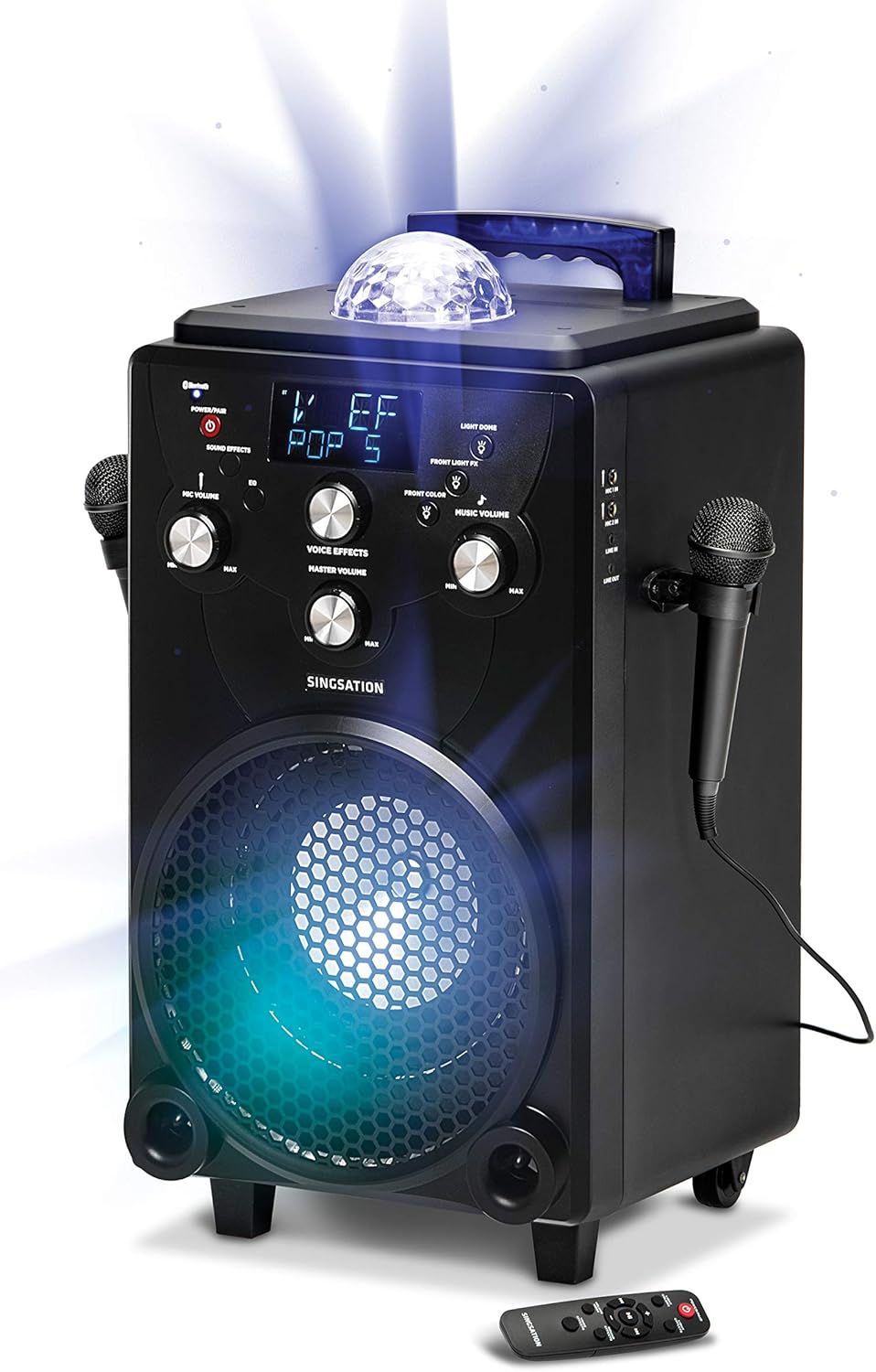
Mufananidzo 5.1: The main unit of the Singsation Professional Karaoke Machine, showing its overall design and primary components.
6. Operating Instructions
This section details how to operate your karaoke machine's various functions.
6.1. Simba On / Off
- Dzvanya uye ubate iyo SIMBA / PAIR button on the control panel or the remote control to turn the unit ON or OFF.
6.2. Mumhanzi Playback
The Singsation Karaoke Machine supports Bluetooth audio streaming and auxiliary input.
6.2.1. Bluetooth Kubatanidza
- Turn on the karaoke machine. The Bluetooth indicator will flash, indicating it's in pairing mode.
- Pane yako smartphone kana piritsi, gonesa Bluetooth uye tsvaga zvishandiso zviripo.
- Select "Singsation" from the list of devices. Once paired, the Bluetooth indicator will glow solid.
- Start playing music from your device. Adjust the Music Volume knob on the karaoke machine.
6.2.2. Inobatsira
- Connect an external audio device (e.g., MP3 player) to the AUX IN port using a 3.5mm audio cable (not included).
- The unit will automatically switch to AUX mode. Adjust the Music Volume knob.
6.3. Maikorofoni Kushandiswa
- Mic Vhoriyamu: Use the MIC VOLUME knob to adjust the volume of the connected microphones.
- Voice Effects Press the VOICE EFFECTS button repeatedly to cycle through the 60 available voice effects. Use the VOICE EFFECTS knob to fine-tune the effect level.
6.4. Migumisiro Yeruzha
- Press the SOUND EFFECTS button to activate one of the 10 built-in sound effects. Press again to cycle through them.
6.5. Chiedza Ratidza
- Light Colors: Press the LIGHT COLORS button to switch between different color modes for the main speaker light.
- Light Effects: Press the LIGHT EFFECTS button to cycle through the 25 dynamic light effects for the main speaker light and the top disco ball light.
- Front Light FX: Use the FRONT LIGHT FX button to control the front-facing light effects.
6.6. Remote Control Mabasa
Iyo inosanganisirwa remote control inopa nyore kuwana kune akakosha mabasa:
- Power/Pair: Turns the unit on/off and initiates Bluetooth pairing.
- Light Colors: Changes the color of the main speaker light.
- Light Effects: Cycles through light show patterns.
- Volume Mode: Switches between adjusting music volume and microphone volume.
- Sound Effects: Activates and cycles through sound effects.
- Voice Effects Cycles through voice transformation effects.
- Playback Controls: Play/Pause, Skip Forward, Skip Backward.

Mufananidzo 6.1: The Singsation remote control, detailing the functions of each button for convenient operation.
7. Kuchengeta
Proper care will ensure the longevity of your karaoke machine:
- Kuchenesa: Pukuta chikwata nemucheka wakapfava, wakaoma. Usashandise abrasive cleaners kana solvents.
- Kuchengeta: Kana isiri kushandiswa, chengetai mudziyo uyu munzvimbo inotonhorera, yakaoma, kure nezuva rakananga uye tembiricha yakanyanya.
- Battery Care: If the unit is not used for an extended period, charge the battery periodically to maintain its health.
8. Kugadzirisa matambudziko
If you encounter issues with your Singsation Professional Karaoke Machine, refer to the following common problems and solutions:
| Dambudziko | Zvinogona Kukonzera | Solution |
|---|---|---|
| Unit haibatike. | Battery is depleted or power adapter is not connected properly. | Connect the power adapter and ensure it's plugged into a working outlet. Allow the unit to charge for a few minutes before attempting to power on again. |
| Hapana ruzha kubva kumutauri. | Music volume is too low, external device volume is low, or incorrect input mode. | Increase the Music Volume knob. Check the volume on your connected Bluetooth device or auxiliary source. Ensure the correct input mode is selected (Bluetooth/AUX). |
| Maikorofoni haisi kushanda. | Microphone not plugged in, Mic Volume too low, or microphone is faulty. | Ensure microphones are securely plugged into the MIC ports. Increase the MIC VOLUME knob. Test with another microphone if available. |
| Bluetooth pairing inokundikana. | Unit is not in pairing mode, or device is too far away. | Press and hold the POWER/PAIR button to enter pairing mode (indicator will flash). Ensure your device is within 30 feet of the karaoke machine. Try unpairing and re-pairing. |
9. Zvinotsanangurwa
| Feature | Detail |
|---|---|
| Brand | Kuimba |
| Model Number | SPKA75 |
| Item Weight | 20.7 makirogiramu |
| Product Dimensions | 12 x 13 x 25 inches |
| Color | Nhema |
| Inowirirana Devices | Smartphone, Tablet |
| Connector Type | XLR (yemamaikorofoni) |
| Mutauri Verenga | 1 |
| Simba Source | Battery Powered |
| Voltage | 12 Volts |
| Special Feature | Portable |
| Inosanganisirwa Zvikamu | Microphone (x2), Remote Control, Power Adapter |
10. Warranty uye Tsigiro
For warranty information or technical support, please refer to the contact details provided on the product packaging or visit the official Singsation website. Chengetedza risiti yako yekutenga sehumbowo hwekutenga kune chero vimbiso yewaranti.


