HXSJ V100 35 Keys Gaming Keyboard User Manual
Muenzaniso: V100
1. Nhanganyaya
Thank you for choosing the HXSJ V100 35 Keys Gaming Keyboard. This compact, single-hand membrane keyboard is designed to enhance your gaming experience with its ergonomic design, programmable features, and vibrant LED backlighting. This manual provides detailed instructions on how to set up, operate, and maintain your keyboard to ensure optimal performance.
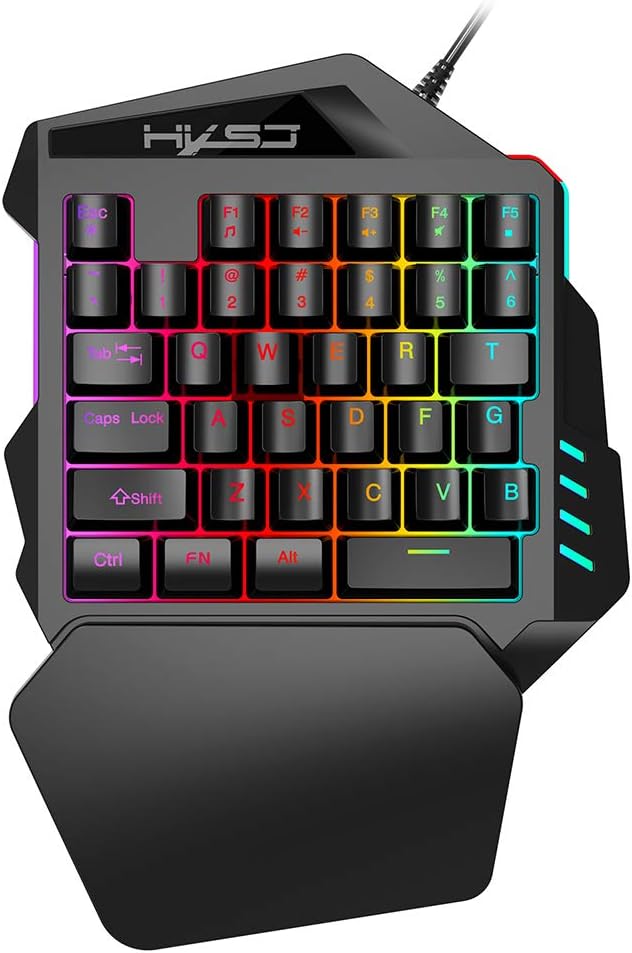
Figure 1: HXSJ V100 35 Keys Gaming Keyboard Overview
The HXSJ V100 is engineered for precision and comfort, making it an ideal companion for games like PUBG, LOL, and CS. Its mini design allows for easy single-hand operation, while the integrated wrist rest provides support during extended gaming sessions.
2. Key Features
- Luminous LED Backlight: Features vibrant LED color backlighting for an immersive gaming atmosphere, especially in low-light conditions.
- Programmable Advanced Control: Offers customizable lighting and key functions for a personalized gaming setup.
- Mini Portable Design: Compact 35-key layout provides a super easy single-hand operating experience, optimizing desk space.
- Ergonomic Wrist Rest: Designed to fit your hand and wrist comfortably, simplifying complex operations and reducing fatigue.
- Wide Compatibility: Supports various operating systems including Win 2000, Win XP, Win ME, Vista, Win7, Win8, Android, Linux, and Apple.

Figure 2: Ergonomic Hand Rest for Enhanced Comfort
3. Package Zviri mukati
Ndokumbira utarise zviri mukati mepakeji pane unboxing kuti uone kuti zvinhu zvese zviripo:
- 1 x HXSJ V100 35 Keys Gaming Keyboard
- 1 x Chinyorwa cheMushandisi
4. Setup Guide
Setting up your HXSJ V100 Gaming Keyboard is straightforward. Follow these steps to get started:
- Batanidza kuChishandiso: Locate an available USB 2.0 port on your computer, laptop, or compatible gaming device.
- Plug In: Insert the USB connector of the keyboard into the USB port.
- Kuisa otomatiki: Yako yekushandisa system inofanirwa kuona uye kuisa madhiraivha anodiwa. Izvi zvinogona kutora nguva shoma.
- Yakagadzirira Kushandiswa: Once the drivers are installed, the keyboard's LED backlight will illuminate, indicating it is ready for use.

Figure 3: Connecting the HXSJ V100 Keyboard to a Device
5. Operating Instructions
The HXSJ V100 keyboard is designed for intuitive use. Here are the primary functions and special key combinations:
5.1 Mabasa Akakosha Akajairwa
The keyboard features 35 standard keys, including alphanumeric keys, function keys (F1-F5), and modifier keys (Ctrl, Shift, Alt, FN). These keys operate as standard input devices for your computer or gaming system.

Figure 4: HXSJ V100 Keyboard Key Layout
5.2 FN Combination Functions
The FN key allows access to multimedia functions. Press and hold the FN key, then press the corresponding function key:
- FN + F1: Music Player
- FN + F2: Volume Decrement
- FN + F3: Volume Increment
- FN + F4: Mute
- FN + F5: Kumbomira/Tamba
Cherechedza: This keyboard features a single backlight color mode as depicted in the product images. The backlight is not customizable to different colors, but provides a consistent, vibrant illumination.
6. Kuchengeta uye Kuchengeta
To ensure the longevity and optimal performance of your HXSJ V100 Gaming Keyboard, follow these maintenance guidelines:
- Kuchenesa: Use a soft, dry cloth to wipe down the keyboard surface. For stubborn dirt, slightly dampIsa jira nemvura kana muchina wekuchenesa usina kunyorova, usingasvibisi. Dzivisa hunyoro hwakawandisa.
- Kubvisa Dust: Shandisa mweya wakamanikidzwa kubvisa huruva nemarara kubva pakati pemakiyi.
- Dzivisa Zvinwiwa: Do not spill liquids on the keyboard. If a spill occurs, immediately unplug the keyboard and allow it to dry completely before reconnecting.
- Kuchengeta: Chengetedza keyboard munzvimbo inotonhorera, yakaoma kure nechiedza chezuva uye tembiricha yakanyanyisa kana isiri kushandiswa kwenguva yakareba.
- Bata Nekungwarira: Avoid dropping the keyboard or subjecting it to strong impacts, which can damage internal components.
7. Kugadzirisa matambudziko
If you encounter issues with your HXSJ V100 Gaming Keyboard, please refer to the following common problems and solutions:
| Dambudziko | Zvinogona Kukonzera | Solution |
|---|
| Kiyibhodhi haisi kudaira | Yakasununguka USB yekubatanidza, yakanganisa USB port, mutyairi nyaya. | Ensure USB cable is securely plugged in. Try a different USB port. Restart your computer. Check Device Manager for driver issues. |
| Backlight haisi kushanda | Keyboard not powered, backlight setting. | Ensure keyboard is properly connected and receiving power. The backlight is always on when powered. If not, try reconnecting. |
| Makiyi asiri kunyoresa | Dust/debris under keys, software conflict. | Use compressed air to clean around and under the affected keys. Test the keyboard on another computer to rule out software issues. |
| FN multimedia keys not working | Incorrect key combination, software conflict. | Ensure you are pressing and holding the FN key before pressing the desired F key. Check if other multimedia software is interfering. |
8. Zvigadzirwa zveChigadzirwa
Detailed technical specifications for the HXSJ V100 Gaming Keyboard:
| Parameter | Value |
|---|
| Product Name | One-handed Gaming Keyboard |
| Product Model | V100 |
| Chigadzirwa Chigadzirwa | USB 2.0 |
| Keyboard Standard | Mini Keyboard |
| Operation Style | Membrane |
| Number of Keys | 35 makiyi |
| Product Line Length | 1.6 mamita |
| Kushanda Current | 100mA |
| Chigadzirwa Net Weight | 350g |
| Kukura Kwechigadzirwa (L*W*H) | 26 x 18 x 4 cm |
| Package Weight | 415g |
| Package Size | 26 x 19 x 4 cm |
| Inoenderana OS | Win 2000, Win XP, Win ME, Vista, Win7, Win8, Android, Linux, Apple |
| Backlight Color | RGB (fixed mode) |

Figure 5: Product Label on the Bottom of the Keyboard
9. Warranty uye Tsigiro
HXSJ products are manufactured to high-quality standards. For information regarding warranty coverage, technical support, or service inquiries, please refer to the warranty card included with your product or visit the official HXSJ website. Ndapota chengetedza humbowo hwako hwekutenga kune chero vimbiso yewaranti.


