Nhanganyaya
Ndatenda nekutengaasing the Caliber Alarm Clock with QI Charging Station. This device combines a digital alarm clock with a convenient wireless charging pad and a USB charging port, designed to simplify your bedside setup. It also features an adjustable night light and a large LED display for clear visibility.
This manual provides detailed instructions on how to set up, operate, maintain, and troubleshoot your new alarm clock. Please read it thoroughly before use to ensure optimal performance and longevity of the product.
Gadzirira
Kuburitsa: Bvisa wachi yekuyambira kubva mupakeji yayo nokungwarira. Iva nechokwadi chekuti zvinhu zvese zviripo: chikamu chewachi yekuyambira uye adapta yemagetsi.
Power Connection: Connect the provided power adapter to the DC input port on the back of the alarm clock. Plug the other end of the adapter into a standard wall outlet. The display will illuminate.
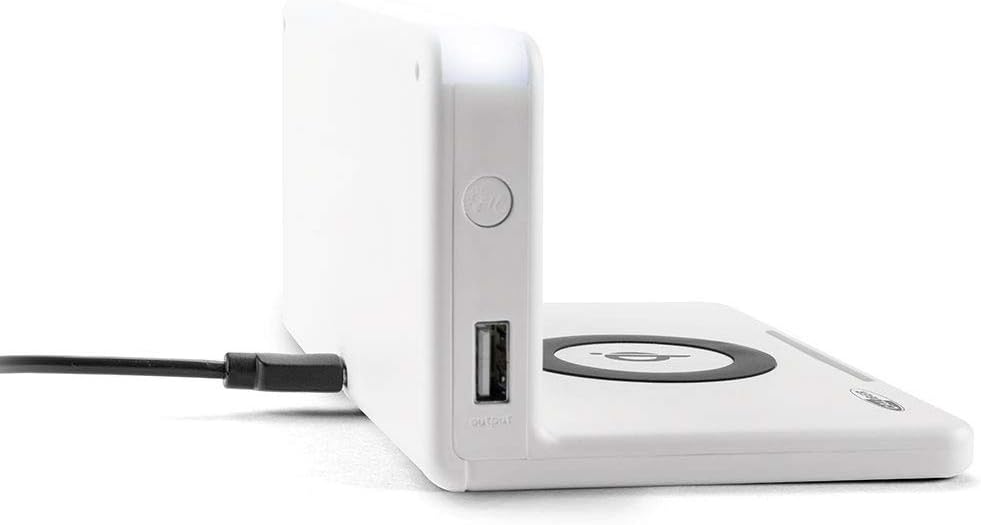
Mufananidzo: Side view of the alarm clock, illustrating the power input port (left) and the USB output port (right).
Battery Installation (Backup): The unit includes 1 Lithium Ion battery for backup. This battery maintains time settings during power outages. No user installation is typically required for this pre-installed battery.
Kugadzika Nguva Yekutanga: Upon first power-up, the clock may display a default time or require manual setting. Refer to the "Operating" section for detailed instructions on setting the time.
Operating Instruction
Kugadza Nguva uye Zuva
- Dzvanya uye ubate iyo NGUVA ISETA button (location may vary, typically on the back or top) until the hour digits flash.
- Shandisa iyo + or - mabhatani ekugadzirisa awa.
- Press NGUVA ISETA again to move to minutes, then adjust with + or -.
- Repeat for year, month, and day if applicable.
- Press NGUVA ISETA one last time to confirm and exit.
Kuisa maAlarms
- Dzvanya uye ubate iyo ALARAMU SETA button (or similar) until the alarm hour digits flash.
- Gadzirisa awa yealamu nemaminitsi uchishandisa + or - mabhatani.
- Press ALARAMU SETA kusimbisa.
- Kuti uvhure/kudzima alarm, tinya iyo ALARAMU ON / OFF bhatani. Chiratidzo chealamu chichaonekwa/chinonyangarika pachiratidziro.
- Kana alarm yarira, tinya pa KUSVIRA button for a temporary pause, or any other button to turn it off for the day.
Using the QI Wireless Charging Station
The alarm clock features a built-in QI wireless charging pad for compatible devices.
- Iva nechokwadi chekuti wachi yekuridza alarm yakabatidzwa.
- Place your QI-compatible smartphone or device directly onto the charging pad, centering it over the QI chiratidzo.
- A charging indicator (e.g., an LED light or on-screen icon) will illuminate to confirm charging has begun. If charging does not start, reposition your device.

Image: A smartphone placed on the QI charging pad of the alarm clock, showing the charging interface on the phone screen.

Image: The alarm clock with a phone positioned on its wireless charging surface, indicating active charging.
Uchishandisa USB yekuchaja Port
A USB output port is available on the side of the unit for charging non-QI compatible devices or for faster wired charging.
- Connect your device's USB charging cable to the USB output port on the alarm clock.
- Batanidza rimwe divi retambo nemudziyo wako. Kuchaja kunotanga otomatiki.
Adjusting Display Brightness and Night Light
- The alarm clock features adjustable display brightness. Look for a DIMMER or KUpenya button, typically on the back or top. Press it repeatedly to cycle through brightness levels.
- To activate or adjust the night light, locate the dedicated CHIEDZA CHAHusiku button. Press it to turn the light on/off or cycle through different brightness settings if available.
Maintenance
- Kuchenesa: Disconnect the power adapter before cleaning. Use a soft, dry cloth to wipe the surface of the alarm clock. Do not use abrasive cleaners, waxes, or solvents as they may damage the finish.
- Kuchengeta: Kana ukachengeta mudziyo kwenguva yakareba, bvisa simba rawo wouchengeta munzvimbo inotonhorera, yakaoma.
- Kubata: Avoid dropping the unit or subjecting it to strong impacts. Keep it away from water and high humidity.
Kugadzirisa matambudziko
| Dambudziko | Zvinogona Kukonzera | Solution |
|---|---|---|
| Chiratidziro chewachi hachina chinhu. | Hapana kubatanidza magetsi. | Iva nechokwadi chekuti adapta yemagetsi yakabatanidzwa zvakanaka muyuniti uye pamadziro anoshanda. |
| QI charging not working. | Device not QI-compatible; device not properly aligned; foreign objects on pad; phone case too thick. | Verify device compatibility. Reposition device on the center of the pad. Remove any foreign objects. Remove thick phone cases. |
| Alarm hainzwi. | Alarm not activated; volume too low; incorrect alarm time. | Ensure the alarm icon is displayed. Check alarm volume settings. Verify the alarm time is set correctly. |
| Nguva haina kururama. | Nguva haina kuiswa nemazvo; kukanganiswa kwemagetsi. | Reset the time manually. If power was interrupted, the backup battery should maintain time, but a manual check is recommended. |
Zvinotsanangurwa
| Feature | Detail |
|---|---|
| Brand | Caliber |
| Model Number | HCG018QI/W |
| Color | Chena |
| Display Type | Digital |
| Special Feature | Night light, QI charging station, USB charging port |
| Simba Source | Corded Electric |
| Product Dimensions | 7.09 x 4.25 x 3.86 inches |
| Item Weight | 7.9 ounces (225 magiramu) |
| Mabhatiri | 1 Lithium Ion battery (included, for backup) |
| GTIN | 08714505047157 |
Warranty uye Support
This Caliber product is designed for reliability and performance. For information regarding warranty coverage, please refer to the warranty card included with your purchase or visit the official Caliber website.
Should you encounter any issues not covered in the troubleshooting section, or require further assistance, please contact Caliber customer support. Contact details can typically be found on the product packaging or the manufacturer's official website.


