Nhanganyaya
Ndatenda nekutengaasing the Muse M-1935 DJ Bluetooth Party Speaker. This powerful audio system is designed to deliver high-quality sound with dynamic light effects, perfect for any gathering. Featuring Bluetooth connectivity, USB playback, AUX input, and a microphone jack, it offers versatile entertainment options. Please read this manual carefully before using the device to ensure proper operation and to maximize its performance.
Yakakosha Mirayiridzo Yekuchengetedza
- Verenga mirairo iyi.
- Chengeta mirairo iyi.
- Teerera nyevero dzose.
- Tevera mirairo yose.
- Usashandise mudziyo uyu pedyo nemvura.
- Chenesa chete nemucheka wakaoma.
- Usavhare chero mazaru emhepo. Isa maererano nemirairo yemugadziri.
- Usaise padhuze nechero zvitubu zvekupisa zvakaita semaradiator, marejita ekupisa, zvitofu, kana zvimwe midziyo (kusanganisira amplifiers) zvinoburitsa kupisa.
- Chengetedza tambo yemagetsi kubva pakufambiswa kana kudzvanywa, kunyanya pamapulagi, midziyo yekurerutsira, nenzvimbo yavanobuda kubva mumidziyo.
- Shandisa zvinonamirwa/zvishandiso zvinotsanangurwa nemugadziri chete.
- Bvisa mudziyo uyu panguva yemadutu emheni kana kuti usina kushandiswa kwenguva yakareba.
- Tumira masevhisi ese kuvashandi vanokwanisa. Kushumira kunodiwa kana mudziyo wakuvadzwa neimwe nzira, senge tambo yemagetsi-yekugovera kana plug yakuvadzwa, mvura yadeuka kana zvinhu zvawira mumidziyo, iyo midziyo yave ichinaya mvura kana hunyoro, haishande zvakajairika. , kana kuti yadonha.
Package Zviri mukati
Ndokumbira utarise kuti zvinhu zvese zvakanyorwa pazasi zvinosanganisirwa mupakeji yako:
- Muse M-1935 DJ Party Speaker
- Remote Control
- AUX IN Cable (3.5mm)
- Wired Maikorofoni
- Power Cable
- User Manual

Image showing the Muse M-1935 DJ Party Speaker along with its standard accessories: a remote control, a 3.5mm AUX input cable, and a wired microphone. These components are essential for full functionality and versatile use of the speaker system.
Product Overview
The Muse M-1935 DJ is a tower-type party speaker featuring a robust design and multiple connectivity options. It includes an amber LED display for clear information, integrated color lights and flash effects for dynamic visuals, and various input ports for audio playback.
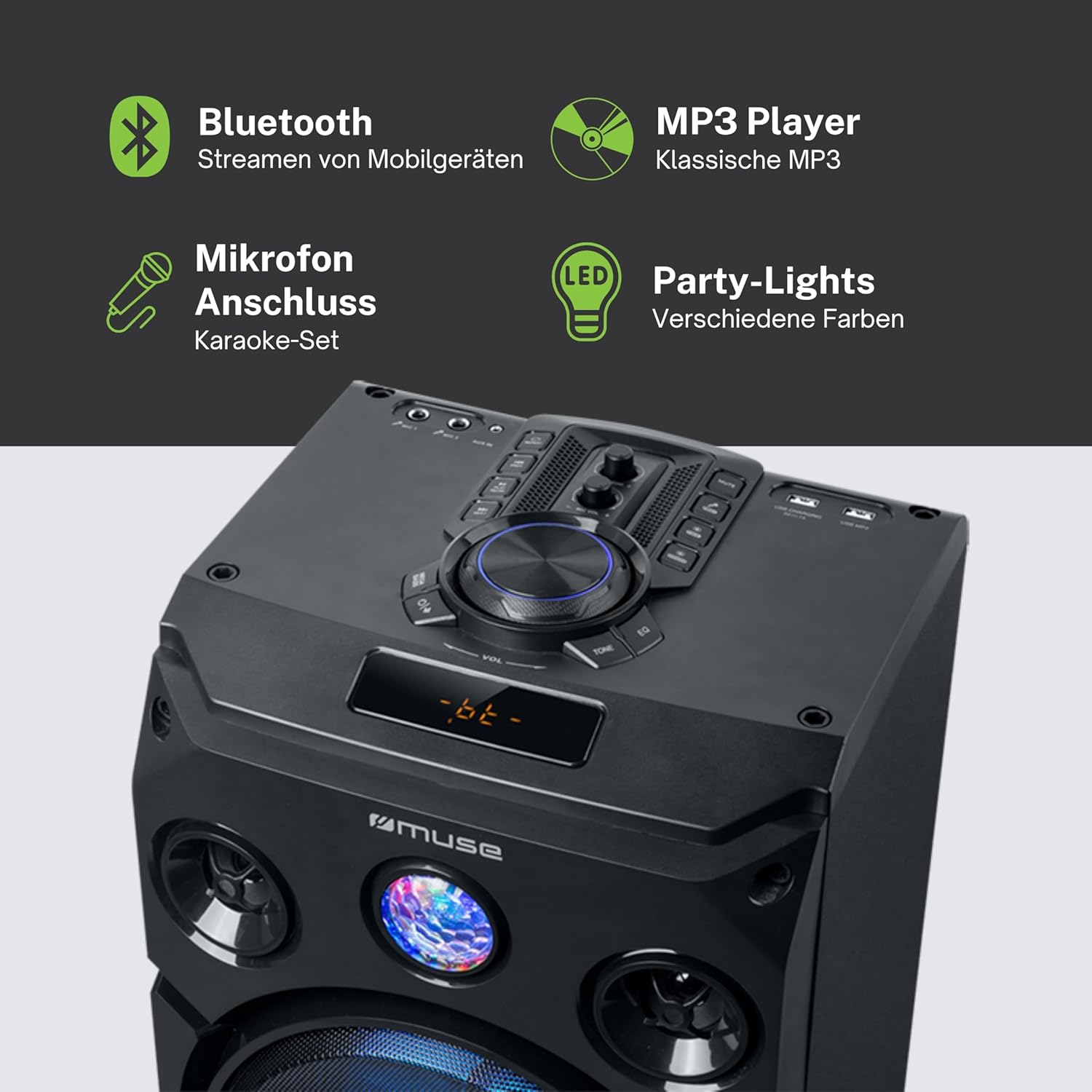
Mufananidzo uyu unopa zvakadzama view of the speaker's key features, including the control panel at the top, the amber LED display, and the integrated party lights. Icons indicate support for Bluetooth streaming, MP3 playback via USB, microphone connection for karaoke, and dynamic party light effects.
Gadzirira
1. Simba Connection
- Ensure the speaker is placed on a stable, flat surface.
- Connect the power cable to the AC IN port on the back of the speaker.
- Batanidza rimwe divi rewaya yemagetsi muchikamu chekunze chemadziro (AC 100-240V, 50/60Hz).
2. Audio Connections (Optional)
- AUX Input: For connecting external audio devices (e.g., smartphone, tablet, MP3 player) via a 3.5mm audio cable. Insert one end of the AUX cable into the AUX IN port on the speaker and the other end into your device's headphone jack.
- USB Kutamba: Isa USB flash drive ine MP3 audio files into the USB port. The speaker will automatically detect and begin playing compatible files.
3. Microphone Connection (Optional)
- Connect the wired microphone to the MIC IN jack on the speaker. Adjust the microphone volume using the dedicated control on the speaker's panel.
Operating Instruction
1. Powering On / Off
- Press the SIMBA button on the control panel or remote control to turn the speaker on or off.
2. Bluetooth Kubatanidza
- Turn on the speaker. The LED display will show the current mode.
- Press the MODE button to select Bluetooth mode. The display will show "BT" and an indicator will flash, signifying it's ready for pairing.
- Pamudziyo wako une Bluetooth (smartphone, tablet, nezvimwewo), vhura Bluetooth wobva watsvaga michina iripo.
- Select "MUSE M-1935 DJ" from the list. Once paired, the speaker will emit a confirmation sound, and the Bluetooth indicator will stop flashing.
- Iye zvino wava kukwanisa kuridza odhiyo pasina waya kubva pamudziyo wako kuenda kuspika.
3. USB Playback
- Insert a USB flash drive into the USB port. The speaker will automatically switch to USB mode and begin playing MP3 files.
- Shandisa iyo TAMBA/KUMIRA, ZVINOTEVERA,uye ZVAKApfuura mabhatani ekudzora kutamba.
4. AUX Input
- Connect your external audio device to the AUX IN port using the provided 3.5mm cable.
- Press the MODE button to select AUX mode. Audio will now play through the speaker.
5. FM Radio Kushanda
- Press the MODE bhatani rekusarudza FM Radio mode.
- Dzvanya uye ubate iyo TAMBA/KUMIRA button to initiate an automatic scan for FM stations. The speaker will save found stations as presets (up to 60 presets).
- Shandisa iyo ZVINOTEVERA uye ZVAKApfuura mabhatani ekufamba nenzira dzakachengetedzwa.
6. Maikorofoni Kushandiswa
- Ensure the microphone is connected to the MIC IN jack.
- Adjust the microphone volume using the dedicated MIC VOL knob on the control panel.
7. Light Effects Control
- The speaker features integrated color lights and flash effects. Use the CHIEDZA button on the control panel or remote to cycle through different light modes or turn them off.
8. Volume and Tone Control
- Gadzirisa vhoriyamu huru uchishandisa hombe VOLUME knob.
- Shandisa iyo Bass uye DAMBUDZIKO controls (if available) to fine-tune the audio output.

This diagram visually represents the diverse functionalities of the speaker, such as dynamic color and flash lighting, the clear amber LED display, USB connectivity for MP3 playback and charging, built-in FM radio with extensive preset memory, and a versatile AUX input for external devices.
Maintenance
- Kuchenesa: Disconnect the power before cleaning. Use a soft, dry cloth to wipe the exterior of the speaker. Do not use liquid cleaners or aerosol sprays.
- Kuchengeta: Kana isingashandiswi kwenguva yakareba, chengeta mukurukuri munzvimbo inotonhorera, yakaoma, kure nechiedza chezuva uye tembiricha yakanyanyisa.
- Battery Care: The speaker contains a Lithium-ion battery. For optimal battery life, avoid fully discharging the battery frequently and store the unit with a partial charge if not used for long periods.
Kugadzirisa matambudziko
| Dambudziko | Zvinogona Kukonzera | Solution |
|---|---|---|
| Hapana simba | Power cable not connected; Power outlet faulty; Speaker turned off. | Ensure power cable is securely connected. Try a different power outlet. Press the POWER button to turn on the speaker. |
| Hapana ruzha | Volume too low; Incorrect input mode selected; Audio cable not connected properly (AUX); Bluetooth not paired. | Increase volume. Select the correct input mode (Bluetooth, AUX, USB, FM). Check audio cable connections. Re-pair Bluetooth device. |
| Bluetooth pairing yakundikana | Mutauri asiri mukuita pairing; Mudziyo wakanyanya kureba; Kupindira. | Ensure speaker is in Bluetooth pairing mode. Move device closer to speaker (within 10m). Avoid obstacles and other wireless devices. |
| Kutamba kwe USB hakusi kushanda | Dhiraivha yeUSB haina kurongwa nemazvo; Haienderane file types; USB drive damaged. | Ensure USB drive is FAT32 formatted. Only MP3 files dzinotsigirwa. Edza imwe USB drive yakasiyana. |
| Maikorofoni haisi kushanda | Microphone not connected; MIC VOL too low. | Ensure microphone is securely plugged into MIC IN. Increase the MIC VOL knob. |
Zvinotsanangurwa
| Feature | Tsanangudzo |
|---|---|
| Model Number | M-1935 DJ |
| Output Power | 400 Watts |
| Mutauri Rudzi | Tower |
| Kubatana Technology | Bluetooth, USB, AUX |
| Audio Input | Microphone jacks, AUX IN (3.5mm) |
| Special Features | Bluetooth, Color Lights, Flash Effects, Amber LED Display, FM Radio (60 presets), USB Charging |
| Simba Source | Electric Cable, Built-in Lithium-ion Battery |
| Material | Plastiki |
| Color | Nhema |
| Zviyero zveChigadzirwa (L x W x H) | 83.5 x 26.5 x 28.7 cm |
| Item Weight | 9.05 makirogiramu |
| Mugadziri | MUSE |
| Nyika Yekwakabva | Bherujiyamu |

This technical drawing provides precise measurements of the Muse M-1935 DJ speaker, indicating its height (835mm), width (287mm), and depth (265mm). These dimensions are crucial for planning placement and transportation.
Warranty uye Support
Mugadziri Warranty
The Muse M-1935 DJ Party Speaker comes with a three-year warranty against manufacturing defects. Please retain your proof of purchase for warranty claims. This warranty covers defects in materials and workmanship under normal use. It does not cover damage caused by misuse, accidents, unauthorized modifications, or normal wear and tear.
Spare Parts Kuwanikwa
Spare parts for this product are guaranteed to be available for 2 years from the date of purchase within the EU.
Mutengi Support
For technical assistance, warranty service, or general inquiries, please contact Muse customer support. Refer to the official Muse webwebhusaiti kana magwaro ako ekutenga kuti uwane ruzivo rwemazuva ano rwekuonana.


