Nhanganyaya
Thank you for choosing the TOPTECH Jet-4 Portable Bluetooth Speaker. This manual provides essential information for setting up, operating, and maintaining your speaker to ensure optimal performance and longevity. Please read this manual thoroughly before using the product.

Image: The TOPTECH Jet-4 Bluetooth Speaker, showcasing its compact design and vibrant LED lighting.
Safety Information
To prevent fire or shock hazards, always follow basic safety precautions when using this product:
- Usaisa chitauriri pamvura kana hunyoro.
- Do not disassemble or modify the speaker. Refer all servicing to qualified personnel.
- Chengeta mutauri kure nezuva rakananga, nzvimbo dzinopisa, uye tembiricha yakanyanya.
- Dzivisa kudonhedza kana kuita kuti mukurukuri apedzisire akasimba.
- Shandisa chete tambo yekuchaja yakatarwa uye adapta yemagetsi.
Package Zviri mukati
- TOPTECH Jet-4 Bluetooth Speaker
- USB Kuchaja Cable
- User Manual
Product Overview
Kudzora uye Ports
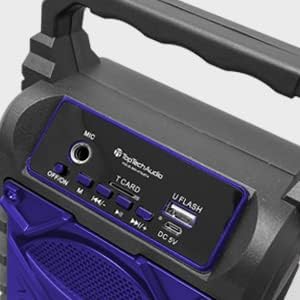
Mufananidzo: Zvakadzama view of the speaker's top control panel, showing various buttons and input ports.
- MIC Input: Connect an external microphone for karaoke.
- DZIMA/VISA Switch: Power the speaker on or off.
- M (Modhi) Bhatani: Switch between Bluetooth, AUX, USB, and TF Card modes.
- Previous / Volume Down Button: Kudzvanya kupfupi kweyapfuura track, dzvanya kwenguva refu kuderedza vhoriyamu.
- Tamba / Kumbomira Bhatani: Ridza kana kumbomira kutamba odhiyo.
- Next / Volume Up Button: Kudzvanya kupfupi kune inotevera track, dzvanya kwenguva refu kuti uwedzere vhoriyamu.
- T CARD Slot: Insert a TF (MicroSD) card for direct audio playback.
- U FLASH (USB) Port: Isa USB flash drive yekutamba yakananga yekuteerera.
- DC 5V Chiteshi: Connect the USB charging cable to power and charge the speaker.
Key Features

Image: An infographic showing the TOPTECH Jet-4 speaker with icons representing its key features: easy portability, mic port, mode karaoke, disco light, TF card port, and USB port.
- Inzwi Rine Simba: Dual-driver stereo output delivers crisp highs and deep bass for a premium audio experience.
- Kutamba Kwemhando Dzakawanda: Supports Bluetooth, AUX, USB, and TF card input for versatile music streaming.
- Karaoke Yakagadzirira: Built-in karaoke mode with light effects and mic support makes any party more fun.
- TWS Pairing Support: Connect two speakers wirelessly for immersive, room-filling sound.
- Hupenyu Hurefu Hwebhatiri: Enjoy up to 6 hours of playtime with a rechargeable battery, perfect for all-day events.
Gadzirira
Kutanga Charge
Before first use, fully charge the speaker. Connect the provided USB charging cable to the DC 5V port on the speaker and the other end to a USB power adapter (not included) or a computer USB port.

Image: A visual representation of a fully charged battery, symbolizing the speaker's long battery life.
The charging indicator light will illuminate during charging and turn off or change color when fully charged. A full charge typically takes a few hours.
Operating Instruction
Bluetooth Kubatanidza
- Turn on the speaker by sliding the OFF/ON switch to the 'ON' position. The speaker will enter Bluetooth pairing mode automatically, indicated by a flashing LED light and an audible prompt.
- Bvumira Bluetooth pafoni yako, tablet, kana chimwe chinhu chinoshandisa Bluetooth.
- Tsvaga available Bluetooth devices and select "JET-4" from the list.
- Kana yabatanidzwa, sipika ichapa vimbiso inonzwika, uye mwenje we LED uchamira kupenya.
- Iwe unogona ikozvino kuridza odhiyo kubva pane chako kifaa kuburikidza nemutauri.
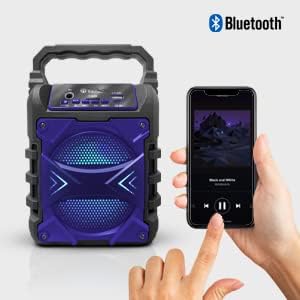
Image: The TOPTECH Jet-4 speaker positioned next to a smartphone, illustrating the seamless Bluetooth connection process.
Playback Modes (AUX, USB, TF Card)
Press the 'M' (Mode) button to cycle through available playback modes:
- AUX Maitiro: Connect an external audio device using a 3.5mm audio cable (not included) to the AUX input.
- USB Modhi: Insert a USB flash drive into the 'U FLASH' port. The speaker will automatically detect and play compatible audio files.
- TF Kadhi Mode: Insert a TF (MicroSD) card into the 'T CARD' slot. The speaker will automatically detect and play compatible audio files.
Karaoke Mode
To use the karaoke function, connect a microphone (not included) to the 'MIC' input port. Adjust the microphone volume as needed. The speaker's built-in light effects will enhance the karaoke experience.
TWS Pairing (True Wireless Stereo)
For an enhanced stereo sound experience, you can pair two TOPTECH Jet-4 speakers together:
- Ensure both Jet-4 speakers are powered on and not connected to any Bluetooth device.
- On one speaker (this will be the primary speaker), long press the 'M' (Mode) button until you hear a pairing tone.
- Maspika maviri aya anozobatana otomatiki. Kana angobatanidzwa, uchanzwa inzwi rekusimbisa.
- Now, connect your Bluetooth device to the primary speaker as described in the 'Bluetooth Pairing' section. Audio will play through both speakers in stereo.

Image: Two TOPTECH Jet-4 speakers wirelessly connected to a smartphone, demonstrating the True Wireless Stereo (TWS) pairing feature for expanded sound.
Maintenance
- Geza mutauri nejira rakapfava, rakaoma. Usashandise abrasive cleaners kana solvents.
- Chengeta mukurukuri munzvimbo inotonhorera, yakaoma kana isiri kushandiswa.
- Avoid prolonged exposure to extreme temperatures or humidity.
Kugadzirisa matambudziko
| Dambudziko | Solution |
|---|---|
| Mutauri haabati simba. | Iva nechokwadi chekuti bhatiri rachajwa. Batanidza sipika kune simba remagetsi uchishandisa tambo yeUSB. |
| Hapana ruzha kubva kumutauri. | Tarisa huwandu hwevhoriyamu paspika nepamudziyo wako wakabatana. Iva nechokwadi chekuti wasarudza nzira chaiyo yekutamba. |
| Bluetooth pairing inokundikana. | Ensure the speaker is in pairing mode. Turn off Bluetooth on your device and turn it back on. Try restarting both the speaker and your device. Make sure no other devices are connected to the speaker. |
| Yakashata yemhando yepamusoro. | Move the speaker closer to your Bluetooth device to reduce interference. Ensure the audio source is of good quality. |
Zvinotsanangurwa
| Feature | Detail |
|---|---|
| Brand | TOPTECH |
| Model Number | JET-4-BLUE |
| Simba Source | Battery Powered |
| Kubatana Technology | Bluetooth, USB |
| Audio Input | Guitar Input, Karaoke Input, USB |
| Nhamba yeChannels | 2 |
| Material | Plastiki, Metal |
| Item Weight | 1.54 makirogiramu |
| Package Dimensions | 9.29 x 6.38 x 4.17 inches |
| UPC | 689259338593 |
Warranty uye Support
For warranty information and customer support, please refer to the contact details provided on the product packaging or visit the official TOPTECH website. Chengetedza risiti yako yekutenga sehumbowo hwekutenga kune chero vimbiso yewaranti.


