1. Nhanganyaya
Ndatenda nekutengaasing the GLIDiC Sound Air TW-5000s True Wireless Earbuds. This manual provides essential information for the safe and effective use of your device. Please read it thoroughly before use and retain it for future reference.
2. Safety Information
- Usaise maearbuds kana kechi yekuchaja kune tembiricha yakanyanyisa, zuva rakananga, kana hunyoro hwepamusoro.
- Dzivisa kudonhedza, kupwanya, kana kuparadzanisa mudziyo. Izvi zvinogona kukonzera kukuvara uye garandi haishande.
- Keep the device away from water and liquids. While sweatproof, immersion can cause damage.
- Shandisa chete tambo yekuchaja yakapihwa kana certified yakaenzana.
- Kuteerera kwenguva refu pahuwandu hwepamusoro kunogona kukonzera kukuvara kwekunzwa. Gadzirisa huwandu hwenzwi kusvika padanho rakachengeteka.
- Be aware of your surroundings when using earbuds, especially in traffic or hazardous environments.
3. Package Zviri mukati
Ona kuti zvinhu zvese zviripo mupasuru yako:
- GLIDiC Sound Air TW-5000s True Wireless Earbuds (Left and Right)
- Kuchaja Case
- Waya yekuchaja yeUSB (Type-A kuenda kuMicro-USB)
- Akawanda saizi yematipi nzeve (S, M, L)
- Chinyorwa Chirairo (gwaro iri)
4. Chigadzirwa Pamusoroview
Familiarize yourself with the components of your GLIDiC Sound Air TW-5000s earbuds and charging case.

Figure 4.1: GLIDiC Sound Air TW-5000s Earbuds and Charging Case. The image displays the black charging case with the GLIDiC logo on top, positioned next to the two black earbuds.
Zvikamu zveEarbud
- Multifunction Bhatani: Located on the outer surface of each earbud, used for playback control, call management, and voice assistant activation.
- Chiratidzo che LED: Provides status information (pairing, charging, power).
- Maikorofoni: For voice calls and voice assistant commands.
- Kuchaja Mazita: Located on the underside of each earbud, for charging within the case.
- Zano renzeve: Silicone tip for in-ear comfort and sound isolation.
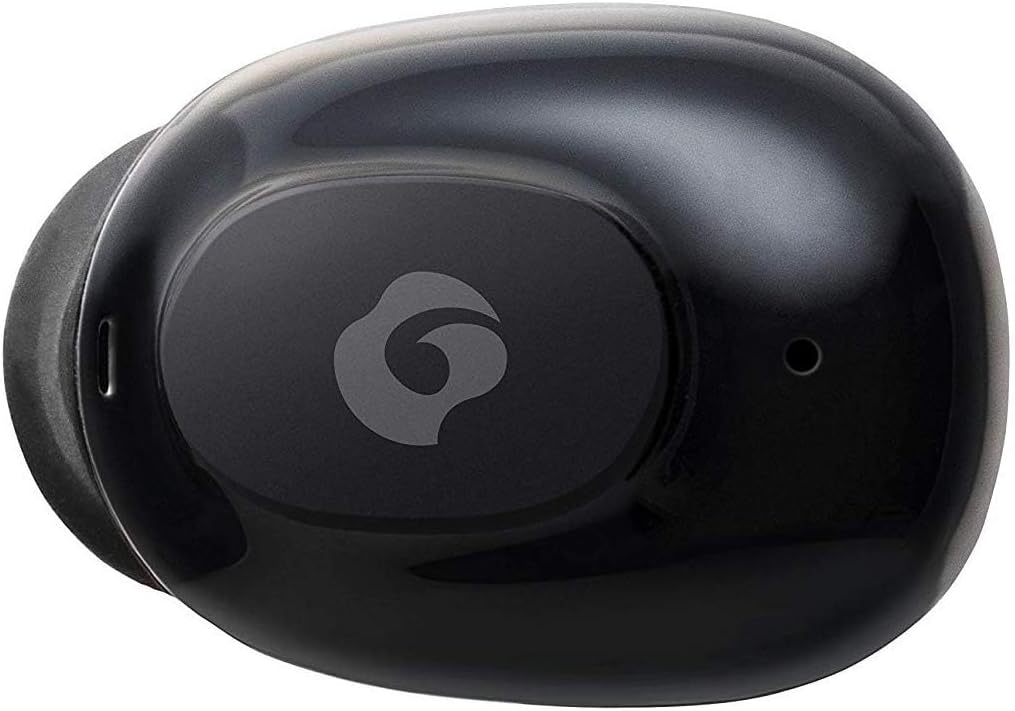
Mufananidzo 4.2: Pedyo-kumusoro view of a single GLIDiC earbud, highlighting the multifunction button with the GLIDiC logo and the microphone opening.
Zvikamu zveKesi yekuchaja
- Kuchaja Ports: Internal contacts for earbuds, external port for case charging.
- Case LED Indicator: Shows charging status of the case.
- Lid: Protects earbuds and secures them during charging.
5. Setup
5.1 Kutanga Kuchaja
- Place both earbuds into the charging case. Ensure they are correctly seated, and the LED indicators on the earbuds illuminate.
- Batanidza tambo yekuchaja yeUSB kune chinobatidza chiri pabhokisi wobva wabatanidza rimwe divi musosi yemagetsi yeUSB (semuenzaniso, komputa, adapta yemadziro).
- The case LED indicator will show charging status. Allow approximately 2 hours for a full charge of both earbuds and the case.
- Once fully charged, disconnect the charging cable. The earbuds offer up to 60 days of standby time when stored in the fully charged case.
5.2 Kubatanidza neBluetooth Chishandiso
- Ita shuwa kuti maearbuds akachajwa.
- Open the charging case. The earbuds will automatically enter pairing mode, and their LED indicators will flash.
- Pamudziyo wako unoshanda neBluetooth (smartphone, tablet, nezvimwewo), enda kuzvirongwa zveBluetooth.
- Tsvaga available devices. Select "GLIDiC TW-5000s" from the list.
- Once connected, the earbud LED indicators will stop flashing and may show a solid light or turn off, depending on the model. A voice prompt may also confirm the connection.
- If pairing fails, place the earbuds back in the case, close the lid, wait a few seconds, and then repeat the steps.
6. Operating Instructions
6.1 Simba On/Kudzima
- Power On: Open the charging case, or press and hold the multifunction button on each earbud for approximately 3 seconds.
- Power Off: Place the earbuds back into the charging case and close the lid, or press and hold the multifunction button on each earbud for approximately 5 seconds.
6.2 Kuridza Mumhanzi
- Tamba/Kumbomira: Press the multifunction button once on either earbud.
- Next Track: Double-press the multifunction button on the right earbud.
- Previous Track: Double-press the multifunction button on the left earbud.
- Vhoriyamu Kumusoro: Triple-press the multifunction button on the right earbud.
- Vhoriyamu Pasi: Triple-press the multifunction button on the left earbud.
6.3 Call Management
- Pindura/Pedzisa Kufona: Press the multifunction button once on either earbud.
- Ramba Kufona: Press and hold the multifunction button on either earbud for approximately 2 seconds.
6.4 Izwi Mubatsiri
- Shandisa Izwi Mubatsiri: Press and hold the multifunction button on either earbud for approximately 2 seconds (when not on a call).
6.5 Multi-Communication Mode
The GLIDiC Sound Air TW-5000s features a multi-communication mode that allows select ambient sounds to be heard without compromising audio quality. This enhances user awareness and safety.
- Activate/Deactivate Multi-Communication Mode: Consult the specific instructions provided with your device, as activation methods can vary. Typically, this involves a specific press sequence on the multifunction button or an option within a companion app if available.
7. Kuchengeta
7.1 Kuchenesa
- Pukuta maearbud nekesi yekuchaja nejira rakapfava, rakaoma, risina lint.
- Usashandise abrasive cleaners, doro, kana makemikari zvinonyungudutsa.
- Gently remove ear tips and clean them with mild soap and water if necessary. Ensure they are completely dry before reattaching.
- Use a dry cotton swab to carefully clean the charging contacts on both the earbuds and the case.
7.2 Kuchengeta
- Kana isiri kushandiswa, chengetedza maearbuds mukesi yavo yekuchaja kuti uzvidzivirire uye uone kuti inoramba yakachajiwa.
- Chengetedza mudziyo munzvimbo inotonhorera, yakaoma, kure nechiedza chezuva uye tembiricha yakanyanyisa.
8. Kugadzirisa matambudziko
If you encounter issues with your GLIDiC Sound Air TW-5000s, refer to the following common problems and solutions:
| Dambudziko | Possible Solution |
|---|---|
| Maearbud haabatidzike. | Ensure earbuds are charged. Place them in the charging case and connect the case to a power source. |
| Maearbud haaenderane nemudziyo. |
|
| Imwe chete earbud ine ruzha. |
|
| Kesi yekuchaja haichaji. |
|
| Hunhu hweruzha hahuna kunaka kana kuti hunonzwika nguva nenguva. |
|
9. Zvinotsanangurwa
| Feature | Detail |
|---|---|
| Model Name | TW-5000s |
| Kubatana Technology | Wireless (Bluetooth) |
| Bluetooth Range | 10 Mamita |
| Frequency Range | 20 Hz - 20,000 Hz |
| Battery Life (Carrying Case Standby) | Kusvikira ku60 Mazuva |
| Mvura Resistance Level | Inodzivirira Mvura (Inodzivirira Dikita) |
| Control Type | Kudzora Midhiya, Kubata, Inzwi |
| Special Features | Microphone Included, Noise Cancellation, Multi-communication mode |
| Material | Plastic, TPE, and Silicone |
| Zviyero (Earbud) | 0.98 x 0.67 x 0.91 inches (anenge) |
| Item Weight | 9.6 ounces (huremu hwese hwepakeji) |
| UPC | 811559030024 |
10. Warranty uye Tsigiro
GLIDiC products are designed for reliability and performance. For specific warranty details, please refer to the warranty card included with your purchase or visit the official GLIDiC website. If you require technical support or have questions not covered in this manual, please contact GLIDiC customer service through their official channels.
Ndapota chengetedza humbowo hwako hwekutenga kwezvichemo zvewaranti.


