1. Nhanganyaya
Ndatenda nekutengaasing the TWS i17 Dual Earbuds. This manual provides essential information for setting up, operating, and maintaining your new wireless earbuds. Please read this manual thoroughly before use to ensure optimal performance and longevity of your device.
2. Safety Information
To prevent damage to your earbuds or injury to yourself or others, please observe the following precautions:
- Usaisa maearbuds kana kechi yekuchaja kune tembiricha yakanyanyisa, mwando, kana zvinwiwa.
- Dzivisa kudonhedza, kukanganisa, kana kubvisa mudziyo.
- Do not use abrasive cleaners or solvents. Clean with a soft, dry cloth.
- Teererai pahuwandu huri pakati nepakati kuti musakanganiswe nekunzwa.
- Chengetedza pasingasvikirwi nevana.
- This product is not water resistant. Avoid exposure to water or excessive moisture.
3. Package Zviri mukati
Ona kuti zvinhu zvese zviripo mupasuru yako:
- TWS i17 Dual Earbuds (Left and Right)
- Kuchaja Case
- USB Kuchaja Cable
- User Manual

Image: The TWS i17 Dual Earbuds, with one earbud partially removed from its charging case, showcasing dhizaini yakasviba inoyevedza.
4. Setup
4.1 Kuchaja maEarbuds uye Case
Usati watanga kushandisa, chaja zvizere maearbud nekesi yekuchaja.
- Isa maearbud ese ari maviri mukesi yekuchaja. Ita shuwa kuti vakagara zvakanaka.
- Connect the USB charging cable to the charging port on the bottom of the case and the other end to a USB power source (e.g., computer, wall adapter).
- The indicator light on the case will show charging status. It will turn off or change color when fully charged.
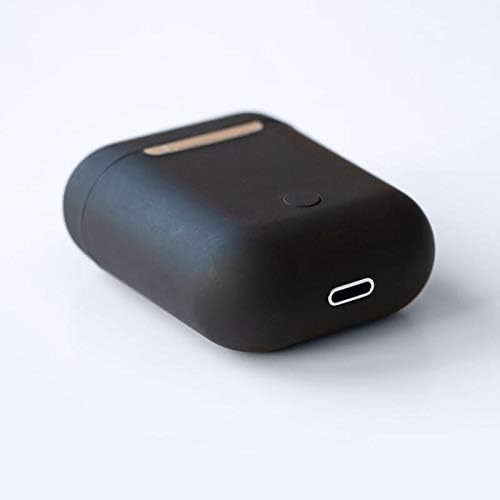
Mufananidzo: Kuvhara view of the bottom of the TWS i17 charging case, highlighting the USB charging port and a small button.
4.2 Kubatanidza neChishandiso Chako
The i17 earbuds use Bluetooth for wireless connection.
- Ita shuwa kuti maearbuds akachajwa.
- Vhura kesi yekuchaja. Maearbuds anozopinda otomatiki maitiro (malambi echiratidzo anopenya).
- On your mobile phone or Bluetooth-enabled device, go to Bluetooth settings and turn Bluetooth on.
- Tsvaga available devices. Select "i17" from the list.
- Once connected, the indicator lights on the earbuds will stop flashing. You are now ready to use your earbuds.

Image: The TWS i17 Dual Earbuds resting inside their open charging case, ready for pairing or use.
5. Operating Instructions
5.1 Simba On/Kudzima
- Power On: Take the earbuds out of the charging case. They will automatically power on and connect to the last paired device.
- Power Off: Dzorera maearbud mubhokisi rekuchaja. Anodzima otomatiki otanga kuchaja.
5.2 Kuridza Mumhanzi
- Tamba/Kumbomira: Tokonya chero earbud kamwe.
- Next Track: Tokonya kaviri munzeve wekurudyi.
- Previous Track: Tokonya kaviri munzeve wekuruboshwe.
5.3 Call Management
- Pindura/Pedzisa Kufona: Tokonya chero earbud kamwe.
- Ramba Kufona: Dzvanya uye bata chero earbud kwemasekonzi maviri.
5.4 Izwi Mubatsiri
- Shandisa Voice Assistant (Siri/Google Assistant): Tokonya katatu chero earbud.
6. Kuchengeta
Proper maintenance ensures the longevity of your earbuds:
- Kuchenesa: Use a soft, dry, lint-free cloth to clean the earbuds and charging case. Do not use liquids or sprays.
- Kuchengeta: Kana isiri kushandiswa, chengeta maearbuds mukesi yavo yekuchaja kuti uzvidzivirire uye ugare wakachajwa. Chengetedza munzvimbo inotonhorera, yakaoma.
- Battery Care: To prolong battery life, avoid fully discharging the earbuds frequently. Charge them regularly.

Image: The TWS i17 Dual Earbuds securely stored within their closed charging case, ready for transport or charging.
7. Kugadzirisa matambudziko
| Dambudziko | Zvinogona Kukonzera | Solution |
|---|---|---|
| Maearbuds haasi kubatanidza | Low battery; Out of range; Not in pairing mode; Bluetooth off on device. | Charge earbuds; Move closer to device; Ensure case is open for pairing; Turn on Bluetooth on device. |
| Imwe chete earbud inoshanda | One earbud not charged; Earbuds not properly synced. | Ensure both earbuds are charged; Place both earbuds back in case, close, then reopen to re-sync. |
| Hapana ruzha | Volume too low; Not connected; Media paused. | Increase volume on device; Reconnect earbuds; Check media playback status. |
| Kuchaja kesi kwete kubhadharisa | Faulty cable/adapter; Loose connection. | Try a different USB cable or power adapter; Ensure cable is securely plugged in. |
8. Zvinotsanangurwa
| Feature | Detail |
|---|---|
| Model Number | i17 |
| Brand | TWS |
| Kubatana Technology | Wireless (Bluetooth) |
| Mahedhifoni Form Factor | Munzeve |
| Maikorofoni Inosanganisirwa | Ehe |
| Kubvisa Noise | Aihwa |
| Inopindirana Na | Mobile Phones |
| Color | Nhema |
| Material | Plastiki |
| Cable Feature | Hapana waya |
| Mvura Resistance Level | Kwete Kudzivirira Mvura |
| Shipping Dimensions | 12.6 x 8.8 x 3.6 cm |
| Kurema | 96 magiramu |
| Kutanga Kuwanikwa Zuva | Ndira 15, 2020 |
9. Warranty uye Tsigiro
For warranty information and customer support, please refer to the contact details provided on the product packaging or the official TWS website. Chengetedza humbowo hwako hwekutenga kune warranty claim.
For further assistance, please contact TWS customer service.


