1. Nhanganyaya
Ndatenda nekutengaasing the Lenco SPR-100BK Splash-Proof Bluetooth Speaker. This portable speaker delivers powerful sound with strong bass and features FM radio, USB, SD card playback, and integrated light effects. Designed for durability, it is splash-proof, making it suitable for various environments. This manual provides essential information for safe and optimal use of your device.
2. Yakakosha Mirayiridzo Yekuchengetedza
- Usaisa mudziyo kune tembiricha yakanyanyisa, zuva rakananga, kana hunyoro hwepamusoro.
- Ensure the charging port cover is securely closed when near water to maintain splash-proof integrity.
- Usabvisa kana kushandura mudziyo. Tumira masevhisi ese kuvashandi vanokwanisa.
- Shandisa chete waya yekuchaja yakatarwa.
- Chengetedza mudziyo kure nemasimba ane magineti.
- Dzivisa kudonhedza kana kuisa mudziyo kune zvinokanganisa zvakasimba.
3. Chigadzirwa Pamusoroview
Familiarize yourself with the components of your Lenco SPR-100BK speaker.
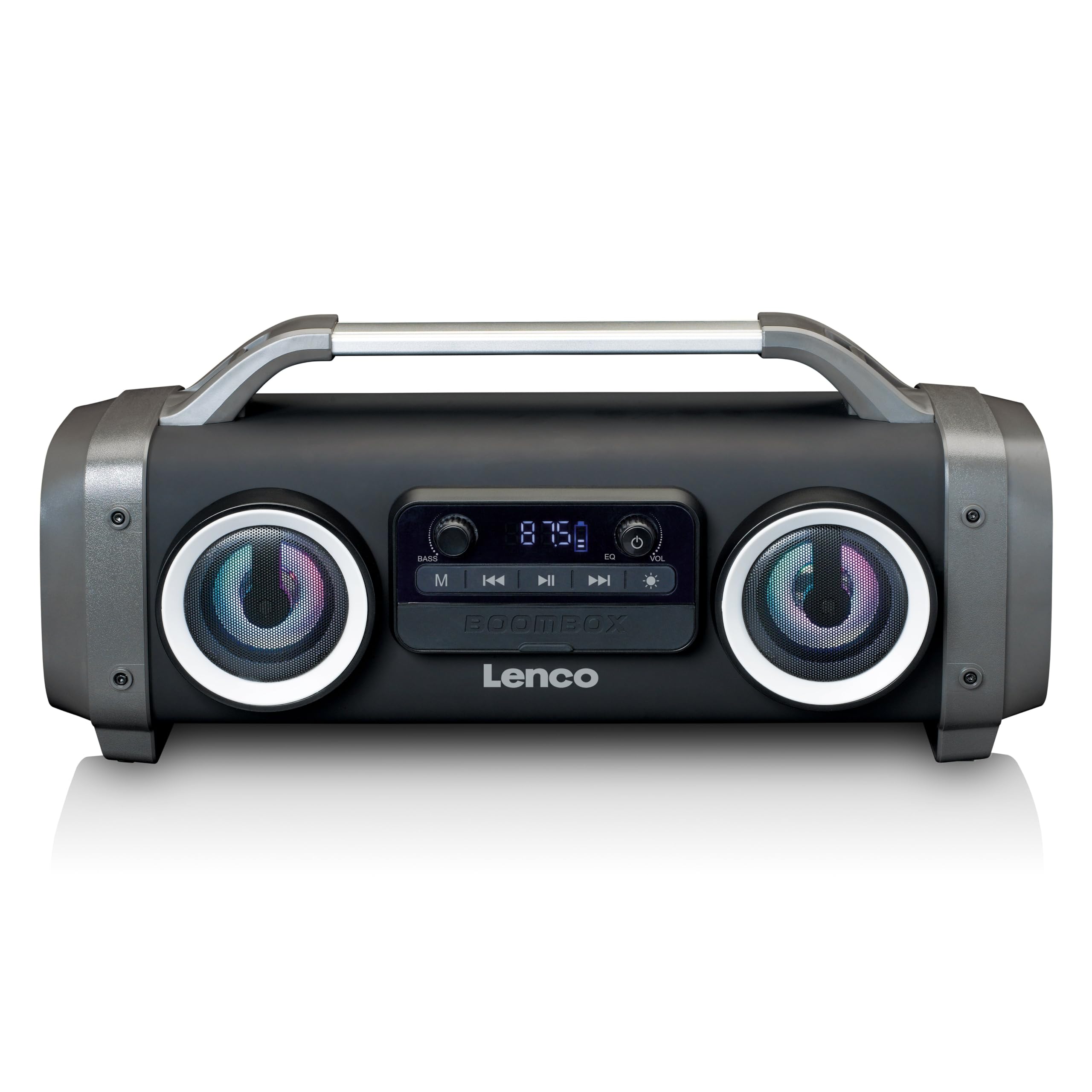
Mufananidzo 1: Mberi view of the Lenco SPR-100BK speaker, showing the main speaker grille, control panel, and integrated light effects.
3.1 Kudzora uye Maports
- Bhatani reSimba: Inobatidza kana kudzima sipika.
- Bhatani reModhi: Switches between Bluetooth, FM Radio, USB, SD, and AUX modes.
- Bhatani reTamba/Kumbomira: Inoridza kana kumisa odhiyo.
- Vhoriyamu Kudzora Pfundo Inogadzirisa iyo tenzi vhoriyamu.
- Bass Boost Knob: Inogadzirisa iyo bass level.
- Light Effect Button: Cycles through or turns off light effects.
- USB Port: Kuti utarise USB flash drive.
- SD Card Slot: Kuti kadhi reSD ritambirwe.
- Kupinza kweAUX (3.5mm): Yekubatanidza ekunze ekuteerera midziyo.
- Charging Port (Mini USB): Yekuchaja bhatiri remukati.
4. Setup
4.1 Kusunungura
Carefully remove the speaker and all accessories from the packaging. Ensure the following items are present:
- Lenco SPR-100BK Bluetooth Speaker
- USB Kuchaja Cable
- 3.5mm Audio Cable (AUX cable)
- User Manual
4.2 Kuchaja Bhatiri
- Locate the Mini USB charging port on the speaker.
- Connect the supplied USB charging cable to the speaker's charging port.
- Connect the other end of the USB cable to a compatible USB power adapter (5V/1A, not included) or a computer's USB port.
- Mwenje wechiratidzo chekuchaja unozopenya, kazhinji kacho mutsvuku, panguva yekuchaja. Unodzima kana kuchinja ruvara (semuenzaniso, bhuruu) kana wachaja zvizere.
- A full charge takes approximately 4-5 hours and provides up to 15 hours of playback (without light effects).
4.3 Simba rekutanga Rakabatidzwa
Dzvanya uye ubate iyo Bhatani reSimba for a few seconds until the speaker powers on and you hear an audible prompt or see the display light up.
5. Kushanda
5.1 Simba On/Kudzima
- Kuti ubate: Dzvanya wobata bhatani Bhatani reSimba.
- Kudzima: Dzvanya wobata bhatani Bhatani reSimba zvakare.
5.2 Bluetooth Connection
- Batidza sipika. Inopinda otomatiki muBluetooth pairing mode, inoratidzwa ne LED inopenya.
- Bvumira Bluetooth pafoni yako (smartphone, tablet, nezvimwewo).
- Tsvaga zvishandiso zveBluetooth zviripo wobva wasarudza "SPR-100BK"kubva pane rondedzero.
- Once paired, the speaker will emit a confirmation sound, and the LED will stop flashing.
- Yechokwadi Wireless Stereo (TWS) Modhi: If you have two SPR-100BK speakers, you can pair them for stereo sound.
- Ensure both speakers are powered on and in Bluetooth mode.
- On one speaker (the master), press and hold the Bhatani reModhi until you hear a TWS pairing prompt.
- The two speakers will automatically connect. Once connected, pair your device to the master speaker as described above.
5.3 FM Radio
- Press the Bhatani reModhi repeatedly until you select FM Radio mode.
- To auto-scan and save stations: Press and hold the Bhatani rekutamba/kumbomira. The speaker will scan for available FM stations and save them automatically.
- To switch between saved stations: Use the Previous/Next Track Buttons (if available, otherwise it will cycle through automatically).
- Cherechedza: For better FM reception, ensure the included 3.5mm audio cable is plugged into the AUX input, as it acts as an external antenna.
5.4 Kutamba Kadhi reUSB/SD
- Insert a USB flash drive or an SD card (with supported audio files) into the respective port/slot.
- The speaker will automatically switch to USB or SD mode and begin playback. If not, press the Bhatani reModhi kusarudza tsime chairo.
- Shandisa iyo Bhatani rekutamba/kumbomira uye Previous/Next Track Buttons to control playback.
5.5 AUX Input
- Connect one end of the supplied 3.5mm audio cable to the AUX input on the speaker.
- Batanidza rimwe divi kune headphone jack kana odhiyo inobuda kubva pamudziyo wako wekunze.
- Press the Bhatani reModhi kusarudza AUX mode.
- Dzora kutamba uye vhoriyamu kubva pamudziyo wako wekunze.
5.6 Chiedza Migumisiro
Press the Chiedza Effect Button to cycle through different light modes or to turn the lights off. The speaker features 12 color light effects.
5.7 Kugadzirisa Inzwi
- Vhoriyamu: Rotate the Vhoriyamu Kudzora Pfundo to increase or decrease the overall sound level.
- Bass: Rotate the Bass Boost Knob to adjust the intensity of the bass.
6. Kuchengeta
6.1 Kuchenesa
Wipe the speaker with a soft, dry cloth. Do not use abrasive cleaners, waxes, or solvents. For stubborn dirt, a slightly damp cloth can be used, ensuring all port covers are sealed.
6.2 Kuchengeta Battery
- To prolong battery life, fully charge the speaker before first use.
- Dzivisa kubvisa zvachose bhatiri nguva nenguva.
- If storing the speaker for an extended period, charge it to about 50% every few months.
6.3 Kuchengeta
Store the speaker in a cool, dry place, away from direct sunlight and extreme temperatures.
7. Kugadzirisa matambudziko
| Dambudziko | Zvinogona Kukonzera | Solution |
|---|---|---|
| Mutauri haabati simba. | Bhatiri rapera. | Charge the speaker using the supplied USB cable. |
| Hapana ruzha. | Vhoriyamu yakadzikira zvakanyanya; modhi isiriyo yakasarudzwa; mudziyo hauna kubatana. | Increase volume; press Mode button to select correct source; ensure Bluetooth device is paired or AUX cable is connected. |
| Bluetooth pairing inokundikana. | Chipika hachisi muchimiro chekupairira; mudziyo wakanyanya kure; kupindira. | Ensure speaker is in Bluetooth pairing mode (flashing LED); move device closer; turn off other Bluetooth devices. |
| Kusagamuchirwa zvakanaka kweredhiyo yeFM. | No external antenna; weak signal. | Plug in the 3.5mm AUX cable to act as an antenna; try moving the speaker to a different location. |
| USB/SD playback not working. | Haisi kutsigirwa file fomati; kadhi/dhiraivha haina kuiswa nemazvo; yakaora files. | Iva nechokwadi files are in a supported format (e.g., MP3); reinsert the USB drive/SD card; try a different drive/card. |
8. Zvinotsanangurwa
| Model Number | SPR-100BK |
| Brand | Lenco |
| Power Output | 25 Watt RMS |
| Kubatana | Bluetooth, USB, SD Card, 3.5mm AUX Input |
| Bhatiri Type | Lithium-ion (4400 mAh) |
| Playback Time | Up to 15 hours (reduced with light effects) |
| Kuchaja Input | 5V/1A (Mini USB) |
| Special Features | Splash-proof design, Integrated light effects, FM Radio, TWS function |
| Dimensions (L x W x H) | 60 x 60 x 85 cm |
| Kurema | 2 makirogiramu |
Ongorora: Zvinotsanangurwa zvinogona kuchinja pasina chiziviso chekutanga.
9. Warranty uye Tsigiro
9.1 Ruzivo rweWaranti
This Lenco product is covered by a warranty for a period of 2 years on parts from the date of purchase. This warranty covers manufacturing defects and workmanship under normal use. It does not cover damage caused by misuse, accidents, unauthorized modifications, or normal wear and tear.
9.2 Zvigadziriso zveSoftware
Software updates for this product are guaranteed until Kubvumbi 13, 2030.
9.3 Mutengi Tsigiro
For technical assistance, warranty claims, or product inquiries, please contact Lenco customer support through their official website or the retailer where the product was purchased. Please have your model number (SPR-100BK) and proof of purchase ready.
Official Lenco Websaiti: www.renco.com


