1. Nhanganyaya
Welcome to the user manual for your Nokia 216 Dual SIM mobile phone. This guide provides essential information to help you set up, operate, and maintain your device. The Nokia 216 (RM-1187) is a classic feature phone designed for reliable communication, featuring dual SIM capability, a 2.4-inch display, and a VGA camera.
Please read this manual carefully to ensure proper use and to get the most out of your phone.
2. Package Zviri mukati
Ita shuwa kuti zvinhu zvese zviripo mune yako chigadzirwa package:
- Nokia 216 Dual SIM Mobile Phone (RM-1187)
- Bhatiri
- Power Adapter
- USB Cable
3. Mudziyo Pamusoroview
Familiarize yourself with the key components of your Nokia 216 phone.
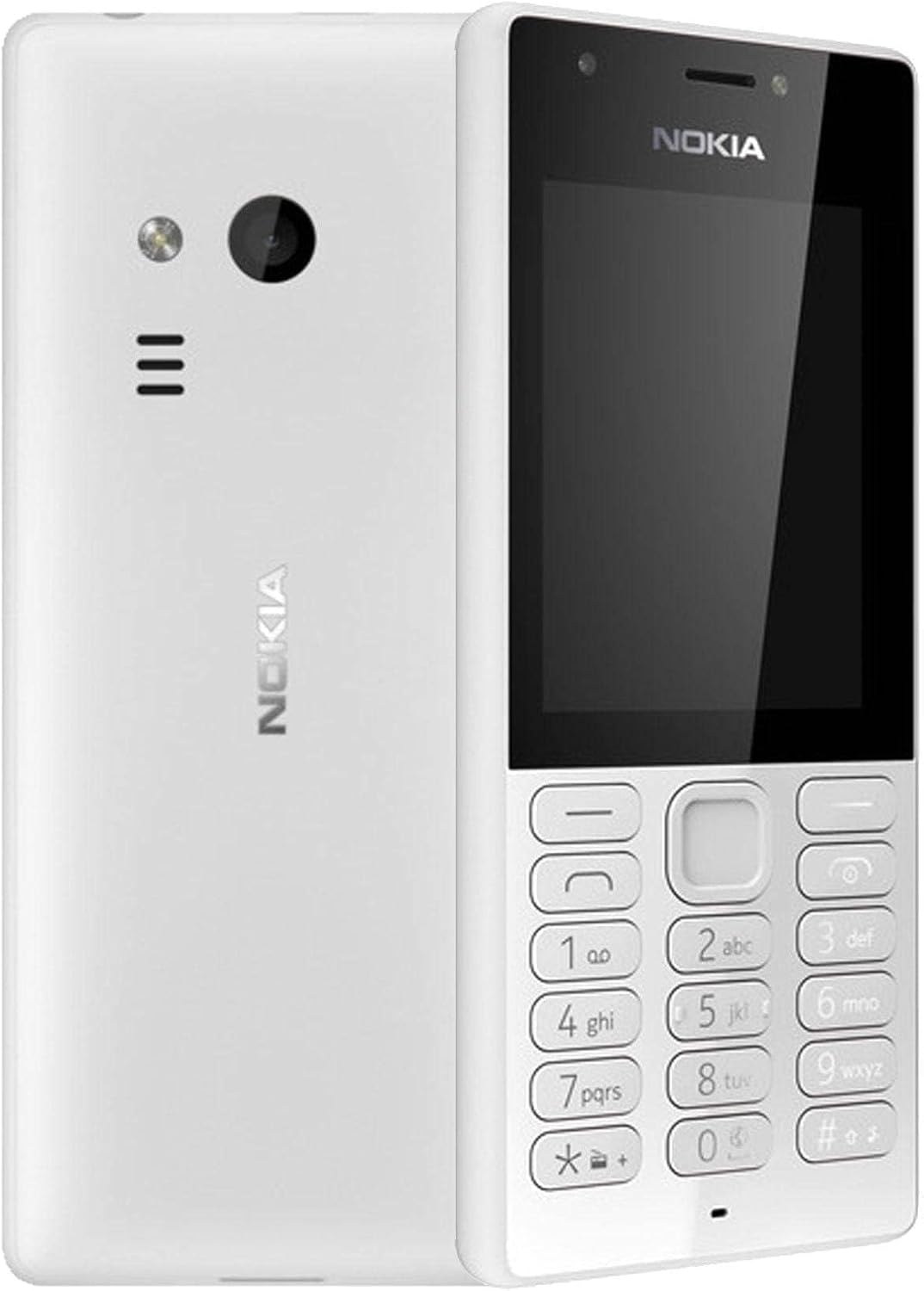
Mufananidzo 3.1: Mberi neshure view of the Nokia 216 Dual SIM mobile phone. The front shows the display, earpiece, and numeric keypad. The back features the rear camera, LED flash, and loudspeaker grille.

Mufananidzo 3.2: Mberi view of the Nokia 216 Dual SIM mobile phone. This image highlights the 2.4-inch display, the navigation keys, and the alphanumeric keypad for dialing and text input.

Mufananidzo 3.3: Back view of the Nokia 216 Dual SIM mobile phone. This view shows the rear VGA camera lens, the LED flash, and the Nokia branding.
Zvikamu Zvikuru:
- Ratidza: 2.4-inch QVGA screen.
- Keypad: Alphanumeric keypad for dialing and text entry, with navigation keys.
- Rear Camera: VGA camera with LED flash.
- Gudzanzwi: For audio playback and hands-free calls.
- Maikorofoni: Zvekupinza izwi panguva yekufona uye kurekodha.
- 3.5mm Audio Jack: Yemahedhifoni kana ekunze matauri.
- Kuchaja Port: Micro-USB port for charging and data transfer.
4. Setup
4.1. Insert SIM Card(s)
- Turn off the phone and disconnect any charger.
- Carefully remove the back cover by prying it open from the notch.
- Kana bhatiri riri mukati, risimudze kunze.
- Insert the SIM card(s) into the designated slot(s) with the gold contacts facing down. For dual SIM models, ensure both SIMs are correctly seated.
- If applicable, insert a microSD card into its slot for additional storage.
- Tsiva bhatiri.
- Align the back cover and press it firmly until it clicks into place.
4.2. Charge iyo Battery
- Batanidza dhiraivha yemagetsi kumadziro emadziro.
- Plug the micro-USB end of the cable into the phone's charging port.
- Chiratidzo chebhatiri chiri pachiratidziro chicharatidza mamiriro ekuchaja.
- Once fully charged, disconnect the charger from the phone and then from the wall outlet.
5. Operating Instructions
5.1. Simba On / Off
- Kubatidza: Dzvanya wobata bhatani rekudzima (kazhinji bhatani dzvuku rekuti 'End Call') kusvika foni yadedera uye logo yeNokia yabuda.
- Kudzima: Dzvanya wobata bhatani rekudzima magetsi kusvika sarudzo yekuti 'Kudzima magetsi' yaonekwa pachiratidziro, wobva wasarudza.
5.2. Kufona
- Kubva pahwindo rekutanga, isa nhamba yefoni uchishandisa kiyi yenhamba.
- Dzvanya bhatani regirini rekuti 'Fonera' kuti utange kufona.
- Kuti upedze kufona, tinya bhatani dzvuku rekuti 'End Call'.
5.3. Sending Text Messages (SMS)
- Enda ku Menu > Mharidzo > Gadzira meseji.
- Nyora meseji yako uchishandisa keypad.
- Isa nhamba yefoni yemunhu waunogamuchira kana kusarudza kubva muvanhu vaunotaura navo.
- Sarudza Send.
5.4. Kushandisa Kamera
- Enda ku Menu > Kamera.
- Rongedza pfuti yako uchishandisa chiratidziro.
- Dzvanya bhatani repakati rekufamba kuti utore mufananidzo.
6. Kuchengeta uye Kuchengeta
To ensure the longevity and optimal performance of your Nokia 216, follow these care guidelines:
- Chengeta mudziyo wacho wakaoma: Hunyoro hunogona kukanganisa macircuit emagetsi.
- Use original accessories: Only use batteries, chargers, and accessories approved by Nokia.
- Chenesa zvinyoro nyoro: Use a soft, clean, dry cloth to clean the surface of the device.
- Dzivisa tembiricha yakanyanyisa: Do not expose your device to very high or low temperatures.
- Bata nehanya: Dzivisa kudonhedza kana kuisa mudziyo kune zvinokanganisa zvakasimba.
7. Kugadzirisa matambudziko
If you encounter issues with your Nokia 216, try these common troubleshooting steps:
| Dambudziko | Solution |
|---|---|
| Foni haibatike | Ensure the battery is charged. Connect the charger and try again. Check if the battery is properly inserted. |
| Hapana netiweki chiratidzo | Check if the SIM card is correctly inserted. Move to an area with better network coverage. Restart the phone. |
| Bhatiri harichaji | Ensure the charger is properly connected to both the phone and the power outlet. Try a different power outlet or charger. Check for any damage to the charging port. |
| Hatikwanise kufona kana kugamuchira | Check network signal. Ensure your SIM card is active and has sufficient credit/plan. Verify that call barring is not enabled. |
8. Zvinotsanangurwa
| Feature | Detail |
|---|---|
| Brand | Nokia |
| Model Name | RM-1187 |
| Operating System | Symbian 9.1 (Series 30) |
| Screen Size | 2.4 inches |
| Screen Resolution | 240 x 320 pixels |
| Refresh Rate | 90 Hz |
| Yakaiswa RAM Saizi | 256 MB |
| Memory Storage Capacity | 3.9 GB (Internal, likely for system/apps, expandable via microSD) |
| CPU Model | A10 |
| Nhoroondo ye Cellular Technology | 2G |
| Wireless Communication Technologies | Cellular |
| Connectivity Technologies | USB, Bluetooth, Wi-Fi |
| GPS | A-GPS |
| Primary Device User Interface | Buttons, Numeric Keypad, Microphone |
| Zvimwe Zvimiro zveKamera | Rear Camera (VGA) |
| Sravana Sameeralu Serial 4th Audio Jack | 3.5 mm |
| Fomu Factor | Classic |
| Color | Gireyi |
| Nguva Yekutaura | Kusvikira kumaawa makumi maviri nemashanu |
| Item Weight | 339 magiramu |
| Package Dimensions | 13.4 x 12.6 x 3.6 cm |
| Chii chiri muBhokisi | Adapta yemagetsi, USB tambo |
9. Warranty uye Tsigiro
For warranty information, please refer to the warranty card included in your product package or visit the official Nokia website. If you require further assistance or technical support, please contact Nokia customer service through their official channels.
Chengetedza risiti yako yekutenga sehumbowo hwekutenga kwezvichemo zvewaranti.