1. Nhanganyaya
Thank you for choosing the TOZO NC9 Hybrid Active Noise Cancelling Wireless Earbuds. These earbuds are designed to provide an immersive audio experience with advanced noise cancellation, clear call quality, and comfortable all-day wear. This manual will guide you through the setup, operation, and maintenance of your new earbuds.
2. Chii chiri muBhokisi
- TOZO Hybrid Active Noise Cancelling Wireless Earbuds
- Kuchaja Case
- USB-C (A to C) cable (20cm)
- Nzeve (dzakakura zvakasiyana-siyana)
- User Manual

Figure 2.1: Contents of the TOZO NC9 package.
3. Chigadzirwa Pamusoroview
The TOZO NC9 earbuds feature a compact design with advanced audio technology. Key components include:
- Hybrid Active Noise Cancelling: Up to 45dB noise reduction for an immersive listening experience.
- 6-Microphone ENC Clear Call: Enhanced environmental noise cancellation for clear voice transmission during calls.
- Transparency Mode: Inokutendera kuti unzwe zvakakukomberedza usingabvisi maearbuds.
- Stereo Bass Sound: Built-in 10mm drivers with OrigX Acoustic 2.0 technology for rich bass and clear audio.
- Ergonomic Dhizaini: Comfortable fit with six replaceable ear tip sizes.
- TOZO App Integration: Customize sound with 32 EQ options and noise cancellation modes.
- Yakawedzerwa Nguva Yekutamba: Up to 59 hours total playtime with the charging case (ANC off).
- IPX8 Kuramba Mvura: Protection against sweat, rain, and splashes.
- Bluetooth 5.3 Tekinoroji: Stable connection and low latency.
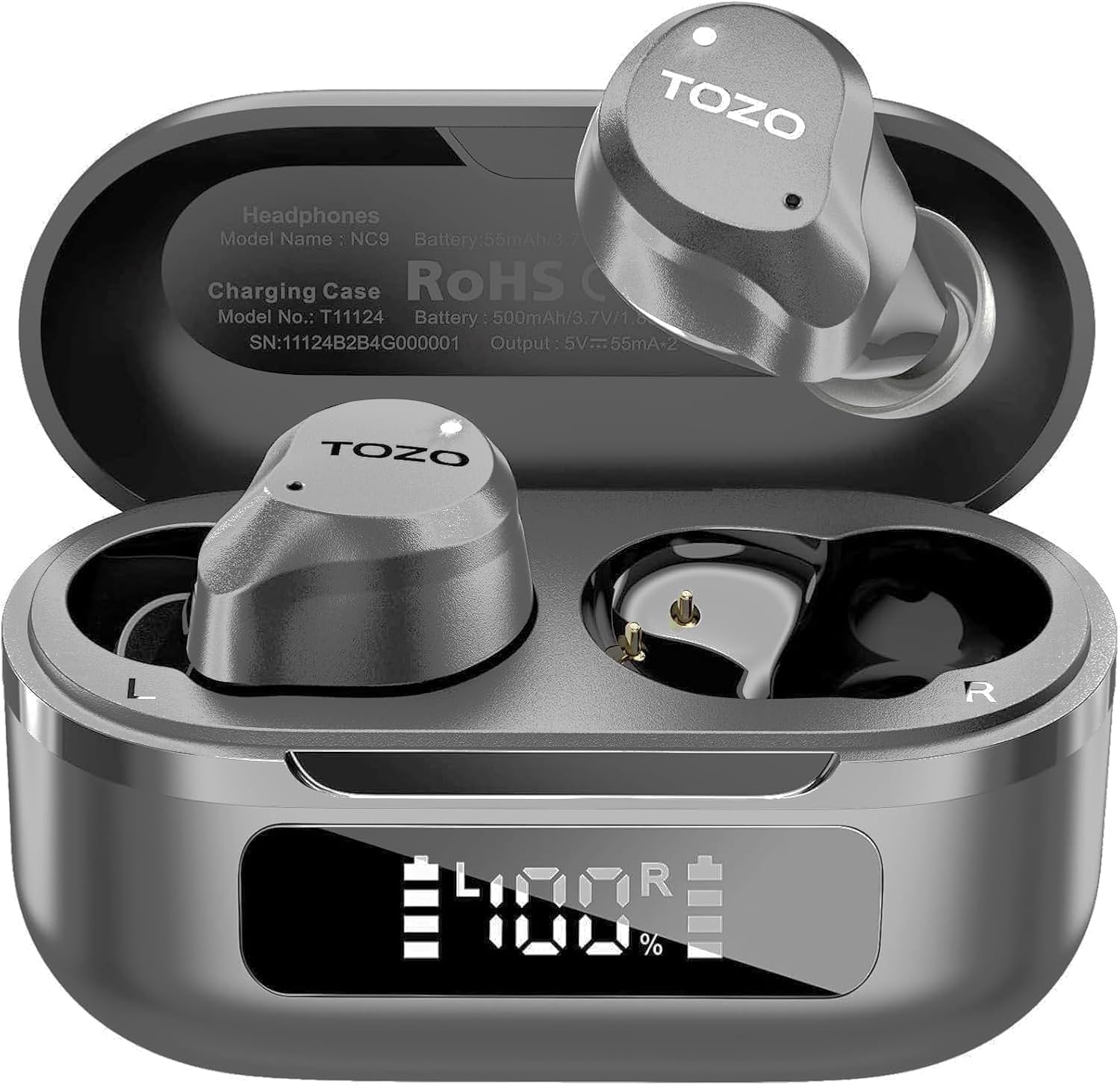
Figure 3.1: TOZO NC9 Earbuds and Charging Case.

Figure 3.2: TOZO OrigX Acoustics Technology for enhanced sound.
4. Setup
4.1. Kutanga Kubatana
- Vhura kesi yekuchaja. Maearbuds anozopinda otomatiki maitiro ekubatanidza.
- Pamudziyo wako (smartphone, piritsi, nezvimwewo), shandisa Bluetooth.
- Tsvaga "TOZO NC9" in the list of available Bluetooth devices and select it to connect.
- Kana zvangobatanidzwa, uchanzwa ruzha rwekunzwa rwuchiratidza kuti kubatana kwacho kwabudirira.
4.2. Kupfeka maEarbuds
Kuti uve neruzha rwakanyanya kunaka uye kunyaradza, simbisa kukwana kwakaringana:
- Choose the ear tips that best fit your ear canal from the provided sizes.
- Insert the earbuds into your ears with the sound hole pointing downwards.
- Gently rotate the earbuds backward to secure them snugly in your ear.

Figure 4.1: Proper wearing of the TOZO NC9 Earbuds.
5. Operating Instructions
5.1. Kubata Kudzora
The TOZO NC9 earbuds feature intuitive touch controls on each earbud:
- Single Tap (Left/Right): Tamba/Misa mimhanzi, Pindura/ Pedzisa kufona.
- Tokonya kaviri (Kuruboshwe): Previous track.
- Top kaviri (kurudyi): Next track.
- Triple Tap (Left): Activate/Deactivate Noise Cancellation or Transparency Mode.
- Tap katatu (kurudyi): Activate Voice Assistant (Siri, Google Assistant).
- Long Press (Left/Right): Ramba kufona.
5.2. Kudzima Ruzha Runoshanda (ANC) & Transparency Mode
The earbuds offer three sound modes:
- Active Noise Cancellation (ANC): Inoderedza ruzha rwekunze kuti ruzha rwunzwike zvakanaka.
- Transparency Mode: Inobvumira manzwi ambient kupfuura, ichikuchengeta iwe uchiziva nezvekwaunogara.
- Normal Mode: Standard audio with no active noise processing.
Switch between modes by triple-tapping the left earbud.
Figure 5.1: Active Noise Cancellation in action.
5.3. TOZO App Features
Download the TOZO App to unlock advanced customization options:
- 32 EQ Options: Tailor your audio experience with various preset equalizers or create custom sound profiles.
- Maitiro Ekudzima Ruzha: Fine-tune ANC and Transparency settings.
- EQ Zone: Share and discover custom EQ settings from other users.

Figure 5.2: TOZO App for sound customization.
6. Kuchaja & Hupenyu hweBhatiri
6.1. Kuchaja bhokisi nemaEarbuds
The charging case can be charged via the included USB-C cable. The earbuds charge automatically when placed inside the case.
- Nguva yekuchaja: Anenge maawa maviri ekuchajisa kwakazara.
- Chiratidzo chebhatiri: The charging case features an LED display to show the remaining battery percentage.

Figure 6.1: Charging case with LED display.
6.2. Battery Performance
- Total Playtime (with charging case): Up to 59 hours (ANC off), 42 hours (ANC on).
- Single Use Playback: Up to 14 hours (ANC off), 10 hours (ANC on).

Figure 6.2: Extended playtime capabilities.
7. Kuchengetedza & Kuchengeta
7.1. Kuramba Mvura
The TOZO NC9 earbuds are IPX8 water-resistant, meaning they can withstand sweat, rain, and accidental splashes. However, they are not designed for swimming or prolonged submersion. Ensure earbuds are dry before placing them back in the charging case.
7.2. Kuchenesa
Regularly clean your earbuds and charging case to maintain optimal performance:
- Shandisa jira rakapfava, rakaoma, risina lint kupukuta maearbud nekesi yekuchaja.
- Bvisa matipi nzeve woachenesa nesipo yakapfava nemvura, wobva wanyatsoomesa usati wabatanidza zvakare.
- Dzivisa kushandisa abrasive zvinhu kana makemikari ane hasha.
8. Kugadzirisa matambudziko
- Maearbuds haana kubatanidza: Ensure both earbuds are in the charging case, then open the lid to initiate pairing mode. Check your device's Bluetooth settings.
- Imwe chete earbud inoshanda: Place both earbuds back in the charging case, close the lid, then open it again. Re-pair if necessary.
- Hunhu husina kunaka: Ensure ear tips provide a secure seal. Clean earbuds to remove any debris. Check audio source quality.
- Kuchaja nyaya: Ensure the charging cable is securely connected and the charging case is clean. Check the LED display for battery status.
- Resetting Earbuds: Refer to the full user manual for specific reset instructions if persistent issues occur.
9. Zvinotsanangurwa
| Feature | Tsanangudzo |
|---|---|
| Model Name | TOZO NC9 |
| Noise Control | Hybrid Active Noise Cancellation |
| Bluetooth Version | 5.3 |
| Bluetooth Range | 10 Mamita |
| Hupenyu hwebhatiri (Earbuds) | Maawa zana (ANC yabviswa), Maawa makumi manomwe nemaviri (ANC yakavharwa) |
| Yese Yekutamba (neNyaya) | Maawa zana (ANC yabviswa), Maawa makumi manomwe nemaviri (ANC yakavharwa) |
| Kuchaja Nguva | 1.5 Maawa |
| Mvura Resistance Level | IPX8 |
| Audio Driver Size | 10 mamirimita |
| Control Type | Touch Control / APP |
| Inosanganisirwa Zvikamu | Earbuds, Charging Case, USB-C Cable, Eartips, User Manual |
10. Warranty & Tsigiro
Your TOZO NC9 earbuds come with an 18-Month Extended Warranty. For warranty activation and support, please visit the official TOZO websaiti kana kubata basa revatengi.
Kuti uwane rumwe rubatsiro, ndapota shanyira iyo TOZO Store on Amazon.
Vhidhiyo 10.1: Kuperaview of the TOZO NC9 earbuds, including unboxing and features.
Vhidhiyo 10.2: A review highlighting the sound quality, fit, and value of the TOZO NC9 earbuds.
Video 10.3: A demonstration of the noise cancelling capabilities of the TOZO NC9 earbuds.


