Product Overview
This AM alphamount Tilting TV Wall Mount Bracket (Model: APPSLTK2) is designed to securely hold LCD, OLED, flat screen, and curved TVs ranging from 37 to 82 inches. It features a low-profile design, keeping your TV close to the wall while offering a convenient tilt adjustment for optimal viewing. The mount is compatible with 16-24 inch wood studs and supports VESA patterns up to 600x400mm. All necessary hardware for installation is included.

Figure 1: The AM alphamount Tilting TV Wall Mount Bracket, showing its main components and low-profile design.
Safety Information
Please read all instructions carefully before installation. If you have any doubts about the installation process, consult a qualified professional. Improper installation may result in serious injury or damage to your TV and property.
- Weight Capacity: Do not exceed the maximum weight capacity of 132 lbs (60 kg). This mount is constructed from durable alloy steel.
- TV Saizi Kuenderana: Designed for TVs between 37 and 82 inches.
- VESA Kuenderana: Ensure your TV's VESA mounting pattern is between 200x100mm and 600x400mm.
- Rudzi rweMadziro: This mount is primarily designed for installation on 16-24 inch wood studs, concrete walls, or brick walls. Do not install on drywall alone.
- Zvishandiso: Shandisa maturusi akakodzera pakuisa. Pfeka magirazi ekuchengetedza nguva dzose.
- Vana uye Zvipfuwo: Ensure the TV is securely mounted and out of reach of children and pets to prevent accidental tipping.
Package Zviri mukati
Verify that all components are present before beginning installation. If any parts are missing or damaged, contact AM alphamount customer service.
- Kuungana kwePlati remadziro
- TV Brackets (2x)
- Assorted TV Screws (M4, M6, M8)
- Spacers and Washers
- Concrete Anchors (for concrete/brick installation)
- Lag Bolts (for wood stud installation)
- Bubble Level
- Velcro Cable Ties
- Chinyorwa Chirairo (gwaro iri)
Zvinotsanangurwa
| Feature | Detail |
|---|---|
| Model Number | APPSLTK2 |
| Brand | AM alphamount |
| Kukura kweTV kukura | 37 - 82 Inches |
| Maximum Weight Capacity | 132 lbs (60 kg) |
| VESA kuenderana | 200x100mm kusvika 600x400mm |
| Tilt Angle | 0 - 10 Degrees |
| Profile from Wall | 1.5 inches (3.8 cm) |
| Material | Alloy Steel |
| Stud Spacing Compatibility | 16-24 inches (wood studs) |
Setup uye Installation
This mount is designed for quick and easy installation, often completed in under 15 minutes. For detailed, step-by-step instructions, please refer to the official Kuisa Manual (PDF) provided by AM alphamount.
Mafungiro akakosha ekuiswa:
- Wall Type Verification:
Identify your wall type (wood stud, concrete, or brick) to ensure you use the correct hardware and installation method. The mount is suitable for 16", 18", and 24" wood studs, as well as concrete and brick walls.

Figure 2: Illustration of compatible wall types for mounting, including wood studs, concrete, and brick.
- Wall Plate Placement:
The open-shaped wall plate design provides ample space for electrical outlets or other obstacles behind the TV. This design also allows for easy horizontal adjustment of the TV after mounting to achieve perfect centering.
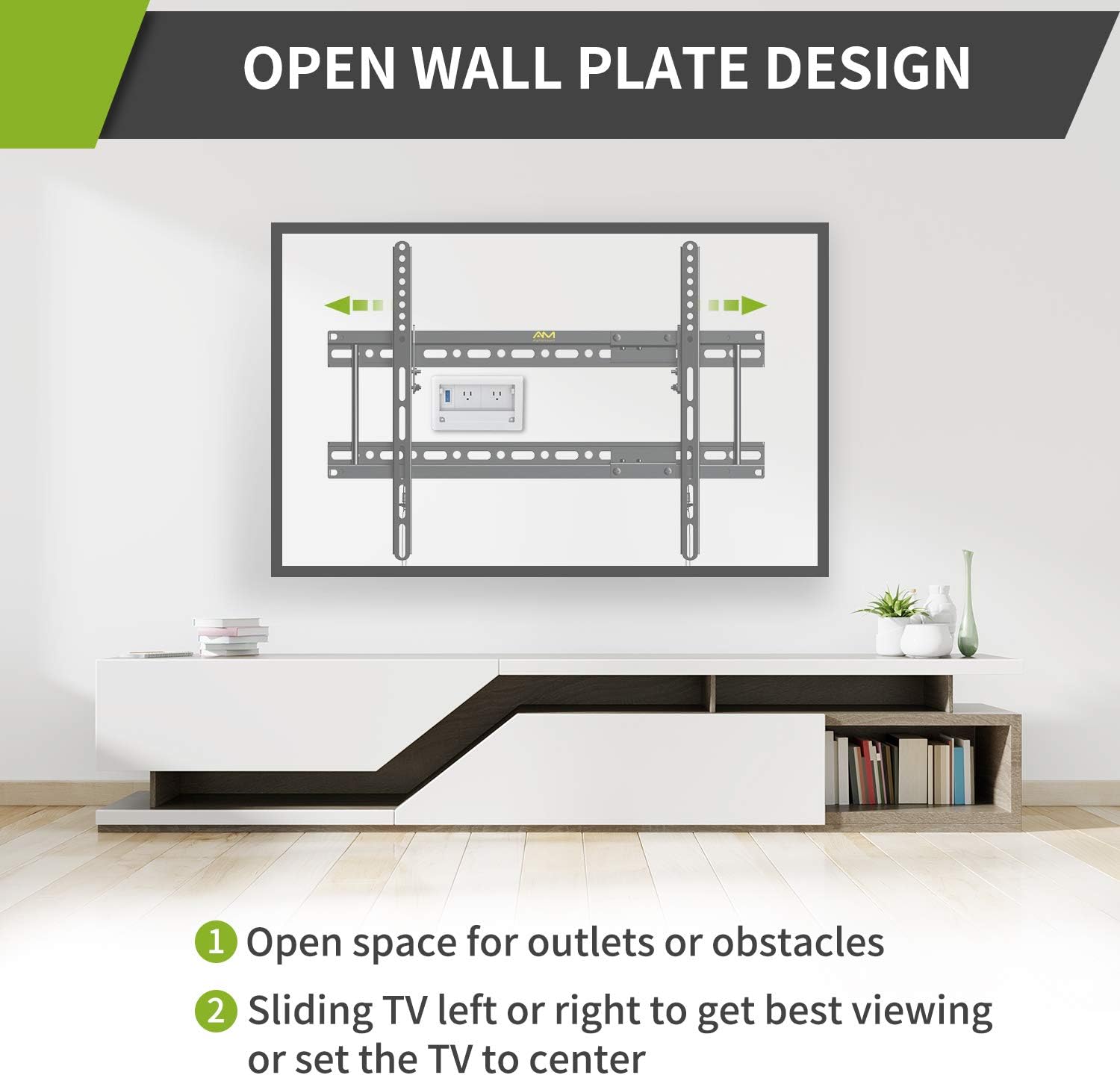
Figure 3: The open wall plate design facilitates access to outlets and allows for sliding the TV left or right for optimal positioning.
- Kubatanidza Mabhuraketi eTV:
Attach the two TV brackets to the back of your television using the appropriate screws and spacers from the included hardware kit. Ensure the brackets are securely fastened and aligned with your TV's VESA pattern.

Mufananidzo 4: Detailed view of the detachable wall plate and VESA dimensions, including extension for wider stud spacing.
- Kuisa TV:
Carefully lift the TV with the attached brackets and hook them onto the wall plate. The quick-release pull-down straps allow for easy removal of the TV from the mount if needed.

Figure 5: The quick release and lock mechanism ensures secure attachment and easy detachment of the TV.
Gwaro reVhidhiyo reKuisa:
Video 1: An official AM alphamount video demonstrating the features and installation process of the tilting TV wall mount. This video highlights the low-profile design, tilt adjustment, and quick release mechanism, showcasing its use in various settings like living rooms, bedrooms, and exhibition spaces.
Operating Instruction
Once installed, the AM alphamount Tilting TV Wall Mount allows for easy adjustment to enhance your viewing experience.
- Tilt Adjustment: This mount offers a 0-10° tilt adjustment. To adjust the tilt, loosen the tilt adjusting bolts on the side of the TV brackets, set your desired angle, and then securely tighten the bolts. This feature helps in reducing glare and relieving neck pain by allowing you to choose the most comfortable viewing position.
- Yakaderera-Profile Dhizaini: The mount holds your TV only 1.5 inches from the wall, providing a sleek and space-saving appearance.
- Quick Release Pull-Downs: The integrated quick release pull-down straps allow for easy and safe removal of the TV from the wall mount when access to cables or the back of the TV is required.

Figure 6: Demonstrates the low-profile design and the 0-10 degree tilt adjustment for flexible viewing angles.
Maintenance
Kugadziriswa nguva dzose kunovimbisa kugara kwenguva refu uye kushanda kwakachengeteka kweTV yako.
- Kuchenesa: Pukuta chigadziko nejira rakapfava, rakaoma kubvisa guruva. Dzivisa kushandisa zvinochenesa zvinogumbura kana zvinonyungudutsa.
- Periodic Checks: Periodically check all screws and bolts to ensure they remain tight and secure. Over time, vibrations or adjustments can cause fasteners to loosen.
- Cable Management: Use the provided Velcro cable ties to keep cables tidy and prevent them from being pinched or damaged.
Kugadzirisa matambudziko
If you encounter issues with your TV mount, refer to the following common problems and solutions:
| Dambudziko | Zvinogona Kukonzera | Solution |
|---|---|---|
| TV haina kuenzana. | Wall plate or TV brackets are not level. | Adjust the wall plate using the integrated leveling feature or re-level the TV brackets before tightening. |
| Kuomerwa nekurereka TV. | Tilt adjusting bolts are too tight. | Slightly loosen the tilt adjusting bolts, adjust the angle, then re-tighten firmly. |
| Mount anonzwa kusagadzikana. | Kuisa zvisina kunaka kana kuti zvisungo zvisina kusimba. | Immediately remove the TV. Re-check all mounting points and fasteners on both the wall and the TV. Ensure you are mounting into appropriate wall structures (studs, concrete, brick) and not just drywall. |
| Zvikamu zvisipo. | Packaging error. | Contact AM alphamount customer service for replacement parts. |
Warranty uye Support
AM alphamount stands behind the quality of its products. This TV wall mount comes with a 10-year manufacturer's service warranty, ensuring long-term reliability and support.
For further assistance, technical support, or warranty claims, please visit the official AM alphamount Store on Amazon kana tarisa kune ruzivo rwekusangana rwunopihwa mune yako chigadzirwa kurongedza.