1. Nhanganyaya
This manual provides detailed instructions for the installation, operation, and maintenance of your JVC KD-TD71BT CD Receiver. The KD-TD71BT is a versatile car audio system featuring CD playback, AM/FM tuner, built-in Bluetooth for hands-free calling and audio streaming, front USB and AUX inputs, and integrated Amazon Alexa functionality. It also includes advanced audio processing technologies like a 13-band equalizer, K2 Technology, Time Alignment, Space Enhancement, and Sound Lift for an optimized listening experience. Please read this manual thoroughly before using the product to ensure correct operation and to prevent damage.
2. Safety Information
- Driving Safety: Always operate the unit safely. Do not perform any operations that distract you from driving.
- Kudzora inzwi: Chengeta vhoriyamu iri padanho rekuti ugone kunzwa ruzha rwekunze, senge mota dzenjodzi.
- Magetsi: This unit is designed for 12V DC negative ground electrical systems.
- Kuiswa: Ensure proper installation to prevent fire, electric shock, or other injuries. Consult a qualified technician if unsure.
- Dzivisa Unyoro: Usaise mudziyo wacho pamvura kana hunyoro kudzivirira moto kana kuvhundutswa nemagetsi.
- Kufefetedza Ita shuwa kuti pave nemhepo yakakwana yakatenderedza unit kudzivirira kupisa.
3. Package Zviri mukati
Tarisa uone kuti zvinhu zvese zviripo mupakeji:
- JVC KD-TD71BT CD Receiver Unit
- Wired Microphone (for Bluetooth hands-free calling)
- Wiring Sunga
- Mounting Hardware
- Chinyorwa Chirairo (gwaro iri)
4. Setup uye Kuiswa
Proper installation is crucial for optimal performance and safety. If you are unsure about any part of the installation process, it is recommended to consult a professional car audio installer.
4.1. Usati waiswa
- Disconnect the negative terminal of the car battery to prevent short circuits.
- Ensure you have all necessary tools and mounting accessories.
- Review your vehicle's wiring diagram.
4.2. Wiring Connections
Connect the wiring harness provided with the unit to your vehicle's wiring. Pay close attention to the color codes and functions of each wire.
- Yera: 12V inogara iripo (Bhatiri)
- Tsvuku: Switched 12V (Ignition/Accessory)
- Nhema: Ground
- Bhuruu/Muchena: Kubatidza Kure (kwe amplifier/antenna yemagetsi)
- Mutauri Wires: Batanidza nemasipika emota anoenderana (semuenzaniso, Chena/Chena-Dema pamberi pekuruboshwe, Gireyi/Gireyi-Dema pamberi pekuruboshwe, Gireyi/Gireyi-Dema kumashure kwekuruboshwe, Pepuru/Pepuru-Dema kumashure kwekuruboshwe).
- Maikorofoni Inopinza: Connect the supplied wired microphone to the dedicated input jack for Bluetooth hands-free calling.

Mufananidzo: Rear view of the JVC KD-TD71BT CD Receiver. This image displays the various connection ports, including the main wiring harness connector on the left, RCA pre-outs for external amplifiers, and the antenna input on the right. The heat sink is also visible in the center.
4.3. Kuisa Chikwata
Secure the unit into the dashboard opening using the provided mounting sleeve and brackets. Ensure the unit is firmly seated and does not obstruct any vehicle controls.
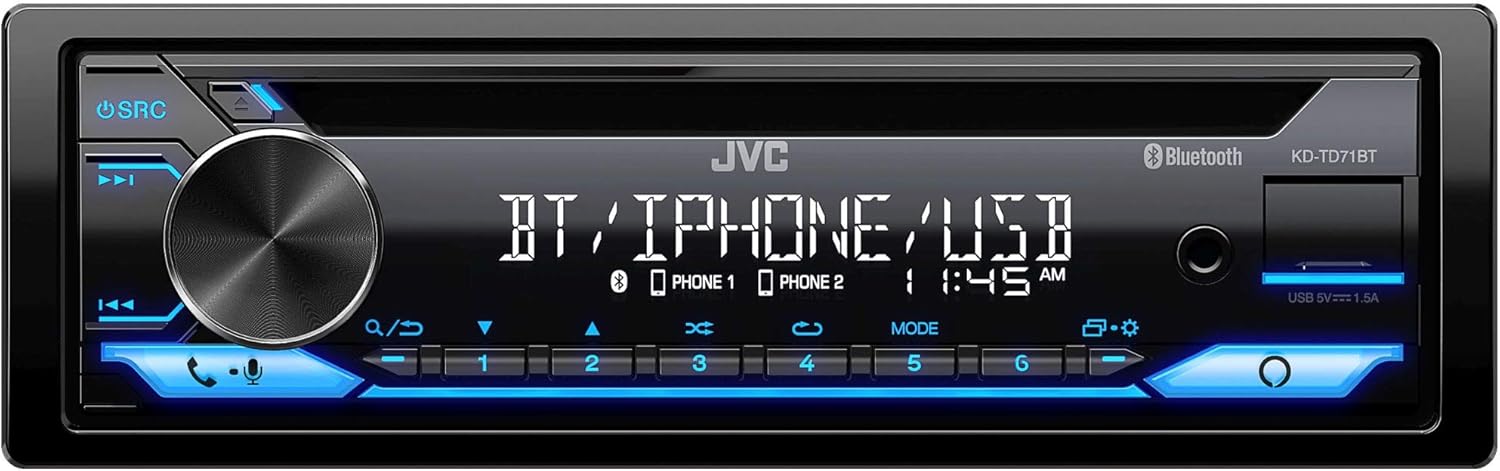
Mufananidzo: Mberi view of the JVC KD-TD71BT CD Receiver. This image shows the main display, the large rotary volume knob, source button, track controls, and the CD slot. The front USB and AUX inputs are also visible on the right side of the faceplate.
5. Operating Instructions
5.1. Basic Operation
- Batidza/Kudzima: Press the SRC bhatani rekubatidza mudziyo. Dzvanya wobata bhatani re SRC bhatani kuidzima.
- Kudzora inzwi: Tenderedza bhatani guru rinotenderera kuti ugadzirise huwandu hwevhoriyamu.
- Kwakabva Sarudzo Press the SRC button repeatedly to cycle through available sources (CD, Tuner, Bluetooth Audio, USB, AUX).
- Menyu/Zvirongwa: Press the MENU button (often integrated with the volume knob press) to access system settings.
5.2. Bluetooth Functions
The KD-TD71BT features Bluetooth for hands-free calling and wireless audio streaming.
- Kubatanidza Chishandiso:
- Batidza Bluetooth pane nharembozha yako.
- Select "KD-TD71BT" from the list of available devices.
- Confirm the pairing on both devices if prompted. The unit supports Bluetooth Automatic Pairing.
- Kufona Kwemahara:
- Answer/End Call: Press the FANA button (often a dedicated button or part of the volume knob function).
- Dialing: Use the unit's controls or your phone to dial.
- Kutenderera Kwemumhanzi: Select Bluetooth Audio as the source. Play music from your paired device. The unit supports Streaming DJ, allowing up to 5 Bluetooth devices to be connected simultaneously for music streaming.
- 2-Phones Full-Time Connection: The unit can maintain a full-time connection with two Bluetooth-enabled phones simultaneously, allowing for seamless switching between devices for calls or music.
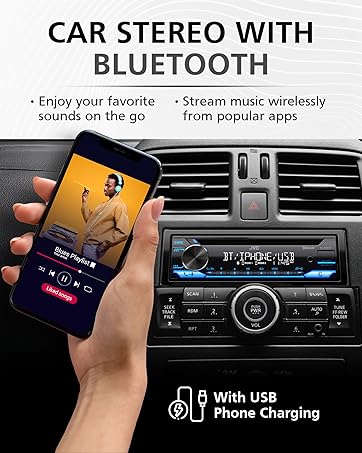
Mufananidzo: A hand holding a smartphone displaying a music playlist, positioned next to a car stereo. The car stereo's display shows "BT / IPHONE / USB", indicating its Bluetooth and USB capabilities. This illustrates the unit's ability to connect with smartphones for audio playback.
5.3. USB neAUX Inputs
- USB Kutamba: Connect a USB storage device to the front USB port. The unit supports MP3, WMA, WAV, AAC, and FLAC audio file playback. Use the track controls to navigate. The USB port also provides 1.5A charging for compatible devices.
- AUX Input: Connect an external audio player to the front 3.5mm AUX input using a stereo mini-jack cable. Select AUX as the source.
5.4. CD Playback
- Insert a CD into the disc slot. The unit will automatically switch to CD source and begin playback.
- Shandisa iyo TRACK UP / PASI mabhatani ekusvetuka makwara.
- Press the IMBOMIRA/ITAMBA bhatani kumbomira kana kutangazve kutamba.
5.5. Tuner yeAM/FM
- Select Tuner as the source.
- Shandisa iyo TSVAGA buttons to find radio stations.
- Dzvanya uye ubate TSVAGA for automatic station search.
- Store favorite stations using the preset buttons (1-6).
5.6. Kubatanidzwa kweAmazon Alexa
The KD-TD71BT features built-in Amazon Alexa.
- Activation: Connect your smartphone via Bluetooth and ensure the JVC Remote App is installed and configured with your Amazon Alexa account.
- Voice Commands: Press the dedicated Alexa button (or activate via the JVC Remote App) and speak your commands, such as "Alexa, play music," "Alexa, get directions," or "Alexa, check the weather."
6. Zvirongwa zveModhiyo
Customize your listening experience using the advanced audio settings. Access these settings through the unit's menu.
- 13-Bhendi Graphic EQ: Adjust specific frequency bands to tailor the sound to your preference. Eleven preset EQ settings are also available.
- Nguva Kurongeka: Adjust the delay of individual speaker outputs to ensure sound from all speakers reaches the listener at the same time, creating a more focused soundstage.
- Space Enhancement: Digitally expands the sound field to create a larger, more immersive listening environment.
- Sound Lift: Virtually adjusts the height of the sound image, making it appear as if the sound is coming from the dashboard rather than the floor.
- K2 Technology: JVC's proprietary technology that reproduces the original master sound by expanding the bit rate and frequency range.
7. Kuchengeta
- Kuchenesa Chikamu: Use a soft, dry cloth to wipe the faceplate. For stubborn dirt, dampen jira nemvura. Usamboshandisa abrasive cleaners kana solvents.
- CD Player Care: Use only standard, round CDs. Avoid using irregularly shaped discs or discs with labels that may peel off. Keep the disc tray clean.
- Fuse Replacement: If the unit does not power on, check the fuse located on the rear of the unit. Replace it with a fuse of the same amperage chiyero.
8. Kugadzirisa matambudziko
If you encounter issues with your KD-TD71BT, refer to the following common problems and solutions.
| Dambudziko | Zvinogona Kukonzera | Solution |
|---|---|---|
| Hapana simba | Fuse yakaputika; waya isiriyo; dambudziko rebhatiri remotokari. | Check and replace fuse; verify wiring connections; check car battery. |
| Hapana ruzha | Volume too low; mute activated; speaker wiring issue; incorrect source selected. | Increase volume; deactivate mute; check speaker connections; select correct source. |
| Bluetooth haina kubatana | Bluetooth off on phone/unit; device not paired; interference. | Ensure Bluetooth is on; re-pair device; move closer to unit; restart phone/unit. |
| CD skipping or not playing | Dirty or scratched disc; unit vibration; foreign object in slot. | Clean disc; ensure stable mounting; check for obstructions. |
| Kugamuchirwa kweredhiyo kusina kunaka | Antenna not connected; damaged antenna; weak signal area. | Check antenna connection; replace antenna if damaged; try a different location. |
9. Zvinotsanangurwa
Key technical specifications for the JVC KD-TD71BT CD Receiver:
- Model Number: KD-TD71BT (also referred to as KD-T710BT in some documentation)
- Magetsi: 12V DC (Negative Ground)
- Kubatana: Bluetooth, Front USB, Front AUX (3.5mm Jack)
- Kuchaja USB: 1.5A
- Audio Output Mode: Stereo
- Yakapoteredza Sound Channel Configuration: 2
- Chiyero: 13-Band Graphic EQ with 11 Presets
- Supported Audio Formats (USB/CD): MP3, WMA, WAV, AAC, FLAC
- Special Features: Amazon Alexa Compatible, K2 Technology, Time Alignment, Space Enhancement, Sound Lift, Streaming DJ, 2-Phones Full-Time Connection, Steering Wheel Remote Ready
- Zviyero zvechigadzirwa: Anenge 10 x 9 x 4 inches (25.4 x 22.86 x 10.16 cm)
- Chinhu Weight: 3.19 makirogiramu (1.45 kg)
- Mugadziri: JVC
10. Ruzivo rweWaranti
JVC products are manufactured to high-quality standards. For specific warranty terms and conditions, please refer to the warranty card included with your product or visit the official JVC website. Warranty coverage typically includes defects in materials and workmanship for a specified period from the date of purchase. Keep your proof of purchase for warranty claims.
11. Mutengi Tsigiro
If you require further assistance or have questions not covered in this manual, please contact JVC customer support.
- JVC Official Websaiti: www.jvc.com (for product information, FAQs, and support contact details)
- Zvekushandisa Pamhepo: Check the support section of the JVC website for updated manuals, firmware, and troubleshooting guides.


