Bhuku rekushandisa reAmazon Fire TV Stick (chizvarwa chechitatu)
Muenzaniso: Chidzitiro cheTV cheMoto (chizvarwa chechitatu)
Mutengo: Amazon
Nhanganyaya
The Amazon Fire TV Stick (3rd Gen) transforms your television into a smart entertainment hub, providing access to a vast library of streaming content. This device offers fast, Full HD streaming and comes with an Alexa Voice Remote for intuitive control. This manual provides comprehensive instructions for setting up, operating, and maintaining your Fire TV Stick, along with troubleshooting tips and product specifications.
Chii chiri muBhokisi
Before you begin, please ensure all components are present in the package:
- Chidzitiro cheTV cheMoto (chizvarwa chechitatu)
- Alexa Voice Remote (3rd Gen)
- Tambo yemagetsi neadapta yemagetsi
- HDMI extender
- 2 AAA mabhatiri
- Quick Start Guide

Image: All components included in the Fire TV Stick package, laid out for clear identification.
Gadzirira
Setting up your Fire TV Stick is a straightforward process. Follow these steps to get started:
- Batanidza Chimuti cheTV cheMoto: Plug the Fire TV Stick directly into an available HDMI input on your high-definition television. If space is limited or the stick obstructs other ports, use the included HDMI extender.
- Batanidza Simba: Connect the micro-USB end of the power cable to the Fire TV Stick and the other end to the power adapter. Plug the power adapter into a wall outlet.
- Isa Mabhatiri muKure: Open the battery compartment on the back of the Alexa Voice Remote and insert the two included AAA batteries, ensuring correct polarity.
- Batidza TV wobva wasarudza Input: Turn on your television and select the HDMI input to which the Fire TV Stick is connected.
- Tevera On-Screen Instructions: The Fire TV Stick will guide you through the remaining setup steps, including connecting to your Wi-Fi network, signing into your Amazon account, and pairing the Alexa Voice Remote. The remote will automatically pair; if not, press and hold the Home button for 10 seconds.
- Gadziridza Software: The device may download and install software updates during the initial setup. Allow this process to complete without interruption.

Image: The Fire TV Stick connected to a television's HDMI port, demonstrating its compact design that can be neatly tucked behind the TV.
Kushandisa Chidzitiro Chenyu CheMoto
The Fire TV Stick provides a user-friendly interface for accessing a wide range of entertainment.
Alexa Inzwi Remote
The included Alexa Voice Remote is your primary tool for navigating the Fire TV interface and controlling content. It features dedicated buttons for power and volume, allowing you to control your TV and soundbar with a single remote.
- Voice Control: Press and hold the Alexa button (microphone icon) and speak your commands. You can search for movies, TV shows, launch apps, or ask general questions.
- Navigation Use the directional ring to move through menus and select items. The center button acts as a 'Select' or 'OK' button.
- Bhatani Repamba: Inokudzorera kuFire TV home screen.
- Back Button: Inodzokera kune yakapfuura skrini.
- Bhatani reMenu: Accesses contextual options within apps or the system.
- Playback Controls: Dedicated buttons for play/pause, fast forward, and rewind.
- App Shortcut Mabhatani: Quickly access popular streaming services with dedicated buttons.

Image: The Alexa Voice Remote demonstrating its voice control capability for adjusting TV volume.
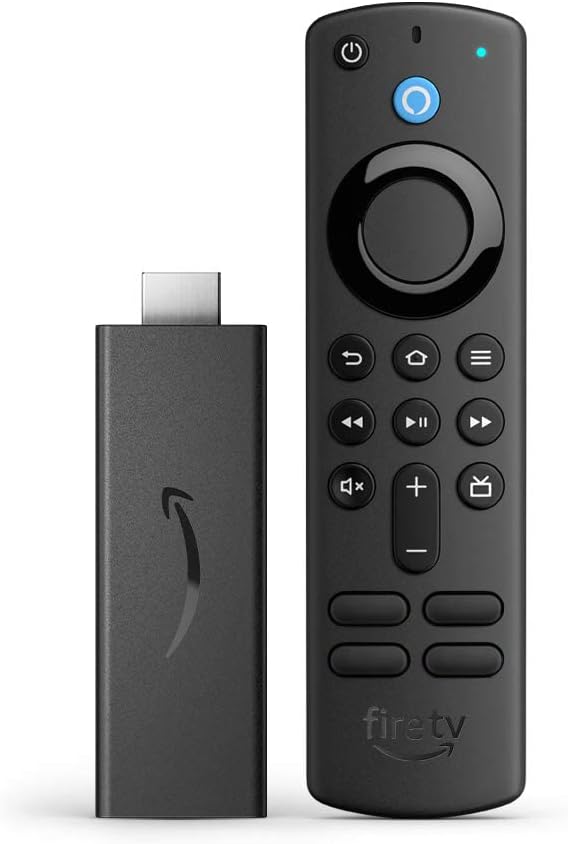
Image: The Fire TV Stick and its accompanying Alexa Voice Remote, showcasing yavo compact dhizaini.
Content Access
Your Fire TV Stick provides access to a vast library of content:
- Mafirimu & Zviratidziro zveTV: Stream over 1.5 million movies and TV episodes from services like Netflix, Prime Video, Disney+, Peacock, and more (subscription fees may apply).
- Live TV & Sports: Watch your favorite live TV, news, and sports with subscriptions to services such as SLING TV and YouTube TV. Use the Guide button on your remote to see what's available.
- Zvemukati Zvemahara: Access over 300,000 free movies and TV episodes from popular ad-supported streaming apps like Amazon Freevee, Tubi, and Pluto TV.
- Mumhanzi: Listen to millions of songs on Amazon Music, Spotify, Pandora, and other platforms (subscription fees may apply).

Image: A collage of popular streaming service logos, illustrating the wide range of content available on the Fire TV Stick.

Image: The Fire TV Stick and remote alongside icons representing various entertainment categories like sports, movies, music, and live TV.
Accessibility Features
The Fire TV Stick includes several accessibility features to enhance the user experience:
- VoiceView Screen Reader: Inobvumira vashandisi vane matambudziko ekuona kuti vasvike pazvinhu zvakawanda zveFire TV.
- Chinokudza Sikirini: Inobvumira vashandisi kuti vakwanise kuwedzera nekuburitsa mifananidzo, uye kutenderedza skrini.
- Text Banner: Inosanganisa magwaro ari pachidzitiro kuita banner diki uye inogadziriswa.
- Yakavharwa Captioning: Watch videos and TV shows with closed captioning displayed (availability varies by content).
- Tsanangudzo yeOdhiyo: Inopa tsananguro dzemashoko ezviito zviri pachikirini, chitarisiko chechiso, uye shanduko dzenzvimbo (kuwanikwa kwezvinhu kunosiyana zvichienderana nezviri mukati).
- Bluetooth Headphone Support: Listen to Fire TV with compatible Bluetooth headphones.

Image: A television displaying a live camera feed, illustrating the Fire TV Stick's capability to integrate with smart home devices.
Zvinotsanangurwa
Detailed technical specifications for the Amazon Fire TV Stick (3rd Gen) and its Alexa Voice Remote:
| Feature | Tsanangudzo |
|---|---|
| Chidzitiro cheTV cheMoto (chizvarwa chechitatu) | |
| Size | 3.4" x 1.2" x 0.5" (86 x 30 x 13 mm) |
| Kurema | 1.1 oz (32.0 g) |
| processor | Quad-core 1.7 GHz |
| GPU | IMG GE8300 |
| Storage | 8 GB yemukati |
| Wi-Fi | Dual-band, dual-antenna Wi-Fi (MIMO) for faster streaming and fewer dropped connections. Supports 802.11a/b/g/n/ac Wi-Fi networks. |
| Bluetooth | Bluetooth 5.0 and Bluetooth Low Energy. Pair with compatible Bluetooth speakers, headphones, video game controllers, and more. |
| Voice Support | Yes, with Alexa Voice Remote (included) or the free Fire TV app. |
| Kudzora Mudziyo weIR | Controls Fire TV Stick and certain functions (power, volume) on compatible IR-enabled devices (TVs, soundbars, A/V receivers). |
| Cloud Storage | Free cloud storage for digital content purchased from Amazon. |
| Ports | HDMI output, micro-USB for power only. |
| Audio Support | Dolby Atmos, Dolby Digital, Dolby Digital+ surround sound and HDMI Audio passthrough. |
| Video Content Formats Supported | HDR 10, HDR10+, HLG, H.265, H.264, VP9 |
| Output Resolution Inotsigirwa | 1080p uye 720p kusvika pa60 fps |
| System Zvinodiwa | High-definition television with available HDMI input, internet connection via Wi-Fi, a power outlet. |
| TV Kugarisana | High-definition TVs with HDMI capable of 1080p or 720p at 60/50 Hz. |
| Alexa Voice Remote (3rd Gen) | |
| Size | 38 x 142 x 16 mm |
| Kurema | 43.4 g (pasina mabhatiri) |
| Mabhatiri | 2 AAA (inosanganisirwa) |
| Vadivelu Comedy Technology | Bluetooth |
| Kugarisana | Chimuti cheTV cheFire (chizvarwa chechitatu), Chimuti cheTV cheFire 4K, Chimuti cheTV cheFire 4K Max |
Maintenance
To ensure optimal performance and longevity of your Fire TV Stick, consider the following maintenance tips:
- Zvichengete Zvakachena: Gently wipe the Fire TV Stick and remote with a soft, dry cloth to remove dust. Avoid using liquid cleaners or abrasive materials.
- Iva nechokwadi cheKupinda Pamhepo: While compact, ensure the Fire TV Stick is not covered or placed in an enclosed space that could lead to overheating.
- Zvigadziriso zveSoftware: Allow the device to install software updates when prompted. These updates often include performance improvements and security enhancements.
- Remote mabhatiri: Replace the AAA batteries in the Alexa Voice Remote when performance degrades or the remote becomes unresponsive.
Kugadzirisa matambudziko
If you encounter issues with your Fire TV Stick, try the following troubleshooting steps:
- Hapana Simba/Hapana Chiratidzo:
- Ensure the power adapter is securely plugged into a working wall outlet and the micro-USB cable is firmly connected to the Fire TV Stick.
- Verify the Fire TV Stick is fully inserted into the HDMI port on your TV. Try a different HDMI port if available.
- Iva nechokwadi chekuti TV yako yaiswa panzvimbo chaiyo yeHDMI input.
- Remote Kwete Kupindura:
- Replace the AAA batteries in the Alexa Voice Remote.
- If the remote is not paired, press and hold the Home button on the remote for 10 seconds to initiate pairing.
- Ensure there are no obstructions between the remote and the Fire TV Stick.
- Buffering or Poor Streaming Quality:
- Check your Wi-Fi connection. Ensure your router is working correctly and the Fire TV Stick is within range.
- Restart your Wi-Fi router by unplugging it for 30 seconds and then plugging it back in.
- Restart the Fire TV Stick by unplugging its power adapter for a few seconds and then plugging it back in.
- Ensure other devices on your network are not consuming excessive bandwidth.
- App Haisi Kushanda:
- Go to Settings > Applications > Manage Installed Applications, select the problematic app, and choose 'Force Stop' then 'Clear Cache'.
- If the issue persists, try 'Clear Data' (this will log you out of the app) or uninstall and reinstall the app.
Warranty uye Support
Your Amazon Fire TV Stick (3rd Gen) comes with a 90-day Limited Warranty and service. Optional 2-Year and 3-Year Extended Warranty plans are available for U.S. customers and are sold separately.
Ichi chishandiso chinogashira yakavimbiswa kuchengetedza software kusvika angangoita makore mana mushure mekunge mudziyo wapedzisira kuwanikwa kutengwa sechinhu chitsva pane yedu. websites. For specific information regarding your device, you can visit the 'Manage Your Content and Devices' section on the Amazon website.
For further assistance, please refer to the official Amazon support resources or contact Amazon customer service.


