Nhanganyaya
The Edifier TWS NB2 True Wireless Active Noise Canceling Earbuds are designed to provide a superior audio experience with advanced noise cancellation technology. These earbuds offer hybrid ANC for effective noise reduction, ensuring clear audio in various environments. Key features include crystal-clear calls with dual microphones, infrared wearing detection for automatic playback control, and convenient one-touch pairing. The ambient sound pass-through mode allows users to stay aware of their surroundings without removing the earbuds. With an extended playback time, the TWS NB2 is ideal for daily use, commuting, and workouts.
Chii chiri muBhokisi
Pakuvhura package, iwe unowana zvinotevera zvikamu:
- Edifier TWS NB2 Earbuds
- Kuchaja Case
- USB Type-C Yekuchaja Cable
- Spare Eartips (S/M/L sizes)
- User Manual
Vhidhiyo Unboxing the Edifier TWS NB2 Earbuds. This video demonstrates the contents of the product packaging, including the earbuds, charging case, charging cable, and various eartip sizes.
Product Overview
The Edifier TWS NB2 earbuds are designed for comfort and high-quality audio performance. Below are some key features and components:

Mufananidzo: The Edifier TWS NB2 earbuds resting in their open charging case, showcasing their sleek design and compact form factor.

Mufananidzo: Visual representation highlighting the Hi-Res Audio Wireless capability, promising an immersive sound effect and HiFi enjoyment.

Mufananidzo: An individual using the earbuds, illustrating the Tri-MIC phone call feature designed for clear communication even in windy conditions.

Mufananidzo: A user wearing the earbuds in an outdoor setting, demonstrating the Environment Monitoring Mode which allows hearing surroundings for safety.
Mufananidzo: The charging case with water droplets, indicating the IP54 dust and water resistance, making the earbuds suitable for outdoor activities.

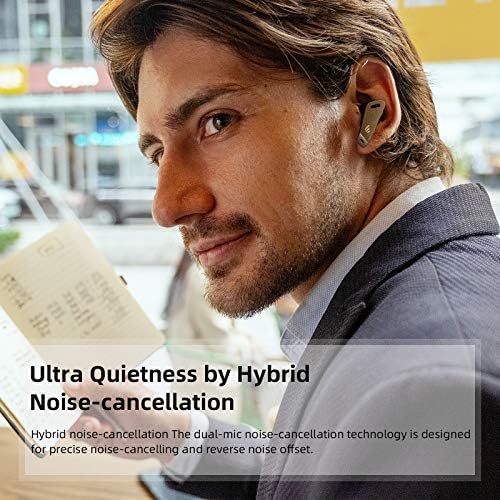
Mufananidzo: A person wearing the earbuds in a cafe, highlighting the Ultra Quietness achieved through Hybrid Noise-cancellation technology.

Mufananidzo: The earbuds in their case with a speed gauge background, illustrating the extended playback time of up to 32 hours.
Vhidhiyo Edifier TWS NB2 Active Noise Cancelling Lifestyle Video. This video showcases the earbuds' active noise cancellation and ambient sound features in various daily scenarios.
Gadzirira
1. Kuchaja maEarbuds uye Case
Before first use, fully charge the earbuds and the charging case. Place the earbuds into the charging case. Connect the USB Type-C charging cable to the charging port on the case and a power source. The indicator lights on the case will show the charging status. A full charge typically takes approximately 1.5 hours for the earbuds and 2 hours for the case.
2. Bluetooth Kubatanidza
To pair your Edifier TWS NB2 earbuds with a device:
- Ita shuwa kuti maearbuds ari mucheji yekuchaja uye chivharo chekesi chakavhurika.
- Pamudziyo wako (smartphone, piritsi, nezvimwewo), shandisa Bluetooth.
- The earbuds will automatically enter pairing mode. Look for 'TWS NB2' in your device's Bluetooth settings.
- Select 'TWS NB2' to connect. Once connected, a voice prompt will confirm successful pairing.
Vhidhiyo Bluetooth Connection Guide for Edifier TWS NB2. This video illustrates the steps to connect your earbuds to a mobile device via Bluetooth.
Operating Instruction
The Edifier TWS NB2 earbuds feature intuitive touch controls. Here’s how to operate them:
| Function | Chiito | Earbud |
|---|---|---|
| Tamba/Misa | Tokonya kaviri | Kuruboshwe kana Kurudyi |
| Next Track | Tap katatu | Rudyi |
| Previous Track | Tap katatu | Ruboshwe |
| Volume Up | Press and hold (Right) | Rudyi |
| Volume Down | Press and hold (Left) | Ruboshwe |
| Pindura/Pedzisa Kufona | Tokonya kaviri | Kuruboshwe kana Kurudyi |
| Ramba Kufona | Dzvanya uye bata kwemasekonzi maviri | Kuruboshwe kana Kurudyi |
| Activate Voice Assistant | Quadruple-tap | Kuruboshwe kana Kurudyi |
| Toggle ANC/Ambient Sound | Double-tap (Left) | Ruboshwe |
Infrared Wearing Detection: The music will automatically pause playback when the earbuds are removed from your ears and resume when you put them back on.
Maintenance
To ensure the longevity and optimal performance of your Edifier TWS NB2 earbuds, follow these maintenance guidelines:
- Kuchenesa: Gara uchichenesa maearbud uye kesi yekuchaja nejira rakapfava, rakaoma. Dzivisa kushandisa abrasive zvinhu kana makemikari ane hasha.
- Kuchengeta: Kana isiri kushandiswa, chengeta maearbuds mukesi yavo yekuchaja kuti azvidzivirire kubva kuguruva nekukuvadzwa.
- Kuramba Mvura: The earbuds are IP54 rated for dust and water resistance. This means they are protected against limited dust ingress and water spray from any direction. Do not submerge them in water or expose them to heavy rain. Dry them thoroughly if they get wet.
- Kuchaja: Use only the provided USB Type-C cable for charging. Avoid extreme temperatures during charging and storage.
- Dzivisa Impact: Do not drop or subject the earbuds to strong impacts, as this can damage internal components.
Kugadzirisa matambudziko
If you encounter issues with your Edifier TWS NB2 earbuds, refer to the following common solutions:
- Maearbuds haana kubatanidza: Ensure both earbuds are charged and in the case with the lid open. Turn off and on your device's Bluetooth. If issues persist, try resetting the earbuds (refer to the full user manual for specific reset instructions).
- Hapana ruzha kubva kune imwe earbud: Isa maearbud ese ari maviri muchesi yekuchaja, vhara chivharo, mirira mashoma mashoma, wozovhura zvakare. Izvi zvinowanzovabatanidza zvakare.
- Kuchaja nyaya: Tarisa tambo yekuchaja neadapta. Iva nechokwadi chekuti macontacts ekuchaja ari pama earbuds nemukati mebhokisi akachena uye haana tsvina.
- Hunhu husina kunaka: Iva nechokwadi chekuti nzeve dziri munzeve dzinovhara zvakanaka nzeve yako. Edza nzeve dzehukuru hwakasiyana. Tarisa kana paine zvipingamupinyi mumuromo wemuromo.
- Kubatana kwepakati: Keep your device within the Bluetooth range (up to 10 meters). Avoid strong electromagnetic interference.
For more detailed troubleshooting or persistent issues, please contact Edifier customer support.
Zvinotsanangurwa
| Tsanangudzo | Detail |
|---|---|
| Model Name | TWS NB2 |
| Noise Control | Active Noise Cancellation |
| Kubatana Technology | Wireless (Bluetooth 5.0) |
| Hupenyu hwebhatiri | 32 Hours (Total with charging case) |
| Control Type | Bata Kudzora |
| Mvura Resistance Level | IP54 Mvura Inodzivirira |
| Item Weight | 1.9 Onzi |
| Color | Chena |
| Material | Plastiki |
| Bluetooth Range | 10 Mamita |
| Mugadziri | EDIFIER |
Warranty uye Support
Edifier products typically come with a limited warranty covering manufacturing defects. For specific warranty terms and conditions, please refer to the warranty card included in your product packaging or visit the official Edifier website.
If you require technical assistance, have questions about your product, or need to claim warranty service, please contact Edifier customer support through their official channels. You can usually find contact information on the Edifier website or in your product's user manual.


