Nhanganyaya
This manual provides instructions for the proper installation, operation, and maintenance of the Tilta Nucleus-Nano Run/Stop Cable (Model: RS-WLC-T04-SYA). This cable enables run/stop functionality between the Tilta Nucleus-Nano motor and compatible Sony a6, a7, and a9 series camera systems.
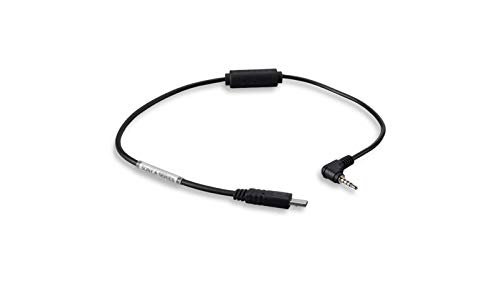
Mufananidzo 1: Tilta Nucleus-Nano Run/Stop Cable. This image displays the black cable with a micro-USB connector on one end and a 2.5mm TRS (Tip-Ring-Sleeve) connector on the other, designed for connecting the Nucleus-Nano motor to Sony cameras for remote run/stop control.
Gadzirira
- Ziva Vanobatanidza: Locate the micro-USB connector and the 2.5mm TRS connector on the cable.
- Connect to Nucleus-Nano Motor: Insert the micro-USB end of the cable into the designated run/stop port on your Tilta Nucleus-Nano motor. Ensure a secure connection.
- Connect to Sony Camera: Insert the 2.5mm TRS end of the cable into the remote control port (typically labeled 'REMOTE' or 'MULTI') on your compatible Sony a6, a7, or a9 series camera. Refer to your camera's manual for the exact port location.
- Power On: Ensure both the Nucleus-Nano motor and the Sony camera are powered on.
Operating Instruction
Once the cable is correctly connected and both devices are powered on, the Nucleus-Nano motor's run/stop button will control the recording function of the connected Sony camera.
- Initiate Recording: Press the run/stop button on the Nucleus-Nano motor once to start recording on the Sony camera.
- Misa Kurekodha: Press the run/stop button on the Nucleus-Nano motor again to stop recording on the Sony camera.
- Simbisa Mashandiro: Always verify that the camera's recording indicator light responds correctly to the run/stop commands from the Nucleus-Nano motor.
Maintenance
- Kuchenesa: Use a soft, dry cloth to gently wipe the cable and connectors. Avoid using liquid cleaners or solvents.
- Kuchengeta: Store the cable in a cool, dry place, away from direct sunlight and extreme temperatures. Avoid sharp bends or kinks in the cable.
- Kuongorora: Periodically inspect the cable for any signs of wear, fraying, or damage to the connectors. Discontinue use if damage is observed.
Kugadzirisa matambudziko
Issue: Run/Stop function is not working.
- Tarisa Makabatana: Ensure both the micro-USB and 2.5mm TRS connectors are fully and securely inserted into their respective ports on the Nucleus-Nano motor and the Sony camera.
- Simba Status: Verify that both the Nucleus-Nano motor and the Sony camera are powered on and have sufficient battery life.
- Kuenderana nekamera: Confirm that your Sony camera model is compatible with the Nucleus-Nano run/stop system and that the remote port is enabled in the camera settings, if applicable.
- Cable Integrity: Inspect the cable for any visible damage. A damaged cable may prevent proper communication.
- Motor Functionality: Test the Nucleus-Nano motor's run/stop button independently, if possible, to rule out issues with the motor itself.
Zvinotsanangurwa
| Feature | Detail |
|---|---|
| Model Number | RS-WLC-T04-SYA |
| Brand | Tilta |
| Kugarisana | Tilta Nucleus-Nano Motor, Sony a6/a7/a9 series cameras |
| Rudzi rwekubatanidza 1 | Micro-USB (for Nucleus-Nano motor) |
| Rudzi rwekubatanidza 2 | 2.5mm TRS (for Sony camera remote port) |
| Function | Run/Stop control |
| Cable Type | AUX |
| Special Feature | Tangle Free |
| Item Weight | 3.2 ounces |
Warranty Information
This product is covered by Tilta's standard limited warranty. For detailed information regarding warranty terms, conditions, and duration, please refer to the official Tilta website or contact their customer support. Proof of purchase may be required for warranty claims.
Mutengi Support
For further assistance, technical support, or inquiries regarding the Tilta Nucleus-Nano Run/Stop Cable, please visit the official Tilta website or contact their customer service department. Contact information can typically be found on the Tilta webnzvimbo yekutsigira chikamu.
Zvekushandisa Pamhepo: www.tilta.com


