Nhanganyaya
This manual provides detailed instructions for the setup, operation, and maintenance of your HXSJ J800 Wired Gaming Mouse. Please read this manual thoroughly to ensure proper use and to maximize your gaming and productivity experience.
Package Zviri mukati
- 1 x HXSJ J800 Wired Gaming Mouse
- 1 x Chinyorwa cheMushandisi
Gadzirira
- Batanidza Mouse: Insert the USB connector of the HXSJ J800 mouse into an available USB port on your computer.
- Kuiswa kwemutyairi: The mouse is plug-and-play. Your operating system will automatically detect and install the necessary drivers. No additional software installation is required for basic functionality.
- Kushandiswa Kwekutanga: Once connected, the mouse is ready for immediate use.

Image: The HXSJ J800 mouse with its braided USB cable, ready for connection to a computer.
Operating Instruction
1. Mode Switching (Office Mode / Game Mode)
The HXSJ J800 mouse features two operational modes: Office Mode and Game Mode.
- Default Mode: The mouse defaults to Office Mode upon connection.
- Kuchinja Mamodhi: To switch between Office Mode and Game Mode, press and hold the Scroll Wheel button uye Right Mouse bhatani panguva imwe chete kwemasekonzi mashanu.
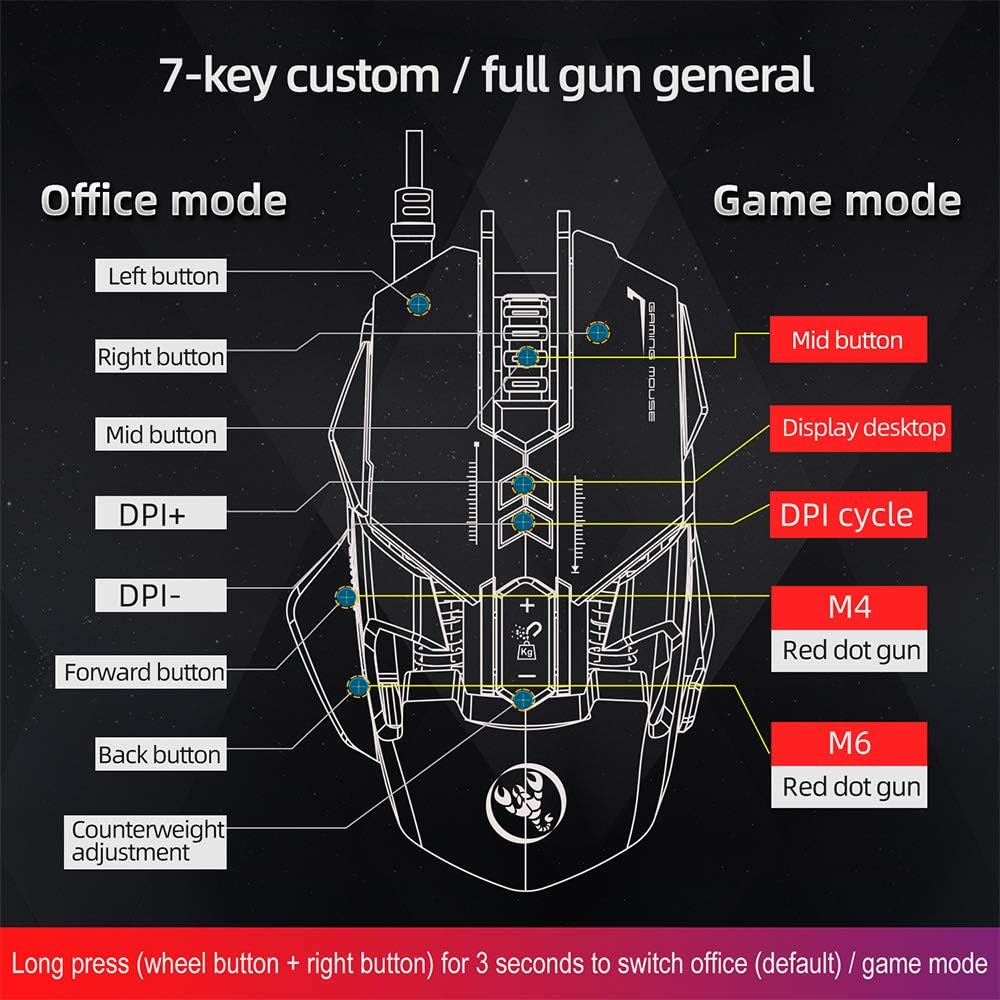
Image: A diagram illustrating the different button assignments for Office Mode (left) and Game Mode (right), including the mode switching instruction.
2. DPI Kugadzirisa
The mouse supports six adjustable DPI settings for varying cursor sensitivity.
- DPI Levels: 800, 1600, 2400, 3200, 4800, 6400 DPI.
- Kuchinja DPI: Use the dedicated DPI+ and DPI- buttons located on the top of the mouse to cycle through the available DPI settings.
- Visual Indicator: The RGB lighting will flash with a corresponding color when the DPI setting is changed.
3. Kuronga Makorogiramu eMacro
The HXSJ J800 features an A6653 E-sports Game Chip with onboard storage for hardware macro definition.
- Kushanda Record and write macro definition commands directly to the mouse.
- Software-Free Operation: Once macros are recorded, no additional software is required for their execution, making it convenient for use across different computers.

Mufananidzo: Yakadzama view of the A6653 E-sports Game Chip, highlighting its role in hardware macro definition.
4. RGB Light Effect
The mouse features 16.8 million color RGB backlight modes.
- Customization: The RGB lighting provides various color effects.
- DPI Indicator: The light of the corresponding gear will flash every time the DPI changes.

Image: The HXSJ J800 mouse illuminated with vibrant RGB lighting, showcasing its aesthetic features.
5. Removable Weight Adjustment
Customize the mouse's weight for enhanced stability and accuracy.
- Weight System: The mouse incorporates a suction magnet design with two 5g removable weights.
- Kugadzirisa: The weights can be easily inserted into or removed from the weight chamber. The magnetic design ensures the weights are securely held and not easily lost.

Image: A user adjusting the removable 5g weights in the HXSJ J800 mouse's magnetic weight chamber.
Features Overview
- Seven-Key Macro Programming: Supports recording and writing macro definition commands for personalized control.
- Six Adjustable DPI Levels: Easily switch between 800-1600-2400-3200-4800-6400DPI to suit various tasks and games.
- E-sports Game Chip (A6653): Features onboard storage for true hardware macro definition, eliminating the need for software after initial setup.
- Cool RGB Light Effect: 16.8 million color RGB backlight modes with dynamic effects and DPI change indicators.
- Removable Weight Design: Two 5g magnetic weights allow for customization of mouse weight for optimal feel and precision.
- Swichi Dzinogara: Rated for 20 million cycles.
- Aluminum Alloy Roller: Provides a high-grade feel and comfortable damping.

Mufananidzo: Yemukati view of the HXSJ J800 mouse, highlighting key components such as the A6653 chip, aluminum alloy roller, and weight counterweights.

Image: A close-up of the HXSJ J800 mouse, focusing on the aluminum alloy scroll wheel and its textured design.
Maintenance
- Kuchenesa: Shandisa jira rakapfava, rakaoma kuchenesa mbeva. Patsvina yakasindimara, zvishoma dampen jira nemvura. Dzivisa kushandisa makemikari ane hasha kana abrasive zvinhu.
- Sensor Care: Chengetedza iyo optical sensor iri pasi pegonzo yakachena uye isina guruva kana marara kuti uve nechokwadi chekutevera.
- Cable Management: Dzivisa kubhenda kwakapinza kana kudhonza zvakanyanya pa USB tambo kudzivirira kukuvara.
- Kuchengeta: Store the mouse in a clean, dry environment when not in use.
Kugadzirisa matambudziko
- Mbeva isingapindure:
- - Ensure the USB cable is securely connected to your computer's USB port.
- - Try connecting the mouse to a different USB port.
- - Tangazve komputa yako.
- DPI adjustment not working:
- - Ensure you are pressing the correct DPI+ or DPI- buttons.
- - Check if the mouse is in a mode that supports DPI adjustment (both Office and Game modes support it).
- RGB lighting not functioning:
- - Verify the mouse is properly connected and receiving power.
- - The lighting should activate automatically. If not, ensure no software is overriding the mouse's default lighting settings (though this mouse is designed to be software-free for basic functions).
- Macros not executing:
- - Ensure the macros were correctly recorded and saved to the mouse's onboard memory.
- - Confirm the mouse is in Game Mode if the macros are assigned to Game Mode specific buttons.
Zvinotsanangurwa
| Item | Tsanangudzo |
|---|---|
| Model | J800 |
| Color | Gireyi |
| Number of Keys | 7 |
| DPI Zvirongwa | 800-1600-2400-3200-4800-6400DPI |
| Interface | USB |
| Chinja Upenyu | 20 miriyoni kutenderera |
| Voltage / Izvozvi | DC 5V/100mA |
| Inotsigirwa System | Windows 2000/XP/Win7/Win8/Win10 Vista 32bit, iOS or latest |
| Chinhu Saizi | 13 x 8 x 4 cm (L x W x H) |
| Item Weight | Approx. 154g |
| Chip | A6653 E-sports Game Chip |
| Special Features | Programmable Buttons, Adjustable DPI, RGB Lighting, Removable Weights |
Warranty uye Support
For warranty information or technical support, please refer to the retailer where you purchased the HXSJ J800 Wired Gaming Mouse or visit the official HXSJ website. Ndapota chengetedza humbowo hwako hwekutenga kwezvichemo zvewaranti.


