1. Nhanganyaya
This manual provides detailed instructions for the installation, operation, and maintenance of your EZoneTronics Android 10.1 2DIN Car Stereo. This unit features a 9-inch capacitive touchscreen, Android 10.1 operating system, GPS navigation, Bluetooth 4.0, Wi-Fi, AM/FM/RDS radio, and support for Mirror Link, Apple CarPlay, and Android Auto. Please read this manual thoroughly before using the product to ensure proper function and safety.
2. Kugarisana Kwemotokari
This car stereo is designed for specific Mercedes-Benz models:
- Mercedes-Benz ML-W164 / ML300 / ML350 / ML450 / ML500 / ML320 / ML63 AMG (2005-2012)
- Mercedes-Benz GL-X164 / GL320 / GL350 / GL420 / GL450 / GL500 (2005-2012)
Chiziviso Chakakosha: If your vehicle is equipped with a Harman, Kardon, or BOSE amplification system, an additional fiber optic decoder box (e.g., ASIN B08K49SQSM) may be required for proper audio functionality. Consult a professional installer if you are unsure.
3. Package Zviri mukati
Tarisa kuti zvinhu zvese zvakanyorwa pazasi zvinosanganisirwa mupakeji yako:
- 1 x EZoneTronics Android Car Stereo Unit
- 1 x GPS Antenna
- 1 x Simba rekushandisa
- 1 x RCA Output Cable
- 2 x USB Adapters
- 1 x Cable yekupinda kamera
- 1 x Chinyorwa cheMushandisi (gwaro iri)
- 1 x Canbus Box
4. Setup uye Kuiswa
Installation of this car stereo requires technical knowledge and experience with automotive electrical systems. Professional installation is highly recommended to prevent damage to the unit or your vehicle.
4.1 Pre-Instalation Check
- Ensure the vehicle's ignition is off and the battery is disconnected before starting installation.
- Simbisa kuti zvese zviri mupakeji zviripo.
- Review your vehicle's wiring diagram for specific connections.
4.2 Matanho Ekuisa (Zvakajairika)
- Carefully remove the original car stereo unit from your dashboard.
- Connect the provided power harness to the vehicle's wiring. Ensure all connections are secure.
- Connect the GPS antenna and route it to a location with a clear view of the sky (e.g., dashboard corner).
- Connect the USB adapters and route them to an accessible location (e.g., glove compartment).
- If installing a rear camera, connect the camera input cable and route it to the camera location.
- Connect the RCA output cable for external ampma lifiers kana subwoofers, kana zvichibvira.
- Connect the Canbus box as per the wiring diagram to enable steering wheel controls and other vehicle-specific functions.
- Carefully slide the new EZoneTronics unit into the dashboard opening.
- Chengetedza chikwata panzvimbo.
- Batanidza bhatiri remota zvakare uye edza mashandiro eyuniti yacho.

Mufananidzo 4.1: Comparison of the car dashboard before and after the EZoneTronics car stereo installation. The top image shows the new unit installed, while the bottom images show the original radio (left) and the new unit (right) for direct comparison.
5. Operating Instructions
5.1 Basic Operation
- Batidza/Kudzima: Press and hold the power button (usually on the front panel) to turn the unit on or off. A short press typically mutes/unmutes audio.
- Touchscreen: The 9-inch capacitive touchscreen responds to touch gestures similar to a smartphone. Tap to select, swipe to scroll.
- Sikirini Yemba: The main interface provides access to various functions like Radio, Music, Navigation, Bluetooth, and Apps.
5.2 Radio (AM/FM/RDS)
The unit features a built-in AM/FM/RDS radio tuner for clear signal reception.
- Accessing Radio: Tap the 'Radio' icon on the home screen.
- Kuongorora: Use the 'Scan' or 'Seek' buttons on the screen to automatically search for available stations.
- Kuchengeta Presets: Once a station is tuned, press and hold a preset number button on the screen to save it.
- Basa reRDS: Radio Data System (RDS) displays station information like song title or program type where available.

Mufananidzo 5.2: The FM/AM/RDS Radio interface on the EZoneTronics car stereo, showing frequency display and preset buttons for easy station selection.
5.3 Makaralı 4.0
Batanidza foni yako uchishandisa Bluetooth kuti ufonere pasina kushandisa maoko uye kuti utarise odhiyo.
- Kubatanidza: Go to the 'Bluetooth' menu on the stereo. Enable Bluetooth on your phone and search for available devices. Select 'EZoneTronics' (or similar name) and confirm the pairing code.
- Kufona Kwemahara: Once paired, you can make and receive calls directly from the stereo screen. Your phone's contact list may sync automatically.
- Kuyerera Kwekuteerera (A2DP): Play music from your phone through the car stereo speakers. Control playback (play/pause, skip) from the stereo.

Mufananidzo 5.3: The Bluetooth 4.0 interface showing music playback controls and icons for phone video, dial-up, hang-up, and phone music functions.
5.4 GPS Navigation
The unit includes an integrated GPS receiver and comes with Google Maps pre-installed. Other navigation apps can be downloaded from the Google Play Store.
- Kufamba Pamhepo: Connect to Wi-Fi to use online maps and real-time traffic information.
- Kufamba Usina Kushanda: Download offline map data for specific regions via Wi-Fi for navigation without an internet connection.
- Using Navigation Apps: Tap the 'Navigation' icon to launch the default map application. Follow on-screen prompts to enter destinations and start routes.
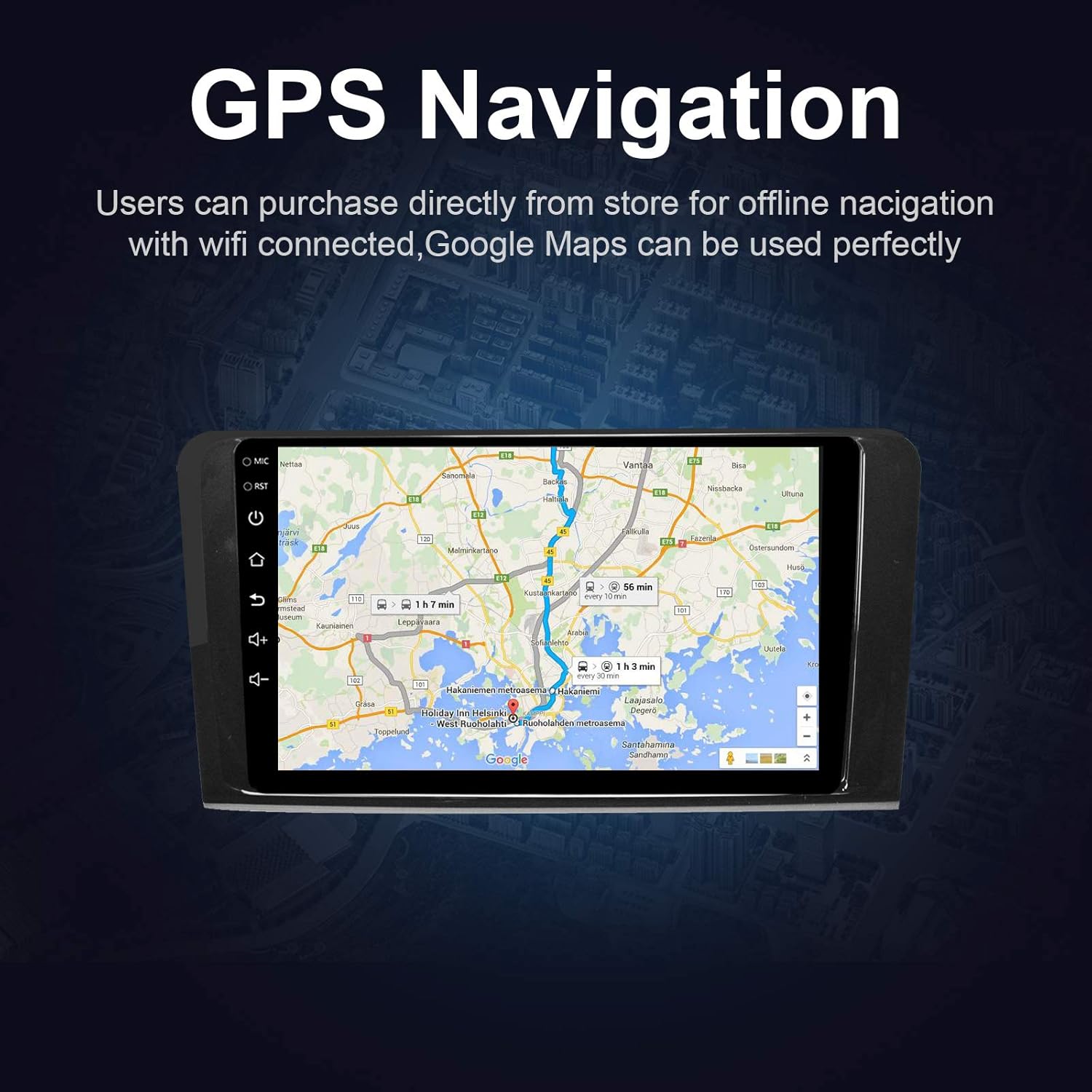
Mufananidzo 5.4: The GPS Navigation screen showing a map with a highlighted route and estimated travel time.
5.5 Apple CarPlay & Android Auto
The unit supports both wireless Apple CarPlay and wired Android Auto, allowing seamless integration with your smartphone.
- Apple CarPlay (Wireless): Connect your iPhone via Bluetooth and Wi-Fi. Follow the on-screen prompts to enable CarPlay.
- Android Auto (Wired): Connect your Android phone via a USB cable. Ensure Android Auto is installed on your phone.
- Features: Access phone calls, messages, music, and navigation apps directly from the car stereo interface, optimized for driving.
5.6 Chinongedzo chegirazi
Mirror Link allows you to display your smartphone's screen directly on the car stereo.
- Zvemidziyo yeIOS: Supports AirPlay mirroring wirelessly.
- Zvemidziyo yeAndroid: Connect via a USB cable.
- Activation: Select the 'Mirror Link' app on the stereo and follow the instructions for your specific phone model.

Mufananidzo 5.6: The Mirror Link function showing a smartphone screen mirrored onto the car stereo display.
5.7 Split Screen Basa
The Android 10.1 system supports multitasking, allowing you to run two applications simultaneously on the screen.
- Activation: While one app is open, press and hold the recent apps button (or swipe up from the bottom and hold, depending on the Android version) and drag another compatible app to the other half of the screen.
- Kushandisa: For example, you can use navigation on one side and play music or radio on the other.

Mufananidzo 5.7: The Split Screen function in action, showing a navigation map on one side and a music player on the other, enabling multitasking.
5.8 Digital Sound Processor (DSP) / Equalizer
Customize your audio experience with the built-in 14-band equalizer and sound processor.
- Kupinda muEQ: Tap the 'Equalizer' or 'Sound Settings' icon from the home screen or audio playback interface.
- Kugadziridza: Adjust individual frequency bands (bass, treble, mid-range) to your preference.
- Presets: Select from various pre-defined sound modes (e.g., Pop, Rock, Classic, Jazz) or create custom profiles.
- Volume/Fader/Balance: Control overall volume, and adjust audio distribution between front/rear and left/right speakers.

Mufananidzo 5.8: The Digital Sound Processor (DSP) system interface, showing a 14-band equalizer for precise audio adjustments.
5.9 Multimedia Playback (USB)
Tamba odhiyo nevhidhiyo files kubva kumidziyo yekuchengetedza ye USB.
- Kubatanidza USB: Insert a USB drive into one of the provided USB ports.
- Accessing Files: The unit will automatically detect the USB device. Navigate to the 'Music' or 'Video' app to browse and play files.
- Mafomu Anotsigirwa: The unit supports various audio and video formats, including high-definition 1080P video.

Mufananidzo 5.9: The car stereo displaying high-definition 1080P video content, demonstrating its multimedia playback capabilities.
6. Kuchengeta
Proper maintenance ensures the longevity and optimal performance of your car stereo.
- Kuchenesa Screen: Shandisa jira rakapfava, risina lint zvishoma dampened with water or a screen cleaner specifically designed for electronics. Do not use abrasive cleaners or solvents.
- General Cleaning: Wipe the unit's exterior with a soft, dry cloth. Avoid getting liquids into openings.
- Zvigadziriso zveSoftware: Periodically check for available software updates through the unit's settings menu (requires Wi-Fi connection) to ensure optimal performance and access to new features.
- Dzivisa Kunyanya Kupisa: Do not expose the unit to extreme heat or cold for extended periods, as this can affect performance and lifespan.
7. Kugadzirisa matambudziko
If you encounter issues with your EZoneTronics car stereo, refer to the following common problems and solutions:
| Dambudziko | Zvinogona Kukonzera | Solution |
|---|---|---|
| Unit haibatike. | Incorrect wiring, blown fuse, vehicle battery disconnected. | Check power connections and fuses. Ensure battery is connected. Consult a professional installer. |
| Hapana ruzha. | Volume too low, mute activated, incorrect speaker wiring, fiber optic box needed. | Increase volume, check mute status. Verify speaker connections. If your car has a premium sound system, ensure a fiber optic decoder box is installed. |
| Chiratidzo cheGPS hachina simba kana kuti hachina kuwanikwa. | GPS antenna haina kuiswa zvakanaka kana kuvharirwa. | Ensure the GPS antenna is placed in a location with a clear view yedenga uye yakabatana zvakachengeteka. |
| Bluetooth nyaya dzekubatanidza. | Phone not in pairing mode, incorrect pairing code, interference. | Ensure Bluetooth is enabled on both devices and in pairing mode. Re-pair the devices. Restart both the stereo and phone. |
| Zvinodzora mavhiri edhiringi hazvisi kushanda. | Canbus box not connected or configured correctly. | Verify the Canbus box connection and ensure it is properly configured in the unit's settings. Refer to installation instructions. |
| Sikirini yekubata haibati kana kuti inononoka. | Temporary software glitch, excessive background apps. | Restart the unit. Close unnecessary background applications. If the issue persists, perform a factory reset (note: this will erase all user data). |
8. Zvinotsanangurwa
Key technical specifications of the EZoneTronics Android Car Stereo:
| Feature | Tsanangudzo |
|---|---|
| Model Number | RMCT-BENZ-ML05-2G16-IP |
| Operating System | Android 10.1 |
| Screen Size | 9 inches LCD |
| Screen Type | Capacitive Touchscreen |
| Resolution | 1024 x 600 pixels |
| processor | Quad Core 1.3G |
| RAM | 2GB DDR3 |
| Kuchengeta Kwemukati | 32GB Flash Memory |
| Kubatana | Bluetooth 4.0 (A2DP, Hands-free), Wi-Fi, USB (2 rear inputs) |
| GPS Receiver | Built-in, compatible with Waze, Google Maps, etc. |
| Radio Tuner | AM/FM/RDS |
| Audio Output | 4 x 45W Power Output, 2.1 Channel RCA/Sub Output |
| Vhidhiyo Input | 1 Channel (for rear camera) |
| Audio Input | 2 Channel |
| Special Features | Steering Wheel Control, Mirror Link, CarPlay, Android Auto, Multi-EQ Presets, Spotify, Digital Sound Processor |
| Zviyero zveChigadzirwa (L x W x H) | 32 x 26 x 13 cm |
| Kurema | 1.38 kg |
9. Warranty uye Tsigiro
9.1 Chigadzirwa Chivimbiso
This EZoneTronics car stereo comes with a 1-year mugadziri waranti kubva pazuva rawakatenga. Waranti iyi inovhara zvikanganiso muzvinhu uye kugadzirwa kwezvinhu pasi pekushandiswa kwakajairika. Haivhari kukuvara kunokonzerwa nekuiswa zvisina kunaka, kushandiswa zvisina kunaka, tsaona, kana kugadziriswa kusina mvumo.
9.2 Tsigiro yehunyanzvi
Kuti muwane rubatsiro rwehunyanzvi, kugadzirisa matambudziko kunze kwebhuku rino, kana zvikumbiro zvewaranti, ndapota taurai nechikwata chedu chekutsigira:
- Email: sales2@rhythmhk.com
When contacting support, please provide your product model number (RMCT-BENZ-ML05-2G16-IP) and a detailed description of the issue.