Nhanganyaya
The Amazon Echo Show 5 (2nd Gen, 2021 release) is a smart display designed to simplify your daily routines and enhance your connected home experience. This certified refurbished device has been tested and certified to function like new, offering all the features of a new unit.
With Alexa built-in, you can manage your day, stay entertained, and connect with others using just your voice. The compact 5.5-inch screen provides visual feedback for alarms, timers, news, video calls, and more.

Image: The Echo Show 5 on a nightstand, illustrating its use as a smart display for time and daily information.
Gadzirira
Setting up your Echo Show 5 is a straightforward process. The device is designed for simple setup, allowing you to connect to your Wi-Fi network with ease.
Chii chiri muBhokisi:
- Echo Show 5 device
- Glacier White power adapter (15W) with cable (4.9 ft.)
- Kurumidza kutanga gwara
Matanho ekutanga ekugadzirisa:
- Plug In: Connect the power adapter to your Echo Show 5 and plug it into a wall outlet.
- Tevera On-Screen Instructions: The device will power on and guide you through the initial setup process on its touch screen.
- Batanidza kuWi-Fi: Select your Wi-Fi network from the list and enter the password. The Echo Show 5 supports dual-band 802.11a/b/g/n/ac Wi-Fi networks.
- Sign In to Amazon Account: Log in with your Amazon account credentials.
- Personalize Settings: Customize settings such as time zone, device name, and privacy preferences.
- Dhawunirodha Alexa App: For full functionality and advanced controls, download the Alexa app on your Fire OS, Android, or iOS device. The app is also accessible via a web browser.
Amazon's Wi-Fi simple setup technology helps streamline the connection process, making it easier to get your device up and running quickly.
Kushandisa Echo Show Yako 5
The Echo Show 5 offers a wide range of functionalities, primarily controlled by voice commands to Alexa and through its interactive touch screen.
Daily Assistance:
- MaAlarm uye Nguva: Set alarms and timers with voice commands.
- Calendar & News: Check your calendar, get news updates, and view mamiriro ekunze.
- Maitiro: Create routines to automate actions, such as gradually turning on compatible lights in the morning.
Smart Home Control:
Manage compatible smart home devices using the interactive display, your voice, or motion detection.
- Yakavakwa-mukati Kamera: Use the 2 MP camera to look in on your home when you're away.
- Device Control: Control lights, cameras, and other smart devices.

Image: A man carrying a laundry basket, with an Echo Show 5 in the foreground, demonstrating how the device can be used to control smart home devices, possibly through motion detection.
Kukurukurirana:
- Kufona kweVhidhiyo: Make video calls to friends and family who have the Alexa app or an Echo device with a screen using the 2 MP camera.
- Zviziviso: Send announcements to other compatible devices in your home.

Image: The Echo Show 5 displaying an active video call, highlighting its communication capabilities.
Varaidzo:
- Kutenderera: Play TV shows and movies from services like Prime Video and Netflix on the 5.5-inch screen.
- Mumhanzi & Audio: Stream music from Amazon Music, Apple Music, Spotify, and others.
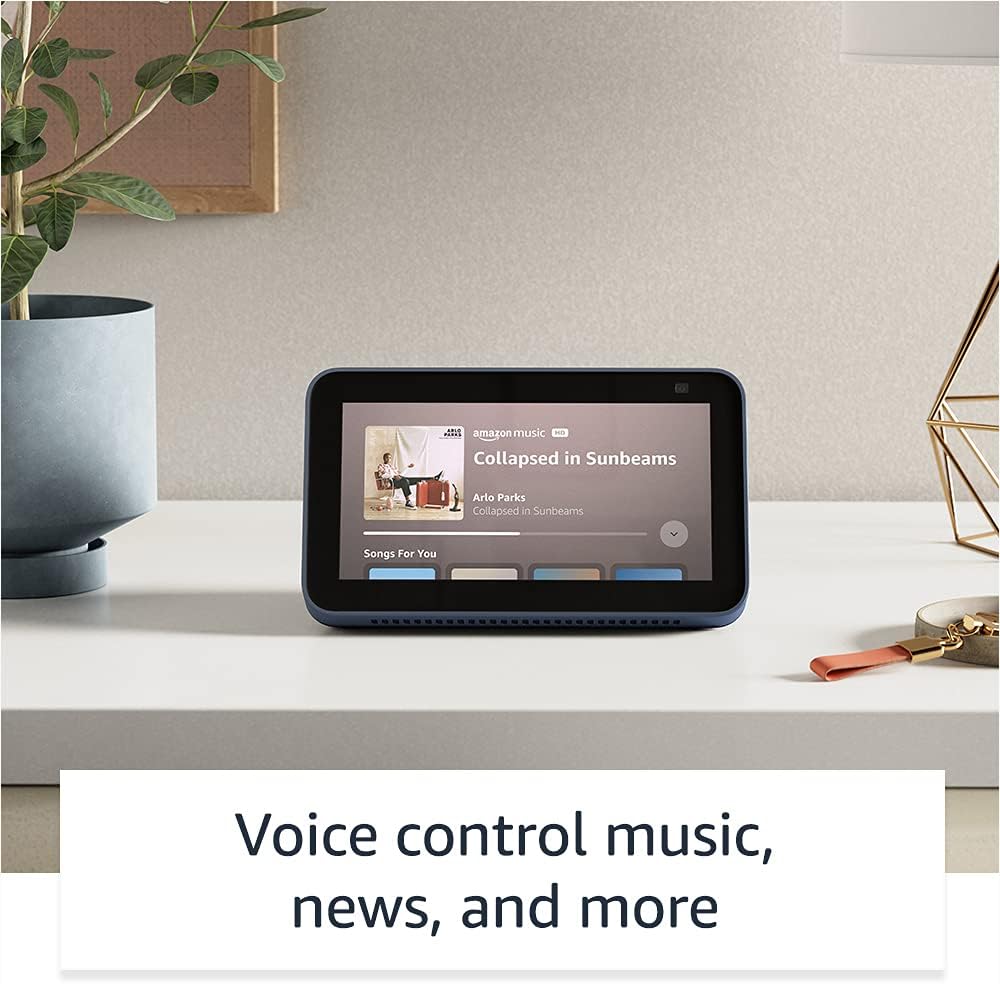
Image: The Echo Show 5 displaying a music playback screen, demonstrating its entertainment features.
Personalization:
- Furemu yemifananidzo yedhijitari: Use Amazon Photos to turn your home screen into a digital photo frame.

Image: The Echo Show 5 displaying a personal photo, illustrating its use as a digital photo frame.
Privacy Features:
Echo Show 5 yakagadzirwa nematanho akasiyana-siyana ekuchengetedza zvakavanzika:
- Mic/Camera Off Button: A physical button to electronically disconnect the microphones and camera.
- Shutter yeKamera Yakavakirwa Mukati: A physical shutter to cover the camera lens.
- Voice Recording Controls: Kugona view uye bvisa marekodhi ako ezwi.
- Tekinoroji yeWake Word: The device only begins listening after detecting your chosen wake word.
- Zviratidzo zveKuyerera: Visual indicators show when audio or video is being streamed to the cloud.

Mufananidzo: Kuvhara view of the Echo Show 5's top, highlighting the physical camera shutter button for privacy control.
Accessibility Features:
The Echo Show 5 includes various accessibility features to personalize Alexa to your abilities. These can be accessed via Zvirongwa → Kusvikika pamudziyo wako.
- Dzvanya paAlexa: Interact with Alexa via touch through on-screen tiles or a keyboard.
- Kuteerera Kunoenderana Nezvinodiwa: Zvinopa nguva yakawanda yekupedza kutaura Alexa asati apindura.
- Mwero wekutaura waunoda: Dzora kuti Alexa anotaura nekukurumidza kana kunonoka sei.
- Kunyora mashoko: Alexa Captioning, Call Captioning, uye Closed Captioning zvinopa mashoko ezvinyorwa zvinotsigirwa.
- Ratidza uye Taura: Helps identify products for users who are blind or visually impaired.
- VoiceView Screen Reader: Enables access for blind or visually impaired users.
- Chinokudza Sikirini: Zoom in/out wobva wadzvanya pani uchitenderedza skrini.
- Zivisa Kana Uri Pedyo: Inoridza ruzha rwezviziviso kana rwaonekwa pedyo nemudziyo.
- Kuverenga Zvinonzwika Kindle: Alexa anogona kuverenga mabhuku ako eKindle zvinonzwika.
- Rugwaro Rwenguva Chaiyo: Nyora mameseji ari mhenyu panguva yekufona kwevhidhiyo.
- Additional settings for Color Inversion, Color Correction, Request Sound, and more.
Maintenance
The Certified Refurbished Echo Show 5 has undergone rigorous testing and certification to ensure it looks and works like new. Regular maintenance is minimal.
- Kuchenesa: Pukuta zvinyoro nyoro sikirini nekunze kwemudziyo nejira rakapfava, risina ruvara. Dzivisa zvinochenesa zvinokwesha kana zvinopfapfaidza.
- Zvigadziriso zveSoftware: Ensure your device is connected to Wi-Fi to receive automatic software security updates, which are guaranteed for at least four years after the device is last available for purchase as a new unit.
Kugadzirisa matambudziko
Kana ukasangana nematambudziko neEcho Show 5 yako, funga nezvematanho anotevera ekugadzirisa matambudziko:
- Power Cycle: Unplug the device from the power outlet, wait for 30 seconds, and then plug it back in.
- Tarisa Wi-Fi Connection: Ensure your Wi-Fi network is active and the device is connected. You can check network status in the device settings.
- Verify Internet Connectivity: Confirm your internet service is working by testing other devices on the same network.
- Check Microphone/Camera: Ensure the mic/camera off button is not activated and the camera shutter is open if you are trying to use these features.
- Alexa App: Use the Alexa app on your smartphone or tablet to manage device settings, check for updates, and access further support resources.
- Voice Commands: Speak clearly and ensure you are within range of the device's microphones.
For more detailed troubleshooting or specific issues, refer to the help section within the Alexa app or visit the official Amazon support website.
Zvinotsanangurwa
| Feature | Detail |
|---|---|
| Size | 5.8" x 3.4" x 2.9" (148mm x 86mm x 73mm) |
| Kurema | 14.5 oz (410 gramu) |
| Display | 5.5” yekubata sikirini |
| Kamera | 2 MP camera with built-in shutter |
| WiFi Kubatana | Dual-band wifi (802.11a/b/g/n/ac). Does not support ad-hoc networks. |
| Kubatana kweBluetooth | A2DP support for audio streaming; AVRCP for voice control of connected mobile devices. PIN-code speakers not supported. |
| Vadivelu Comedy Audio | Full range 1.65” built-in speaker |
| processor | MediaTek MT 8163 |
| Generation | Echo Show 5 (2nd Gen) - 2021 release |
| Mutauro | Alexa anotaura Chirungu neSpanish |
Warranty uye Support
Your Certified Refurbished Echo Show 5 comes with the same limited warranty as a new device. For specific details regarding your warranty, please refer to the documentation included with your device or visit the official Amazon website for Certified Refurbished Amazon devices.
For customer support, troubleshooting, and to manage your device settings, utilize the Alexa app on your compatible smartphone or tablet. You can also find extensive support resources and FAQs on the Amazon support website.
Zvigadziriso zvekuchengetedzwa kweSoftware: This device receives guaranteed software security updates until at least four years after the device is last available for purchase as a new unit on Amazon's webnzvimbo.
Related Documents - Echo Show 5 (2nd Gen, 2021 kuburitswa)
 |
Gwaro Rekutanga Nekukurumidza reAmazon Echo Show 8 (Chizvarwa Chechipiri) Gwaro rekutanga neAmazon Echo Show 8 yako (chizvarwa chechipiri), rinofukidza gadziriro, maficha, uye zvakavanzika. |
 |
Gwaro reVashandisi veAmazon Echo Show 8 (chizvarwa chechipiri) Gwaro rekushandisa rakazara reAmazon Echo Show 8 (chizvarwa chechipiri), rine ruzivo rwakadzama nezvekugadzirisa, maficha ekuchengetedza ruzivo, mirairo yezwi, uye matipi ekushandisa Alexa. |
 |
Amazon Echo & Alexa Brand Mashandisiro Mazano eKunze Partners Nhungamiro yepamutemo yevadyidzani vekunze pakushandiswa kwakakodzera kweAmazon Echo uye Alexa brand assets, zvinosanganisira marogo, typography, mavara, uye chinomiririra mune zvekushambadzira zvinhu. Ita shuwa kuti brand kuenderana uye kutendeseka. |
 |
Amazon Echo Show 8 (Chizvarwa chechipiri) Gwaro Rekutanga Nekukurumidza: Kugadzirisa uye Zvimiro Dzidza maitiro ekugadzirisa uye kushandisa Amazon Echo Show 8 yako (Chizvarwa chechipiri). Gwaro iri rinofukidza maficha emudziyo, zvidziviriro zvekuchengetedza ruzivo, uye mirairo inokosha yeAlexa yemabasa ezuva nezuva. |
 |
Gwaro Rekutanga Nekukurumidza reAmazon Echo Show 5 (Chizvarwa Chechipiri) Gwaro rekutanga nekukurumidza reAmazon Echo Show 5 (Chizvarwa chechipiri), rinosanganisira gadziriro, maficha ekuchengetedza ruzivo, uye mashandisirwo akajairika neAlexa. |
 |
Gwaro Rekutanga Nekukurumidza reAmazon Echo Show 5 (Chizvarwa Chechipiri) Get started with your Amazon Echo Show 5 (2nd Generation). This guide covers setup, device features, privacy controls, and how to use Alexa for entertainment, smart home, and communication. |