1. Nhanganyaya
Thank you for choosing the FREESTYLE FH0955 LED Bluetooth Headphones. This manual provides essential information for the proper setup, operation, and maintenance of your new headphones. Please read it carefully before use to ensure optimal performance and longevity of the product.
2. Chigadzirwa Pamusoroview
The FREESTYLE FH0955 headphones offer a wireless audio experience with integrated features designed for convenience and style. Key features include Bluetooth 5.0 + EDR connectivity, a built-in microSD card slot for direct music playback, a foldable headband for portability, and subtle LED backlighting on the earcups.

Mufananidzo 2.1: Mberi view of the FREESTYLE FH0955 LED Bluetooth Headphones, showcasing the over-ear design and LED lighting.

Mufananidzo 2.2: Side profile of the FREESTYLE FH0955 LED Bluetooth Headphones, highlighting the earcup and headband design.

Image 2.3: A person wearing the FREESTYLE FH0955 LED Bluetooth Headphones, demonstrating typical usage.
3. Setup
3.1. Kuchaja mahedhifoni
Before first use, fully charge the headphones. The FH0955LB model is equipped with a 400 mAh Lithium-ion battery.
- Connect the supplied MicroUSB charging cable to the charging port on the headphones.
- Connect the other end of the cable to a USB power source (e.g., computer USB port, USB wall adapter, or power bank).
- The LED indicator will illuminate during charging and turn off or change color once fully charged.
- A full charge typically takes approximately 2 hours and provides up to 10 hours of continuous music playback.
3.2. Bluetooth Kubatanidza
Kuti ubatanidze mahedhifoni ako pasina waya kune mudziyo:
- Iva nechokwadi chekuti mahedhifoni akadzimwa uye achangochajwa.
- Dzvanya wobata bhatani rePower pamahedhifoni kusvika chiratidzo che LED chapenya, zvichiratidza kuti pane pairing mode.
- Pamudziyo wako (smartphone, piritsi, komputa), gonesa Bluetooth uye tsvaga zvishandiso zviripo.
- Select "FH0955" or a similar name from the list of found devices.
- Once connected, the LED indicator will stop flashing and remain solid or turn off, depending on the model.
- The Bluetooth 5.0 + EDR technology allows for a stable connection up to 10 meters.
3.3. MicroSD Card Playback
The headphones feature an integrated microSD card slot for direct music playback without a connected device.
- Insert a microSD card (pre-loaded with audio files) into the designated slot on the headphones.
- The headphones should automatically switch to microSD playback mode. If not, use the Mode button (if available) to switch.
- Use the playback controls on the headphones to manage your music.
3.4. Kubatanidza Newaya (3.5mm Audio Jack)
For devices without Bluetooth or when the battery is depleted, you can use the included 3.5mm audio cable.
- Batanidza mugumo mumwe wetambo yekuteerera ye3.5mm kune jeki yekuteerera iri pamahedhifoni.
- Batanidza rimwe divi kune odhiyo inobuda mumudziyo wako ye3.5mm.
- The headphones will operate in passive mode, and Bluetooth functionality will be disabled.
4. Operating Instructions
4.1. Simba On / Off
- Power On: Dzvanya uye bata bhatani reSimba kweanenge masekonzi matatu kusvika chiratidzo che LED chavheneka.
- Power Off: Press and hold the Power button for approximately 3-5 seconds until the LED indicator turns off.
4.2. Mumhanzi Playback
- Tamba/Kumbomira: Dzvanya bhatani rePlay/Pause kamwe chete.
- Next Track: Press the "Next" button (often Volume Up, long press).
- Previous Track: Press the "Previous" button (often Volume Down, long press).
- Vhoriyamu Kumusoro: Dzvanya pfupi bhatani reVolume Up.
- Vhoriyamu Pasi: Dzvanya pfupi bhatani reVolume Down.
4.3. Call Management
With the built-in microphone, you can manage phone calls when connected via Bluetooth.
- Pindura/Pedzisa Kufona: Dzvanya bhatani rekuti Play/Misa kamwe chete panguva yekufona kuri kuuya.
- Ramba Kufona: Press and hold the Play/Pause button for approximately 2 seconds during an incoming call.
- Dhonzazve Nhamba Yekupedzisira: Dzvanya kaviri bhatani reKutamba/Kumbomira.
4.4. LED Backlighting
The headphones feature subtle LED backlighting. Refer to the specific controls on your device for toggling or changing LED modes, if available. This feature is primarily aesthetic.
5. Kuchengeta
5.1. Kuchenesa
- Shandisa jira rakapfava, rakaoma kuchenesa pamusoro pemahedhifoni.
- Do not use abrasive cleaners, alcohol, or chemical solvents, as these may damage the finish.
- Keep the charging port and audio jack free from dust and debris.
5.2. Kuchengeta
- Chengetedza mahedhifoni munzvimbo inotonhorera, yakaoma kure nechiedza chezuva uye tembiricha yakanyanyisa.
- When not in use for extended periods, charge the battery at least once every three months to maintain battery health.
- Utilize the foldable headband feature for compact storage and transport.
6. Kugadzirisa matambudziko
| Dambudziko | Zvinogona Kukonzera | Solution |
|---|---|---|
| Mahedhifoni haabatike. | Bhatiri rakaderera. | Chaja mahedhifoni zvizere. |
| Haikwanise kubatanidza kuburikidza neBluetooth. | Mahedhifoni asiri mukuita pairing mode; mudziyo Bluetooth wadzima; kure kwazvo kubva mudziyo. | Ensure headphones are in pairing mode. Turn device Bluetooth off/on. Move closer to device (within 10m). |
| Hapana ruzha. | Vhoriyamu yakadzikira zvakanyanya; inzwi risiri iro; mahedhifoni haana kubatana. | Increase volume on headphones and device. Check Bluetooth connection or 3.5mm cable. Ensure correct mode (Bluetooth/MicroSD). |
| MicroSD card not playing. | Kadhi harina kuiswa nemazvo; haritsigirwi file fomati; kadhi rakakanganisika. | Reinsert card. Ensure audio files are in a supported format (e.g., MP3). Try a different microSD card. |
7. Zvinotsanangurwa
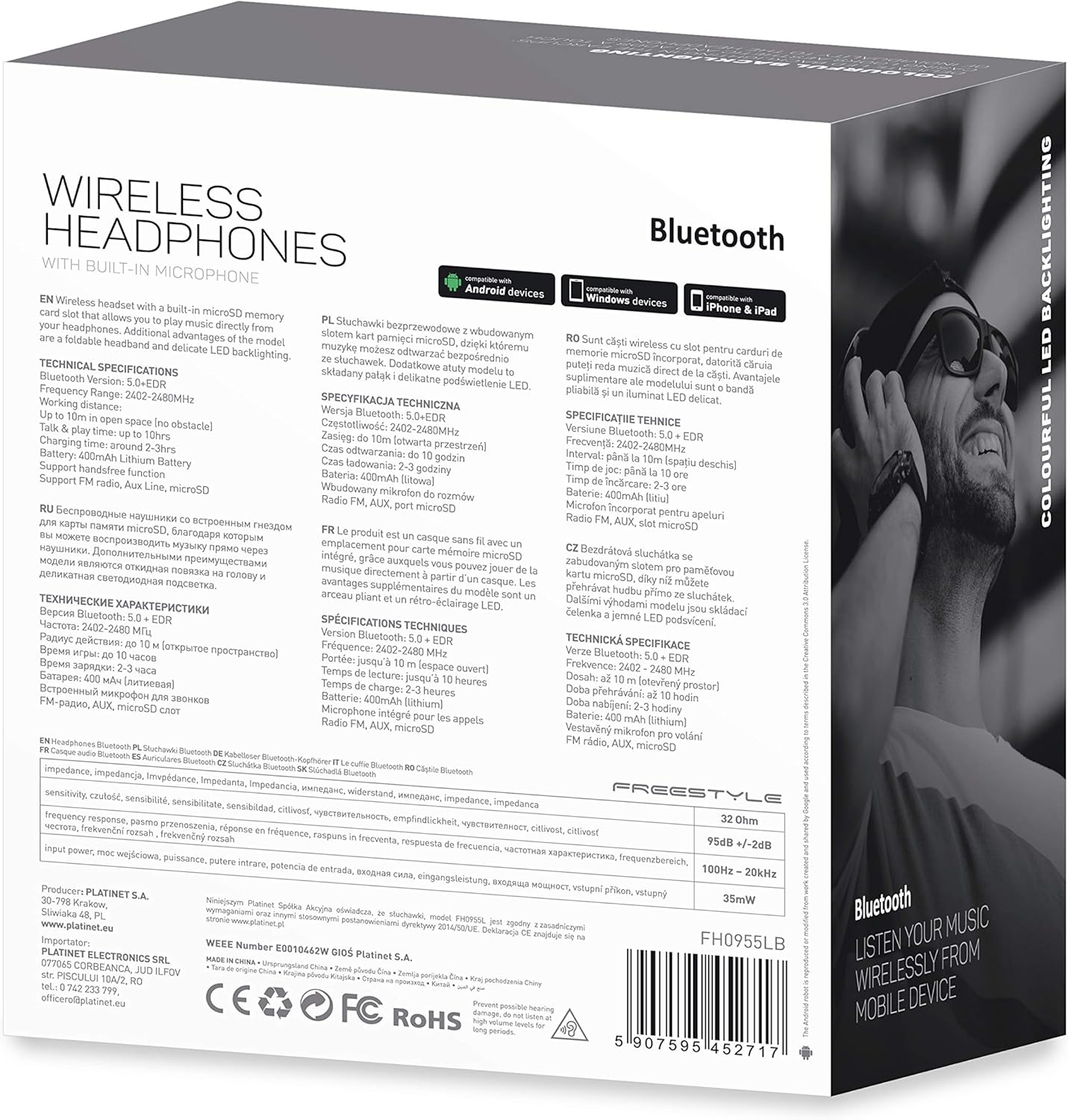
Mufananidzo 7.1: Yakadzama view of the product packaging, showing technical specifications and compliance information.
| Feature | Tsanangudzo |
|---|---|
| Model Number | FH0955LB |
| Brand | Freestyle |
| Kubatana Technology | Wireless (Bluetooth 5.0 + EDR) |
| Wireless Range | Kusvika 10 metres |
| Sravana Sameeralu Serial 4th Audio Jack | 3.5 mm |
| Fomu Factor | Over-Ear (Circum-Auricular) |
| Special Features | Noise Cancellation, LED Backlighting, MicroSD Card Slot |
| Bhatiri Type | Integrated Lithium-ion (400 mAh) |
| Playback Time | Kusvikira kumaawa makumi maviri nemashanu |
| Kuchaja Nguva | Anenge maawa maviri |
| Kuchaja Port | MicroUSB |
| Color | Nhema |
| Material | Leather (earpads/headband) |
| Mvura Resistance Level | Kudzivirira mvura |
| Inosanganisirwa Zvikamu | 1 peya yemahedhifoni |
| Mugadziri | Platinet |
8. Warranty uye Tsigiro
Specific warranty details are typically provided with your purchase documentation or on the manufacturer's official website. Ndapota chengetedza humbowo hwako hwekutenga kune chero vimbiso yewaranti.
For technical support or inquiries, please refer to the contact information provided by your retailer or the manufacturer, Platinet.
9. Safety Information
- Do not expose the headphones to extreme temperatures, humidity, or liquids.
- Dzivisa kuteerera nepamusoro-soro mazinga kwenguva yakareba kudzivirira kukuvara kwekunzwa.
- Usaedze kupatsanura kana kugadzirisa mahedhifoni, sezvo izvi zvingaita kuti garandi isashande uye zvikonzere kukuvara.
- Chengetedza pasingasvikirwi nevana.
- Dispose of the product responsibly according to local electronic waste regulations.


