1. Nhanganyaya
This manual provides instructions for the safe and efficient operation of your Lepro PR210002-US LED Table Lamp. Izvi zvakasiyana-siyana lamp offers a range of lighting options, including tunable white light, RGB color changing, dimming capabilities, and an auto-off timer. Please read this manual thoroughly before use and retain it for future reference.

Figure 1: Lepro PR210002-US LED Table Lamp.
2. Package Zviri mukati
Before proceeding with setup, please ensure all components are present:
- 1 x Lepro PR210002-US LED Table Lamp
- 1 x US Simba Adapter
- 1 x Rudzi C USB Cable
- 1 x Chinyorwa cheMushandisi (gwaro iri)
3. Setup
Follow these steps to set up your LED Table Lamp:
- Bvisa zvinhu: Nyatsobvisa zvese zvikamu kubva pakurongedza.
- Batanidza Simba: Insert the Type C USB cable into the lamp's charging port. Connect the other end of the USB cable to the provided US power adapter, then plug the adapter into a standard wall outlet.

Figure 2: Connecting the lamp to power. The lamp measures 3.9 inches in diameter and 7.1 inches in height, with a 4.9 ft cable.
4. Operating Instructions
The Lepro LED Table Lamp features intuitive touch controls located on the top surface and the base.

Figure 3: Touch Control Overview.
4.1. Simba On / Off
- Short Press: Lightly tap the top touch area (power symbol) to turn the lamp on or off.
4.2. Adjusting White Light (Tunable White Mode)
Iyo lamp offers three white light temperatures: 2700K (Warm White), 4000K (Neutral White), and 5700K (Cool White).
- Shandura Tembiricha: Press the 'M' button on the lamp's base to cycle through the white light temperatures (2700K → 4000K → 5700K).
- Gadzirisa Kupenya: While in any white light mode, Long Press the top touch area to continuously adjust the brightness from 5% to 100%. Release when desired brightness is reached.

Figure 4: Tunable White Light Options (2700K, 4000K, 5700K).
4.3. RGB Color Changing Modes
Iyo lamp features 7 static RGB colors and an auto-color changing mode.
- Access RGB Modes: Press the 'M' button repeatedly until the lamp enters RGB mode.
- Select Static Color: While in RGB mode, Long Press the top touch area to cycle through the 7 available colors. Release when your desired color is displayed.
- Auto Color Changing: Continue pressing the 'M' button after the static RGB colors to activate the auto-color changing mode.
- Adjust Speed (Auto Mode): While in auto-color changing mode, Long Press the top touch area to adjust the speed of the color transitions (3-level speed).

Figure 5: RGB Color Changing Mood Light.
4.4. Auto-Off Timer
Iyo lamp includes a convenient auto-off timer function for 30 or 60 minutes.
- Activate Timer: Press the timer button (clock symbol) on the lamp's base.
- 30-Minute Nguva: One press activates the 30-minute timer (indicated by one green LED on the base).
- 60-Minute Nguva: A second press activates the 60-minute timer (indicated by two green LEDs on the base).
- Deactivate Timer: A third press will turn off the timer function (no green LEDs).
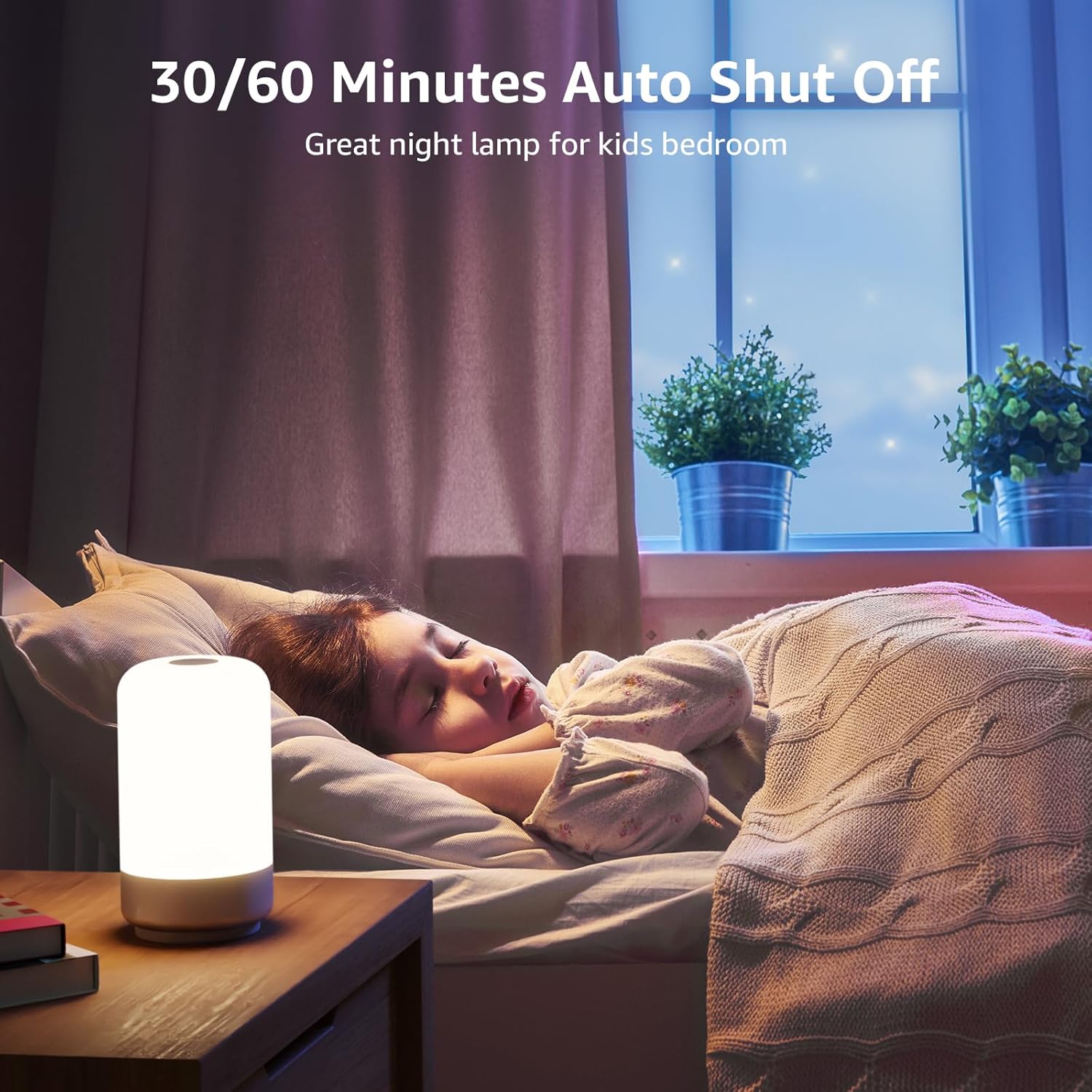
Figure 6: Auto-Off Timer Function.
4.5. Basa reKurangarira
Iyo lamp retains the last used brightness and color setting when turned off and on again, ensuring a consistent experience.
5. Kuchengeta
Kuve nechokwadi chekuti hupenyu hwako hunogara kwenguva refu uye kushanda zvakanakaamp, tevera mazano ekugadzirisa aya:
- Kuchenesa: Bvisa lamp kubva pamagetsi usati wachenesa. Shandisa jira rakapfava, rakaoma kupukuta jira remagetsiamp's surface. Do not use abrasive cleaners, solvents, or harsh chemicals, as these can damage the finish.
- Kubata: Bata iyo lamp with care. Avoid dropping it or subjecting it to strong impacts.
- Kuchengeta: Kana kuchengeta lamp Kwenguva yakareba, iva nechokwadi chekuti yakachena uye yakaoma. Chengeta munzvimbo inotonhorera, yakaoma kure nezuva rakananga.
6. Kugadzirisa matambudziko
If you encounter issues with your Lepro LED Table Lamp, tarisa matambudziko akajairika nemhinduro dzinotevera:
| Dambudziko | Zvinogona Kukonzera | Solution |
|---|---|---|
| Lamp haina kubatidza. | Hapana kubatanidza magetsi. | Ensure the power adapter is securely plugged into a working outlet and the USB-C cable is firmly connected to the lamp. |
| Brightness adjustment is not smooth or lamp turns off when dimming. | Incorrect operation of touch control. | Ensure you are performing a Long Press on the top touch area to adjust brightness. A short press will turn the lamp off. Release your finger when the desired brightness is achieved. |
| Colors are not changing or cycling. | Not in RGB mode or incorrect operation. | Press the 'M' button to cycle through modes until RGB mode is active. For static colors, Long Press the top touch area. For auto-changing, ensure auto-color changing mode is selected via the 'M' button, then Long Press the top touch area to adjust speed. |
| Timer basa harisi kushanda. | Timer not activated or incorrectly set. | Press the timer button on the base. One green LED indicates 30-minute timer, two green LEDs indicate 60-minute timer. Ensure the correct timer setting is active. |
7. Zvinotsanangurwa
| Feature | Detail |
|---|---|
| Model Number | PR210002-US |
| Brand | Lepro |
| Product Dimensions | 3.9"D x 3.9"W x 7.1"H |
| Item Weight | 0.85 Pounds (13.6 ounces) |
| Material | Plastiki |
| Chiedza Chinyorwa Type | LED |
| Kupenya | 350 Lumen |
| Wattage | 7 watts |
| Voltage | 120 Volts (AC) |
| Chiedza Rudzi Sarudzo | 7 Colors + 3 White Light Temperatures (2700K-4000K-5700K) |
| Kudzora Nzira | Bata |
| Simba Source | Corded Electric |
| Cable Length | 4 Tsoka |
| Indoor / Outdoor Kushandiswa | Indoor kushandiswa chete |
| Mvura Resistance Level | Kwete Kudzivirira Mvura |
8. Warranty uye Tsigiro
For warranty information or technical support, please contact Lepro customer service through their official website or the retailer where the product was purchased. Please have your model number (PR210002-US) and purchase details ready when contacting support.


