1. Nhanganyaya
The Lepro PR902103-US Smart Table Lamp offers versatile lighting solutions for your home. This LED touch lamp features RGB color changing capabilities, tunable warm to cool white light, and dimmable brightness. It is designed for seamless integration with smart home ecosystems, supporting both Amazon Alexa and Google Assistant for voice control, as well as control via a dedicated mobile application. This manual provides comprehensive instructions for setup, operation, and maintenance.

Figure 1: Lepro Smart Table Lamp showcasing its app control interface.
2. Chii chiri muBhokisi
Please verify that all components are present in the packaging:
- 1 x Lepro Smart Table Lamp (Model: PR902103-US)
- 1 x 4.9 ft USB Cable
- 1 x Power Adapter
- 1 x Chinyorwa cheMushandisi (gwaro iri)
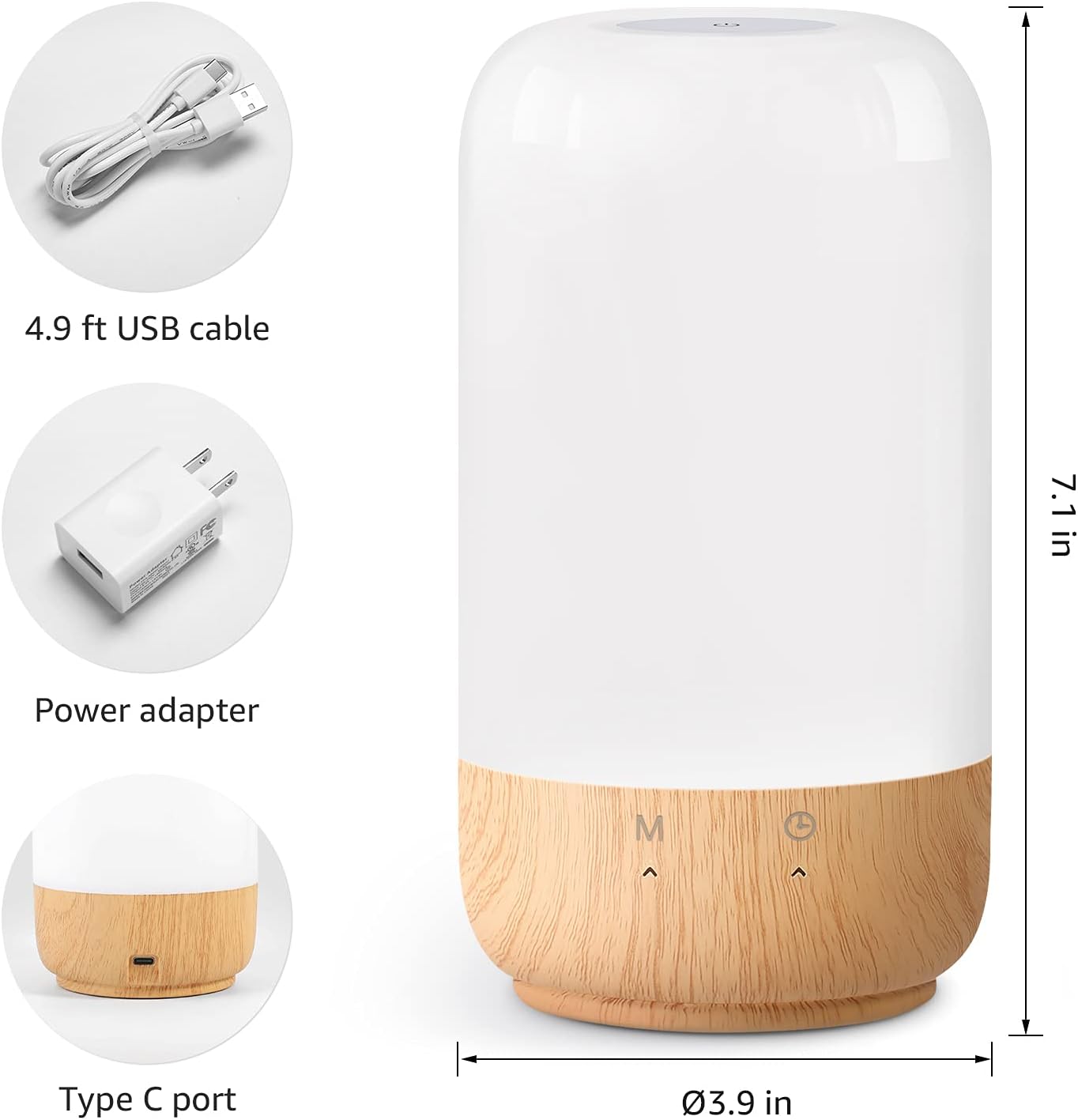
Figure 2: Included components and product dimensions.
3. Setup
Follow these steps to set up your Lepro Smart Table Lamp:
- Power Connection: Batanidza yakapihwa USB tambo kune iyo lamp's Type-C port and the power adapter. Plug the power adapter into a standard wall outlet. The lamp achavhenekera.
- App Download: Download the 'Lepro LampUX' app from your mobile device's App Store (iOS) or Google Play Store (Android).
- Kunyoresa Akaundi: Open the 'Lepro LampUX' app and register a new account or log in if you already have one.
- Kubatanidza Mudziyo:
- In the app, tap 'Add Device' or the '+' icon.
- Select 'Table Lamp' from the lighting category.
- Iva nechokwadi chekuti lamp is powered on. Long press the timer button on the lamp's base for at least 5 seconds until the indicator light blinks rapidly.
- Confirm the indicator light is blinking rapidly in the app and proceed.
- Select your 2.4 GHz Wi-Fi network and enter the password. (Note: The lamp only supports 2.4 GHz Wi-Fi networks. If your router is 5 GHz, please set it to 2.4 GHz during setup.)
- The app will begin adding the device. Once successfully added, you can rename your lamp kuti zvizivikanwe zviri nyore.
Video 1: Detailed steps on how to set up your Lepro Smart Lamp uchishandisa mobile application.
4. Operating Instructions
The Lepro Smart Table Lamp can be controlled via touch, the mobile app, or voice commands.
4.1. Kubata Kudzora
- Batidza/Kudzima: Short press the power button (marked 'M') on the lamp's base.
- Kugadzirisa Kupenya: Slide your finger along the left side of the lamp's base to adjust brightness.
- Color Change (RGB): Slide your finger along the right side of the lamp's base to cycle through RGB colors.
- Mode Switch: Short press the timer button (clock icon) to switch between white light modes (warm white, cool white) and RGB color mode.
4.2. Mobile App Controls
The 'Lepro LampUX' app provides comprehensive control over your lamp:
- Brightness & Color Temperature: Adjust the brightness level and select color temperatures from 2700K (warm white) to 5700K (cool white).
- Sarudzo yeRuvara rweRGB: Choose from 16 million colors using the color wheel in the app.
- Zviratidziro: Select from pre-set scenes like 'Night', 'Read', 'Meeting', 'Leisure', or customize your own scenes with specific colors and effects.
- Timer & Wake-up: Gadza purogiramu dze lamp to turn on/off automatically. Utilize the 'Sunrise Simulation' feature to gradually increase light for a gentle wake-up.

Figure 3: Mobile application interface for controlling lamp zvirongwa.

Mufananidzo 4: The lamp's timer and wake-up functions in use.
4.3. Voice Controls
The Lepro Smart Table Lamp is compatible with Amazon Alexa and Google Assistant. To enable voice control:
- Iva nechokwadi chekuti lamp is successfully paired with the 'Lepro LampUX' app.
- Vhura Amazon Alexa kana Google Home app.
- Enda kuchikamu che'Unyanzvi neMitambo' (Alexa) kana 'Inoshanda neGoogle' (Kumba kweGoogle).
- Tsvaga and enable the 'Lepro LampUX' skill/service.
- Link your 'Lepro LampUX' account with your Alexa/Google account.
- Kana yangobatanidzwa, unogona kushandisa mirairo yezwi yakadai se:
- "Alexa, turn on [Lamp Zita].
- "Hey Google, set [Lamp Zita] kuti rive jena rinodziya.
- "Alexa, change [Lamp Name] to blue."
- "Hey Google, dim [Lamp Name] to 50%."

Figure 5: Voice control integration with Amazon Alexa.
Video 2: Demonstration of the Lepro Smart Table Lamp working with Alexa and Google Home.
5. Kuchengeta
To ensure the longevity and optimal performance of your Lepro Smart Table Lamp, please follow these maintenance guidelines:
- Kuchenesa: Bvisa magetsi usati wageza. Shandisa jira rakapfava, rakaoma kupukuta jira remagetsi.amp's surface. Avoid using abrasive cleaners, solvents, or harsh chemicals, as these may damage the finish or electronic components.
- Kuchengeta: Kana kuchengeta lamp for an extended period, ensure it is clean and dry. Store it in a cool, dry place away from direct sunlight and extreme temperatures.
- Kubata: Bata iyo lamp with care. Avoid dropping it or subjecting it to strong impacts.
6. Kugadzirisa matambudziko
If you encounter issues with your Lepro Smart Table Lamp, tarisa matambudziko akajairika nemhinduro dzinotevera:
| Dambudziko | Zvinogona Kukonzera | Solution |
|---|---|---|
| Lamp haina kubatidza. | Hapana magetsi. | Tarisa kana adapta yemagetsi yakabatanidzwa zvakanaka mu lamp and the wall outlet. Ensure the outlet is functional. |
| Haikwanisi kubatana neWi-Fi. | Incorrect Wi-Fi band (5 GHz). Pasiwedhi isiriyo. Simba reWi-Fi chiratidzo. | Ensure your Wi-Fi network is 2.4 GHz. Verify the Wi-Fi password. Move the lamp closer to your router. |
| Kudzora kwezwi hakusi kushanda. | Skill not enabled/linked. Zita remudziyo risiri iro. | Ensure the 'Lepro LampUX' skill is enabled and linked in your Alexa/Google Home app. Use the exact device name configured in the app. |
| Lamp haateereri. | Temporary software glitch. | Bvisa iyo lamp from the power outlet for 10 seconds, then plug it back in to perform a soft reset. |
7. Zvinotsanangurwa
| Feature | Detail |
|---|---|
| Brand | Lepro |
| Model Number | PR902103-US |
| Product Dimensions | 3.9"D x 3.9"W x 7.1"H |
| Item Weight | 1.19 makirogiramu |
| Material | Chipurasitiki, Wood |
| Chiedza Chinyorwa Type | LED |
| Wattage | 7 watts |
| Kupenya | 350 Lumen |
| Chiedza Rudzi | RGB + CCT (Tunable White 2700-5700K) |
| Kudzora Nzira | App, Touch, Voice (Alexa, Google Assistant) |
| Kubatana | WiFi ye2.4 GHz Chete |
| Indoor / Outdoor Kushandiswa | Indoor |
8. Warranty uye Tsigiro
Lepro products are designed and manufactured to the highest quality standards. For warranty information and technical support, please refer to the contact details provided on the product packaging or visit the official Lepro website. Chengetedza risiti yako yekutenga sehumbowo hwekutenga kwezvichemo zvewaranti.


